
Changing the password on the Twisted Servers Games panel is a crucial security measure for server administrators. Regularly updating the password helps safeguard sensitive server information and maintains control over who has access to server management tools. This practice reduces the risk of unauthorized access, which could lead to data breaches, server disruptions, or even malicious activity. A strong and frequently updated password policy is a fundamental aspect of maintaining the integrity and security of servers.
How to Change the Password on the Games Panel
1. Log in to the Twisted Servers Games panel.
2. Click Account Settings and choose Account.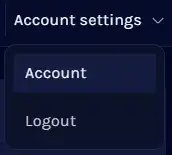
3. Enter the Current Password.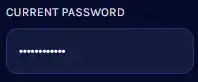
4. Enter the desired New Password and confirm it.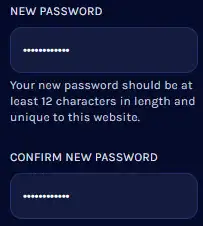
5. Click Update Password.
Most Popular Articles
How to add a server to Steam Favorites
Steam Favorite Servers is a feature within the Steam gaming platform that allows users to save...
How to add sub-users on the Games panel
Adding sub-users on the Twisted Servers Games panel is a valuable administrative feature that...
How to allocate a port on the Games panel
Allocating a port on the Twisted Servers Games panel allows efficient network traffic management...
How to configure an SFTP client for Game servers
SFTP, or Secure File Transfer Protocol, is a secure and encrypted method for managing...
