
Recommended Services


Supported Scripts


You can’t run a precise tactical operation when your bullets take half a second to register. For Aussie players, attempting to coordinate a large-scale Conflict match on international Arma Reforger servers isn’t just difficult; it’s often unplayable. We understand the frustration of watching your ping spike during a firefight or feeling like you’re fighting the server more than the enemy. High latency on overseas hardware ruins the immersion that the Enfusion engine is designed to provide.
Setting up your own environment shouldn’t be a source of stress, even with the technical shift from Arma 3 to Reforger’s new architecture. This guide provides a clear path to hosting a stable, low-latency experience using local Australian infrastructure. We’ll explore the specific hardware demands of the Enfusion engine, effective methods for server optimisation, and how to streamline mod management through the Workshop. By the end, you’ll have the knowledge to keep your mates’ gameplay smooth and responsive.
Key Takeaways
- Understand how the Enfusion engine utilises multi-threading and why high single-core CPU clock speeds are vital for maintaining server stability.
- Identify the specific hardware requirements needed to host 64+ players on arma reforger servers without encountering performance bottlenecks.
- Master the configuration of your config.json file and learn to manage mods efficiently through the integrated Arma Reforger Workshop.
- Optimise your network configuration to handle Australian routing challenges and ensure a responsive experience for local players.
- Learn how to simplify technical management using specialised local hosting tools that automate updates and streamline server monitoring.
Understanding Arma Reforger Servers and the Enfusion Engine
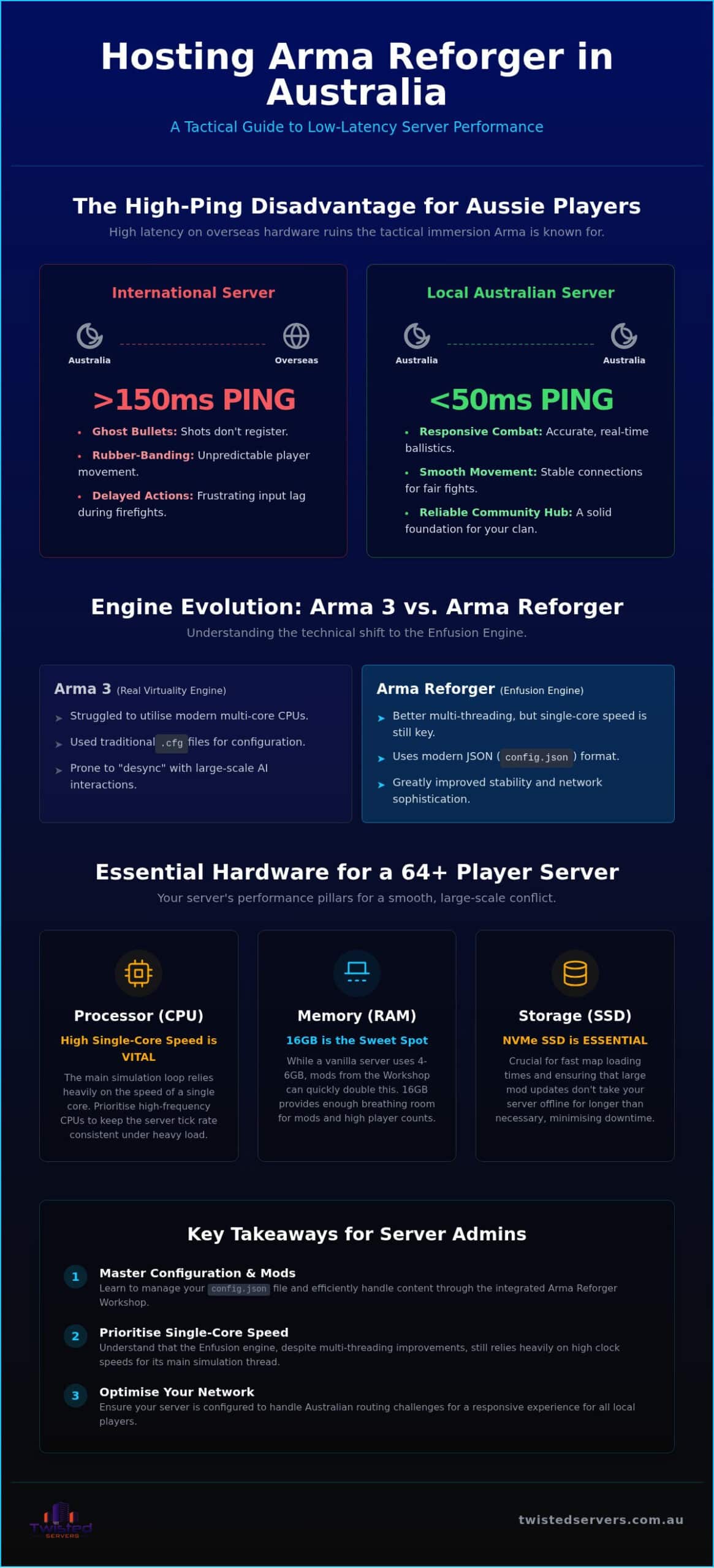
Arma Reforger represents a fundamental departure from the aging Real Virtuality engine that powered previous titles. By introducing the Enfusion engine, Bohemia Interactive has changed how servers handle complex simulations and player interactions. Unlike its predecessors, which often struggled to utilise modern multi-core processors effectively, this new architecture allows for better distribution of tasks. While the game is more efficient, it still demands high-performance hardware to maintain a stable tick rate during intense firefights. Managing arma reforger servers requires an understanding of this shift, as the engine now prioritises different hardware resources than Arma 3 did.
Reforger vs. Arma 3: The Technical Shift
The most immediate change for server administrators is the move from traditional .cfg files to JSON-based configurations. This transition allows for more structured data and easier integration with modern management tools, though it requires a slightly different approach to initial setup. Beyond the file structure, the Enfusion engine handles network traffic with much greater sophistication. It manages server-side stability for large-scale AI interactions more gracefully, reducing the “desync” that plagued older titles. This improved stability is vital for community growth, as it allows mission creators to build more complex scenarios without the fear of the server collapsing under the load of a few dozen AI units.
Why Aussie Players Need Local Infrastructure
Physics and ballistics are at the heart of the Arma experience. When your ping exceeds 150ms on an international host, the complex calculations required for ballistic trajectories often fall out of sync with what you see on your screen. This leads to “ghost bullets” where your shots appear to hit a target but deal no damage because the server has already moved the entity. By choosing game server hosting in Australia, you ensure that projectile physics and close-quarters combat remain responsive and fair.
Local routing is about more than just a lower number on the scoreboard. It significantly reduces “rubber-banding” during peak times, which is a common issue when data has to travel through congested international undersea cables. We’ve seen that building a sustainable Australian community requires a reliable home base on local soil. When players know they can jump into a match and experience smooth, predictable movement, they’re far more likely to return. This stability is the foundation of any successful clan or public community, making the choice of local infrastructure a strategic decision rather than just a technical one. Aussie communities planning ahead for upcoming titles like the Hytale server hosting launch in 2026 will find that establishing local infrastructure habits now pays dividends across every game they host.
Essential Hardware Requirements for Australian Reforger Hosting
Hosting a smooth match for 64 players requires more than just meeting the minimum specs listed on a Steam page. Real-world performance for arma reforger servers depends on your hardware’s ability to process complex physics and AI logic in real-time. If your hardware lags behind, your players will experience the dreaded “yellow” or “red” connection icons, even if their own internet is perfect. We’ve found that simulation integrity is the first thing to suffer when resources are stretched too thin.
CPU and RAM: The Performance Pillars
Single-core CPU clock speed remains the primary bottleneck for the Enfusion engine. While the engine is better at multi-threading than previous versions, the main simulation loop still relies heavily on the speed of a single processor core. We recommend high-frequency processors that can maintain high speeds to handle sudden spikes in activity, such as large-scale artillery strikes or vehicle-heavy insertions. Utilising high-performance hardware ensures that the server’s tick rate stays consistent under heavy load.
RAM allocation is equally critical, especially when you start adding content from the Workshop. A vanilla server might only use 4GB to 6GB, but heavily modded scenarios can quickly double that requirement. You also need to account for the overhead of the operating system and any management tools. We’ve found that 16GB is the sweet spot for most community servers, providing enough breathing room for mods and high player counts. Don’t overlook storage speed; NVMe SSDs are essential for fast map loading and ensuring that mod updates don’t take your server offline for longer than necessary.
Choosing Between VPS and Dedicated Hardware
For smaller groups or private testing, a TCAdmin VPS is often the most cost-effective solution. It provides a user-friendly interface that simplifies the technical side of hosting while still offering enough power for 16 to 32 players. However, large units and public communities with 64 or more players will find better stability with dedicated server hosting Australia. Dedicated hardware gives you exclusive access to the CPU and RAM, eliminating the “noisy neighbour” effect where other users on a shared system might impact your performance.
Scaling your resources is a vital part of community growth. If you’re starting small but have big ambitions, you can explore our range of game server hosting Australia options. Starting with a scalable plan allows you to grow your resources as your player base expands, ensuring you’re always providing a stable environment for your mates without overspending on unused capacity.
Step-by-Step: Setting Up Your Dedicated Arma Reforger Server
Setting up arma reforger servers is a logical process that rewards a methodical approach. While the Enfusion engine introduces new concepts, the core installation remains grounded in familiar tools like SteamCMD. We recommend establishing a clean directory structure from the start; keeping your server binaries, profile data, and workshop mods in separate folders prevents permission errors and makes troubleshooting much simpler during future updates.
Initial Installation and SteamCMD
The first step involves downloading the Arma Reforger Dedicated Server files (App ID: 1874900) through SteamCMD. Creating a dedicated user for the server process is a standard security practice that we encourage for all Australian hosts. Once your files are downloaded, verify the integrity of the installation to ensure no data was corrupted during the transit over local exchanges. You can automate the maintenance of your environment by using a simple SteamCMD script to check for and apply updates every time the server restarts.
Configuring the JSON and Startup Parameters
Your server’s behaviour is dictated by the config.json file, which replaces the old .cfg files used in previous Arma titles. In this file, you’ll define your server name, public visibility, and the administrative password required for in-game management. For those running Conflict or Game Master modes, the scenarioId field must point to the specific mission file you intend to run. We’ve found that missions like “Conflict_Everon” or “Conflict_Arland” provide the most stable experience for larger groups.
Startup parameters are equally important for performance. When launching your arma reforger servers, you should specify the -config and -profile paths to ensure the engine knows exactly where to find your custom settings. For Australian networks, adding the -limitFPS parameter can help stabilise the simulation tick rate, preventing the CPU from wasting cycles on frames that aren’t necessary for a dedicated environment. Before your first boot, ensure you’ve opened UDP ports 2001 and 17777 in your firewall.
Use this checklist for your first successful boot:
- Validate that your
config.jsonsyntax is correct using a JSON linter. - Confirm that the
-profiledirectory has write permissions for the server user. - Check that your router or hardware firewall is correctly forwarding UDP traffic.
- Monitor the initial console output for any “Resource not found” errors related to your chosen scenario.
Optimising Performance: Mods, Network, and Stability
Maintaining high performance on arma reforger servers requires a delicate balance between custom content and simulation stability. Once your base environment is operational, the focus shifts to long-term health and the user experience. Unoptimised configurations often lead to a gradual degradation of the server’s tick rate, which manifests as sluggish movement or delayed interactions for your players. We’ve found that a proactive approach to maintenance is the best way to ensure your community remains active and satisfied.
Managing the Reforger Workshop
The integrated Workshop is a powerful feature, but it must be managed with care. To add mods, you need to include the correct Mod IDs within the mods array of your config.json file. It’s a common mistake to overlook versioning; however, the Enfusion engine handles most of this by ensuring clients auto-download the required versions when they join. You should still monitor your total mod count closely. Every additional asset requires RAM and CPU cycles to synchronise across all connected clients. We recommend keeping your mod list lean to maintain a high server FPS, especially during large-scale operations where the engine is already under heavy load.
Network Stability and DDoS Protection
The “Aussie Distance” factor is a reality for every local host. Our national network infrastructure means that routing can vary significantly between different ISPs. This is why local DDoS protection is essential for any public community. Without it, a single malicious actor can disrupt your match and force your players to find another home. You can learn more about how we handle these challenges in our overview of game server hosting in Australia, which covers the broader context of local infrastructure.
Stability also depends on how you handle the technical debt that accumulates during a long session. We suggest scheduling automated restarts every 12 to 24 hours to clear the server’s memory and reset the simulation state. If you encounter issues, the Enfusion engine generates detailed logs in your profile directory. Learning to read these logs is vital; they often point to specific mod conflicts or “Resource not found” errors that are easily fixed once identified. If you want a platform that simplifies these technical hurdles, our Australian game server hosting provides the tools you need to manage your community with confidence.
Why Host Your Arma Reforger Servers with Twisted Servers?
Choosing a provider for arma reforger servers shouldn’t be a gamble based on the lowest price. While many international companies claim to serve our region, they often rely on suboptimal routing that treats the Australian market as an afterthought. We’ve built our reputation on a different philosophy: providing high-performance infrastructure that’s physically located here, managed by locals who understand the unique constraints of the Australian internet landscape. Our commitment is to transparency, ensuring that the resources you pay for are exactly what you receive without hidden complications.
High-Performance Aussie Infrastructure
We’ve invested in enterprise-grade hardware specifically selected for the heavy simulation requirements of the Enfusion engine. Our datacentre positioning is strategic, designed to provide the most direct routing possible for players across the country. This focus on local connectivity reduces the “Aussie Distance” lag we’ve discussed, giving your community the responsive environment they need for competitive matches. We don’t oversubscribe our nodes; your CPU and RAM allocations are guaranteed, preventing the performance dips often found on budget shared platforms.
Our network is built for stability, utilising local peering to ensure that your data takes the shortest path possible to your players. This is particularly vital for Arma Reforger, where the server’s ability to synchronise complex physics across 64+ players can be the difference between a successful operation and a frustrating session. When you host with us, you’re getting a partner who values performance as much as you do.
Support for the Arma Community
Managing a community is hard enough without fighting your hosting provider’s interface. Our custom control panel simplifies the complexities of the Reforger Workshop and JSON configurations, allowing you to spend more time in-game and less time in a text editor. Whether you’re running a standard game server or a more flexible TCAdmin VPS, you’ll find intuitive tools for one-click mod updates and automated backups. We’ve designed our systems to remove the stress of technical management, making you feel capable and well-supported.
Our support team isn’t just a group of general IT staff; we’re people who actually play the game and understand the difference between a minor bug and a critical engine crash. We provide expert assistance that’s grounded in real-world experience with the Enfusion engine. If you’re ready to stop worrying about technical bottlenecks and start focusing on your operations, we’re here to help. Launch your Arma Reforger server today with Twisted Servers and join the ranks of top-tier Aussie communities.
Build Your Australian Tactical Community
Mastering the technical side of the Enfusion engine is the first step toward creating a reliable tactical environment for your mates. We’ve explored how prioritising high-frequency CPUs and managing your Workshop mods correctly can prevent the performance bottlenecks that often plague unoptimised setups. By hosting your arma reforger servers on local soil, you eliminate the unresponsive combat caused by international routing and provide your players with the precise, high-fidelity simulation they expect.
Our team is here to support your journey with a low-latency Australian network and enterprise NVMe SSD storage that ensures your maps and mods load without delay. We offer expert 24/7 support to help you navigate any technical hurdles, allowing you to focus on leading your unit rather than troubleshooting config files. It’s time to move beyond the frustration of high ping and unstable international hosts. Deploy Your Aussie Arma Reforger Server Now and experience the difference that professional local infrastructure makes for your gameplay. Your community is waiting for a stable, responsive home.
Frequently Asked Questions
How much RAM do I need for an Arma Reforger server?
A standard arma reforger servers instance requires at least 8GB of RAM to maintain stability for small groups. If you plan to host 64 players or integrate heavy mods from the Workshop, we recommend 16GB. This allocation provides enough overhead for the Enfusion engine to handle complex simulations and AI logic without crashing. Always monitor your usage during peak operations, as custom assets can significantly increase the memory footprint of your session.
Can I run mods on my Australian Arma Reforger server?
Yes, you can easily run mods by adding their unique Workshop IDs to the mods array in your server’s config.json file. The Enfusion engine simplifies this process by allowing clients to automatically download the necessary files when they join. It’s vital to balance your mod count to ensure the server tick rate remains high. Too many custom assets can impact performance, so we suggest testing additions in smaller batches to ensure compatibility.
How do I update my Reforger server when a new patch drops?
Updating your server is a straightforward process using SteamCMD or our intuitive control panel’s one-click update tool. When Bohemia Interactive releases a new patch, you simply need to trigger the update command to synchronise your files with the latest build. We suggest performing a backup of your profile and configuration data before updating. This precaution ensures you can quickly restore your settings if a specific game update introduces unexpected changes to your server environment.
What is the difference between a VPS and a dedicated server for Arma?
A VPS provides a cost-effective environment with shared resources, making it suitable for small groups of 16 to 32 players. In contrast, a dedicated server offers exclusive access to high-frequency CPU cores and RAM. This exclusivity is essential for large communities or public servers hosting 64 or more players. While a VPS is a great starting point, dedicated hardware provides the superior stability needed for the most demanding tactical operations.
Do I need a separate license for the Arma Reforger Dedicated Server software?
No, you don’t need a separate license or an additional copy of the game to run the dedicated server software. The Arma Reforger Dedicated Server tool is available for free through SteamCMD using App ID 1874900. This allows you to host your environment on a remote server without needing to log into your personal Steam account. It’s a professional solution designed specifically for community leaders who want to build permanent homes for their units.
How can I reduce lag for players connecting from across Australia?
Reducing lag starts with choosing local Australian infrastructure to ensure the shortest possible routing for your players. By hosting within the country, you avoid the high latency associated with international undersea cables. You can also optimise your network performance by adjusting the tick rate and limiting the server’s FPS in the startup parameters. These small technical adjustments help maintain a responsive environment, even during intense firefights with players connecting from different states.
Is crossplay supported on dedicated Arma Reforger servers?
Crossplay is fully supported on dedicated arma reforger servers, allowing PC and Xbox players to join the same tactical scenarios. You must ensure that crossplay is enabled within your server configuration to allow console connections. This feature is excellent for growing your local community, as it brings together players from different platforms into a single, unified environment. It provides a more populated and diverse player base for your custom missions and operations.
What ports need to be open for Arma Reforger hosting?
To make your server visible and accessible to the public, you must open UDP ports 2001 and 17777 in your firewall. Port 2001 is typically used for game traffic, while 17777 handles the steam query functions. We recommend verifying these settings in your router or hosting panel before your first boot. Correct port forwarding is essential for ensuring that the master server list can see your instance and that players can connect without errors.
Disclaimer
Game titles, trademarks, logos and related assets are the property of their respective owners. Twisted Servers is an independent hosting provider and is not affiliated with or endorsed by the developers or publishers of the games mentioned unless otherwise stated. Information is provided as a general guide and may change as games, software and hosting services are updated.

