
Recommended Services


Supported Scripts

A long mod list can make a shared Valheim world harder to manage, not better. The best mods for Valheim server 2026 are the ones your group can agree on, install correctly and keep compatible as the game and mods change.
Before choosing a mod, find out what it changes, where it needs to be installed and whether it has dependencies. Some mods need files on the server, some on players’ computers, and some on both. Check the current instructions for each mod rather than assuming one setup fits them all.
This guide gives you a practical way to compare mod types, assess candidates on Thunderstore or Nexus Mods, and manage changes to a shared world. You’ll also find a checklist for planning updates and weighing self-hosting against a hosted Valheim server.
Key Takeaways
- Choose the best mods for Valheim server 2026 based on what your group wants to change, not download counts alone.
- Compare building, convenience and progression mods by their purpose, requirements and ongoing upkeep.
- Record mod versions and dependencies so you can trace changes if players encounter compatibility issues.
- Review updates before rolling them out, and give players clear instructions for any required client-side changes.
- Compare self-hosting with a hosted Valheim server. An Australian server location may suit local players, although latency still depends on location, ISP and routing.
Best Valheim server mods in 2026 start with your group’s needs
Mods can change the feel of a shared Valheim world, but each one adds decisions about compatibility, coordination and upkeep. Start with what your group wants from the game, then check whether a mod delivers that change and what it asks of admins and players.
First, agree on the goal. Your group might want more building options, fewer routine tasks, a different progression experience or changes to exploration. These goals are not interchangeable. A mod that suits one player’s preferences may not improve the experience for everyone, so discuss the trade-off before adding it to a shared setup.
Valheim centres on survival, crafting and exploration. The Valheim Wikipedia page provides background on the game, but a mod’s current listing and documentation are the sources to use when checking what that mod does and what it requires.
Choose mods around the way your group plays
Convenience changes may suit a group that wants to reduce routine tasks, while progression or exploration changes can affect how players spend their time in the world. Before shortlisting a candidate, ask who benefits, whether the change affects the whole group and whether everyone is comfortable with it.
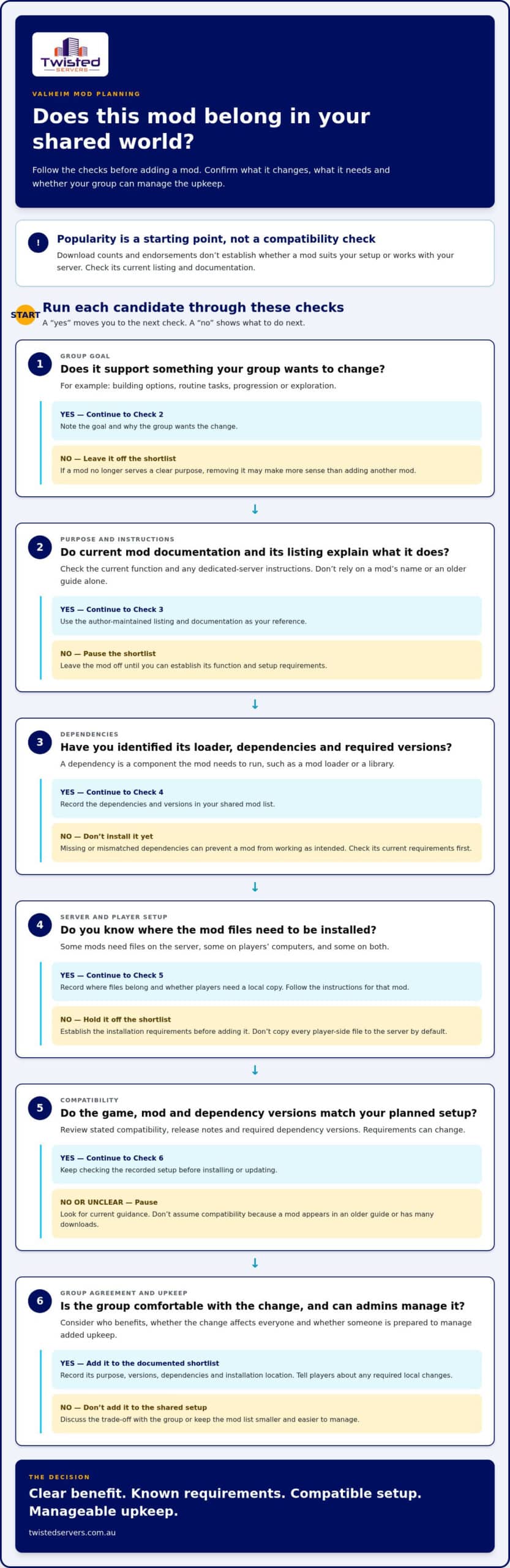
Popularity can help you find candidates, but download counts and endorsements don’t establish compatibility with your server or show whether a mod suits your setup. Check the current listing for its function, update information, dependencies and dedicated-server instructions. These details can change, so review them again before installing or updating.
Set a sensible scope for a modded world
Start with a small, documented set of changes. That makes it easier to see whether each mod improves the experience and to narrow down possible causes if something goes wrong. If you change several parts of the setup at once, it becomes harder to identify which change led to an unexpected result.
For each candidate, note its purpose and why the group wants it. Use questions like these to compare options:
- Convenience: Does it address a recurring frustration for the group?
- Building: Does its documented function support the kinds of projects players enjoy?
- Progression: Is the group comfortable changing how advancement feels?
- World expansion: Does the group want changes to exploration, and is someone prepared to manage the added upkeep?
Review the list as the group’s needs change. If a mod no longer serves a clear purpose, removing it may be more sensible than adding another mod to compensate. The best mods for Valheim server 2026 have a clear benefit, group agreement and a maintenance plan your admins can manage.
How Valheim server mods work: dependencies, clients and compatibility
A mod dependency is a component the mod needs to run. It may be a mod loader or a library that provides functions the mod relies on. Each mod’s current listing should identify its requirements. Treat those details as part of the installation: missing or mismatched dependencies can prevent a mod from working as intended.
Keep three things distinct: Valheim’s built-in features, community-made mods that change or extend the game, and hosting-provider features related to the server service. The overview of how video game modding works explains the broader concept, but the individual mod’s documentation is the relevant source for its Valheim requirements.
For a shared modded session, check that the server and players have compatible game, mod and dependency versions. Some mods need files on the server, some are installed by players, and others require files on both. Don’t copy every player-side file to the server by default. Follow the instructions for each mod.
Check server-side and player-side requirements
For every candidate, check where it must be installed and whether players need a local copy. Look for the stated loader, dependencies and dedicated-server instructions. If a player’s setup does not meet the mod’s requirements, they may be unable to join or may not see the same behaviour as other players. The precise requirements depend on the mod.
Record these details in a shared mod list. Players can use it to prepare their game, while admins can compare it against the server setup when troubleshooting. If the installation instructions do not explain what is required, leave the mod off the shortlist until you can establish its setup.
Treat updates as a compatibility check
A game update can affect whether a mod still works with the game version you run. Before updating, review the mod’s stated compatibility, release notes and required dependency versions. Don’t assume a mod is compatible or maintained because it appears in an older guide or has many downloads.
Make updates deliberate. Compare the new requirements with your recorded setup, then tell players what changed and whether they need to update local files. If the mod’s documentation does not address the game version you run, pause and look for current guidance rather than assuming compatibility. These checks help you assess the best mods for Valheim server 2026 against the requirements of your own shared world.
Once you’ve settled the mod requirements, Australian game server hosting is one option for running a shared world without hosting it on a personal computer.
Valheim server mod shortlist: options for building, convenience and progression
The names below are starting points for research, not a ranking or a statement about current compatibility. A mod’s name or an older guide is not enough to establish what it does today, whether it suits your game version or whether it works on a dedicated server. Check its current author-maintained listing and documentation before adding it to your shortlist.
Use the table as a comparison worksheet. Confirm each mod’s purpose from its current description, then record its requirements and any relevant server instructions. If you cannot establish a detail from the documentation, leave it unresolved rather than inferring it from the name.
| Candidate | Gameplay purpose | Requirements to verify | Current-verification note |
|---|---|---|---|
| PlantEverything | Check the current description to establish what it changes. | Check loader, dependencies, and client and server requirements. | Review current availability, game-version notes and dedicated-server guidance. |
| ValheimRAFT | Check the current description rather than inferring function from the name. | Check listed dependencies and where files are required. | Review current status, description and server-use instructions. |
| EquipmentAndQuickSlots | Confirm its current effect from the mod description. | Check loader, dependencies and client and server requirements. | Review the current listing and release notes. |
| Epic Loot | Confirm whether and how it changes gameplay. | Check dependencies, supported game version and multiplayer guidance. | Review current documentation before considering it for a server. |
Building and world customisation candidates
PlantEverything and ValheimRAFT are candidates to investigate for this category, not confirmed recommendations. Read each current description and check its stated function, supported game version and dedicated-server requirements. Classify a mod as a building or world customisation option only when its documentation supports that description.
Convenience and progression candidates
Apply the same checks to EquipmentAndQuickSlots and Epic Loot. Their names alone do not establish whether they affect convenience, equipment or progression. Confirm each mod’s function in its current documentation. If the description shows that a mod changes shared progression, discuss that change with the group before deciding whether it belongs in your setup.
For each candidate, record the source you checked, the date of your review, its stated function and any listed server or player requirements. Recheck the details before installing if the game or mod has changed. Broader game server hosting considerations may inform your hosting plans, but they don’t establish a Valheim mod’s current behaviour. A useful shortlist makes confirmed details and open questions easy to distinguish.
Plan a Valheim mod setup without making server upkeep harder
A consistent change process makes a modded world easier to manage. Keep one record of the game version, mod versions and dependencies, and update deliberately rather than changing several parts of the setup at once. The aim is to make changes traceable so admins can respond with a clear understanding of what changed.
Use this sequence when considering a new mod or update:
- Record versions: note the game version and the versions of the loader and mods in use.
- Confirm dependencies: compare each mod’s current requirements with the existing setup.
- Test the change: assess one change, or a small related set, before making further adjustments.
- Brief players: share what changed and any client-side action required by the mod documentation.
Store the record where admins and players can refer to it. A specific note, such as “updated a mod and its listed dependency”, is more useful for troubleshooting than a general note that the server was changed.
Test a small change before rolling it out
Change one mod, or a small related set, at a time. This narrows down possible causes if the server behaves differently afterwards. Before testing, compare the game, loader and dependency versions with their current documentation. Treat updates to these components as separate changes unless their instructions say otherwise.
Plan how you would return to the previous setup before changing world files or the mod list. Make a backup first, and confirm how your actual hosting or file-management arrangement allows you to restore it. Backup and restore options vary, so don’t assume a backup exists or can be restored in a particular way. Keep the previous version details with your change notes.
Keep the group aligned as mods change
Before players next join, share the exact mod list and version expectations. Include any files players need, following each mod’s instructions, and note what has been removed as well as added. If someone cannot join or notices unexpected behaviour, admins can compare their setup with the recorded requirements rather than relying on memory.
Keep change notes factual: record the date, versions before and after, and what the group observed. This helps admins investigate a mod-related issue without assuming that the mod caused it. For general panel administration, follow the documentation for the control panel and hosting setup you use. Panel instructions do not establish a mod’s Valheim-specific requirements.
A Valheim server hosted through Twisted Servers gives your group an alternative to running the world from a personal computer. If that suits your plan, explore our Australian game server hosting. The best mods for Valheim server 2026 still depend on a shortlist your group can keep aligned and an update routine your admins can manage.
Run a modded Valheim world with Australian game server hosting
Choosing mods is only part of running a shared world. You also need to decide where the server will run and who will manage it. With self-hosting, your group’s nominated admin is responsible for the server environment and its changes. With a hosted game server, the provider supplies the hosting environment, while your group still needs to choose mods and coordinate updates.
Twisted Servers lists Valheim among its hosted games and provides Australian Game Server Hosting. An Australian server location may suit a group based in Australia, but latency depends on each player’s location, ISP, routing and the server location. It is a factor to consider, not a promise of a particular ping or experience.
Decide whether hosting fits your group
With self-hosting, your nominated admin manages the server environment. With a hosted game server, the hosting environment is provided for you, but your group still needs to decide which mods to use and coordinate any player-side requirements. Consider how much time your admins can set aside, how often the world changes and who will communicate updates.
For more information about game server hosting, compare the hosting arrangement with your group’s administration needs. The key question is who manages the server environment, while the mod list still needs attention either way.
Make the next step straightforward
Before launching or changing a modded world, prepare a focused shortlist, record each mod’s current requirements and agree how you’ll test changes and inform players. Make sure admins understand the backup and restore options available before changing world files or mods.
Hosting-provider support and mod-author documentation serve different purposes. Use each mod’s own guidance to understand its requirements, and make sure your group knows who is responsible for its setup and upkeep. A hosted environment can give your group a shared place to play while you manage the mod decisions.
If a hosted environment suits your group, explore Australian game server hosting.
Set your group up for a world that can grow
A modded world doesn’t need a perfect feature list before it begins. It needs agreement about what the group wants from the experience and how you’ll decide whether a change is worth keeping. Treat your shortlist as a starting point, then review it as players’ preferences and game updates change.
Keep the process simple: players raise issues early, admins record changes, and the group reviews whether each mod still adds enough value to justify its upkeep. The best mods for Valheim server 2026 are those your community enjoys and your admins can maintain without making routine server management a burden.
Ready to set up a shared world? Explore Australian game server hosting from Twisted Servers.
Frequently Asked Questions
Can every Valheim mod run on a dedicated server?
No. Dedicated-server compatibility depends on how a mod is made and what its author documents. Some mods are intended for a player’s client, while others need server-side files or both. Check the current mod listing for dedicated-server instructions before choosing it for your world.
Do all players need the same Valheim mods as the server?
No. Requirements vary by mod. Some changes are local to a player’s client, while others require corresponding server-side or player-side files. Follow the mod’s instructions instead of assuming everyone needs an identical set. If a player can’t connect or sees different behaviour, compare their installed mods and versions with the server’s documented requirements.
Is Valheim modding officially supported by Iron Gate?
Community-made Valheim mods are third-party additions, not features officially supported by Iron Gate. For mod-specific guidance and troubleshooting, use the mod author’s documentation or community resources. If you’re diagnosing a problem, check whether it also occurs without the mod, then use the relevant documentation to investigate.
Can you add mods to an existing Valheim world?
It depends on the specific mod and its guidance for existing saves. Before using one on a world you want to preserve, check whether its author documents compatibility with existing worlds and notes any save or world-generation conditions. Keep a separate copy of the world before testing, then confirm the result before your group resumes regular play there.
What happens to a Valheim world if you remove a mod?
The effect depends on what the mod changed or added. Removing a mod may leave parts of a save dependent on content or behaviour that is no longer available. Check the author’s removal guidance and preserve a copy of the save before testing. Don’t assume that removing a mod reverses every change.
Do Valheim mods still work after a game update?
Not always. A game update can affect whether a mod or one of its dependencies continues to work. Check the mod’s current game-version notes and release information before updating your shared world. If its documentation does not address compatibility, don’t assume it will work as before. Keep your existing save and setup available while you assess the change.
Disclaimer
Game titles, trademarks, logos and related assets are the property of their respective owners. Twisted Servers is an independent hosting provider and is not affiliated with or endorsed by the developers or publishers of the games mentioned unless otherwise stated. Information is provided as a general guide and may change as games, software and hosting services are updated.

