
Recommended Services


Supported Scripts

More server power doesn’t automatically make hosting a better fit for an Elementor Pro site. Choosing the best hosting for Elementor Pro sites means balancing speed, support and room to grow with WordPress compatibility. A useful starting point is PHP 8.1 or newer and at least 512 MB of PHP memory for Elementor sites.
It’s understandable to focus on loading speed, but the hosting environment and the support available when something goes wrong matter too. This guide compares hosting options for Australian websites by performance, support, scalability and Elementor compatibility, helping you identify a setup that suits your site.
We’ll compare shared, managed WordPress, Elementor-specific, VPS and dedicated hosting, explaining what each can offer. You’ll get practical criteria for weighing trade-offs and choosing hosting that fits your site’s needs now and as they change.
Key Takeaways
- Compare hosting by more than speed: support, WordPress compatibility and capacity all affect how well it suits an Elementor Pro site.
- Use PHP version and memory as practical compatibility checks, including the guide’s recommendations of PHP 8.1 or newer and at least 512 MB of PHP memory.
- Match the hosting type to your site’s traffic, growth plans and how much server management you want to handle.
- Consider how Australian server location, your visitors’ locations and network routing can affect latency.
- Use the comparison and decision guide to narrow down which hosting approach best fits your site’s priorities.
Server performance and hosting requirements
Elementor Pro performance depends on server resources, WordPress compatibility and how published pages are delivered. Assess these factors together rather than relying on a hosting plan’s label.
Hosting speed and reliability
Shared hosting places multiple sites on common server resources. VPS and dedicated hosting use different arrangements, with varying levels of isolation and control. The right fit depends on your site’s workload and the resources allocated to it, not whether a plan is labelled premium or enterprise.
For Australian visitors, local infrastructure can reduce the distance data travels. One Australian hosting option in this comparison uses the Equinix PE2 data centre. A data-centre name indicates where infrastructure is located, while actual latency also depends on visitor location, ISP and network routing.
Caching and published-page performance
Caching stores page content so the server can deliver it without rebuilding every element for each visit. This can help serve repeat requests for published pages. Caching is not the same as adding server capacity: it reduces repeated processing, while additional resources address workload limits.
Editing in Elementor and viewing a published page involve different processes. Caching can help with repeat page delivery, but it won’t fix every cause of slow editing or server responses. Compare the caching features and server resources actually provided instead of relying on hosting labels or brand names.
For an existing Elementor Pro site, migration can involve preparing a staging copy, transferring its files and database, then testing key pages before switching traffic. Planning the final change after testing helps limit disruption. Site size, DNS changes and email setup can all affect the process.
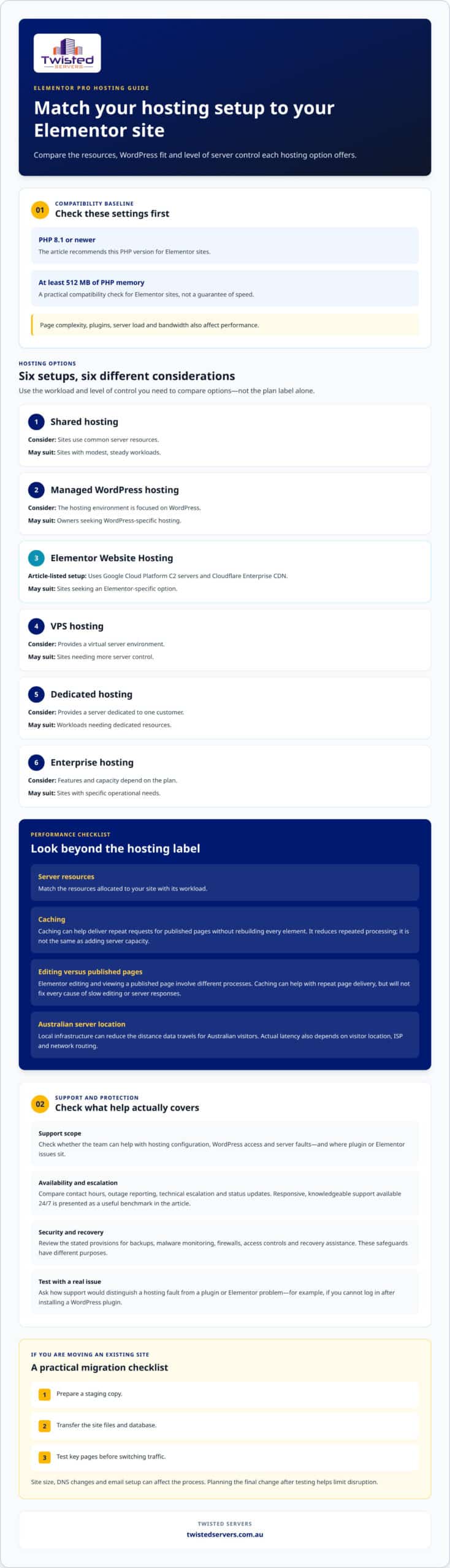
Elementor sites are recommended to have at least 512 MB of PHP memory, with PHP 8.1 or newer recommended for comfortable editing. These settings support compatibility but don’t guarantee speed. Page complexity, plugins, server load and bandwidth also affect performance.
For Australian hosting context, local web hosting options are one part of the comparison. Assess the server location alongside your audience, performance needs and resource requirements.
| Hosting option | Performance consideration | May suit |
|---|---|---|
| Shared | Sites use common server resources | Sites with modest, steady workloads |
| Managed WordPress | Hosting environment focused on WordPress | Owners seeking WordPress-specific hosting |
| Elementor Website Hosting | Uses Google Cloud Platform C2 servers and Cloudflare Enterprise CDN | Sites seeking an Elementor-specific option |
| VPS | Provides a virtual server environment | Sites needing more server control |
| Dedicated | Provides a server dedicated to one customer | Workloads needing dedicated resources |
| Enterprise | Features and capacity depend on the plan | Sites with specific operational needs |
Choose a host by matching your site’s workload, caching needs and preferred level of server control to the plan’s documented features.
Look for hosting providers with uptime guarantees of around 99.9% or higher. Use the guarantee as one comparison point alongside server resources, caching and compatibility, rather than treating it as a complete measure of how a site will perform. Before choosing a plan, review the provider’s stated commitment and clarify what it covers. A clear uptime policy can help you compare service expectations, while the technical fit still needs to match your site’s workload and the way visitors access its pages.
Customer support availability
Support matters when an Elementor update, plugin conflict or server error interrupts your site. Compare more than contact hours: consider whether the team can explain WordPress issues, guide a beginner and distinguish hosting faults from builder settings. Responsive, knowledgeable support available 24/7 is a useful benchmark, particularly for sites that need assistance outside standard business hours.
Australian WordPress hosts differ in their support channels and the issues their teams handle. A host may help with server access or hosting configuration, while a plugin conflict may require attention to the plugin or site setup. Compare support terms against a specific scenario, such as an Elementor page failing after a plugin update.
Review the host’s stated security provisions, including backups, malware monitoring, firewalls, access controls and recovery assistance. These safeguards have different purposes: backups can help restore site data, while a firewall filters network traffic. Find out how suspected compromises are handled and what remains your or your WordPress administrator’s responsibility.
Use a realistic example to assess how clearly a support team handles an issue. Explain that you can’t log in after installing a WordPress plugin, then consider whether the team can distinguish a hosting fault from a plugin or Elementor problem. Useful guidance should suggest a diagnostic step and clarify what falls within hosting support.
A provider’s name alone doesn’t establish its support scope, response channels or security features. Compare the published terms for help with hosting configuration, WordPress access, backups and plugin-related outages. Clear responsibilities show where hosting support can assist and when a plugin developer or site administrator may need to be involved.
Uptime information needs context. An availability figure doesn’t explain how quickly support responds or whether a particular Elementor feature will work. Look for details on outage reporting, technical escalation and status updates during an incident. These processes clarify what communication to expect if your site becomes unavailable.
A focused support comparison can cover these points:
- Identify which WordPress and server issues the support team handles.
- Compare contact channels and stated availability, including 24/7 coverage.
- Review backup, security and recovery responsibilities.
- Consider whether the guidance suits your experience as a beginner or site manager.
For an Elementor Pro site, look for support terms that define boundaries and provide a practical next step for each issue. Compare that clarity with the hosting environment to find support that matches how you manage your site.
Scalability and website requirements
Plan for your WordPress site’s current workload and expected changes. Elementor use, WooCommerce activity and site growth all affect hosting needs.
Managed WordPress hosting can suit owners of WooCommerce or high-traffic sites who want a WordPress-focused environment. VPS or dedicated hosting may suit sites that need more server control or a different resource arrangement. The right option depends on workload, management preferences and the resources the plan provides.
The guide recommends PHP 8.1 or newer for comfortable Elementor editing and at least 512 MB of PHP memory for Elementor sites. CPU needs depend on the site’s workload, including Elementor editing, plugins and WooCommerce processes.
Elementor hosting requirements
Elementor’s hosting requirements are best assessed through software compatibility and the resources available to the site, rather than the hosting label alone. PHP version and memory are useful points of comparison. Staging, caching and backup arrangements also affect how teams can test changes and manage site operations.
Scaling means adjusting the hosting arrangement as workload changes. A WooCommerce site handling product pages and checkout, for example, has different tasks from a brochure site. Review resource allocations and upgrade options as your catalogue, plugins or visitor activity change.
Traffic, storage and resource limits
Australian WordPress plans set their own traffic, storage and resource conditions. Shared plans use common server resources, while VPS and dedicated options provide different arrangements. Compare each plan’s stated limits and upgrade options with your traffic patterns, media library and site requirements.
Traffic and storage needs vary by site. Product images, customer uploads and backup files use storage, while page content affects the data transferred to visitors. Assess both when comparing plans rather than treating a traffic allowance or storage figure as the sole measure of capacity.
Elementor Website Hosting automatically creates daily website backups and retains them for 30 days. When comparing other WordPress plans, consider how backup files relate to the storage allocated for site files, staging copies and media. That helps clarify how the plan fits your site’s day-to-day requirements.
Staging lets a team test site changes before publishing them. Caching can affect how the live site serves repeat requests. For a growing site, consider how these features fit your workflow alongside the plan’s stated capacity and upgrade path. For teams also coordinating content distribution beyond WordPress, frik.io offers an AI-powered platform to create, schedule and publish social media content across multiple networks from a single workspace.
Choose a plan by matching your site’s workload, software needs and growth plans to its documented resources and features.
Elementor-compatible WordPress hosting
Elementor Pro needs more than a WordPress installation: the hosting environment must support your site’s software, traffic and maintenance needs. Compare the provider’s documented features with how you manage updates, staging and recovery.
Elementor Website Hosting is one named option. Its published features include a Cloudflare Enterprise CDN and daily backups retained for 30 days. Staging, SSL and one-click WordPress installation vary by provider and plan, so compare those specific features rather than assuming every WordPress host includes them.
For an Elementor Pro site, distinguish compatibility from convenience. Compatible PHP settings and adequate memory support the builder; staging lets a team test changes away from the live site. Backups help restore site data, while SSL protects connections between a visitor’s browser and your site. Each feature addresses a different need.
WooCommerce adds further considerations. Product images, catalogue changes, checkout activity and connected plugins all affect how a store operates. A provider’s stated WooCommerce support and hosting limits matter more than an “unlimited” label, which may not explain resource allocation or applicable conditions.
Managed WordPress hosting is worth considering if you want the provider to handle specified hosting tasks. It may suit a business seeking less server administration, but its value depends on the included tasks and support boundaries. If you manage updates and troubleshooting yourself, a less managed plan may fit better.
Before selecting a plan, compare the practical details that shape everyday work:
- Staging: Can the team test an Elementor layout or WooCommerce change before publishing?
- Backups: How often are copies made, and how long are they retained?
- SSL: Is a certificate included, and how is it managed?
- CDN: Does the service describe how it delivers site content to visitors?
- Installation: Is WordPress installation supported, and what does the process cover?
These questions help distinguish a documented feature from a broad plan description. For example, staging is useful only if your team can test the relevant pages and safely move approved changes to the live site.
When choosing the best hosting for Elementor Pro sites, match the plan to your technical workload, not its label. A beginner may value clear WordPress guidance, while a store manager may prioritise WooCommerce compatibility, backups and a practical staging process. This comparison gives you a clearer basis for choosing the service level your site needs.
Which Australian web hosts offer the best performance for Elementor Pro WordPress sites?
No single Australian host suits every Elementor Pro site. A small portfolio site, a WooCommerce store and a high-traffic publisher have different workloads. Compare actual resources, WordPress compatibility, support scope and data-centre location instead of relying on brand reputation or a plan label.
Start with your site’s workload. For a WooCommerce store, account for product pages, customer sessions, checkout activity and installed plugins. For a content-heavy site, consider how image delivery and caching affect published pages. Shared hosting uses common server resources, while VPS and dedicated environments offer different levels of isolation and control.
An Australian data-centre location can matter to local visitors, but it doesn’t guarantee a particular loading time. Latency also depends on visitor location, ISP and network routing. Compare the host’s stated server region with your audience, then consider whether it explains its infrastructure and how it handles service interruptions.
Elementor compatibility is another useful filter. PHP 8.1 or newer is recommended for comfortable Elementor editing, and Elementor sites are recommended to have at least 512 MB of PHP memory. These requirements help assess compatibility; they do not establish that a host will deliver a particular speed. CPU capacity and resource limits also matter as plugins and traffic increase.
For a fair comparison, assess the same site needs against each plan:
- Location: Identify the stated Australian server region and consider where visitors connect from.
- Resources: Compare PHP settings, memory, CPU allocation, storage and bandwidth terms.
- WordPress fit: Review support for Elementor Pro, WooCommerce and the plugins the site uses.
- Page delivery: Compare caching and CDN features, including what content they serve.
- Operations: Review backups, staging, security features and support responsibilities.
Don’t treat “unlimited” bandwidth or storage as a complete performance specification. Read the plan conditions and identify how the provider describes resource use. Clear limits help you judge whether a plan suits your site’s media library, expected traffic and backup needs.
Managed WordPress hosting may suit site owners who want a WordPress-focused environment. VPS or dedicated hosting may be more appropriate when server control or distinct resource arrangements matter. Choose based on the work involved, not a universal ranking of Australian providers.
Narrow your options by matching your site type and workload to the host’s documented resources, location and support. This gives you a practical comparison without assuming a provider’s name alone predicts Elementor performance.
Twisted Servers
Twisted Servers offers Web Hosting, VPS Hosting and Dedicated Server Hosting for different site and infrastructure needs. If your Elementor Pro site needs a straightforward hosting environment, Web Hosting may fit. A site requiring greater server control may call for VPS Hosting or Dedicated Server Hosting.
The right fit depends on your WordPress setup, resource requirements and preferred level of server management. When discussing your options with Twisted Servers, share these priorities so the conversation can focus on the hosting type that suits your site, rather than generic performance claims.
For help considering hosting for your Elementor Pro site, contact Twisted Servers.
Choose hosting that can grow with your site
Your hosting choice should support the site you run now and the changes you plan next. As an Elementor Pro site gains pages, plugins or WooCommerce features, its requirements may change. Reassess the fit when the site’s use changes instead of assuming one setup will suit every stage.
Finding the best hosting for Elementor Pro sites is a matter of matching the environment to your priorities, including WordPress compatibility, control and capacity. Twisted Servers offers Game Server Hosting, VPS Hosting and Dedicated Server Hosting alongside web hosting, giving you options to discuss as your requirements take shape.
If you’re ready to discuss which hosting option suits your site, contact Twisted Servers about hosting. A clear conversation about your site’s needs is a practical next step, and you can make the decision at your own pace.
Frequently Asked Questions
How do Australian hosts compare on page speed, uptime, and Core Web Vitals for Elementor sites?
Compare hosts by testing the same Elementor page under similar conditions, then review uptime information and the plan’s service terms. Core Web Vitals assess loading, interactivity and visual stability through metrics such as LCP, INP and CLS. Results also depend on page design, images, plugins and caching, so infrastructure alone can’t establish how your finished site will perform. If you are also analysing how visitors visually navigate and engage with your layouts, behavioural research specialists like Ergoneers provide technologies to track and understand user attention.
Disclaimer
Game titles, trademarks, logos and related assets are the property of their respective owners. Twisted Servers is an independent hosting provider and is not affiliated with or endorsed by the developers or publishers of the games mentioned unless otherwise stated. Information is provided as a general guide and may change as games, software and hosting services are updated.

