
Recommended Services


Supported Scripts


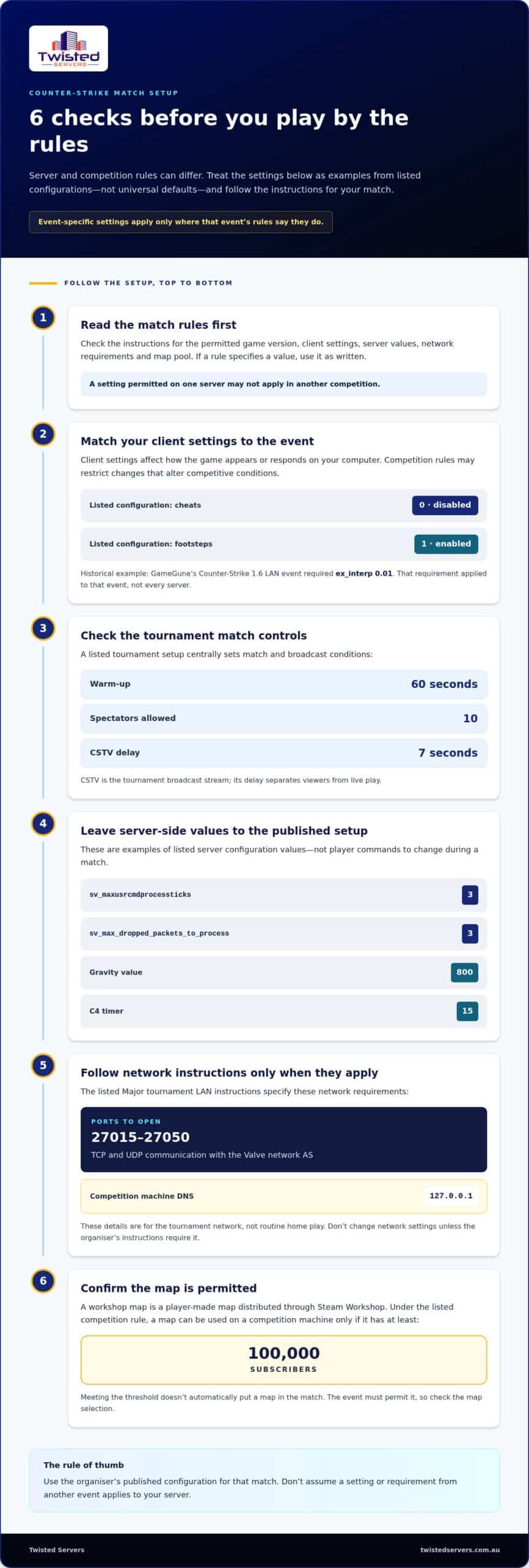
Fair play depends on clear rules, not guesswork. Counter-Strike server rules vary by server and competition, but a listed configuration disables cheats with value 0 and enables footsteps with value 1. Event-specific limits, such as grenade caps and restart procedures, apply only when that competition’s rules set them.
It’s not always clear whether a command, tactic or form of communication is acceptable, particularly when community servers and tournaments use different settings. This guide explains how to interpret rules on commands and client settings, fair play, grenades, communication and admin decisions. You’ll learn what may be allowed, what can lead to action and why each server’s published rules matter.
Key Takeaways
- Separate everyday server settings from tournament rules; a setting permitted in one match may not apply in another.
- Know which client commands affect fair play, and keep cheat-related settings disabled on a rules-based server.
- Use clear, respectful communication and understand how disruptive conduct can affect a match or community.
- Read the server’s admin and ban procedures so you know how decisions are handled and what exceptions may apply.
- Check grenade limits before play, as competition rules can set specific allowances for each round.
Allowed commands and client settings
Common competitive rules set approved client settings, server configuration and match procedures before play. For example, a listed Counter-Strike configuration enables footsteps with value 1, while tournament setups can specify warm-up, spectator and CSTV settings. These values are event-specific, so use the rules published for your match.
A client setting is an option that affects how the game appears or responds on your computer. Tournament rules may restrict changes that alter competitive conditions. In a historical Counter-Strike 1.6 LAN event, GameGune required players to use ex_interp 0.01. That requirement applied to the event, not every Counter-Strike server. Keep your configuration aligned with the competition’s instructions.
A server command is an instruction that changes a server’s behaviour or match settings. Tournament configurations can set technical values centrally, helping keep the server consistent for both teams. A listed tournament setup uses a 60-second warm-up, allows 10 spectators and applies a 7-second CSTV delay. CSTV is the tournament broadcast stream, and its delay separates viewers from live play.
Other listed tournament configuration values include:
sv_maxusrcmdprocessticksis set to 3.sv_max_dropped_packets_to_processis set to 3.
These are server-side values, not commands for players to change during a match. Follow the organiser’s configuration instead of copying settings from another event.
Network restrictions can also form part of a Major tournament setup. Its LAN instructions require ports 27015-27050 to be open for TCP and UDP communication with the Valve network AS. Competition machines use 127.0.0.1 for DNS under those restrictions. These details apply to the tournament network, not routine home play; don’t alter your network settings unless the organiser’s instructions require it.
A workshop map is a player-made map distributed through Steam Workshop. Under the listed competition rule, a map can be used on a competition machine only if it has at least 100,000 subscribers. That threshold doesn’t automatically make a map part of a match. The event still needs to permit it, so confirm the map selection before play.
For a practical check, read the match rules before changing a config, joining a server or selecting a map. Look for the permitted game version, client settings, server values, network requirements and map pool. If an instruction names a value, use it exactly; for example, the historical GameGune ex_interp requirement was 0.01. This is how Twisted Servers and standard Counter-Strike server rules distinguish a valid personal setup from a setting that conflicts with that competition.
The listed Counter-Strike server settings include a gravity value of 800 and set the C4 timer to 15. Treat these as listed configuration values, and follow your event’s published setup for any match.
Bugs, cheats and unfair practices
A cheat is software or a method that gives a player an improper advantage. A listed Counter-Strike server configuration disables cheats with value 0, helping establish a baseline for fair play. That setting is not a complete conduct policy: organisers also need to explain what behaviour they prohibit and how they’ll assess reports.
A bug exploit is the deliberate use of a game fault to gain an advantage. For example, a player might repeat an unintended action to reveal an opponent’s position or bypass a map obstacle. Server rules should distinguish deliberate exploitation from an accidental encounter. If you discover a fault, stop using it and report the map, round and circumstances to an admin.
Cheat software alters or reads game information to give a player an advantage. Examples include an aimbot that moves aim automatically and a wallhack that reveals opponents through walls. Rules should focus on conduct, not guesswork about skill: a strong score or accurate shot alone does not prove cheating. Before taking action, admins should review relevant evidence, such as a recorded round or server record.
Unfair play can also undermine a match without external software. Examples include deliberately sharing an opponent’s position with the other team, intentionally disrupting a teammate or exploiting a known map fault after an admin has prohibited it. Spell out these boundaries in the server rules so players can distinguish allowed strategy from conduct the community has agreed to restrict.
Use a consistent reporting process so players know what details to provide and admins can assess incidents fairly:
- Record the player name, map and round where the incident occurred.
- Describe the action observed, rather than labelling the player a cheater.
- Share a relevant recording or other available match evidence.
- Let an admin review the report against the published rule.
A report is an allegation, not proof. A player tracking an opponent through a wall, for example, may have heard footsteps or received a teammate’s call. Admins should consider what happened before the disputed action, whether the behaviour repeated and whether the evidence supports a rule breach. This helps separate suspicious-looking moments from clear patterns without treating every strong play as misconduct.
Set out the rules and enforcement process before disputes arise. State that cheat software is prohibited, explain how to report suspected bug abuse and describe what evidence admins consider. Base decisions on observed conduct and apply the same standard to both teams. Clear procedures make Counter-Strike server rules easier to follow and help admins reach fair decisions.
Communication and conduct rules
Official, community and private servers may have different conduct rules because their operators set different conditions. For an Australian match, follow the rules published by its organiser. Event requirements apply to that competition, not to every server.
Voice communication means spoken information shared through in-game chat. A useful rule permits concise tactical calls, such as naming an opponent’s position, while prohibiting insults, threats and deliberate audio disruption. Specify whether players may speak during live rounds, pauses and post-match discussions. Clear timing rules help distinguish team communication from interruptions.
Text communication means information sent through in-game messages. Set separate expectations for team chat and public chat. For example, players can use team chat for tactical information but should not flood public chat with repeated messages. Explain how admins may respond, such as muting a player who continues after a warning.
Sportsmanship means treating other players and officials respectfully, even in a close match. A conduct policy can prohibit targeted harassment, personal abuse and attempts to provoke opponents. Give examples instead of relying on a vague instruction to “be respectful”. Players should know how to report a concern and which admin can review it.
Are Counter-Strike server rules different on official, community and private servers? Yes. Official matchmaking follows its own game and platform rules, while community and private server operators can set additional conduct, communication and access conditions. Read the rules for the specific server or event before joining.
For Australian players, tournament requirements are set out in the rules for each event. An organiser may define match procedures and conduct expectations for its competition, so don’t assume a rule from another event applies. Check the event instructions for communication limits, pauses, player behaviour and dispute handling.
Match communication should support play without giving either team an unfair information advantage. For example, a spectator should not relay an opponent’s location to a player during a live round. Follow any event instructions about broadcast delays or spectator access. Players should also avoid sharing private team communications with opponents.
Use a simple process when a communication dispute occurs:
- Note the player name and the message or behaviour involved.
- Report the incident to an admin through the stated channel.
- Allow the admin to review the context before responding.
- Follow the decision process published for that server or event.
A clear policy helps admins distinguish an isolated mistake from repeated disruption. Explain possible responses, such as a warning, mute or removal, and apply them consistently. Written Counter-Strike server rules give players a practical standard for voice chat, text chat and conduct, whether they join a public community server or a private match.
Admin bans and exceptions
An admin is authorised to enforce a server’s published policy. Define the decisions admins can make, such as removing a disruptive player or restricting access. Separate routine moderation from tournament rulings so players know whether a server admin or event official handles each matter.
A ban restricts a player’s access to a server. State its scope clearly: does it apply to one server, a linked community or a specific event? Explain the policy basis and what information players will receive. This helps avoid confusion when a player can join one community server but not another.
A temporary ban has a defined end, while a permanent ban has no scheduled expiry. Set criteria for choosing between them based on the seriousness, frequency and impact of the conduct. A single, low-impact disruption may warrant a different response from repeated interference. Apply the same criteria regardless of a player’s team, rank or relationship with an admin.
An exception is an approved departure from a usual rule for a particular circumstance. State who can approve one and how it affects the match. For example, an event official might authorise a procedural adjustment after an unexpected interruption. Record the reason and communicate the ruling to both teams to avoid the impression of preferential treatment.
An appeal asks for an admin’s decision to be reconsidered. Explain who can review it and which grounds are relevant, such as mistaken identity or new context. Where practical, assign someone who was not involved in the original decision. A fresh review does not guarantee a different outcome.
Before publishing the policy, define these boundaries:
- Which admins can issue access restrictions.
- Whether a restriction covers one server or a wider community.
- How event rulings interact with community moderation.
- Who can approve an exception and record its reason.
- How an appeal reaches someone independent of the original decision.
Use precise wording in decision notices. Identify the policy clause and describe the observed conduct without guessing at motive. For example, record that a player repeatedly interrupted a match rather than labelling them malicious. Keep private account details out of public announcements and share only what players need to understand the ruling.
Review the policy when the community changes its match format or moderation approach. Tell players where the current version is published and make updates visible before they take effect. Consistent wording gives admins a dependable framework while allowing unusual situations to receive considered, documented decisions.
Grenade limits
A grenade limit sets how many grenades a player may use during a round. The rule depends on the competition, so don’t treat one event’s allowance as universal. For example, GameGune’s Counter-Strike 1.6 competition at Euskal Encounter 20 allowed up to 2 flashbangs per round and 1 smoke grenade per round. Those were event rules, not a default for every server.
A flashbang is a grenade used to impair opponents’ vision temporarily. Under the GameGune rules, each player could use up to 2 flashbangs per round. The limit applied to each player, not the whole team. That distinction matters when you write rules: state whether a cap applies per player, per team or across the entire round.
A smoke grenade creates a visual screen that can obscure sightlines. GameGune allowed 1 smoke grenade per round. A clear rule should say whether this means one per player or one shared by the team. Avoid leaving players to infer the scope from a number alone.
These historical limits show why organisers should publish grenade allowances alongside the match format. Players preparing for another competition may expect different limits. Name each grenade type, state its allowance and specify the unit, such as “per player per round”. If the event uses a team-wide cap, say so plainly.
Before a match, players can use this checklist:
- Read the event’s grenade section before joining the server.
- Confirm whether each allowance applies per player or per team.
- Check whether the stated cap resets each round.
- Ask an admin about an unclear rule before play begins.
Make grenade enforcement practical. If a player appears to exceed an allowance, identify the round and grenade involved, then review the match context before deciding whether a breach occurred. A published procedure should explain how admins handle the incident, rather than relying on inconsistent assumptions between teams.
Grenade restrictions can shape a team’s approach. A flashbang allowance affects how players coordinate visual disruption, while a smoke allowance affects how they manage sightlines. Don’t infer further restrictions from these limits. If a rule also covers grenade timing, locations or other tactics, state that separately and explain its scope.
For community matches, present limits in a short, readable rule entry instead of burying them in a long document. State the relevant game version, grenade type and per-round allowance. Keep event rules separate from general server settings, and update the published wording when the match format changes. The GameGune example is a useful reminder that limits belong to a specific competition and should be read in context.
Twisted Servers: Game Server Hosting
Twisted Servers offers Game Server Hosting for communities that want a dedicated place to play and apply their own server policies. Clear settings and written conduct rules help players understand how a community match will run. Hosting provides the server environment; your community or event organiser sets match rules and decides how admins enforce them.
If you’re planning a community server, consider whether VPS Hosting or Dedicated Server Hosting better suits your wider setup. The right option depends on what you need to run and manage, not on a rulebook alone. Document your Counter-Strike settings, conduct expectations and admin process for players.
Contact Twisted Servers to discuss your hosting needs.
Put your server rules into practice
Before launching a community server, assign someone to maintain its configuration notes and policy document. Keep a change log that records what changed and why, so admins can trace decisions when settings or procedures are revised.
For a hosted multiplayer setup, Game Server Hosting provides the server environment; your community remains responsible for its own rules and moderation decisions. Record the chosen match settings alongside the rules so admins can refer to both during setup.
Before launch, compare the written policy with the configured server and resolve any mismatches before opening access. Keep the approved versions together for the people administering the community.
Frequently Asked Questions
What are the standard rules for Counter-Strike 2 servers?
There’s no single rule set shared by every Counter-Strike 2 server. The game mode and operator determine the server’s conditions, while a tournament may publish a separate rulebook. Before joining, identify whether you’re entering official matchmaking, a community server or an organised event. That distinction tells you which rules apply and where to look if server notices and event instructions appear to differ.
What rules apply to cheating, scripts, exploits, and third-party software on Counter-Strike servers?
Check the server policy and applicable game or platform terms before using scripts or third-party software. A server’s rules may be stricter than the game’s baseline conditions. If a tool’s purpose or effect is unclear, avoid using it in a competitive match until you understand the relevant restrictions. Don’t assume software is permitted just because it runs on your computer or works in another game.
What conduct rules apply to griefing, team killing, and player harassment?
Look for rules explaining how the server distinguishes deliberate disruption from ordinary gameplay. A policy can clarify whether repeated behaviour, match impact or intent matters when an admin assesses an incident. This is useful in close rounds, where teammates may interpret a tactical move or accidental collision differently. If the wording is unclear, seek clarification before play rather than relying on assumptions about community standards.
What are the rules for voice chat, text chat, and offensive language on Counter-Strike servers?
Chat restrictions vary by server, so check whether voice and text channels have separate settings or expectations. Available in-game mute controls can help manage what you hear or read, but they affect your experience, not necessarily another player’s standing with the server. In organised matches, check whether team communication is limited during pauses, warm-ups or other non-live periods.
How do Counter-Strike server admins handle bans, reports, and appeals?
Server admins manage access to their own community. Game or platform enforcement follows separate processes, so a community ban may restrict access to that server without determining a player’s status elsewhere. If you receive a restriction, identify who issued it and which process applies. Keep any response relevant to that decision rather than treating every ban as platform-wide action.
Disclaimer
Game titles, trademarks, logos and related assets are the property of their respective owners. Twisted Servers is an independent hosting provider and is not affiliated with or endorsed by the developers or publishers of the games mentioned unless otherwise stated. Information is provided as a general guide and may change as games, software and hosting services are updated.

