
Recommended Services


Supported Scripts


A business email address is only as useful as the service behind it. Choosing email hosting in Australia means deciding how your business email is stored and accessed, as well as how it works with your domain and devices. The right setup should make everyday communication clear and manageable.
When comparing email hosting in Australia, it’s easy to focus on the headline price and overlook what affects the fit, such as mailbox needs, billing period and included features. This guide explains what email hosting is, how business and annual plans differ, and what to consider when comparing prices, without treating the billing period as the only factor.
You’ll also learn how a custom domain creates addresses using your business name and how email syncing lets you access messages across devices. We cover practical details to help you understand the options and choose a setup that suits your business.
Key Takeaways
- Understand how email hosting stores and delivers business messages, and how mailbox storage needs can shape your plan choice.
- Compare business email plans by billing period, mailbox allowance and included features, not price alone.
- Learn how a custom domain gives your business email addresses a consistent, branded format.
- See what affects access and syncing across devices, so you can choose a setup that fits your daily workflow.
- Use the annual plan comparison to weigh billing convenience against the features and capacity your business needs.
What is email hosting?
Email hosting stores and manages business mailboxes, allowing your team to send and receive messages through addresses linked to a domain. The plan can also set storage space, account limits and features such as calendar or contacts access.
Flexible Mailbox Plans
Mailbox plans define how many email accounts you can create and how storage is allocated. A small business might need individual staff addresses alongside shared addresses such as accounts@yourdomain.com.au. Compare whether storage is assigned per mailbox or shared across the plan, and how the arrangement can accommodate changing team needs.
Consider what each mailbox holds. A client who regularly sends large attachments may use storage faster than someone handling short messages. Calendar and contacts features can also affect whether a plan suits your team. Compare the plan details with everyday tasks, such as managing appointments or keeping supplier contacts accessible.
Australian-Based Email Data
Australian-based email data means mailbox data is stored on infrastructure located in Australia. A provider’s business address alone doesn’t establish where data is held. Look for clear information about data centre location and which data the statement covers. Email and website hosting are separate services, even if your business uses the same domain for both; web hosting covers the website component.
Does Australian email hosting need to comply with the Privacy Act and Australian Privacy Principles? Choosing an email host does not, by itself, answer that question. Consider your organisation’s Privacy Act and APP responsibilities separately from where mailbox data is stored.
Storage Quotas and Account Limits
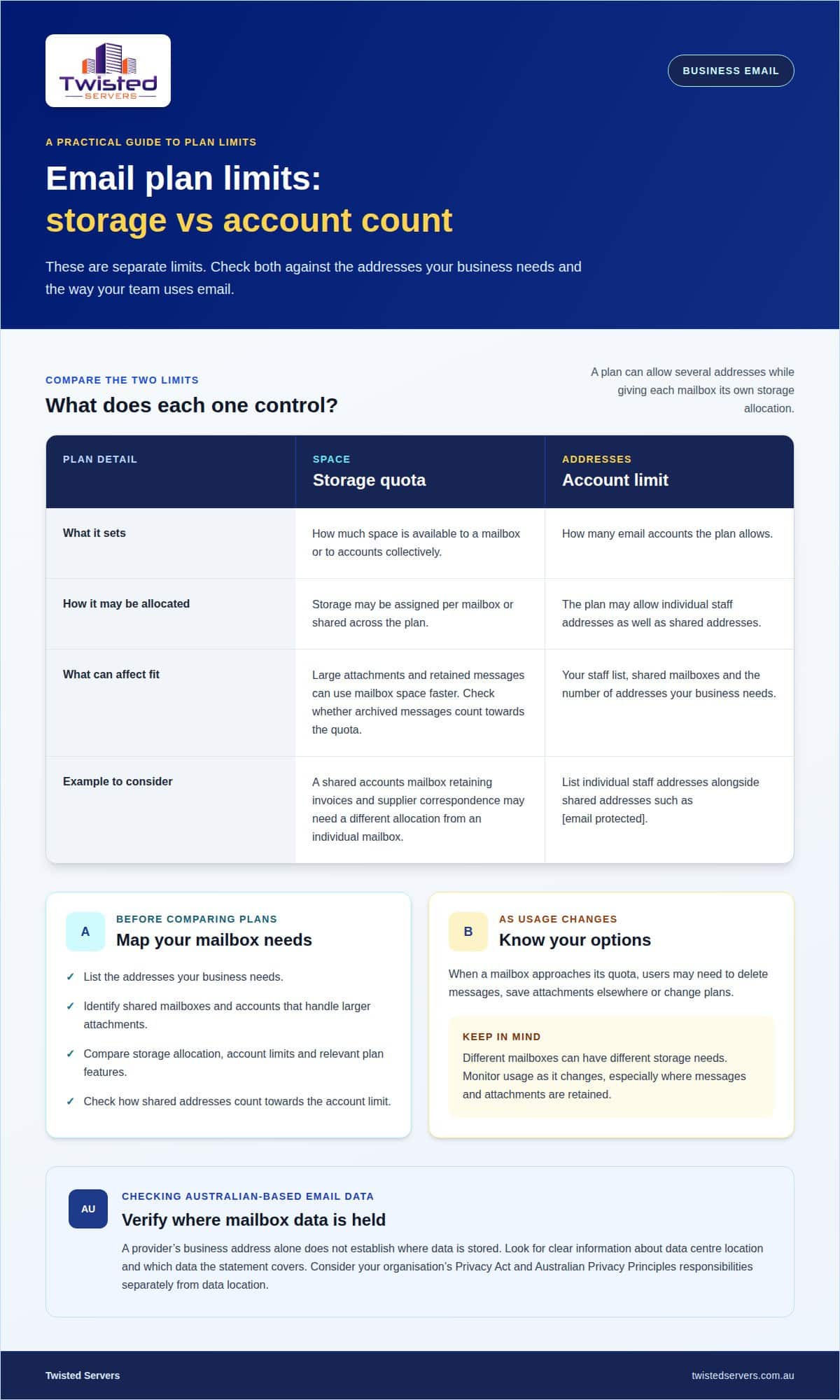
A storage quota sets the space available to a mailbox or to accounts collectively. An account limit sets how many email accounts a plan allows. These are separate restrictions: a plan could allow several accounts while assigning storage to each mailbox. Compare both limits with your staff list and expected message volume.
When a mailbox approaches its quota, users may need to delete messages, save attachments elsewhere or change plans. For example, a shared accounts mailbox that retains invoices and supplier correspondence may need a different storage allocation from an individual mailbox. Check whether archived messages count towards the quota and how account limits apply to shared addresses.
Before choosing, list the addresses your business needs, identify shared mailboxes and note which accounts handle larger attachments. Compare these needs with storage allocation, account limits and relevant plan features. This gives you a practical way to assess flexibility without assuming every employee needs the same mailbox capacity. It also highlights which mailboxes to monitor as usage changes.
Business email plan pricing
Business email plans can provide standalone mailboxes or combine email with productivity services. When comparing email hosting in Australia, look at mailbox numbers, storage, domain support and included collaboration tools. A small consultancy with several staff may need different features from a business sharing accounts across sales and administration. Match plan features to actual use, rather than choosing by brand name alone.
Pricing usually depends on mailbox count, storage, billing period and included tools. List individual and shared addresses before comparing plans, then note which accounts need extra storage or shared access. This gives you a clearer basis for assessing the total cost without assuming every employee needs the same setup.
Email may be bundled with calendar, file-sharing or meeting tools. Check which functions are included and whether your team will use them. If staff already rely on a separate productivity platform, an email-only option may avoid paying for overlapping services. For example, a team using its existing calendar may not need another one in a package.
Some providers bundle email with business web hosting. This may suit a business that wants its website and email accounts managed through one hosting plan. A separate email service may better fit a team with distinct mail requirements. Compare renewal terms, mailbox limits and the effect of changing the website plan. Website hosting and email hosting remain different services, even when bundled.
Collaboration features can affect value as much as mailbox capacity. Shared calendars can help staff coordinate appointments, while shared contacts make client details available across a team. Check whether these features are included, how account access works and whether they fit your existing email applications. Link each feature to a task your team performs, rather than treating a longer feature list as automatic value.
Security should also factor into your choice. Review account authentication options, access controls and support for email authentication records. These settings can help reduce risks such as account compromise and unauthorised messages sent using your domain. Decide who in your organisation will administer accounts and update settings when staff responsibilities change.
Use a comparison table to keep the decision practical. Record mailbox count, storage, included tools, renewal terms and any limits on adding accounts. A business with separate sales and finance addresses, for instance, should include both in its account plan. This makes it easier to see whether a plan fits current operations and likely changes.
For an email hosting in Australia comparison, assess the complete set of services each plan includes, not just the mailbox charge. If you also need a domain for branded email addresses, domain name registration is another part of the setup to consider alongside email and collaboration tools.
What are the benefits of having an email address that has a custom email domain?
A custom email domain puts your business name after the @ symbol, such as hello@harbourstudio.com.au. That gives an Australian consultancy, for example, a consistent address for proposals, invoices and its website. Unlike a generic address, it connects business messages with a domain name customers already recognise.
Consistency helps people identify who sent a message and where replies should go. An Australian business can create role-based addresses such as sales@, accounts@ or support@, then assign each address to the people responsible. Role addresses remain useful when staff change, because they do not need to change with an employee’s name.
A custom domain also gives you control over your email naming format. You might use first names for personal correspondence and role addresses for shared work. Before creating accounts, decide which addresses need individual access, which should be shared and who will manage them. A clear naming policy helps staff send messages from the right account.
Custom domains do not guarantee that every message will reach an inbox. Delivery also depends on correct domain configuration and the receiving mail service’s filtering. Email authentication records, including SPF, DKIM and DMARC, help receiving systems assess whether messages are authorised. Keep these records aligned with the service sending mail for your domain, especially if you use a website form or invoicing system.
Separate the provider’s availability commitment from message delivery. An uptime guarantee describes a service commitment, while delivery can also depend on recipient systems, filtering and domain configuration. Compare the guarantee’s terms, measurement period and exclusions. For support, check the published contact channels, service hours and whether assistance is available outside ordinary business hours, including 24/7 coverage.
Support matters when a domain setting or mailbox stops working. For example, if your team cannot receive new mail after changing DNS records, support may need to determine whether the issue involves the domain, mail routing or individual account settings. Review what support covers, how to report urgent faults and whether account changes require administrator access.
Plan for staff changes in advance. Give each employee an individual account where accountability matters, and use shared role addresses for functions that need continuity. When someone leaves, remove their access and redirect or reassign relevant messages through your organisation’s process. This protects business correspondence without requiring customers to learn a new contact address.
A custom domain is especially useful when your email identity needs to match your business name across customer communications. Choose an address structure, assign ownership for shared mailboxes and keep authentication records current. Then assess service availability and support terms separately, so branding, message delivery and operational continuity each have a clear place in your decision.
Email access and syncing across devices
Email access depends on how your mailbox connects to the service and which protocol or interface you use. Choose a setup that keeps messages and folders consistent across your phone, computer and webmail.
Mobile Email Access
On an iPhone or Android device, you can usually access email through a mail app or mobile browser. Add the account using the mailbox settings, then test sending and receiving messages. Check that sent mail, read status and folders stay in sync with your desktop account. This matters when you move between a phone and work computer during the day.
Webmail and Device Access
Webmail opens in a browser, so you can access a mailbox without installing a desktop mail program. Sign in from a trusted device, use the mailbox credentials and confirm that the browser session shows the expected folders and sent messages. This is useful when working away from your usual workspace, though access still depends on a connection to the email service.
Cloud-Based Email Access
With cloud-based email, messages are stored on remote servers and accessed through an internet-connected app or browser. The service acts as the central mailbox, and each device connects to it. Before choosing a platform, consider how it handles folders, contacts and calendars across devices. A consistent setup helps staff see current information instead of relying on separate local copies.
IMAP and POP3 Access
IMAP keeps mail on the server and synchronises mailbox activity across connected devices. If you read a message on your phone, that status can also appear on your computer. POP3 generally downloads messages to a device, which can make the mailbox less consistent across several devices. Choose the protocol based on whether you need one device or a shared, synchronised view.
For a team, consistency depends on using compatible account settings on each device. For example, if a staff member adds an account to a laptop and phone, both should use the same incoming and outgoing server details. Incorrect settings can prevent sending, receiving or syncing, even when the account is active.
Protect access by locking devices, using unique account passwords and removing access from devices no longer used for work. In a shared workspace, agree which staff can access each mailbox and avoid sharing individual login details. If a device is lost, the account administrator can review access and change credentials as part of the organisation’s response.
Before rollout, test one account on a computer, phone and browser. Send a message from each, then confirm it appears in the sent folder and can be read from the other access points. This simple test helps identify configuration issues before staff rely on the setup for daily business communication.
Annual email hosting prices
An annual plan bills for business email over a yearly period instead of renewing month by month. To compare plans fairly, calculate the total for the mailboxes your business needs, then compare the same features and billing period. A lower annual total may reflect different storage, account limits or included tools.
Email hosting prices in Australia depend on mailbox numbers, storage, plan features and billing period. Twisted Servers’ Email Hosting pricing depends on your requirements and is provided after a quote request. Key cost factors include the number of mailboxes, storage allocation, included features and whether email is bundled with other services.
Start with a mailbox list. For example, a business might need individual addresses for staff alongside shared accounts for sales and finance. Count each required mailbox, then note which accounts need more storage or collaboration features. This helps prevent overlooking shared addresses or paying for capacity the team will not use.
Next, compare annual hosting plans on a like-for-like basis. Check what each plan includes, whether adding accounts changes the total and how renewal works. Microsoft-based tools may be part of a broader productivity package, while a dedicated email plan may focus on mailboxes. Compare the included services, not just the billing label.
Annual payment can make budgeting more predictable, but it also means planning for the full billing period. Consider staff turnover, seasonal roles and possible account changes before choosing. If your team expects to add mailboxes, check how the plan handles changes during the term. An annual commitment works only when its limits and renewal conditions fit your operations.
Include related services in your cost comparison. A package combining email with other business tools may have a different per-user structure from a mailbox-only service. Check whether it includes the calendar, file sharing or other features your team uses. Do not count an included feature as value if staff already rely on a separate platform.
Then assess practical access. If staff use a phone, laptop and Microsoft applications, confirm that the selected plan supports their intended setup. Review storage limits and account rules alongside the annual total. A spreadsheet with columns for mailboxes, storage, features, billing and renewal makes differences easier to spot.
The clearest takeaway is to compare the total annual commitment against the exact accounts and features required, rather than treating a lower monthly equivalent as the whole decision. Plan your business email requirements by listing mailboxes, storage needs and essential tools before selecting a billing period.
Twisted Servers: Email Hosting
Twisted Servers offers Email Hosting for businesses that need hosted email for their domain. It can suit you if you’re setting up business mailboxes or bringing email services together under a hosting plan. Before choosing a setup, consider the addresses your team uses, who needs access and how email fits alongside your existing services.
Twisted Servers’ other hosting options serve different needs. Game Server Hosting supports multiplayer gaming communities, while VPS Hosting and Dedicated Server Hosting provide separate server hosting options. Consider these independently from email, based on the services your organisation needs. Keeping each requirement clear can help you decide which hosting service is relevant.
Contact Twisted Servers to discuss your email hosting requirements.
Set up email that can grow with your business
Your business email setup can shape how customers reach you as your team and operations change. Decide who will manage mailbox access, domain settings and account changes over time. Clear ownership helps keep business communication organised as responsibilities shift.
For email hosting in Australia, choose a setup that fits how your organisation works now while allowing for future needs. Twisted Servers also offers Game Server Hosting, VPS Hosting and Dedicated Server Hosting, which you can consider separately if your broader hosting requirements change.
When you’re ready to discuss a suitable email setup, talk with Twisted Servers about email hosting. A clear conversation about your requirements is a practical next step, and you can move forward with confidence.
Frequently Asked Questions
How do you set up business email?
Start by selecting a domain and email service, then create mailboxes for individuals and shared roles. For example, set up individual staff addresses alongside accounts@yourdomain.com.au. Configure the domain’s mail records, then add each mailbox to the chosen apps or devices. Send a test message to and from an external address, and confirm replies reach the right mailbox before using it for customer correspondence.
Will I lose my email if I change web hosts?
Changing web hosts does not automatically move or delete email, because website hosting and email hosting can be separate services. Before a change, identify where your mailboxes are hosted and keep that service active during the transition. Back up or migrate existing messages, then update domain records only when the new mail service is ready. This helps prevent interrupted delivery or confusion about where new messages arrive.
Will my emails land in the inbox?
No email service can guarantee that every message reaches an inbox, because recipient filters and sender reputation also affect delivery. Set up SPF, DKIM and DMARC records for your sending domain, and ensure authorised services send mail correctly. For example, if your website sends booking confirmations, include that sending service in your domain’s email configuration. Avoid misleading subject lines and unsolicited bulk messages that may trigger filtering.
What are the best email hosting providers in Australia?
The right provider depends on your mailbox needs, preferred applications, support arrangements and data-location requirements. Compare account limits, storage, security features, migration options and renewal terms with your team’s requirements. Twisted Servers offers Email Hosting for businesses that need hosted email, alongside separate Game Server Hosting, VPS Hosting and Dedicated Server Hosting. Choose the service that fits your needs rather than relying on a general ranking.
How much does business email hosting cost in Australia per user per month?
There is no single price for every business email plan. The total depends on mailbox numbers, storage, billing period and whether collaboration tools or other services are included. Calculate the cost for the accounts your organisation needs, including shared role addresses. Twisted Servers’ Email Hosting pricing depends on your requirements and is provided after a quote request, with mailbox numbers and features affecting the cost.
Which Australian email hosting providers offer local data centres?
Look for clear information on where the email service stores mailbox data, rather than relying only on an Australian business address or support team. Consider whether the stated location covers messages, attachments and backups, as these can involve different systems. Twisted Servers is an Australian hosting provider with Australian-based data centres; assess the email service’s stated data arrangements when comparing hosting options in Australia.
What features should I look for in an Australian business email hosting plan?
Match features to how your team works. Check mailbox capacity, account limits, custom-domain support, webmail access and compatibility with staff devices and email apps. Consider whether shared calendars, contacts, aliases and mailbox migration matter to your workflow. Review authentication options and account access controls too. A business with shared sales and finance addresses, for example, should confirm those addresses fit its account and administration needs.
How do I set up email hosting with an Australian domain name?
Register or use your Australian domain, select an email service and create the required mailboxes. Update the domain’s DNS records using the values supplied for the email service, including mail-routing and authentication records. Allow time for DNS changes to propagate, then test incoming and outgoing messages. If your domain also hosts a website, change mail records carefully so you do not disrupt website records.
Disclaimer
Game titles, trademarks, logos and related assets are the property of their respective owners. Twisted Servers is an independent hosting provider and is not affiliated with or endorsed by the developers or publishers of the games mentioned unless otherwise stated. Information is provided as a general guide and may change as games, software and hosting services are updated.

