
Recommended Services


Supported Scripts


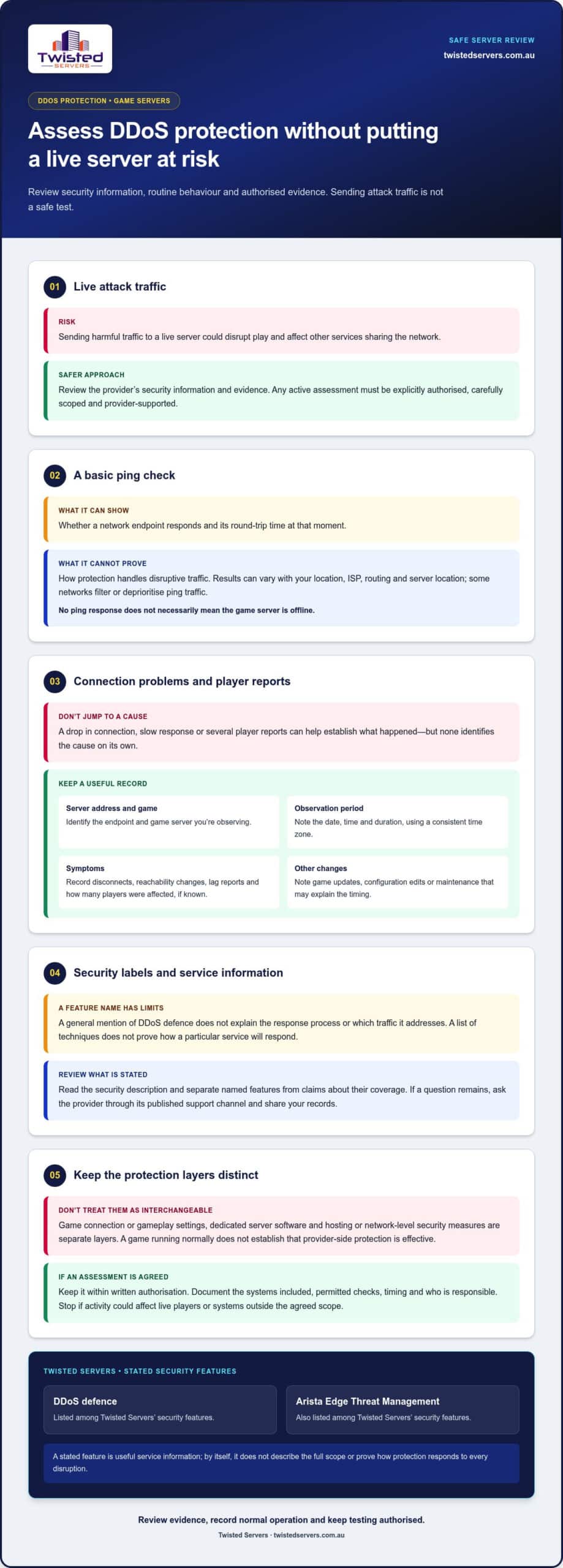
A safe game server DDoS protection test doesn’t involve sending attack traffic. A live test could disrupt your server and affect players, while a basic ping check can’t show how protection responds to an attack.
To assess protection, focus on the security information available, the limits of each check and the process for raising a concern. Any active testing must be explicitly authorised and carefully controlled.
This guide explains how to assess protection safely, what to look for in information about game traffic and mitigation, and why ordinary connectivity checks have limits. You’ll also learn what records can help you understand an incident and what practical steps to take if you’re concerned. Twisted Servers lists DDoS defence and Arista Edge Threat Management among its security features. We’ll explain what those features and routine checks can tell you, and where their limits are.
Key Takeaways
- Use a game server DDoS protection test to review controls, evidence and response information, not to send harmful traffic to a live server.
- Record the server address, game, observation period and connection issues to give any later review useful context.
- Compare documentation, routine reachability checks and authorised assessments. Each reveals different information.
- Separate ordinary connectivity problems, game updates and configuration faults from unexplained disruption before deciding what needs provider review.
- Review the security features Twisted Servers lists, including DDoS defence, proactive threat management and Arista Edge Threat Management.
What a game server DDoS protection test can, and cannot, prove
A game server DDoS protection test should be an authorised review of a provider’s security information, available evidence and response process. It isn’t a reason to send attack traffic to a live server. That could disrupt play and affect other services sharing the network. Keep your review to safe checks and information you’re authorised to access.
DDoS means distributed denial of service: traffic from multiple sources is directed at a service to disrupt its availability. DDoS protection refers to measures intended to detect, manage or filter harmful traffic before it prevents legitimate players from connecting. The DDoS mitigation techniques overview describes approaches used to reduce disruption. A list of techniques, however, doesn’t prove how a particular hosting service will respond.
Keep three layers distinct. A game may have connection or gameplay settings. Dedicated server software manages the game server process. Hosting or network-level security measures are separate. A game setting or a server running normally doesn’t establish that provider-side DDoS protection is effective. Look for information about the protection and response process, rather than relying on a security label alone.
What does DDoS protection mean for a game server?
For a game server, DDoS protection means provider-side measures intended to keep the service reachable when disruptive traffic is directed at it. The methods and scope can differ, so don’t assume a particular attack type, traffic level or response time is covered. A useful review looks at what the provider says its protection does and what information is available, without attempting to trigger an attack.
Why a basic ping test is not proof
A ping can show whether a network endpoint responds and indicate round-trip time at that moment. Results can vary with your location, ISP, routing and the server’s location. Some networks may also filter or deprioritise ping traffic, so no response doesn’t necessarily mean the game server is offline. A normal ping result describes that check under ordinary conditions. It doesn’t show how DDoS protection handles disruptive traffic.
Think of a game server DDoS protection test as an evidence review, not a single pass-or-fail reading. Routine reachability checks can help you spot connection changes, but they can’t prove resilience to every attack type or establish a mitigation limit. Don’t draw broad conclusions from one ping, one successful login or a general claim that protection is included. Each check has value, but its scope is narrow.
How to assess game server DDoS protection without attacking it
A safe game server DDoS protection test starts with service information and records, not traffic generation. Work through the checks below to understand what’s documented and what you’ve observed during normal use. Don’t try to reproduce an attack, even if your aim is only to see how the server responds.
Start with service documentation and observed behaviour
Read the security description for your hosting service and note its exact wording. Separate named features from claims about what they cover. For example, a general mention of DDoS defence doesn’t explain the response process or which traffic it addresses. For background on attack types, Cloudflare explains how DDoS attacks work. Use that information to frame questions, not to assume your service uses a particular method.
Keep a simple record during routine operation. Include:
- Server address and game: identify the endpoint and game server you’re observing.
- Observation period: note the date, time and duration of the check, using a consistent time zone.
- Symptoms: record disconnects, reachability changes, lag reports and how many players were affected, if known.
- Other changes: note game updates, configuration edits or maintenance that could help explain the timing.
Compare your notes with service descriptions and incident communications available to you. A connection drop, slow response or group of player reports can help establish what happened, but none identifies the cause on its own. Don’t label an outage a DDoS incident based on a single symptom.
Use an authorised, provider-supported review
If the documentation leaves a specific question unanswered, use the provider’s published support channel. Share your records and ask for clarification about the stated protection and the appropriate process for reviewing a concern. Don’t arrange an unsolicited test or send harmful traffic to the server or surrounding network.
If an assessment is agreed, keep it within the written authorisation and scope. Document which systems are included, what checks are permitted, when they may occur and who is responsible for the review. Stop if the activity could affect live players or systems outside that scope. A clearly scoped review helps you understand the available evidence without turning your community’s server into a test target.
For service context, explore Australian game server hosting from Twisted Servers.
Which DDoS protection checks are useful, and where they fall short
Each check answers a different question. A service description tells you what protection is stated. A routine connection check shows whether the server responds under current conditions. An authorised assessment can examine agreed controls and response within its scope. None guarantees protection against future disruption or every possible attack.
| Check | Purpose and information gathered | Key limitation |
|---|---|---|
| Documentation review | Clarifies the security features described for your service and any available incident or mitigation information. | Describes stated coverage, not necessarily how the service will perform during a specific incident. |
| Ordinary reachability checks | Shows whether the server responds at the time of the check. Ping, route observations and uptime records can help identify changes in ordinary connectivity. | These checks don’t create or measure hostile conditions, so they can’t establish DDoS mitigation performance. |
| Authorised assessment | Can review agreed controls, evidence and response within a defined scope, with provider involvement. | Results apply to the systems and conditions assessed. They don’t guarantee protection against future events or untested scenarios. |
Documentation review versus live connectivity checks
Use documentation to understand what the provider says is included, and routine checks to observe present-day reachability. A ping, traceroute or uptime record may help narrow down when a connection problem occurs, but none is a DDoS stress test. Neither a clear service description nor a successful connection proves how the server will behave under every hostile traffic condition.
Be careful with broad third-party network or CDN claims. They may describe a platform’s general capability, not the route used by your particular game server or the protection applied to its traffic. Focus on evidence that relates to the service path and server you’re assessing.
When controlled testing needs provider involvement
Any assessment that involves sending traffic must be explicitly authorised and coordinated with the provider in advance. Don’t run a test independently against a live server. Before an authorised assessment begins, document its scope, timing, responsible parties and agreed success criteria. Interpret the results in light of those conditions, rather than treating a successful outcome as proof against all future disruption.
A useful game server DDoS protection test combines these methods carefully. Documentation explains the stated controls, ordinary checks provide a baseline, and an authorised assessment can examine a defined scenario. This keeps routine connectivity separate from evidence of mitigation.
How to interpret test results and respond to warning signs
Sort your findings into three groups: normal reachability, unexplained disruption and evidence that needs provider review. This keeps observations separate from conclusions. A successful connection during a check tells you the server was reachable under those conditions. It doesn’t predict availability during a future incident or prove how protection will respond.
What a normal result does and does not mean
If players can connect and your routine checks show no unusual changes, record that as a normal observation. It’s a useful baseline, not a guarantee. Australian hosting can reduce the distance between a server and local players, but it can’t guarantee a particular ping. Results still depend on each player’s location, ISP and routing, as well as the server location.
When players report lag or disconnections, don’t label the event a DDoS attack based on a symptom alone. A game update, server configuration change or ordinary routing problem may also affect play. Note what changed and when, then compare reports and available service information before deciding whether the pattern needs investigation.
What to record when players report disruption
Keep an incident record that another person can review. Include the start and end times, the game server address, affected connections or players, whether the server remained reachable, and the symptoms players described. Note relevant game updates, configuration changes or maintenance around the same time. Ask players to report what they experienced, but don’t ask them to generate extra traffic or run tests that could worsen the disruption.
- Normal reachability: routine access works. Keep the result as a baseline only.
- Unexplained disruption: record the affected players, timing and symptoms, then compare them with known changes.
- Needs provider review: share the incident record and ask for help interpreting evidence relevant to the hosting service.
A clear timeline is more useful than a guess about the cause. If disruption continues or the evidence is unclear, provide your record through the provider’s published support channel and follow its guidance. For broader context, explore high-performance gaming servers in Australia.
To see the service context for your community, review game server hosting options.
How Twisted Servers approaches game server DDoS protection
A game server DDoS protection test can help you review evidence, but it can’t turn a provider’s feature list into a guarantee about a particular test or future incident. Twisted Servers lists advanced encryption, DDoS defence, malware scanning, proactive threat management and Arista Edge Threat Management among its security features. These are provider-side security features, not game settings or results demonstrated by a ping or other routine connection check.
What Twisted Servers lists as security features
These features are part of the security information you can review when assessing a game server hosting service. Consider each item separately rather than assuming one feature proves a particular mitigation result:
- Advanced encryption
- DDoS defence
- Malware scanning
- Proactive threat management
- Arista Edge Threat Management
This list identifies stated security features. It doesn’t specify mitigation thresholds, protocols or a response procedure, and it shouldn’t be read as evidence that a particular test has passed. A game’s own settings and dedicated server software are separate from hosting and network security. Keeping those layers distinct helps you assess what each piece of information tells you, without treating ordinary gameplay or server availability as proof of DDoS handling.
Where to go with a question about your server
If you’re reviewing a concern, share relevant timestamps and observed symptoms, such as when players first reported connection trouble and whether the server remained reachable. A concise record keeps the discussion tied to what you observed rather than assumptions about the cause. Don’t send attack traffic to confirm a suspicion.
Dedicated expert support is available 24/7. If you need help with a server concern, contact the support team with the details you’ve recorded.
For service details, explore Australian game server hosting from Twisted Servers.
Make your next protection review safer and clearer
A useful game server DDoS protection test reviews documented security features, routine observations and provider-supported evidence. It doesn’t require sending attack traffic. A ping or successful connection confirms only what happened during that check, not how a server will respond to every future disruption.
Record symptoms and timestamps, and treat unexplained connection problems as a reason to investigate rather than proof of a DDoS attack. Twisted Servers lists DDoS defence and Arista Edge Threat Management among its security features. Dedicated expert support is available 24/7 if you need help with a server concern.
With a careful review and clear evidence, you can make informed decisions while protecting your players and keeping your assessment safe.
Frequently Asked Questions
How can I test game server DDoS protection safely?
Review service documentation, observe normal connectivity and use a provider-supported assessment only if it’s authorised and agreed in advance. A game server DDoS protection test should focus on stated security features, available evidence and response information, not harmful traffic. Record the server address, game, observation period and symptoms. These details give you a useful basis for review without putting players or service availability at risk.
Can I DDoS my own game server to test its protection?
Don’t send attack traffic to your game server as a self-test. It could disrupt your server and affect other infrastructure. Owning the game server doesn’t necessarily mean you control every network or system involved. If a traffic-based assessment is being considered, it must be explicitly authorised, coordinated with the relevant parties and kept within a documented scope. Use routine observations and service information for a safer initial review.
Does ping testing prove a game server has DDoS protection?
No. Ping can indicate whether an endpoint responds and show round-trip time at the moment you check. It can’t demonstrate how provider-side protections respond to disruptive traffic or prove resilience to different attack conditions. A successful ping is a connectivity observation, not evidence that mitigation has been tested. Results can also vary with your location, ISP, routing and the server’s location.
What should I check when comparing game server DDoS protection?
Review the service’s stated security features and look for clear information about their scope, available incident evidence and how concerns are handled. Check that claims relate to the game server service you’re considering, rather than relying on broad statements about a separate network or CDN. Don’t assume a feature name proves a particular capacity or outcome. Clear documentation helps you distinguish what’s stated from what remains untested.
Can DDoS protection guarantee my game server will never go offline?
No protection claim should be read as a promise that a server will never become unavailable. Disruption can have different causes, and a test or successful connection reflects only the conditions observed at that time. Review the provider’s security information and any relevant incident evidence, but treat these as inputs to an assessment, not a guarantee against every future event or cause of downtime.
What should I do if my game server becomes unreachable?
Record when the issue started and ended, whether the server responds to routine checks, and which players or connections are affected. Note any relevant game updates, configuration changes or maintenance. Don’t generate additional traffic to investigate. Share the timeline and symptoms through the provider’s published support channel. Twisted Servers’ dedicated expert support is available 24/7 to assist with concerns about your server.
Does Australian game server hosting guarantee lower ping for every player?
No. Hosting a server in Australia can reduce the distance for Australian players compared with a distant overseas server, but it can’t guarantee lower ping for everyone. A player’s location, ISP, network routing and the server location all affect latency. Players connecting from different parts of Australia may see different results. Compare connection observations from the people who use your server rather than treating one ping as universal.
Disclaimer
Game titles, trademarks, logos and related assets are the property of their respective owners. Twisted Servers is an independent hosting provider and is not affiliated with or endorsed by the developers or publishers of the games mentioned unless otherwise stated. Information is provided as a general guide and may change as games, software and hosting services are updated.

