
Recommended Services


Supported Scripts

Why is it that despite paying for “high-speed” NBN, you’re still teleporting across the map the moment a competitive firefight starts? It’s incredibly frustrating to lose a match because your character is rubber-banding or you’ve been kicked for high latency during peak hours. Finding a permanent game server lag australia fix often feels impossible when you’re dealing with poor routing and inconsistent packet loss. We understand these frustrations, especially when you’ve tried every basic trick in the book, yet that “Connection Error” icon still haunts your screen during the most critical moments of play.
This guide provides the technical roadmap to mastering your connection by addressing the bottlenecks specific to our local infrastructure in 2026. We’ll show you how to move beyond basic troubleshooting to achieve a stable, sub-50ms ping that keeps you in the game. We’ll explore the impact of the September 14, 2026 NBN speed tier upgrades, the benefits of Wi-Fi 7 for reducing local wireless interference, and why choosing a host with dedicated Australian-based infrastructure is the only way to truly eliminate overseas routing issues. By the end of this article, you’ll have a clear, actionable plan to secure professional-grade performance and a frictionless gaming experience.
Key Takeaways
- Learn how latency and ping impact your gameplay and why identifying the source of rubber-banding is the first step toward a smoother experience.
- Discover why local datacentre hosting is the most effective game server lag australia fix, bypassing the high-latency routes of overseas connections.
- Master practical home network optimisations, from prioritising Cat6 Ethernet cables to fine-tuning router Quality of Service (QoS) settings for gaming traffic.
- Gain insights into server-side resource management and mod optimisation to prevent desync and performance drops for your community.
- Understand how leveraging Australian-based infrastructure with integrated DDoS defence ensures stable, low-latency performance for local players.
Understanding Lag: Ping, Latency, and the Australian Context
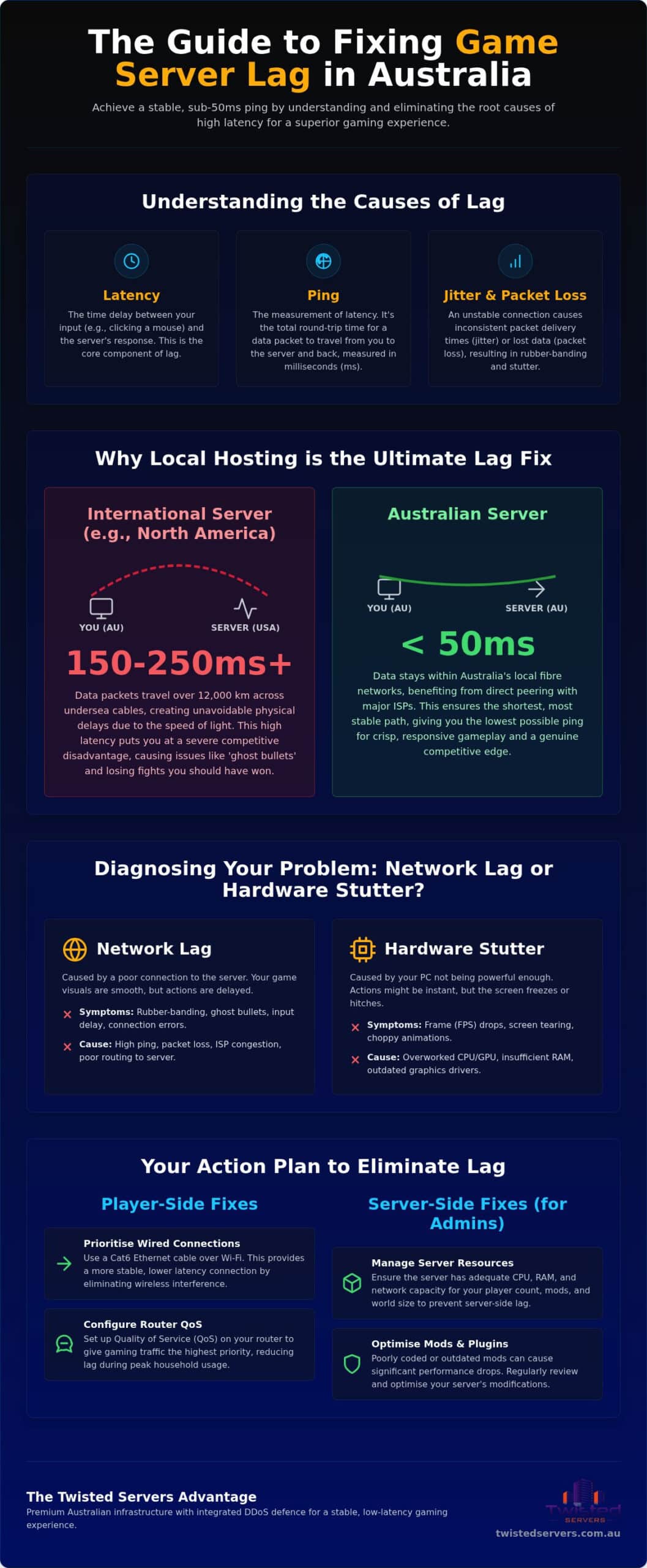
Latency is the fundamental delay between your input and the game’s reaction. It represents the time taken for a packet of data to travel from your gaming rig to the host and back again. While many players focus on download speeds, Understanding Lag is actually about the quality of the round trip. In 2026, Australia’s median fixed broadband latency sits around 19 ms, but this figure rarely reflects the reality of a busy Friday night. Stability is king.
High ping is the primary culprit behind rubber-banding. This occurs when the server and your client disagree on your character’s location, forcing the game to snap you back to a previous confirmed position. Finding a permanent game server lag australia fix requires more than just a fast plan; it requires a stable path. If your connection suffers from jitter, which is the variance in time between data packets, or packet loss, your experience will feel stuttery even with a low average ping.
Our national infrastructure faces unique challenges. Despite the rollout of Fibre-to-the-Premises (FTTP) and HFC connections, peak period congestion remains a factor. When thousands of households stream 4K content simultaneously, gaming packets can be deprioritised by certain ISPs. This leads to spikes in latency that disrupt competitive play, making local hosting a necessity for serious gamers.
The Difference Between Network Lag and Hardware Stutter
It’s easy to confuse network latency with hardware performance issues. Frame drops (FPS) usually result from an overworked GPU or CPU, causing the screen to hitch or feel choppy. In contrast, network lag involves smooth visuals but delayed interactions. Most modern titles provide in-game telemetry tools to help you distinguish between the two. You should enable your game’s Net Graph or network overlay; it visualises packet loss and ping fluctuations in real-time. Identifying the right game server lag australia fix depends entirely on whether the issue is local hardware or server-side routing.
Common Signs of Game Server Lag in Australia
Recognising the symptoms of network distress can help you decide when to switch to game server hosting closer to home. Common signs include:
- Ghost Bullets: You fire directly at an opponent, but the server doesn’t register the hit because they’ve already moved on its end.
- Input Lag: Your character jumps or reloads several hundred milliseconds after you press the key.
- Connection Errors: Frequent “Timed Out” messages often indicate that your data is taking a sub-optimal route to an international host.
Why Local Australian Hosting is the Ultimate Lag Fix
Distance is the enemy of low latency. No matter how fast your NBN plan is, the speed of light remains a hard limit. Data packets travelling from our shores to North America must cover roughly 12,000 kilometres. By the time that data makes the round trip, your ping is already over 200ms. This is why local hosting is the most effective game server lag australia fix. Keeping your data within local fibre networks ensures that packets don’t have to cross oceans just to register a single action.
Many players look toward Singapore as a middle ground, but this often backfires. Undersea cable routing from our coastal data hubs to Singapore can be circuitous; it sometimes results in higher latency than connecting to the US West Coast. By choosing Twisted Servers, you benefit from direct peering with major local ISPs. This reduces the number of “hops” your data takes between your router and the host, ensuring the most direct path possible. Optimising your routing via a local datacentre is the ultimate game server lag australia fix for competitive communities.
The Cost of International Latency
Connecting with 150ms of lag puts you at a severe disadvantage. In fast-paced shooters, “Peeker’s Advantage” allows players with low latency to see an opponent before the server can update the opponent’s screen. On a high-latency connection, this advantage disappears. You’ll find yourself losing encounters you should have won simply because the server hasn’t received your data yet. Data from the ACCC on the Australian gaming experience highlights that server location is one of the most significant factors in overall connection quality. Local communities thrive better on Australian-hosted infrastructure because the playing field is level for everyone.
Choosing an Australian Provider Over Global Giants
Global hosting giants often route traffic through generic hubs that aren’t optimised for the Australian NBN landscape. Local providers understand how to work with Telstra, Optus, and TPG to ensure packets take the most efficient route. Beyond performance, you get the peace of mind that comes with AUD pricing and local 24/7 expert support. If you’re looking for stability, we recommend exploring our High-Performance Gaming Servers Australia options to see the difference local infrastructure makes. This proximity ensures that your community enjoys the reliability they deserve without the complications of international routing.
Player-Side Fixes: Optimising Your Home Network for Gaming
Your home network is the final hurdle in achieving a stable connection. Even if you’re using a high-quality local host, a poorly configured router can ruin your experience. Ditching Wi-Fi is the most immediate game server lag australia fix you can implement. While Wi-Fi 7 routers are now common in 2026, the wireless bands in Australian suburbs remain crowded with interference from neighbours’ devices. A Cat6 Ethernet cable provides a dedicated, shielded path that eliminates jitter and packet loss instantly.
- Step 1: Use a Wired Connection. Plug directly into your router with a Cat6 or Cat6a cable to bypass wireless interference and reduce local latency.
- Step 2: Prioritise Gaming Traffic. Access your router’s interface to enable Quality of Service (QoS) or Smart Queue Management (SQM) settings.
- Step 3: Manage Background Bandwidth. Close applications like Steam, Epic Games Launcher, or Twitch that may be performing background updates or high-definition streams.
- Step 4: Audit Your NBN Hardware. Ensure your Network Termination Device (NTD) is in a well-ventilated area and that all cables are seated firmly without sharp bends.
- Step 5: Refresh Your Network Path. Use the command prompt to flush your DNS and renew your IP; this clears out stale routing paths that might be causing hiccups.
Solving Bufferbloat (Latency Under Load)
Bufferbloat occurs when your router’s memory buffers become overwhelmed by too much data. This is why your ping spikes from 20ms to 200ms the moment someone else in your house starts a 4K Netflix stream. You can test for this using online diagnostic tools that measure “latency under load.” To fix it, configure your router’s SQM to slightly throttle your maximum download and upload speeds. This ensures there’s always a “fast lane” available for small, time-sensitive gaming packets, preventing them from getting stuck behind large file transfers.
DNS and ISP Routing Considerations
Many players believe changing their DNS to Cloudflare (1.1.1.1) or Google (8.8.8.8) will lower their in-game ping. In reality, DNS only affects the initial lookup of a server’s address; it doesn’t change the path your data takes once the game starts. However, it can improve connection reliability and resolve “Connection Timed Out” errors. If you’re consistently seeing poor routing to Australian IP ranges, it might be time to contact your ISP. A gaming VPN might help bypass a congested ISP routing node; however, it cannot reduce the physical distance to a server or fix a poor local NBN connection. Implementing these steps is a vital game server lag australia fix before looking at server-side issues.
Server-Side Fixes: How Admins Can Reduce Lag for Players
While player-side optimisations are vital, even the best NBN connection can’t overcome a struggling server. If the host hardware is maxed out, players will experience “server-side lag,” where the game world hitches or actions desync despite a low ping. Identifying a game server lag australia fix at the administrative level involves balancing resource allocation with the demands of your player base. Ensuring your server has enough CPU headroom and RAM is the first step in providing a seamless experience for your community. If you’re new to running your own instance, our guide on how to host a private game server australia covers the hardware fundamentals and local data centre benefits you need to get started.
Mod management is another critical factor. Bloated mod lists increase loading times and can cause significant desync if the scripts aren’t optimised. Similarly, the server’s tick rate, which is the frequency at which the server updates the game state, must be set appropriately. While a higher tick rate makes the game feel more responsive, it also places a heavy load on the CPU. Robust DDoS defence is also non-negotiable. We utilise Arista Edge Threat Management to ensure malicious traffic doesn’t saturate your server’s connection, keeping the “pipe” clean for legitimate players. For a comprehensive look at how to shield your community from modern multi-vector attacks while maintaining low latency, our guide on securing a DDoS protected game server Australia covers everything you need to know.
Hardware Requirements for Popular Games
Different titles place unique stresses on hardware. For instance, Project Zomboid server hosting requires careful RAM considerations. Large maps and high player counts can quickly consume 8GB or more as the world state expands. In contrast, 7 Days to Die server hosting is notoriously CPU-intensive. To handle high zombie counts and complex physics without lagging, you must ensure your hardware can process those calculations in real-time. Managing your player slots to match your hardware limits is a simple but effective game server lag australia fix for any admin.
Advanced Control with TCAdmin
Maintaining peak performance requires constant vigilance. Our TCAdmin VPS Hosting panel allows you to monitor server health in real-time, identifying memory leaks before they crash the instance. You can automate restarts during off-peak hours to clear out stale data and maintain responsiveness. Setting up automated backups ensures that manual file saves don’t cause the dreaded “save lag” that disrupts gameplay. If you’re ready to host a lag-free environment, explore our Australian game server hosting plans today.
Eliminating Lag with Twisted Servers Australian Infrastructure
Twisted Servers was built to solve the specific connectivity hurdles faced by local players. While we’ve discussed home network tweaks and server-side settings, the most comprehensive game server lag australia fix is choosing a partner that prioritises local infrastructure. Our hosting solutions start from $1.50 AUD per month, making high-performance gaming accessible without the “Australia Tax” often seen with international providers. We operate our own Australian-based hosting infrastructure, ensuring your data never takes a sub-optimal route overseas. This commitment to local hardware means we can offer stability that generic cloud providers simply cannot match.
Modern Infrastructure for Modern Games
We utilise Arista Edge Threat Management to provide a sophisticated layer of security that traditional hosts often overlook. This system identifies and mitigates DDoS attacks before they can saturate your server’s bandwidth, preventing the sudden lag spikes that ruin competitive matches. Our high-speed networking and low-latency backhaul across the country ensure that whether you’re in the suburbs or a regional area, your connection remains as direct as possible. Most of our services feature instant deployment, though specific setups like ARK Xbox hosting may take between 1 and 12 hours to fully provision. This speed of service ensures you spend more time playing and less time waiting for technical hurdles to clear.
Flexible Hosting for Every Community
Whether you’re running a small Minecraft world for friends or a high-pop Rust or DayZ community, our platform scales with your needs. We currently support over 50 popular titles, providing the specific configuration files and resource allocations each game requires to run smoothly. We provide everything from shared game slots to dedicated server hosting for gaming for those who require maximum resource isolation and raw power. If you’re looking to organise their own hosting brand, our reseller and VPS options offer the technical flexibility to build your own community-driven business. Our 24/7 dedicated expert support functions as a supportive partnership; we’re here to help you troubleshoot complex routing issues or fine-tune your configuration to ensure every player enjoys a stable connection. It’s time to reclaim your gaming experience and leave rubber-banding behind. Stop the lag and start your Australian server today.
Secure Your Competitive Edge with Local Infrastructure
Achieving a seamless gaming experience in 2026 requires a proactive approach to both your home network and your choice of host. By prioritising a wired Cat6 connection and implementing Smart Queue Management, you can eliminate local bottlenecks like bufferbloat. However, the most effective game server lag australia fix remains the transition from international routing to dedicated local infrastructure. Keeping your data within Australian fibre networks ensures that the physical limits of distance no longer dictate your performance in the server.
Our team is here to support your journey with local Australian infrastructure, Arista Edge Threat Management, and 24/7 dedicated expert support. We believe in transparency and reliability; our hosting aims to remove the technical stress that distracts from your community’s growth. You don’t have to settle for rubber-banding or high latency when professional-grade stability is within reach. It’s time to reclaim your gameplay and enjoy the precision that only a local host can provide.
Get Started with Low-Latency Australian Hosting from $1.50/mo
Frequently Asked Questions
Is 100ms ping good for gaming in Australia?
100ms ping is generally considered poor for local gaming. While it’s playable for turn-based titles, it’s a significant disadvantage in fast-paced shooters or racing games. Ideally, you should aim for a sub-50ms ping on local servers. A 100ms result often suggests your data is being routed through a congested path or you’re connecting to a host located outside our local region, resulting in noticeable delays and rubber-banding.
How can I lower my ping on Australian servers?
Switching to a wired Cat6 Ethernet connection is the most immediate way to lower your ping. Wi-Fi is prone to interference, which causes latency spikes and jitter. You should also ensure you’re using a host with local infrastructure to avoid long-distance data travel. Choosing a provider with direct peering to major Australian ISPs is a proven game server lag australia fix that reduces the number of network hops.
Does NBN speed affect my game lag?
NBN speed tiers primarily affect your capacity for large downloads rather than your in-game lag. While the September 14, 2026 upgrades will significantly boost baseline speeds for many households, gaming itself requires very little bandwidth. Lag is caused by latency and jitter, not a lack of speed. You could have a 2000 Mbps “Hyperfast” connection and still experience lag if your routing to the server is poor or congested.
Why is my game lagging but my internet is fine?
This occurs because high download speeds don’t guarantee low latency or a stable connection. You might have enough bandwidth for 4K streaming, but your data packets could be taking an inefficient route to the game server. Other factors include server-side issues, such as a host with insufficient CPU or RAM resources, or local network congestion known as bufferbloat, where other devices in your home are saturating the connection’s upload capacity.
Can a VPN fix game server lag in Australia?
A VPN can only help if your ISP is using a congested or sub-optimal routing path to a specific server. By rerouting your traffic through a different node, it might find a more efficient path. However, a VPN cannot overcome the physical distance to overseas hosts; it won’t fix the 200ms delay to the US. It can also add a small amount of overhead due to the encryption process required for the connection.
What is the best NBN plan for low-latency gaming?
Fibre-to-the-Premises (FTTP) and Hybrid Fibre Coaxial (HFC) are the most reliable connection types for gaming due to their lower inherent latency. While the specific speed tier is less critical for ping, plans with higher upload speeds handle multiple users better, preventing “latency under load.” Look for providers that offer transparent routing information and prioritise gaming traffic across the national network to ensure your packets reach the host as quickly as possible.
How do I fix packet loss on an Australian game server?
You should first replace your Wi-Fi with a wired Ethernet cable to rule out local wireless interference. Packet loss is often caused by physical signal degradation or faulty hardware. If the problem persists, it may be due to network congestion at the ISP level or an issue with the server’s own infrastructure. Using a host with Arista Edge Threat Management ensures that malicious traffic isn’t saturating the server’s connection and causing packet drops.
Why does my game lag more at night in Australia?
This is typically caused by “peak hour” congestion on the NBN and ISP networks when millions of Australians are online simultaneously. During these hours, backhaul links can become saturated, leading to increased latency and jitter. If your host doesn’t have sufficient dedicated resources, the increased player load at night can also cause server-side hitching. Switching to a provider with dedicated Australian infrastructure is a reliable game server lag australia fix for these evening slowdowns.
Disclaimer
Game titles, trademarks, logos and related assets are the property of their respective owners. Twisted Servers is an independent hosting provider and is not affiliated with or endorsed by the developers or publishers of the games mentioned unless otherwise stated. Information is provided as a general guide and may change as games, software and hosting services are updated.

