
Recommended Services


Supported Scripts


Your community’s survival depends more on your server’s CPU clock speed and local routing than the number of addons you’ve installed. We know how frustrating it is when physics-heavy sessions are ruined by jittery props or ten-minute loading screens that drive players away before they even spawn. If you’re tired of the physics jitter caused by high ping to overseas providers, finding reliable Garry’s Mod server hosting Australia is the first step toward building a stable, lag-free environment for your players.
This guide will show you exactly how to configure a high-performance Australian server with seamless Workshop integration and rapid content delivery. We’ll explain how to balance the stability of the standard branch with the memory benefits of Garry’s Mod 64, all while keeping your community secure with Arista Edge Threat Management. From managing your first $3.00 AUD/month server to optimising FastDL for near-instant joins, you’ll learn everything needed to run a professional, high-performance community in 2026.
Key Takeaways
- Minimise physics jitter and “rubber-banding” by choosing Garry’s Mod server hosting australia that uses local infrastructure for the lowest possible latency.
- Identify whether the stable standard branch or the 64-bit version is the best choice for managing your server’s specific memory requirements.
- Fix slow join speeds and “Sending Client Info” hangs by properly setting up FastDL to handle your server’s custom content.
- Keep your community online and secure with Arista Edge Threat Management to defend against common DDoS attacks.
- Access professional Australian-based support 24/7 to help you manage your server starting from just $3.00 AUD per month.
What is Garry’s Mod Server Hosting and Why Does Ping Matter?
Garry’s Mod isn’t like your typical shooter. It’s a massive, physics-driven sandbox where the only limit is what you can build. Hosting your own server provides the dedicated hardware necessary to keep these complex environments running 24/7 without the limitations of hosting from a home computer. When you opt for Garry’s Mod server hosting australia, you’re prioritising a stable environment for your community. Australian players often face “rubber-banding” when connecting to overseas hosts, where their character suddenly snaps back to a previous position. This happens because the physical distance to US or EU servers is too great, causing data packets to take a long, slow journey across the ocean.
Latency and the Source Engine Physics
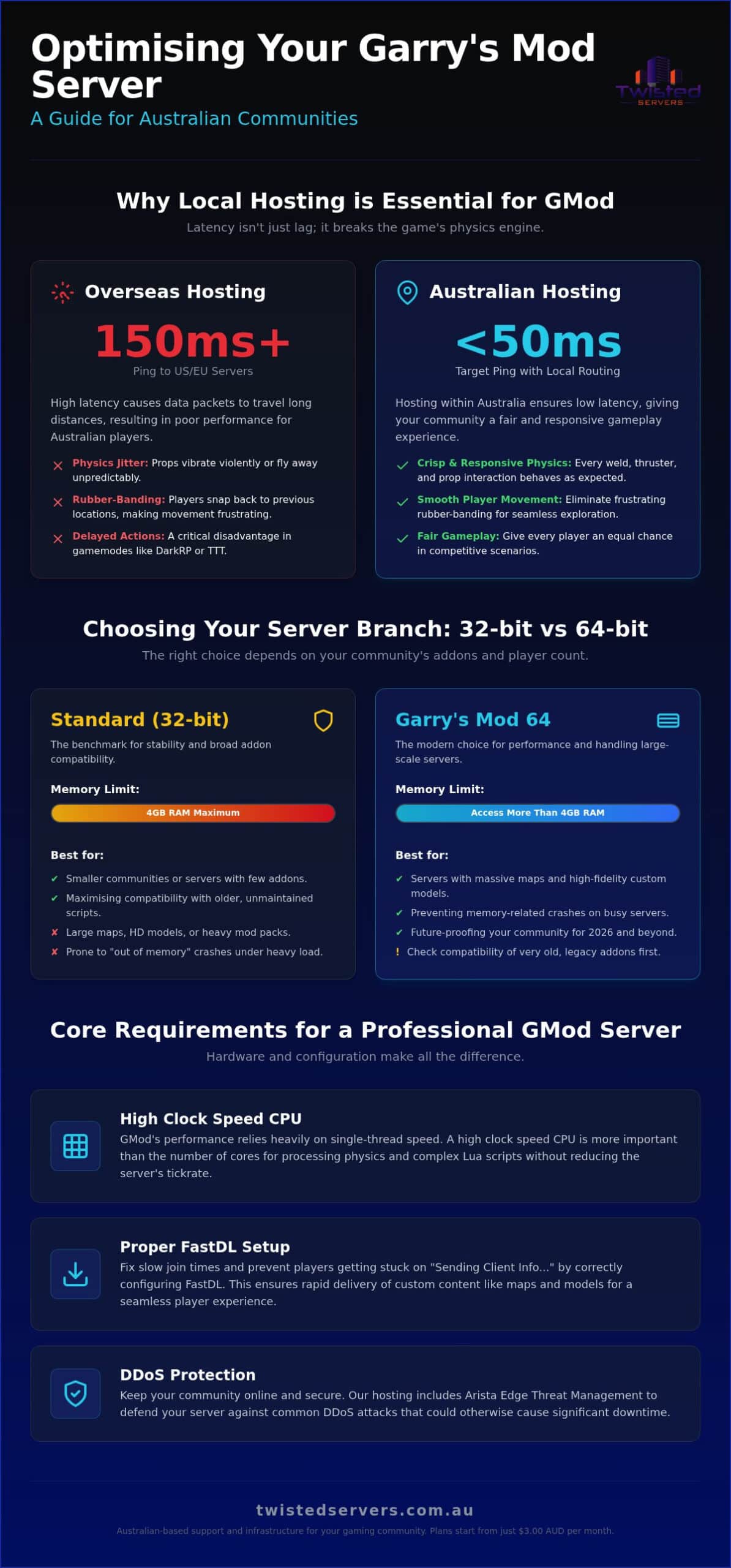
The Source engine, which powers the game, handles physics in a way that’s highly sensitive to latency. High ping doesn’t just cause visual lag; it fundamentally breaks how props behave. When your ping is high, the server and your computer can’t agree on where a prop is located in real-time. This leads to the infamous “physics jitter,” where objects vibrate violently or fly off into the sky for no apparent reason. For Australian gaming communities, a sub-50ms ping is the gold standard we aim for. By utilising local routing through Australian data centres, we can ensure that every weld, thruster, and prop interaction feels crisp and responsive. This local focus provides a “fair go” for everyone, especially in competitive modes like DarkRP where a split-second delay during a raid can be the difference between success and failure.
The Difference Between Shared and Dedicated Game Hosting
Deciding how to host your community depends on your specific needs and the size of your group. Shared hosting is a fantastic, cost-effective starting point for a small group of mates who want to experiment with basic sandbox tools. In this setup, you’re sharing server resources with other users, which is fine for low-population sessions with few addons. However, as your community grows, you’ll find that larger servers or resource-heavy gamemodes require more “grunt.” Consistent CPU clock speeds are vital because the game process relies heavily on single-thread performance. If you’re planning to host a busy city-roleplay server with hundreds of custom scripts, you’ll eventually need the stability of Garry’s Mod server hosting australia with more dedicated resources. Moving to a professional Game Server Hosting Australia plan ensures your server has the dedicated power to process complex Lua scripts and physics calculations without being slowed down by other users on the hardware.
Choosing Your GMod Server Branch: Standard vs 64-bit
Deciding between the standard branch and the x86-64 version is a vital step for any community leader. While the standard version remains the benchmark for stability, the 64-bit branch has become increasingly popular for its ability to handle modern, resource-heavy addons. When you look at Garry’s Mod server hosting australia, you need a provider that understands these technical nuances. We offer both versions starting from just $3.00 AUD/month, ensuring you have the flexibility to switch as your community’s needs evolve. This choice directly impacts how many players you can host and how complex your sandbox can become without the server crashing due to memory limits.
When to Choose Garry’s Mod 64
If your server features massive maps or a collection of high-fidelity models, the 64-bit branch is almost certainly your best bet. The primary advantage is its ability to access more than 4GB of RAM, which prevents the “out of memory” crashes that plague 32-bit servers running heavy mod packs. You should check your legacy addons first; some older Lua scripts might behave unexpectedly on this branch. GMod 64 is the preferred choice for 2026 performance. As part of maintaining Basic Online Safety Expectations, ensuring your server doesn’t crash during peak times helps maintain a consistent and well-moderated environment for your players.
RAM and CPU Requirements for Aussie Servers
GMod’s logic is primarily single-core dependent. This means your server’s performance relies more on the speed of a single CPU core rather than having dozens of slower ones. When you’re running a busy DarkRP or Trouble in Terrorist Town (TTT) session, the main game loop handles everything from prop physics to player movement on that single thread. You can usually run about 30 to 50 basic addons before you’ll notice a hit to your tickrate, but this number drops quickly if those addons are poorly optimised. To get the most out of your hardware, it’s worth looking into a high-performance game server hosting australia plan that provides the clock speeds necessary to keep your tickrate stable under pressure. If you find your community outgrowing standard slots, you might consider the extra control offered by our dedicated server hosting australia for ultimate performance.
How to Set Up Your Garry’s Mod Server in Australia
Deploying a server shouldn’t require a degree in computer science. While some overseas providers expect you to wrestle with complex Linux command lines, professional Garry’s Mod server hosting australia simplifies the process through intuitive control panels. Your first task is to define your server’s identity. Set a clear hostname that includes “[AU]” or “[AUS]” to help local players identify your low-latency connection. You’ll also need to establish a strong RCON password. This Remote Console password is your key to managing the server from within the game client, so keep it secure to prevent unauthorised access from malicious users.
Initial Configuration Lifts
The server.cfg file acts as the brain of your configuration. For Australian networks, setting your tickrate correctly is essential for smooth gameplay. While a tickrate of 33 is standard for many, high-performance servers often push to 66 to ensure prop interactions feel responsive and crisp. To automate your addon management, you’ll need to create a Steam Workshop Collection. By linking your unique Collection ID in the control panel, the server will automatically download and update every mod you’ve selected. This ensures your players always have the latest versions without you having to manually upload files via FTP.
Testing Your Connection
Once your configuration is saved, it’s time to verify that everything is running correctly. Open the GMod client and use the status command in the developer console to view your server’s current health, including the map name and connected players. If you see your server appearing in the Australian master list, you’re ready to invite your mates. If you encounter the common “Server not responding” error, it’s often a sign that the server is still downloading large Workshop files or that a firewall setting needs a quick adjustment. Troubleshooting these early hurdles ensures a smoother experience for your community members later on.
Managing your community effectively requires reliable admin permissions. Most owners choose to install tools like ULX or SAM to handle day-to-day moderation. These tools allow you to assign ranks, manage bans, and keep the peace during busy sessions. Setting these up during your initial deployment ensures you can handle disruptive players before they impact your community’s growth. If you need more control over your environment, our game server hosting australia plans provide the flexibility to scale your resources as your player count increases.
Managing Mods and Speeding Up Join Times with FastDL
Long loading screens are the silent killers of new communities. When a player sees the “Sending Client Info” message for five minutes, they often hit cancel and look for another server. This is where Garry’s Mod server hosting australia needs to be more than just a low-ping connection; it requires a smart content delivery strategy. You need to distinguish between the Steam Workshop, which handles the core mod logic and Lua scripts, and FastDL, which serves large assets like maps and models at much higher speeds. Australian players value their time, and a server that joins in seconds will always beat a bloated alternative that takes ten minutes to load.
Setting Up Steam Workshop Integration
To start, you’ll need a Steam Web API key to link your server to your collection. This key allows your server to communicate with Steam’s servers and download your curated content automatically upon startup. Don’t fall into the trap of adding every cool mod you find on the Workshop. A bloated collection leads to massive download sizes and potential script conflicts that ruin the experience for everyone. A well-optimised Workshop list is the secret to high player retention. Focus on the essentials that define your gamemode and keep the total size manageable to ensure new players aren’t stuck at the loading screen for an eternity. The same principle applies if you’re running other game servers alongside your GMod community; for example, players who also enjoy Terraria server hosting Australia know that keeping mod lists lean is just as critical for fast join times and a smooth multiplayer experience.
Implementing FastDL for Custom Content
While the Workshop is convenient for Lua scripts, it isn’t always the fastest way to deliver custom maps or high-quality sound files. This is where FastDL becomes essential for a professional setup. By hosting your assets on a standard web server and directing the game to download from there using the sv_downloadurl command, you bypass the slower Workshop delivery system. You must organise your files into a specific directory structure-including maps, sound, and materials-and compress them into .bz2 format. This compression can reduce file sizes by up to 70%, saving significant bandwidth and getting players into the action faster. For the best results, you’ll want to link your game server to Reliable Web Hosting Australia to ensure your assets are served at maximum speed. If you’re ready to build a community that loads in a flash, check out our high-performance game server hosting australia plans today.
Securing Your Australian GMod Community
GMod servers in the Australian scene are unfortunately frequent targets for DDoS attacks. Whether it’s a rival DarkRP community or someone looking to disrupt a popular sandbox session, these attacks can take your community offline in seconds. When you invest in Garry’s Mod server hosting australia, security isn’t just an optional extra; it’s the foundation of your community’s longevity. A single evening of downtime can cause players to migrate elsewhere, making proactive defence essential for any serious owner. We understand that your community’s reputation relies on being available whenever your players want to join.
Advanced DDoS Protection in Australia
Many global providers rely on distant scrubbing centres that add significant lag during an attack. We take a different approach by using Arista Edge Threat Management to stop threats before they ever reach your server’s resources. This proactive system identifies malicious traffic patterns locally, ensuring that your players’ ping remains stable even while a large-scale attack is being mitigated. Local DDoS scrubbing is inherently superior for Australian gamers because it avoids the “ping spikes” common with overseas routing. Our commitment to your security includes constant malware scanning and encryption to keep your files safe from external interference.
Backup and Disaster Recovery
Even with the best protection, things can occasionally go pear-shaped. A botched mod update or a corrupted DarkRP database can wipe out weeks of progress if you aren’t prepared. We provide tools to schedule automatic backups of your entire server configuration, including maps and player data. If a script conflict causes your server to crash, you can restore a previous state in minutes through our control panel. This peace of mind allows you to experiment with new addons without the fear of permanent data loss. If you ever find yourself in a bind, our expert support team is available 24/7 via tickets to help you get back on your feet.
Finally, security also includes managing your internal team. Admin abuse or internal griefing can destroy a community faster than any external attack. Use rank-based permissions to ensure your staff only have the access they need to perform their roles. By combining high-performance game server hosting australia with a well-trained admin team, you create a safe, stable environment that players will return to day after day. This holistic approach to security ensures your community remains a welcoming place for everyone.
Build Your Australian GMod Community Today
Establishing a successful community in 2026 requires more than just a passion for sandbox building. It’s about finding a balance between stability and performance by choosing the right server branch and optimising your content delivery with FastDL. By prioritising local infrastructure, you eliminate the physics jitter and lag that often drive players away from overseas hosts. Reliable Garry’s Mod server hosting australia ensures your players enjoy a crisp, responsive experience from the moment they spawn their first prop.
We’re here to help you manage the technical side so you can focus on growing your community. You can start your Australian Garry’s Mod server from $3.00 AUD/month with Twisted Servers, benefiting from our high-performance local infrastructure and Arista Edge Threat Management. With 24/7 expert support available via tickets whenever you need it, you’ll have the peace of mind to build something truly unique. We look forward to seeing your community thrive on the Australian master list.
Frequently Asked Questions
How much does it cost to host a Garry’s Mod server in Australia?
Twisted Servers offers Garry’s Mod and Garry’s Mod 64 hosting starting from $3.00 AUD/month. This entry price provides access to high-performance Australian infrastructure and our intuitive control panel. While the total cost can increase if you require more dedicated resources for massive communities, our starting plans are designed to be the most affordable way to launch a stable local server in 2026.
Can I host a GMod server on my own PC instead of buying hosting?
You can host a server on your own hardware, but it often leads to a poor experience for your players. Most home internet connections in Australia lack the upload speeds and stable routing required for a lag-free experience. Additionally, self-hosting requires your PC to stay powered on 24/7 and exposes your home IP address to security risks like DDoS attacks that can take your entire home network offline.
What is the difference between GMod and GMod 64 hosting?
The primary difference lies in memory access and performance stability. Standard Garry’s Mod is a 32-bit application limited to 4GB of RAM, which often leads to crashes on servers with many addons. Garry’s Mod 64 utilises the x86-64 branch to access more memory, making it the preferred choice for 2026 servers running complex scripts or high-fidelity maps. We provide both versions to suit your specific community needs.
How do I add mods from the Steam Workshop to my Aussie server?
You add mods by creating a Steam Workshop Collection and linking its unique ID to your server’s startup parameters. You’ll also need a Steam Web API key so your server can communicate with Steam to download the files. This process ensures that every player who joins your Garry’s Mod server hosting australia automatically downloads the correct addons, keeping your community synchronised and ready for the action.
Will my server be protected against DDoS attacks?
Yes, all our hosting plans include robust protection against distributed denial-of-service attacks. We utilise Arista Edge Threat Management to provide proactive threat detection and local scrubbing. This system identifies and blocks malicious traffic before it impacts your server’s performance. This local protection is essential for maintaining the low latency that Australian gamers expect, even when your community is being targeted by disruptive attacks.
Do I need a dedicated IP for my Garry’s Mod server?
A dedicated IP isn’t strictly necessary, but it offers several advantages for community growth. It allows your server to run on the default port (27015), which can make it easier for players to find you in the master server list. Without a dedicated IP, you’ll share an address with other users and be assigned a unique port number, which your players must include every time they connect to your server directly.
How many players can my GMod server handle before it lags?
Most well-optimised servers can comfortably handle between 32 and 64 players before the Source engine’s single-core limitations cause performance issues. Your actual capacity depends heavily on the complexity of your gamemode and the number of active props. A physics-heavy sandbox session will hit its limits much sooner than a structured round-based game like Trouble in Terrorist Town where entity counts are more strictly controlled.
Can I switch between different game modes like DarkRP and Trouble in Terrorist Town?
You can easily switch between different gamemodes through our control panel or by modifying your startup command line. By changing the +gamemode parameter, you tell the server which logic to load when it boots up. This flexibility allows you to experiment with different community styles or host special events without the need to purchase additional hosting plans or perform a completely fresh installation.
Disclaimer
Game titles, trademarks, logos and related assets are the property of their respective owners. Twisted Servers is an independent hosting provider and is not affiliated with or endorsed by the developers or publishers of the games mentioned unless otherwise stated. Information is provided as a general guide and may change as games, software and hosting services are updated.

