
Recommended Services


Supported Scripts


What if a hosting upgrade isn’t the answer to your slow website or struggling game server? If the cause is an oversized image, heavy plugin or inefficient script, moving to a larger plan may cost more without fixing the problem. Check what’s limiting performance before choosing your next step.
You might be weighing extra resources against the risk of paying for capacity you won’t use. A change can also raise concerns about downtime, lost data or settings that don’t carry across. These are practical considerations, not reasons to guess or put off a decision.
This guide will help you identify whether your current hosting is the bottleneck, compare options such as a resource increase, VPS Hosting or Dedicated Hosting, and plan a change with clear checks. If you’re assessing a multiplayer community, review our Game Server Hosting. You’ll have a practical way to assess your needs, set expectations and reduce avoidable disruption when you move.
Key Takeaways
- Confirm what’s causing the slowdown before choosing a hosting upgrade. The issue may sit outside your hosting plan.
- Use symptoms and available resource data to check whether CPU, RAM, storage or network capacity may be limiting your workload.
- Compare a plan change, VPS Hosting and Dedicated Hosting against your workload, control needs and management responsibilities.
- Prepare for a move by recording configurations, software versions, dependencies and access details, then plan checks before and after the change.
- Match your hosting category to the job, whether you’re supporting a website or a multiplayer game community.
Hosting upgrade: what it means and when to consider one
A hosting upgrade is a change to your hosting resources, plan or hosting type to meet a verified need. It might mean adjusting capacity or choosing a different service category. The right step depends on your workload, the control you need and the management responsibilities you can take on.
A slowdown or error alone doesn’t prove that hosting is the cause. A website issue might relate to its software or settings; a game server problem could involve the game, server configuration, a player’s device or network. Consider the circumstances around an incident before treating it as a reason to change plans.
What signs suggest your current hosting may be limiting you?
Look for recurring symptoms and note when they happen, how long they last, and which users or services are affected. For a multiplayer community, distinguish reports from individual players from problems that appear to affect the server more broadly.
Review the information available in your hosting account, application or server. Depending on the service, it may show resource use or recorded errors. An isolated incident may need further investigation. Repeated issues affecting a service more widely give you a clearer basis for asking whether hosting is a factor.
Which hosting workloads might need a different setup?
Game servers, websites and business applications have different requirements. Game server needs can vary with the game, its settings and the community using it. Websites depend on their software and configuration, while business applications may have their own access and administration needs. Assess the workload itself rather than assuming one hosting type fits them all.
If you’re considering hosting for a website, review the current details of our Web Hosting. Multiplayer organisers can consult our game server hosting guide for factors to consider when assessing a setup. These are starting points for comparing service categories, not assurances that a particular option will resolve a problem.
Diagnose the hosting bottleneck before choosing an upgrade
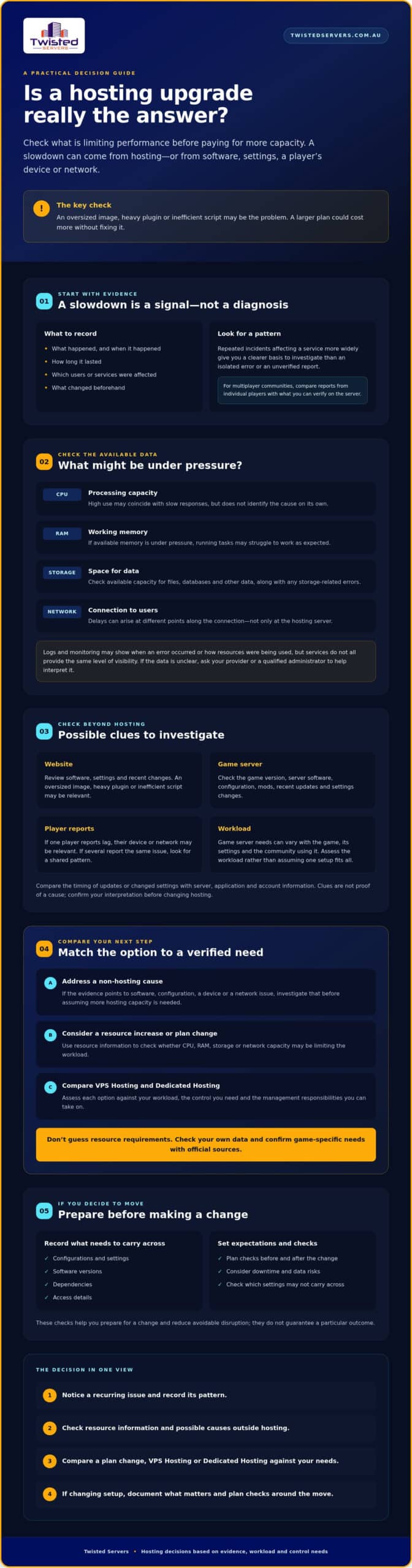
Start with evidence, not a plan change. Record what’s happening, when it happens, who or what is affected, and whether anything changed beforehand. For example, note whether a website slows during a particular task or whether several players report the same issue at the same time. Patterns across repeated incidents are more useful than an isolated error or an unverified report.
Check the information available in your hosting account, application or server. Logs and monitoring data can help show when an error occurred or how resources were being used, but services don’t all provide the same level of visibility. If you can’t access or interpret the data, ask your provider or a qualified administrator to help confirm what it means.
- CPU: Processing capacity used to carry out instructions. High use may coincide with slow responses, but it doesn’t identify the cause on its own.
- RAM: Short-term working memory used by running applications. If available memory is under pressure, tasks may struggle to run as expected.
- Storage: Space for files, databases and other data. Check available capacity and any storage-related errors.
- Network: The connection that carries data between the server and users. Delays can arise at different points along that path, not only at the hosting server.
Checklist: identify the constrained resource before comparing plans. Don’t assume a larger allowance will fix a configuration problem. Recent software updates, changed settings or increased workload may be useful clues, but they aren’t proof of the cause. Compare their timing with available server, application and account information, then confirm your interpretation with your provider or administrator before making a hosting upgrade.
What should game server admins check first?
Check the game version, server software, configuration and any mods, then compare them with current information from the game developer or the relevant software and mod maintainers. Review recent updates and settings changes as well. These checks can help explain a problem, but don’t treat them as a definite cause without supporting evidence.
Compare player reports with what you can verify on the server. If only one player experiences lag, their device or network may be relevant. If several players report the same issue, look for a shared server-side or connection-related pattern. Don’t guess player-slot, CPU or RAM requirements. Confirm game-specific requirements using official sources and review the data available for your own workload. If you’re comparing hosting for your community, see our Australian game hosting service.
For website workloads, technical responsibility also matters. Hosting your own website involves decisions about technical requirements, maintenance and security. Compare those responsibilities with the service you’re considering as well as its resources.
Hosting upgrade options compared: plan, VPS or dedicated hosting
Once you’ve identified a genuine constraint, compare options against the work your server needs to do and the level of control you want. A change within your current hosting category may be worth investigating if the provider can address the verified need. Moving to VPS Hosting, Dedicated Hosting, Game Server Hosting or website hosting is a different decision, with its own management considerations. No category suits every workload.
Use this comparison to guide your questions, not as a promise of specific features. Check the current service details before deciding.
| Hosting category | Workload fit | Control and management | Questions to ask |
|---|---|---|---|
| Plan change | When your current category may still suit the workload, but you’ve identified a need to review its available resources. | Depends on the service and provider. Confirm what changes and what you’ll manage. | Does the change address the resource you identified? Are any settings or limits different? |
| VPS Hosting | When you need a virtual private server for a website, application or other workload. | Check what control is provided and which operating systems and management arrangements are available. | What resources, access and support responsibilities are specified for this service? |
| Dedicated Hosting | When you’re assessing a dedicated server for a workload with specific resource or control needs. | Confirm the level of access and which server administration tasks are yours. | What’s included, and what will you need to configure and maintain? |
| Game Server Hosting | For multiplayer communities comparing a game-focused service with general VPS options. | Check how the service handles your game and what configuration and management you’re responsible for. | Does it support your intended game, software and configuration? Confirm current details with the provider. |
| Website hosting | For websites, with the suitable category depending on the site’s software and requirements. | Compare the control offered with the technical tasks you can manage. | What resources, software and administration arrangements suit your site? |
When might VPS Hosting suit your next step?
Investigate VPS Hosting if your requirements point to a virtual private server, rather than choosing it simply because a website or application feels slow. Review the current VPS Hosting details and verify available resources, operating systems and management arrangements before comparing options. TCAdmin VPS Hosting is a distinct offering. Don’t assume TCAdmin is included with standard VPS Hosting.
When should you compare Dedicated Hosting or game hosting?
Consider Dedicated Hosting if your verified requirements lead you to assess dedicated-server resources or control. Multiplayer organisers should also compare a game-specific service with general VPS options, checking that the current service details align with their game and management needs. Review Dedicated Hosting in Australia alongside relevant game hosting details before settling on a hosting upgrade.
How to plan a hosting upgrade and reduce avoidable disruption
A hosting upgrade is easier to manage when you know what must move, what needs to keep working and how you’ll check the result. The exact steps depend on the service, so confirm requirements with your current and prospective provider before making changes. Downtime, DNS updates and connection changes also vary by setup. Don’t assume a move will be interruption-free or take a particular amount of time.
Use this preparation sequence as a starting point:
- Document the current setup. Record configurations, software and game versions, required services, dependencies, access details and known issues. Keep credentials secure, and note who is authorised to use them.
- Confirm what needs to be preserved. List important files, databases, settings and other data. Ask your current provider what backup coverage is available, how restoration works, and what you’re responsible for. Don’t treat a backup as usable until you understand how it can be restored.
- Check compatibility and requirements. Use official product documentation to confirm software, operating system and version requirements. Identify dependencies that need to be installed or configured on the new environment.
- Agree on the change plan. Confirm the sequence of work, access requirements and any likely service interruption with the providers involved. If DNS records or game connection details need changing, document what must be updated and who will update it.
- Test before directing users. Where the service allows, check the new setup before switching users across. Test access, core functions, settings and the experience from a user’s perspective.
- Keep a fallback plan. Write down how you’ll respond if a critical check fails, including who to contact and what options are available. Confirm with your provider whether returning to the previous setup is practical.
What should you prepare before changing hosting?
Make your record specific enough for someone else to follow. For a website, note its platform, integrations and essential functions. For a business application, document connected services and access requirements. Confirm data ownership, backup scope and restoration options with your current provider, and check migration requirements against official documentation. These details can help surface compatibility gaps before the change begins.
How should you test the upgraded setup?
Check that you can sign in, essential features work and the configuration matches your notes. For a game server, verify the game version, server settings and connection details, then test access before sharing the new details with players. Keep a record of results and unresolved issues. If something fails, pause the switch and follow the fallback plan rather than assuming users won’t notice.
If you’re reviewing hosting options alongside your change plan, explore hosting options with Twisted Servers.
Choose your next hosting step with Twisted Servers
A sensible hosting upgrade decision follows a clear order: confirm what’s causing the issue, identify the workload, then compare hosting categories that may fit. A recurring problem doesn’t automatically mean you need a different server type. If evidence points to a particular resource or configuration, use that finding to guide questions about product details, responsibilities and compatibility.
Twisted Servers is an Australian hosting provider offering Game Server Hosting, VPS Hosting, Dedicated Hosting, Web Hosting and WordPress Hosting. These are options to review against your requirements, not guaranteed remedies for a slowdown or service issue. The right fit depends on what you’re running, which constraint you’ve verified and how much administration you’re prepared to handle. Dedicated expert support is available 24/7.
What information should you have ready before asking about an upgrade?
A concise summary can make a requirements discussion more useful. Note the service you use, the symptoms you’ve observed, when they occur and which users or functions are affected. Add relevant usage or monitoring information you can verify, along with recent software, workload or configuration changes. If you don’t have access to logs or resource data, say so rather than guessing.
- Record essential software, versions, settings and dependencies.
- List known issues and any configuration or data that must be preserved.
- Describe what you’ve checked and what remains uncertain.
- Ask which resources, operating systems, management arrangements and other features are currently included in the option you’re considering.
Clear questions help you compare services on their stated details instead of assumptions. For example, confirm whether an option suits your workload and what tasks you’ll need to manage. Don’t assume similarly named hosting categories include the same features.
How can you compare Twisted Servers hosting options?
Match the category to the work: consider Game Server Hosting for a multiplayer community, VPS Hosting when you’re assessing a virtual private server, or Dedicated Hosting if you’re evaluating a dedicated server for your requirements. For a website, compare Web Hosting or WordPress Hosting as relevant. Check the current product information before deciding, and confirm any technical detail that could affect your setup.
Game community organisers can review our Australian game server hosting service alongside their verified game, configuration and management needs. If you’re ready to discuss your requirements, contact the hosting team. Share what you’ve observed and what you need to preserve; you can ask questions before choosing a next step.
Make your next hosting decision with confidence
A hosting change is most useful when it responds to a confirmed need. Check the evidence, match your workload to a suitable hosting category and confirm what the service includes before making a move. A careful plan for your settings, data and testing can help you approach the change with clearer expectations.
Twisted Servers is an Australian hosting provider offering options for game communities, websites and other workloads. The right service depends on your requirements, so ask about current product details rather than assuming a particular plan will resolve an issue. Dedicated expert support is available 24/7.
Bring your notes on the symptoms, recent changes, software and configurations you need to keep. We can discuss your requirements and help you review the relevant hosting options. Discuss your hosting requirements with our team, and take your next step with a clear view of what you need.
Frequently Asked Questions
How do I know when to upgrade my hosting?
Consider an upgrade when recurring problems align with evidence that your hosting is limiting the workload. Record when slowdowns, errors or interruptions occur, which users are affected and whether the pattern follows busy periods or specific tasks. Check available account, application or server data for resource warnings and errors. A single incident isn’t enough to identify the cause; configuration, software, network or device issues may also be involved.
What should I upgrade first: CPU, RAM or storage?
Upgrade the resource that available evidence shows is constrained, rather than selecting one by default. CPU handles processing, RAM provides working memory for running applications, and storage holds files and data. Check relevant usage information and errors in your hosting account or server, if available. If you can’t interpret the results, ask your provider or a qualified administrator to confirm what’s limiting the workload before changing your plan.
Should I upgrade to VPS Hosting or Dedicated Hosting?
Choose based on verified workload needs, control requirements and the management tasks you can take on. VPS Hosting is an option to investigate if you need a virtual private server; check its available resources, operating systems and management details. Compare Dedicated Hosting if you’re assessing dedicated-server resources or control. Neither is right for every workload, so check current product details and don’t assume a hosting change will resolve an unrelated issue.
Can a hosting upgrade fix lag on a game server?
A hosting upgrade may help if evidence shows the server’s resources or capacity are limiting gameplay, but lag can have other causes. Check the game and server software versions, configuration, mods and recent updates. Compare reports from multiple players with server information. If only one player is affected, their device or network may be relevant; if several players report the issue, investigate shared server or connection factors. Don’t assume a particular resource requirement without checking official sources.
Will upgrading hosting cause downtime?
It may, but the effect depends on the service, migration method, configuration and any DNS or connection changes involved. Ask your current and prospective provider what the change requires, whether access or settings will need updating, and what interruption to plan for. Don’t assume a specific timeframe or that downtime can be avoided. Test essential functions before directing website visitors, players or other users to the changed service.
How do I prepare my website or game server for a hosting upgrade?
Document your current configuration, software versions, dependencies, access details and known issues. Identify the files, databases, settings and other data that must be preserved, then confirm backup coverage and restoration steps with your provider. Check compatibility against current official documentation. Before users move across, test access and core functions. For a game server, also verify its game version, settings and connection details, and keep a fallback plan suited to your setup.
Can I upgrade hosting without changing providers?
Possibly. Ask your current provider whether it offers a plan or resource change that meets the need you’ve verified, and confirm any limits, costs and configuration changes directly with them. If the required control, resources or workload fit isn’t available, compare other hosting categories or providers. Review the current service details before deciding, and plan any move around your data, software dependencies, user access and testing needs.
Disclaimer
Game titles, trademarks, logos and related assets are the property of their respective owners. Twisted Servers is an independent hosting provider and is not affiliated with or endorsed by the developers or publishers of the games mentioned unless otherwise stated. Information is provided as a general guide and may change as games, software and hosting services are updated.

