
Recommended Services


Supported Scripts


Player count is a starting clue, not a reliable RAM calculator. If you’re wondering how much ram for minecraft server with friends, the answer also depends on whether you’re running vanilla Minecraft, adding plugins or using a modpack.
Too little memory can contribute to crashes or sluggish performance, but adding RAM won’t fix every problem. CPU limits, server software, world settings and players exploring new chunks can all affect how smoothly a server runs. Server RAM is also separate from the memory your friends’ computers need to play Minecraft.
This guide explains how to assess a starting allocation for your group and setup, then adjust it based on what you observe in play. You’ll learn what can affect memory use, how to recognise signs of memory pressure and when lag may point to another bottleneck. The aim is a stable server for your friends without relying on a player-count formula or assigning more memory than your setup needs.
Key Takeaways
- To estimate how much ram for minecraft server with friends, start with your server type and setup, not a player-per-GB formula.
- World activity and server settings can affect memory pressure. Note what changes when friends explore or the server gets busier.
- Track memory use alongside performance indicators such as TPS. One metric alone can’t identify every cause of lag.
- Test during a typical session and a busier one. Use the results to decide whether to adjust RAM or investigate another bottleneck.
- Game-server hosting runs the server away from your home machine, while your friends use their own computers to play.
How much RAM does a Minecraft server need for friends?
There isn’t one reliable RAM figure for every friends server. The right allocation depends on the Minecraft edition and version, server software, configuration and workload. A figure without those details can give you false confidence. Treat any allocation as a starting point to test against your server’s resource use, not a guarantee of smooth performance.
Group size is useful context, but it isn’t a complete sizing formula. The same number of players can create different workloads depending on the software, content and activity in the world. To estimate how much ram for minecraft server with friends, identify those details, consult documentation for your specific setup and observe the server during play.
What does server RAM do in Minecraft?
RAM is short-term working memory used by programs while they run. The Minecraft server process uses memory to manage the server-side game, while each player’s client uses memory on that player’s device. These are separate allocations. A player’s computer RAM doesn’t increase the amount assigned to the server.
The RAM installed in a computer also isn’t all available to the server process. The operating system and other programs need memory too. For general background on the game and its editions, see the Minecraft Wikipedia page. It isn’t a server-RAM sizing guide.
Why can two small friends servers need different amounts?
A straightforward vanilla world and a server with plugins or a modpack don’t use the same software setup. World activity and configuration also affect what the server handles. Group size alone can’t establish a precise allocation.
Player count alone cannot determine server RAM. First identify your edition, version, server software and added content. Then check documentation for that setup and monitor resource use during a representative session before changing the allocation.
If you’d rather not run a server on a home computer, Twisted Servers offers Australian-based Minecraft server hosting for Java and Bedrock. Hosting changes where the server runs, but the allocation still needs to suit its software and workload.
What affects Minecraft server RAM use as your world grows?
A server’s memory demand can shift as friends log in, move around the world and use different features. Separate what’s happening in the game from what the server software and its add-ons are doing. That gives you practical factors to check instead of relying on a player-per-GB formula.
How players and world activity change demand
An idle server and an active session aren’t the same workload. Players may be spread across separate areas, loading different parts of the world, or gathered in one busy location. Farms, entities and redstone contraptions can add activity for the server to process. Their effect depends on how they’re built and used, so none provides a universal RAM figure.
Pay attention to what your group is doing when the server feels slow. A quiet building session may not reflect a busier night of exploring, operating farms and moving between areas. Note the activity alongside memory use, so you can interpret monitoring results in context.
How server software and add-ons affect the estimate
Vanilla software runs the standard server experience. Plugin-based software adds server-side features, while modded setups can change game content and may require players to install compatible mods on their own computers. The label alone doesn’t determine memory use. The number, type and behaviour of add-ons matter, as does what they do during play.
Server cores also differ in purpose and compatibility. Before switching software, check what your chosen plugins or mods support and compare the options in Paper vs Spigot vs Fabric Server: Which Should You Choose in 2026? Don’t assume a different core or an optimisation means a particular RAM allocation will be enough.
Which settings and world factors should you account for?
Check view-distance and simulation-distance in your server configuration. In Java Edition, these settings relate to how much of the world is sent to players and how much nearby world activity is processed. Their behaviour and available options can differ by edition and server software, so use documentation for the version you’re running. Bedrock Edition has its own dedicated server software and configuration. Don’t assume Java settings or instructions apply to it.
World size is useful background, but it isn’t a fixed RAM calculator. A large saved world doesn’t mean every area is active at once, while exploration can bring new areas into play. Change one setting at a time and record the result rather than treating a configuration example as a measured requirement. For wider performance steps, see Minecraft Server Optimisation Guide 2026: Reduce Lag Step by Step.
These factors make how much ram for minecraft server with friends a workload question, not a headcount calculation. If you’d rather host away from a home computer, our Australian game server hosting includes Minecraft Java and Bedrock options.
Compare RAM estimates for vanilla, plugin and modded Minecraft servers
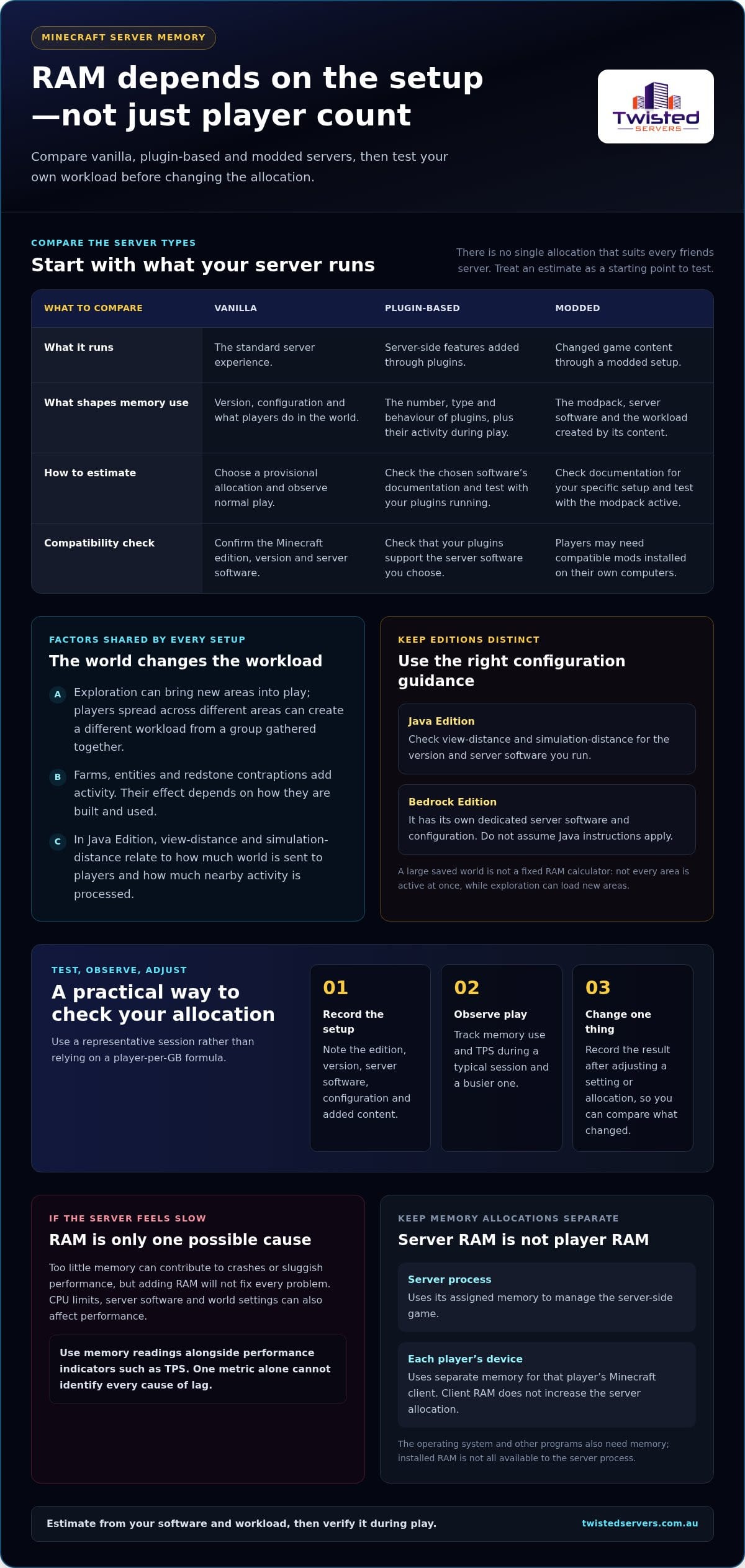
There isn’t one allocation that suits every friends server. Estimates repeated online may refer to different Minecraft versions, settings and workloads. Comparing figures without those assumptions can mislead. The table separates common setups and explains how to approach an estimate without presenting unsourced numbers as requirements.
| Server setup | How to approach RAM | What to check |
|---|---|---|
| Vanilla | Choose a provisional starting allocation, then measure it during your group’s normal play. | Minecraft edition and version, server configuration and activity during a busy session. |
| Plugin-based | Base the estimate on the server software and specific plugins, not the word “plugin” alone. | Plugin documentation, enabled features and any extra load created by how the group uses them. |
| Modded | Follow the modpack’s server instructions. Don’t assume one generic figure suits every pack. | Pack version, included mods, recommended server allocation and configuration notes. |
Vanilla and lightly customised worlds
Vanilla is a useful baseline because it doesn’t include extra plugins or a modpack. An estimate is meaningful only alongside the Minecraft version, edition, settings and workload. The official Minecraft Java server download documentation helps identify the server software, but it doesn’t provide a universal RAM forecast for every private world. Treat any starting figure as a test, not a minimum requirement or performance guarantee.
Plugin servers and modded setups
Plugins add server-side functions, while modded setups can change gameplay and add content. Their memory profiles aren’t interchangeable. A few lightweight plugins may create a different workload from a pack containing larger mods. The category name alone can’t show the difference. Check documentation for your exact server core, plugins or modpack before applying an estimate. Paper vs Spigot vs Fabric Server: Which Should You Choose in 2026? can help you compare server-core options.
For modpacks, use the pack’s own server files and setup notes where available. Recommendations may depend on a particular pack version or configuration, so check the assumptions before applying a figure from another pack.
How to read the comparison without overbuying
For how much ram for minecraft server with friends, treat an estimate as a starting point, not a precise forecast. Leave memory available for the operating system and other processes. Compare the server’s actual use during ordinary and busier play before changing its allocation. A figure for a large public community shouldn’t be the default for a private friends world.
For broader performance factors, see Minecraft Server Optimisation Guide 2026: Reduce Lag Step by Step. If you prefer not to run the world on a home machine, Twisted Servers offers Australian game server hosting, including Minecraft Java and Bedrock hosting.
How to test whether your Minecraft server needs more RAM
Lag doesn’t automatically mean your server needs more memory. Use a repeatable test to see whether memory use rises alongside the problem, while also checking CPU load, network conditions and server settings. This helps you answer how much ram for minecraft server with friends based on your own sessions rather than a guess.
What signs justify checking memory use?
Check the server log if it crashes. An explicit Java error such as OutOfMemoryError: Java heap space is a strong reason to investigate memory allocation and server memory settings. It isn’t a reason to keep adding RAM without checking the process and its configuration.
Lag by itself proves little. Record what players notice, when it happens, who is online, what they’re doing and whether settings, software or add-ons have changed. For example, note whether delays happen during exploration or continue when the group is together in a familiar area.
A simple test before changing the allocation
Keep the Minecraft version, server software, world and configuration consistent while comparing sessions. On a home server, use your operating system’s task manager or system monitor to observe memory and CPU use for the server process. If your hosting panel provides resource graphs, use them for the same purpose. These tools show resource use over time, but don’t identify the cause of lag on their own.
- Record the baseline. Note the game edition and version, server software, allocated memory, relevant settings and installed plugins or mods.
- Play as usual. Observe memory and CPU use during a representative session, and write down when symptoms occur.
- Check a busier session. Repeat the check while your group does its usual high-activity tasks, rather than relying on an idle reading.
- Change one factor at a time. If memory stays close to its allocation or an explicit memory error appears, test a modest allocation change. Keep other conditions consistent and record whether the symptoms change.
For Java Edition, distinguish the memory assigned to the Java heap from total process memory if your monitoring tool reports both. A heap reading doesn’t include every part of the process, and a brief peak may not show a sustained shortage. For Bedrock or a hosted server, use the relevant server or hosting tools and interpret their reported metrics on their own terms.
When the bottleneck may be somewhere else
CPU pressure can affect how promptly the server processes game activity. Network conditions can cause delayed responses or Rubber-banding, a mismatch between client and server state causing objects to appear in incorrect positions. Settings or server software can also contribute to poor performance. None of these symptoms confirms a RAM shortage.
Use measurements and session notes to guide your next check, rather than assuming a larger allocation will solve every issue. For wider lag diagnosis and configuration ideas, read Minecraft Server Optimisation Guide 2026: Reduce Lag Step by Step. If you’d rather not run the server on a home machine, explore Twisted Servers’ Minecraft game server hosting.
Plan a Minecraft server for friends with the right hosting setup
Choose your setup first, then use a relevant estimate and test how the server behaves during real play. This gives you a clearer basis for deciding whether your allocation suits the world, instead of choosing RAM from group size alone. You can run the server on a machine you manage or use game-server hosting so it runs separately from your home computer.
When self-hosting may suit a small group
Running a server at home means you’re responsible for its software, configuration and ongoing administration. The machine must be available when your friends want to play, and you’ll need to manage updates and troubleshoot issues. Your home internet connection and power also affect whether friends can reach the server and how consistently it stays available.
Self-hosting can suit a group that’s comfortable managing these tasks and already has a suitable machine. Account for the server’s workload alongside other programs running on that computer. Installed memory isn’t all available to Minecraft, and allocating more to the server process won’t resolve every performance issue.
What Australian game-server hosting changes
With game-server hosting, the server runs on hosting infrastructure rather than a computer at your home. This can remove the need to keep your own machine running for the group, while the server software and configuration still need to match your Minecraft setup. Twisted Servers offers quality shared and dedicated multiplayer game servers in Australia, including Minecraft Java and Minecraft Bedrock hosting.
An Australian server may reduce the distance for players in Australia compared with a server hosted overseas, but it can’t guarantee a particular ping. Latency also depends on where each player is, their internet service provider, network routing and the server’s location. Twisted Servers provides Australian Game Server Hosting, with dedicated expert support available 24/7.
A practical next step for your group
Before choosing a setup, record the details that affect the server’s workload: Minecraft edition and version, whether you’re using vanilla software, plugins or mods, relevant settings, and what you observed during a busy session. Keep resource readings and performance symptoms together. That makes it easier to distinguish evidence of memory pressure from other causes of lag.
If you self-host, use those notes to guide your next test and remember that the home machine, internet connection and administration remain your responsibility. If you’d rather have the server run separately, explore Game Server Hosting Australia for hosted Minecraft options. Your observations will help you make a more informed choice without assuming a particular RAM allocation, player limit or performance outcome.
Make your next server decision with confidence
Turn your observations into a setup your group can enjoy and manage comfortably. The answer to how much ram for minecraft server with friends should guide your decision, not lock you into an allocation that never changes. As your world, settings or add-ons evolve, keep checking how the server performs during real play.
If you’d rather not run the server from a home machine, Twisted Servers offers Australian Game Server Hosting, including Minecraft Java and Minecraft Bedrock options. Minecraft Java hosting is listed at $2.00 AUD/month. Choose a setup that fits how your friends want to play and how you prefer to manage the server.
Explore Australian Minecraft server hosting and take the next step when you’re ready. Start with what you know, test as you go, and build a shared world with confidence.
Frequently Asked Questions
Can my friends’ computer RAM make up for a Minecraft server’s RAM?
No. A player’s computer runs their own Minecraft client, and its memory is separate from the server’s allocation. Upgrading a friend’s computer may help their own game run, but it won’t add memory to the server or fix a server-side resource limit. If you run a client and server on the same home computer, both still draw on that machine’s physical memory, even though they’re separate processes.
Does Minecraft server RAM include the memory used by players’ game clients?
No. The server’s allocation is for the server process, while each player’s device runs a separate client process with its own memory use. This distinction matters when comparing a hosting allocation with the requirements for playing Minecraft: they aren’t one shared pool. A hosted server’s memory allocation, for example, doesn’t include the RAM used by a friend’s laptop while they connect and play.
Can a Minecraft server keep running when nobody is playing?
It depends on where the server runs and how that environment is configured. A server process on your home computer stops if the computer is shut down or the process is closed. A hosted server’s availability depends on the hosting arrangement and its settings. Before relying on a world being available between sessions, understand how your particular server is managed and what actions stop or restart it.
Is Minecraft Java Edition RAM guidance the same as Bedrock Edition guidance?
Don’t assume so. Java and Bedrock use different server software, so a memory estimate for one edition shouldn’t automatically be applied to the other. Identify the edition your group plays, then consult current documentation for that edition and the exact server software. This is especially useful if friends use different devices, as compatibility between editions and server software is separate from RAM sizing.
Can I change the RAM allocation after my Minecraft server is set up?
Often, an allocation can be changed, but the method depends on how the server is managed. A self-hosted setup may involve changing how the server process is launched, while a hosted environment may manage resources differently. Check instructions for your software and hosting arrangement before making changes. Record the existing allocation and configuration first, so you can compare performance and restore the previous setting if needed.
Does a larger Minecraft world always need more server RAM?
No. The saved world’s overall size alone doesn’t tell you how much memory the server will use at a particular time. What’s active during play also matters, including player locations, loaded areas, server software and configuration. If a world has grown, compare resource use during a representative session rather than assuming its storage size predicts RAM demand. Check relevant software documentation before changing the allocation.
Will more RAM make Minecraft multiplayer lag disappear?
Only if insufficient memory is contributing to the problem. If you’re asking how much ram for minecraft server with friends, first check whether memory use or an explicit memory error points to pressure. Don’t treat lag alone as proof. CPU limits, network conditions, settings or software can also affect play. Identify when the issue occurs and compare resource readings before changing the allocation, as adding RAM can’t guarantee that lag will stop.
Disclaimer
Game titles, trademarks, logos and related assets are the property of their respective owners. Twisted Servers is an independent hosting provider and is not affiliated with or endorsed by the developers or publishers of the games mentioned unless otherwise stated. Information is provided as a general guide and may change as games, software and hosting services are updated.

