
Recommended Services


Supported Scripts


What if the backup you rely on leaves out the files that actually hold your world? If you’re asking how to backup my game server saves, the first challenge is knowing what persists on a multiplayer server. A single PC save-folder guide may not cover server world data, player progress, configuration or add-ons.
It’s sensible to worry about an incomplete copy, or one that gets overwritten and can’t be restored. A useful backup process is specific to the game and server setup, keeps copies separate from live files, and includes a restore test before you need it.
This guide explains how to identify the files worth protecting, choose a practical method such as a manual file copy or a hosting control panel where available, organise dated backups, and check that a copy can be restored safely. You’ll also see why backing up a multiplayer server isn’t always the same as copying a local PC save, so you can build a repeatable routine with fewer unknowns.
Key Takeaways
- Learn how to backup my game server saves by identifying which files hold persistent progress on your specific server.
- Use the game’s official guidance to decide when to make a clean copy and whether the server needs to be stopped or paused.
- Choose a backup method that keeps copies separate from live files and reduces the chance of overwriting an older save.
- Set a backup rhythm that reflects how often your server changes and how much progress you’d need to recreate.
- Test a restore using the game’s instructions so you know the backup is usable before relying on it.
What counts as a game server save, and why back it up?
A game server save is the persistent data a multiplayer server uses to retain a shared world and its progress between sessions. Depending on the game and server software, that data may sit alongside separate player records, configuration files or custom-content files. There’s no universal filename or folder that identifies every server save.
That distinction matters because a server’s shared world is not necessarily stored with a player’s local game files. An accidental change, a damaged data file or an update that fails can disrupt access to the world or its progress. A backup gives you a copy to work from, but only if you’ve identified the relevant files. General data backup strategies can help explain the principles; the game’s own documentation should guide the specific files and process.
It helps to sort server files by what they do:
- World and player data: Files that preserve shared-world state or player progress, as defined by the game’s documentation.
- Configuration: Settings that control how the server runs. These may not contain world progress, but can help you recreate the intended setup.
- Mods and plugins: Custom content or extensions. They may be needed to run the server as before, but aren’t automatically the same as save data.
- Logs: Records of server activity that can help with troubleshooting. Don’t assume they contain a restorable world save.
Which game files might contain persistent progress?
Names and locations vary by game, server software and setup, so avoid relying on a folder path from a different title or an old tutorial. Check the current official game or server documentation for the files that hold world and player data. Treat configuration and custom-content files as separate items: they may be useful for rebuilding the server, but don’t assume they preserve progress.
If you’re working out how to backup my game server saves, start with the server’s own documentation rather than a generic PC guide. For a repeatable process, record which files the documentation identifies as persistent data and note any related configuration or custom content you’d need alongside them. That gives you a clear inventory without assuming every file in the server directory has the same purpose.
Why a local player save may not protect a shared world
A local save belongs to data stored on a player’s device. A dedicated server’s shared-world data is maintained on the server, so copying files from one player’s PC may not copy the world that everyone uses. The exact arrangement depends on the game. PC save-copying instructions can be useful for single-player progress, but don’t treat them as dedicated-server backup steps unless official documentation says they apply.
Twisted Servers provides Game Server Hosting for multiplayer communities. Whatever your hosting arrangement, identify the game’s server-side save data before planning a backup. That’s the starting point for protecting shared progress without confusing it with local saves, settings or troubleshooting records.
How to back up game server saves safely, step by step
A reliable copy starts with the right files and a consistent point in time. Before copying anything, use the current official documentation for your game and server software to confirm which data to include and whether the server needs to be stopped or paused. Don’t assume a method from a PC save tutorial, or from another game, is safe for your server.
Identify the correct save data before copying
Find the documented server-side world and player data, then note the game version and the relevant world or save identifier. Keep configuration and custom-content files on your inventory as separate supporting files, rather than assuming they are part of the save itself. Record what you’re copying and why; this makes it easier to distinguish a useful backup from an unrelated server folder later.
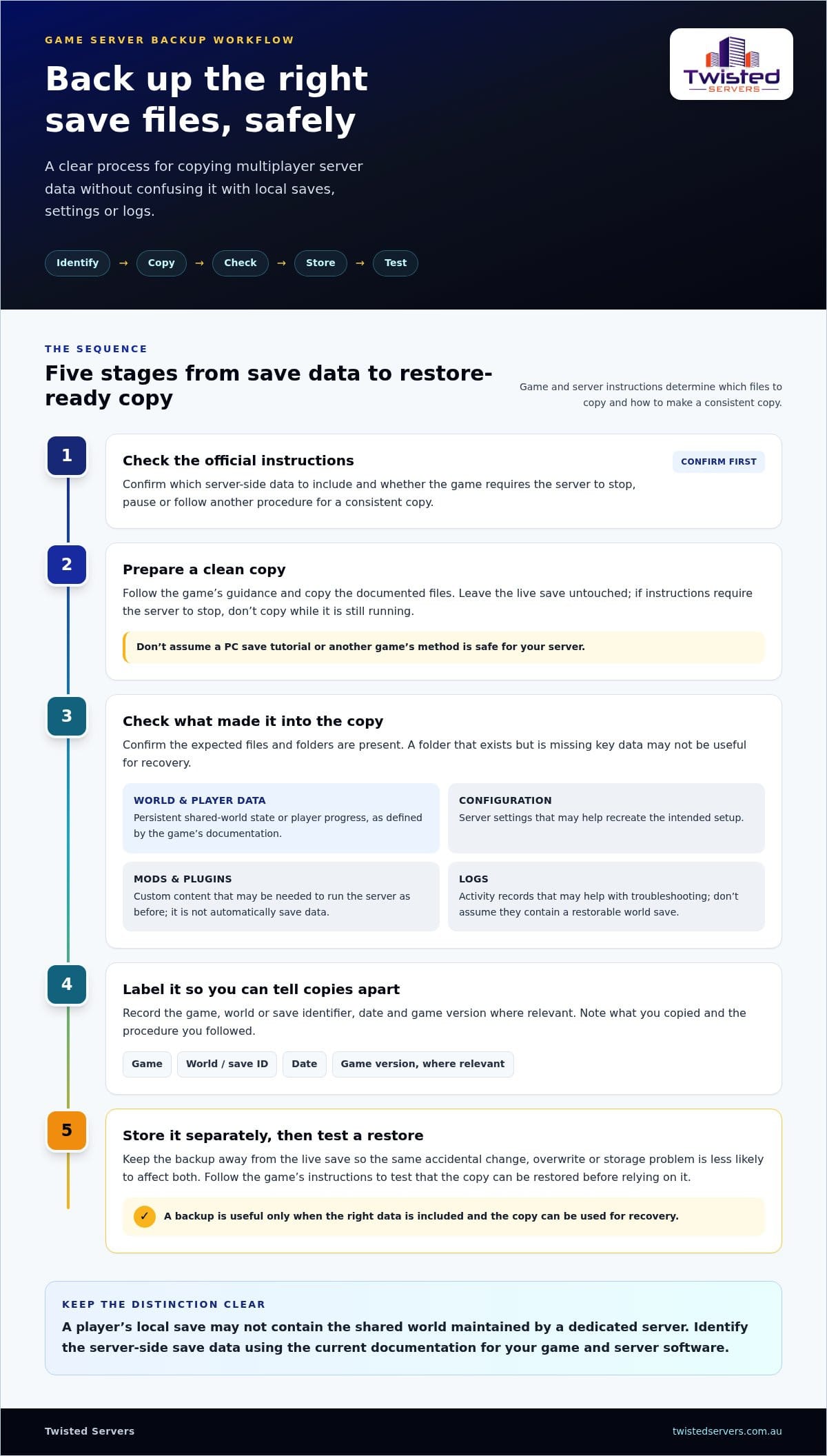
Use this ordered workflow:
- Check the official instructions. Confirm the correct data and whether the game requires the server to stop, pause or follow another procedure for a consistent copy.
- Prepare a clean copy. Follow that guidance and copy the documented files without editing or deleting the live save. If the instructions require the server to stop, don’t copy while it’s still running.
- Check the result. Confirm the expected files and folders are present in the copy. A folder that exists but is missing key data may not be useful for recovery.
- Label it clearly. Include the game, world or save identifier, date and game version where relevant. Use a consistent format so you can tell copies apart.
- Store it separately. Keep the backup away from the live save so an accidental change to the server doesn’t also affect the copy.
A backup copy is a separate set of files stored apart from the live server data, ready to be used if the live files are lost or damaged.
Create and label a separate backup copy
Keep the original files untouched while you create and check the copy. A clear label might record the game, world name, date and version, but use the fields that make sense for your setup. A brief note can also record the documentation or procedure you followed. Guidance on IT disaster recovery planning and data backup reinforces the value of knowing what data matters and having a recovery process.
Think about separation in practical terms: a copy stored beside the live save can be caught in the same deletion, overwrite or storage problem. Choose a separate location you can access when needed, and avoid reusing a single backup name if that would replace an older copy you still want to keep. These steps help make the process repeatable for admins running multiplayer worlds.
If you’re planning a hosted multiplayer setup, explore Twisted Servers Game Server Hosting alongside your own save-protection workflow. Hosting a server doesn’t remove the need to understand which files you’re responsible for preserving.
Which game server backup method should you choose?
The right method is the one you can repeat and recover from without confusing an older copy with the live world. If you’re deciding how to backup my game server saves, compare each option by three things: how clearly it captures the required data, whether it keeps copies separate from live files, and how easily you can identify and restore the version you need.
Manual copies, version history and separate storage
A manual copy gives you control over what you save and where you put it, but it depends on you following the same safe process each time. Versioned copies retain earlier save states instead of replacing one backup repeatedly. They might be created by keeping separately labelled copies or through a storage feature, where supported. Separate storage helps protect a copy if live server files are changed or removed.
| Method | May suit you if | Check before relying on it |
|---|---|---|
| Manual copy | You want direct control and can follow a documented process consistently. | Whether the game requires the server to stop or pause, and whether the copied files are complete. |
| Versioned copies | You want to keep more than one point in time, such as before and after a major change. | How older copies are labelled, retained and protected from being overwritten. |
| Hosting control panel | A panel for your service documents a backup or restore function that fits your game. | Which files it includes, how it creates a consistent copy, where the copy is stored and how recovery works. |
Version history is useful only if you can tell which copy represents the state you want. Use a clear naming pattern and keep older versions separate from the live files. If your storage system supports version history, learn how it retains and restores earlier files rather than assuming that every change creates a recoverable copy.
When a hosting control panel may fit the workflow
A control panel can make backup tasks easier to manage, but the feature depends on the specific service and setup. Confirm through current service and game documentation whether it backs up the required files, creates a consistent copy and provides a restore process. A game feature, dedicated server software and a hosting-provider panel are separate things; don’t assume one provides another’s functions.
For any method, check the game’s current official instructions for backup consistency and restore requirements before using it. That includes whether the server needs to be stopped or paused, and whether custom content or settings need separate handling. Admins comparing Australian game server hosting can include backup responsibility and access to relevant management tools in their planning, without assuming a particular backup feature is included.
How often should you back up, and how do you test a restore?
There’s no single schedule that suits every multiplayer server. Choose a rhythm based on how often meaningful progress is made, how much of it players could afford to lose, and how long it would take to recreate. A quiet world may need a different routine from an active community server with frequent changes. The aim is to make a copy often enough that a setback doesn’t erase more progress than your group can accept.
Choose a backup rhythm that matches your server
Consider how regularly players build, explore or make other changes that matter to your community. Then decide how much recent progress you’re willing to risk losing. Before an update or major configuration change, check the game’s official instructions for any recommended preparation or backup steps. Don’t assume the same schedule suits every title, or that a hosting provider makes copies unless that’s part of your verified service arrangement.
Your routine should also be realistic for the people managing the server. A schedule that’s easy to remember and follow is more useful than an ambitious plan that gets missed. Record when you created each copy and what changed around that time. That gives you a clearer choice if you later need to recover a particular state, especially when several versions are available.
Test recovery without risking the live world
A restore test checks that saved data can be recovered. A backup is only useful if the intended game and server setup can use it. Keep the live world untouched, and test with a separate copy in a safe environment where you can follow the game’s documented restore process without replacing active files.
Before testing, check the official instructions for compatible game versions and the required restore order. Don’t assume a save from one version will load correctly in another, or that the same process applies across games. If the documentation requires a particular setup, use that guidance rather than improvising on the live server.
During the test, note whether the copy is recognised and whether the expected world state and progress appear as intended. Record the game version, the copy tested, the steps taken and any errors. If the restore fails, preserve the original backup and investigate the instructions or missing files before changing it. Retest after correcting the process, so you have a repeatable recovery method rather than an unverified copy.
- Pass: The game accepts the copy and the expected progress is available.
- Needs review: Files are missing, the version is incompatible, or the result differs from what you expected.
Testing turns backup planning into a recovery process you can follow with more confidence. If you’re planning a hosted multiplayer server, explore Twisted Servers Game Server Hosting as part of your setup, and establish your own save and restore routine for the game you run.
Make game-save backups part of your hosted server plan
A dependable save-protection routine is part of running a multiplayer server, whether you manage the machine yourself or use a hosting service. First identify the game’s server-side save data and its documented handling requirements. Then make a clean copy, keep it separate from the live files, label it clearly and test that it can be restored. This gives you a process to follow, rather than relying on a folder copy you haven’t checked.
Self-managed server or game server hosting?
With a self-managed server, you’re responsible for the server environment and for working out how its files are copied and restored. With hosted multiplayer gaming, some infrastructure is managed by the host, but that doesn’t automatically settle who handles save backups. Responsibilities depend on the specific service arrangement, so understand which tasks you manage and follow the game’s current guidance for its save data.
Hosting and game software are different parts of the setup. A feature in a game, a function in dedicated server software and a tool provided by a hosting company aren’t interchangeable. Don’t assume that a control panel offers a particular backup option, or that a hosting plan automatically protects game progress. Your backup and restore procedure should match the functions available to you and the instructions for the game you run.
For broader context, Twisted Servers provides Australian Game Server Hosting for multiplayer communities. Keep your own notes on what you need to preserve and how you would recover it. This helps clarify your responsibilities whether you self-manage or host your server with a provider.
A practical next step for Australian server admins
Write down your game-specific process while it’s fresh. Include the files you identified, the game version, where each backup copy is stored, the official instructions you followed and the result of your restore test. If a game update or server change affects the procedure, review your notes against current documentation before relying on the old steps.
Keep the routine straightforward enough to repeat. You should be able to tell which save a copy belongs to, when it was made and whether it has been tested. If you’re still deciding how to backup my game server saves, start by documenting those details for the game and server software you actually use. A clear record can also help you identify which questions about backup access and responsibilities relate to your hosting arrangement.
Twisted Servers’ dedicated expert support is available 24/7. For your next step, explore Australian game server hosting and plan your save-protection process alongside your multiplayer setup.
Make your backup plan part of server management
As a gaming community grows, server administration may become shared between more people. Decide who can access server files and backup copies, and how a new administrator can take over if roles change. Keeping access limited to the people who need it helps reduce accidental changes and makes ownership clearer.
It’s also worth treating save protection as part of the community’s wider plans for the server. A change in administrators, a new world or a different way of managing the server can affect how your team looks after its progress. Review your arrangements when those changes happen, so the people responsible know what they can access and what decisions they’re expected to make.
For your next step, consider how Australian game server hosting could fit your multiplayer plans. With clear roles and considered access, your team can build a server community that’s prepared to grow.
Frequently Asked Questions
How do I back up my game server saves?
Use the game’s documented server backup method, then keep a manifest with each copy. List the included folders, file sizes, game version, creation time and whether the copy has passed a restore test. This gives you a way to assess an archive beyond its filename and spot an unexpectedly small or incomplete copy. For how to backup my game server saves, a manifest also helps admins compare copies before choosing one to recover.
Where are game server save files stored?
Check the game’s server documentation and, where available, the server’s active settings for the configured world or save identifier. Some setups expose a data location in their configuration, while others require you to follow game-specific documentation. Compare the identifier in the settings with the relevant server data before treating a folder as the right save. Don’t rely on a search of a player’s device as your only way to locate server data.
Can I back up a game server while it is running?
Only use a live-copy method if the game’s official instructions say it creates a consistent backup while the server is running. If that method is supported, coordinate with other administrators so they don’t change server files during the copy. Consider scheduling the task during a quieter period and letting players know if the process may affect access. If live copying isn’t documented, don’t assume that an active file copy is safe.
How often should I back up my game server?
Choose an interval based on how much recent progress your community is prepared to lose, then make the schedule practical to follow. Assign an administrator to own the task and set a reminder in the team’s usual planning system. Review the arrangement when play activity changes. Also decide how older copies will be retained, so routine storage cleanup doesn’t remove a useful recovery point without anyone noticing.
How do I restore a game server save from a backup?
Follow the game’s documented restore process, and keep the test isolated from the public server. Use a separate environment or instance where possible, and prevent players from joining it while you check the result. Confirm you’re working with the intended world before making changes. This avoids confusing a test world with the live one and reduces the risk of players making progress on a temporary copy that the community won’t keep.
Are cloud-synchronised PC saves the same as game server backups?
No. A sync service only handles the files and folders selected for synchronisation; it doesn’t automatically mean the dedicated server’s data is included. Sync behaviour also depends on the service and its settings, so changes or deletions may affect synchronised copies. Check the sync status and any available conflict or version history before relying on it. Treat cloud-synchronised PC files as a server recovery option only if the game supports that use.
Does game server hosting automatically back up my saves?
Don’t assume it does. Check the terms or service information for whether game saves are covered, which data is included, how long copies are retained and who can initiate a restore. These details can affect whether a backup suits your recovery needs. If you manage the server, keep a separate record of the arrangement and your own responsibilities, so you know which recovery steps are yours to carry out.
Disclaimer
Game titles, trademarks, logos and related assets are the property of their respective owners. Twisted Servers is an independent hosting provider and is not affiliated with or endorsed by the developers or publishers of the games mentioned unless otherwise stated. Information is provided as a general guide and may change as games, software and hosting services are updated.

