
Recommended Services


Supported Scripts

The plan with the most resources isn’t automatically the right fit. Comparing Garry’s Mod hosting options means weighing the price against the resources your player count, game mode and addons need, then looking at backup charges and the support available if you want help managing the server.
It’s reasonable to start with the monthly price, but a headline figure doesn’t tell you what a Garry’s Mod hosting plan includes. RAM, CPU performance, storage, backups and management all affect whether a plan fits your community and how much server administration you’ll handle yourself.
This guide explains how to compare plans on a like-for-like basis, assess resources for your setup and account for backup needs. You’ll also learn when management and support may be useful, so you can choose hosting that suits your budget and how you want to run your Garry’s Mod server.
Key Takeaways
- Match RAM to your player count, game mode and addon load rather than choosing a plan by price alone.
- Compare backup frequency, storage and any extra charges to understand the full monthly cost.
- Assess CPU, memory and storage alongside the advertised plan price to judge whether its resources suit your server.
- Decide how much server administration you want to handle yourself before paying for optional management or support.
- Choose a server location with your players in mind, as latency depends on their location, ISP, routing and the server’s location.
Why create a Garry’s Mod private server?
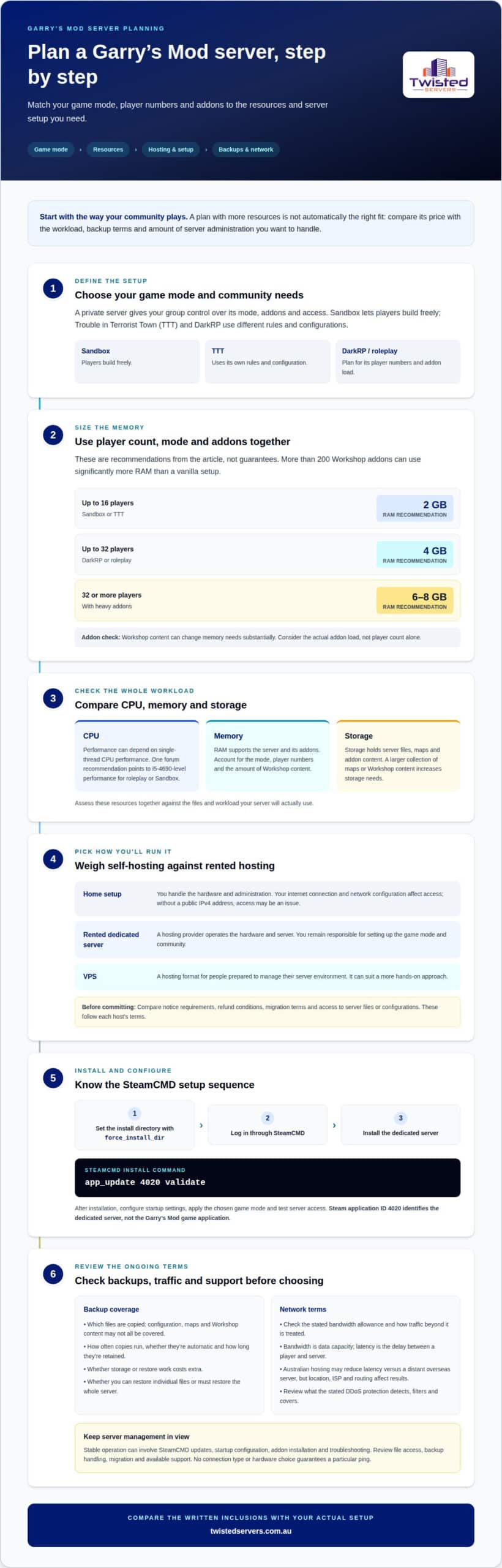
- Choose a private server when your group wants control over its game mode, addons and access. Sandbox lets players build freely, while Trouble in Terrorist Town (TTT) and DarkRP use different rules and configurations. A private modded server lets you shape those details for your community instead of relying on a public server’s settings.
- Match RAM to player numbers and gamemode. A recommendation for up to 16 players on Sandbox or TTT is 2 GB of RAM. For up to 32 players on DarkRP or roleplay, the suggested allocation is 4 GB. At 32 or more players with heavy addons, allow for the 6-8 GB recommendation. More than 200 Workshop addons can use significantly more RAM than a vanilla setup, so addon load matters as much as player count.
- Assess CPU, memory and storage as a combined workload. Garry’s Mod server performance can depend on single-thread CPU performance; one forum recommendation points to i5-4690-level performance for roleplay or Sandbox. RAM supports the server and its addons, while storage holds server files, maps and addon content. A larger collection of maps or Workshop content increases storage needs, so consider the actual files your setup will use.
- Compare self-hosting with renting a dedicated server. A home setup puts hardware and administration in your hands, but your internet connection and network configuration affect access. If your home connection lacks a public IPv4 address, a rented dedicated server is one option. Renting also places hardware and server operation with a hosting provider, while you retain responsibility for the mode and community setup. A VPS is another hosting format for people prepared to manage their server environment; VPS hosting can suit that more hands-on approach with Twisted Servers.
- Understand the provider’s SteamCMD installation process. The operator sets the install directory with force_install_dir before logging in, then uses SteamCMD to install the Garry’s Mod Dedicated Server. The install command is app_update 4020 validate. The provider then configures startup settings, applies the chosen game mode and tests server access. Steam application ID 4020 identifies the dedicated server, not the Garry’s Mod game application.
- Prioritise the technical skills needed to manage a stable server. A capable operator should be able to handle SteamCMD updates, startup configuration, addon installation and troubleshooting. Review how the host handles file access, backups, migration and support, as these affect how easily you can maintain a modded server. Cancellation, refunds and migration follow each host’s terms, not a universal Garry’s Mod rule. Compare notice requirements, refund conditions and access to server files or configurations before committing. For Australian players, consider the server’s location, your group’s internet routing and the host’s infrastructure. No connection type or hardware choice guarantees a particular ping.
Backup options and monthly charges
- Compare backup storage separately from live server storage. A Garry’s Mod server may contain configuration files, maps and Workshop content, but backups may cover only selected files. For example, a configuration backup won’t restore a missing map collection. Check what gets copied, where it’s stored and how to restore it.
- Compare backup frequency with how often your server changes. A server updated after each game night may need a different schedule from one with stable settings. Find out whether backups run automatically or require a manual step. Check how long copies are retained, too: a recent copy won’t replace an older version if unwanted changes have already been made.
- Check whether backup storage costs extra. Some plans may include backups, while others may charge separately for storage or restore work. Compare the full recurring cost, not just the advertised server fee. A plan can cost more overall if the backup option your community needs is billed separately.
- Find out what happens during a restore. Restoring an earlier server copy, for example, might replace newer configuration files or Workshop changes. Check whether you can restore individual files or have to restore the whole server. This matters if one addon is broken but the rest of the server is still usable.
- Check how bandwidth allowances apply to server traffic and backups. Players joining, downloading content and connecting to a dedicated server all generate network traffic. Large Workshop files can also affect transfers. Compare the plan’s stated allowance and its policy for traffic beyond that amount instead of assuming backup transfers are excluded.
- Assess latency separately from bandwidth. Bandwidth describes how much data can move; latency is the delay between a player and the server. An Australian server may reduce latency for Australian players compared with a distant overseas location, but player location, ISP and routing still affect the result.
- Compare DDoS protection by its stated scope. DDoS attacks flood a server or network with traffic, disrupting player connections. A host’s protection can vary in what it detects, filters and covers. Review the plan’s description of network defence and how traffic filtering affects access during an attack.
- Record the terms side by side before choosing: backup schedule, retention, storage, restore process, monthly charge, bandwidth allowance, latency factors and DDoS coverage. Australian Garry’s Mod hosts don’t all provide the same bandwidth, latency or protection terms. These depend on the plan, server location and network arrangements. Compare the written inclusions with your Workshop use and playing habits.
Monthly plan prices and resource allocations
- Compare the monthly charge with the resources allocated to your Garry’s Mod server. Price alone says little about how a plan will handle your chosen mode. Record the included CPU, RAM, storage and network allowance, then compare them across plans. Two similarly priced plans may allocate resources differently, making one a better fit for your setup.
- Check whether a plan has fixed resource limits or lets you choose an allocation. Garry’s Mod workloads vary between a small Sandbox session and a heavily customised roleplay server. More players and addons can increase demand. Compare the stated resources with your intended use instead of assuming every Source Engine server needs the same configuration.
- Review CPU information alongside memory. Garry’s Mod server work may rely on single-thread performance, so processor details can help distinguish allocations. A forum responder says the server can use two CPU threads, but that doesn’t make every two-thread allocation equal. Compare the available CPU details, not just the thread count.
- Check what the storage allocation covers before comparing monthly costs. A Garry’s Mod server may hold game files, configuration, maps and Workshop content. A Sandbox server with many custom maps needs space for those files. Find out whether listed storage covers server files and addons, then account for any separate backup storage or charges.
- Identify charges outside the advertised plan. A low monthly fee, for example, may exclude backups, extra storage or management. Compare recurring charges, setup fees and usage limits in the same currency. For an Australian budget, record amounts in Australian dollars and separate monthly costs from one-off charges.
- Match the network allowance to how players use the server. Joining, playing and downloading Workshop content all involve data transfers. A server with frequent addon downloads may use its allowance differently from one running a stable Sandbox setup. Compare the allowance and any excess-traffic terms; don’t assume every plan handles content downloads in the same way.
- Build your comparison around a real example. Write down the game mode, expected player activity, addons, maps and backup needs. Then compare those requirements with the listed plans. Twisted Servers Garry’s Mod hosting has a starting price in AUD per month; check the current price and plan details before choosing. This makes it easier to compare costs with the server you intend to run.
Optional game management and support add-ons
- Separate game addons from hosting support when comparing plans. Garry’s Mod runs on the Source engine and can use Workshop addons, collections and custom maps. Support for these depends on the provider and plan. A collection-linking method requires a public Workshop collection, and collection addons can update automatically, according to a forum responder.
- Compare control panel functions with the tasks you want to handle. A panel may help organise server settings, files and startup options, while the host’s support team may handle other tasks. Check what each plan covers for addon installation, configuration changes and server errors. Treat each as a separate service, not an assumed part of hosting.
- Decide whether your community needs a separate administration addon. ULX and ULib are commonly recommended together for Garry’s Mod permissions, commands and groups. For example, group permissions can separate moderator tools from standard player access. These are game addons, not features of the Source engine or hosting plan itself.
- Decide who will manage Workshop content and updates. A community that frequently changes its collection needs a clear process for adding or removing content. Check whether the provider assists with collection setup, addon loading or troubleshooting. Automatic updates can keep collection content current, but they don’t replace testing changes before players join.
- Compare support scope against real tasks from your server, such as diagnosing a failed launch, checking configuration changes or restoring access after an addon conflict. Providers may distinguish technical infrastructure support from help with game settings and third-party addons. Read those boundaries carefully, especially if your server uses custom maps or a large Workshop collection.
- Check how support requests are handled and what information staff need. A useful request can include the error message, the recent change and the affected addon name. Find out whether support covers the control panel, server files or game configuration. Clear boundaries help you decide whether optional management suits your skills and available time.
- Choose add-ons to suit how your community operates. A small group playing Sandbox may need basic access controls, while a roleplay community may need defined staff groups and tailored commands. Avoid paying for management you won’t use, but make sure essential administration is covered. List the tasks you want handled, then compare each plan’s stated support with that list.
Which Australian regions and data centres are available for Garry’s Mod hosting?
- Look for the data centre name as well as the broad location. Equinix PE2 is a named facility reference for Australian hosting. A facility name gives you more specific information than a general claim of local infrastructure, but it doesn’t by itself describe every region where a provider may host game servers.
- Distinguish the data centre location from the provider’s administrative location. A provider’s support team, billing portal and game server can be in different places. A company may be Australian-based while its Garry’s Mod server runs in a particular data centre. Compare the server’s hosting location instead of inferring it from the company’s address or branding.
- Check whether the plan names a city, state or facility. These details describe location at different levels: a state gives broad placement, while a facility name identifies a particular data centre. Record the exact wording for each plan and compare equivalent details, rather than treating a state and a facility as interchangeable.
- Read location claims alongside the service description. “Australian hosting” describes a national scope, while Equinix PE2 identifies a specific facility reference. Keep those claims distinct. This helps you understand what the provider says about its infrastructure without assuming that every Australian region or facility is available for every Garry’s Mod plan.
- Consider how location affects your operational requirements. A community, for example, may need its server and related services in a particular country for administrative or organisational reasons. Identify those requirements before comparing plans, then use the named facility or region information to assess whether the stated hosting arrangement fits.
- Record the location details in your comparison notes. Include the named data centre, the stated region and whether those details refer to the game server. Equinix PE2 is a useful facility name to recognise. Keeping these details separate from plan resources and backup terms makes each part of the comparison easier to assess.
- Use the location information alongside the rest of your requirements when reviewing Australian game server hosting options. A named facility helps you understand the hosting arrangement, while your required game mode, addons and administration approach shape the wider plan choice. Keep each criterion clear as you decide what suits your Garry’s Mod community.
Twisted Servers
Twisted Servers offers Australian Game Server Hosting for communities that want a hosted Garry’s Mod server. Use the factors above to weigh player activity, addons, resources, backups and location, then consider how much administration you want to handle. VPS Hosting or Dedicated Server Hosting may suit different requirements for control and server management.
For your shortlist, note your preferred game mode, expected player activity, Workshop content and location priorities. These details make it easier to compare Garry’s Mod hosting options and the resources your setup calls for. You can also consider whether VPS Hosting or Dedicated Server Hosting better matches the level of control you want.
If you’d like to discuss your hosting requirements, contact Twisted Servers.
Choose a hosting setup that can grow with your community
Turn your community’s plans into a clear hosting brief. Note what you want the server to support as the group develops, including any expected changes to its setup or operation. This gives you a practical starting point for discussing a suitable hosting arrangement without making assumptions about how the community will evolve.
Twisted Servers offers Game Server Hosting, VPS Hosting and Dedicated Server Hosting. If you’re weighing these options for a Garry’s Mod community, describe the setup you have in mind and the level of control you want. Get started with the hosting option that fits your requirements.
When you’re ready to take that step, contact Twisted Servers about hosting. A clear conversation can help you move from planning to a setup that supports your community’s next stage.
Frequently Asked Questions
Which GMod server hosting should I get?
Choose the server listing that matches the build your community intends to run. Twisted Servers lists Garry’s Mod and Garry’s Mod 64 separately, so compare the required build before choosing. If you’re moving an existing community, note its current server build and addon dependencies first. That gives you a practical compatibility reference for planning the move and helps avoid choosing a different listing by name alone.
What are the best Garry’s Mod server hosting providers available in Australia?
There isn’t one hosting plan that suits every Garry’s Mod community. Start by confirming that the current catalogue includes the game or build you need, then review the plan details and support scope. Twisted Servers lists Garry’s Mod hosting. If your community has an existing setup, compare its required game build and configuration with the service before choosing.
How much does Garry’s Mod server hosting cost in Australia in AUD?
Twisted Servers’ Garry’s Mod server hosting listing starts at AUD $[verified starting price]/month. This is the starting price for that listing, not a comparison of every plan configuration. Before budgeting, consider the plan you need and any separately stated charges for your chosen hosting arrangement.
What player slots and hardware specs do Garry’s Mod hosting plans offer?
Check each plan’s listing for its player-slot limit and hardware allocation instead of assuming all plans share one specification. Slot capacity sets the configured player ceiling, but doesn’t show whether the resources suit your setup. If you expect your community to grow, find out whether the slot allocation can change later and how that affects the plan.
How do managed Garry’s Mod hosting providers compare with VPS and self-hosting?
Consider who needs administrative access and who will handle routine maintenance. A VPS can offer more control over the operating environment, but also means managing more of it. With self-hosting, that responsibility falls to whoever operates the home server. If your community has several administrators, decide who needs access and how to manage permissions when staff roles change.
How does a Garry’s Mod hosting provider set up and configure a dedicated server?
After installation and configuration, run practical acceptance checks. Confirm that the server starts, the selected game mode loads and a test player can join. If the setup uses Workshop content, test it in-game before inviting the whole community. Record the working configuration and required addons so administrators have a reference if a later change causes problems.
Disclaimer
Game titles, trademarks, logos and related assets are the property of their respective owners. Twisted Servers is an independent hosting provider and is not affiliated with or endorsed by the developers or publishers of the games mentioned unless otherwise stated. Information is provided as a general guide and may change as games, software and hosting services are updated.

