
Recommended Services


Supported Scripts


To fix game server rubber banding, start by identifying where the problem may be coming from instead of changing settings at random. A player snapping backwards or jumping across the map can point to a connection problem, but the cause might be the device, home network, route to the server or the server itself.
During a match, it’s tempting to blame the game server or tweak every setting you can find. But rubber-banding is different from low frame rates. Changing settings without a clear diagnosis can create new problems without fixing the cause.
This guide takes you through repeatable checks to narrow down where the issue starts. Compare your experience across servers, look for signs of packet loss or latency spikes, and check whether other players are affected at the same time. Then apply low-risk fixes in a sensible order and keep a record of the results.
For Australian players, server location can affect latency, but your location, internet provider and network route matter too. If your evidence points to a persistent server-side or routing issue, reviewing your hosting arrangement may be a useful next step. Changing hosts can’t guarantee a fix.
Key Takeaways
- Compare who is affected and which servers show the issue to narrow down whether the cause may be the device, network route or game server.
- Check whether you’re seeing movement snap-back or a different problem, such as low frame rates, freezing or disconnection.
- Test one low-risk change at a time and compare the results before adjusting more settings.
- Record when the issue occurs, who is affected and what changed recently so you have useful evidence for further troubleshooting.
- Consider server location, routing and hosting arrangements if symptoms persist across multiple players. A hosting change can’t guarantee a fix.
What game server rubber-banding looks like and what it can indicate
Rubber-banding is a position snap-back that can result from latency or packet loss. Your character appears to move, then jumps back to an earlier position as the game corrects what it shows on your screen to match the game server’s state. It may happen during movement, combat or other actions that rely on timely updates between your device and the server.
This movement correction is a network symptom, not proof that the server is at fault. The Rubber banding reference describes the term in its gaming and latency context. Before deciding what to try, note exactly what you see, when it happens and whether it affects other players.
How to tell rubber-banding apart from other game lag
Different problems can feel like lag, but they don’t look quite the same. With rubber-banding, your position changes and then snaps back. Other symptoms point towards different checks:
- Delayed actions: You press a button and the response arrives late, but your character doesn’t necessarily snap to an earlier position.
- Stuttering visuals: The picture judders or movement looks uneven. Low frame rate can cause this, even if the network connection is working normally.
- Freezing: The game stops updating briefly. Freezing can have more than one cause, so it doesn’t establish that the connection or server is responsible.
- Disconnection: The game reports that you’ve lost connection or returns you to a menu. That’s different from snapping back while you remain in the session.
Your local frame rate affects how smoothly the game is displayed, while your network connection affects how updates travel between your device and the server. These issues can overlap. Note when the symptom starts and whether it affects movement, actions or both. This makes it easier to describe the problem and compare it with other players’ experiences.
Why the same server can feel different to different players
Players can connect to the same game server over different network routes. Their location, internet provider and routing can all affect latency, so one player may experience snap-backs while others appear unaffected. If several players report the issue, record that as useful evidence, but don’t treat it as proof that the server is responsible. Players may share a connection or experience different network conditions.
Australian server infrastructure can support local routing for Australian players, but it can’t guarantee a particular result. The outcome still depends on where each player is, their ISP, the route taken and the server’s location. Identifying who is affected and what the symptom looks like is a better first step than changing settings at random.
How to diagnose whether rubber-banding is client-side, network-related or server-side
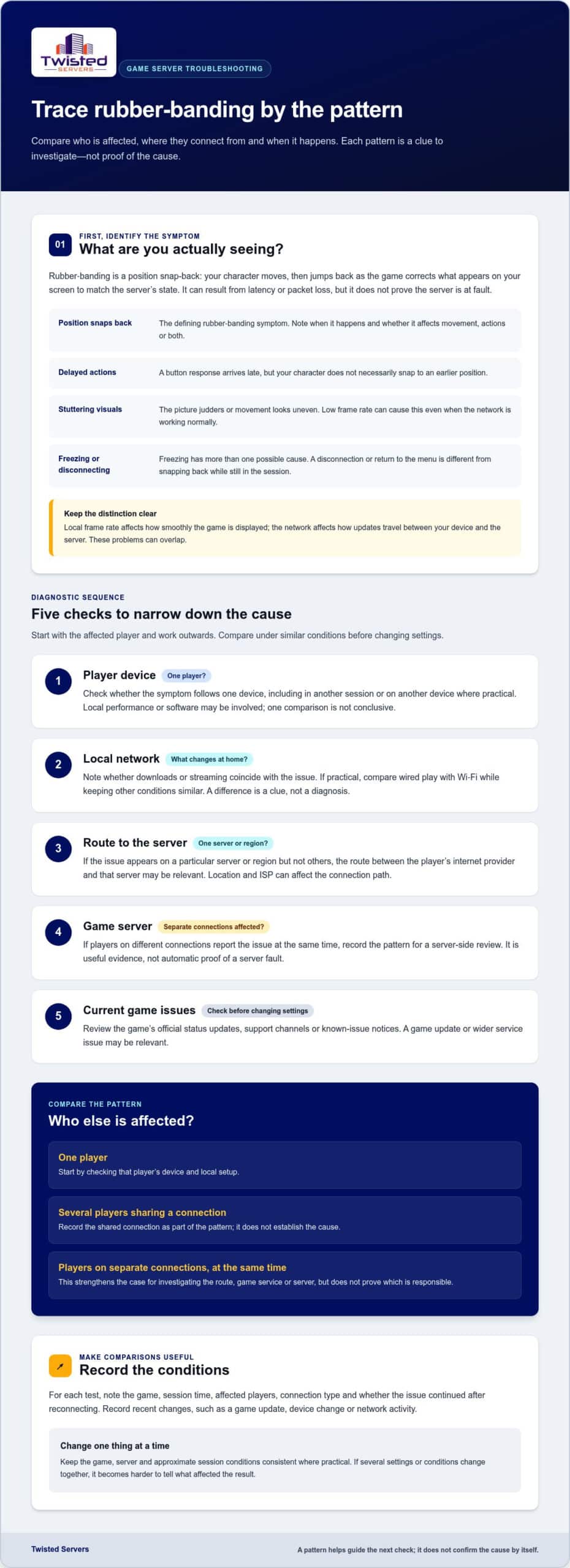
Start by comparing who is affected, where they connect from and when the problem appears. The pattern helps narrow down what to check, but won’t identify the cause on its own. Treat each observation as a clue, then repeat the test under similar conditions before changing settings.
- Player device: Check whether the issue follows one device, including across another game session or device where practical. Local performance or software may be involved, but one comparison isn’t conclusive.
- Local network: Note whether other household activity, such as downloads or streaming, coincides with the symptom. If practical, compare a wired connection with Wi-Fi. A difference is a useful clue, not a diagnosis by itself.
- ISP route: If the issue appears on a particular server or region but not others, the route between the player’s internet provider and that server may be relevant. Location and ISP can affect the connection path.
- Game server: If players on different connections report the issue at the same time, record that pattern for a server-side review. Independent reports are useful evidence, not automatic proof of server fault.
- Current game issues: Check the game’s official status updates, support channels or known-issue notices before changing server settings. A game update or wider service issue may be relevant.
Check the player device and local connection first
Ask the affected player whether the symptom occurs in another session or on another device, if available. Also ask whether household network activity changes at the same time. Where practical, compare wired and Wi-Fi play while keeping the game, server and approximate session conditions consistent. Since packet loss can cause rubber-banding, a fast internet plan alone doesn’t rule out a connection problem.
Look for patterns across players and sessions
Record the game, session time, affected players, connection type and whether the issue continues after reconnecting. Note what changed before each test, such as a game update, device change or network activity. Avoid changing several things at once, or you won’t know which change affected the result.
Compare three situations: one player, several players sharing a connection, and players on separate connections. A problem limited to one player points towards checks on that player’s setup. Reports from separate connections at the same time strengthen the case for investigating the route, game service or server. Neither pattern proves a cause. This evidence-led approach helps you investigate before making configuration changes.
If repeatable reports point to a persistent server-side issue, reviewing the hosting arrangement is one possible next step. Twisted Servers provides Australian game server hosting on Australian infrastructure. Changing hosts can’t guarantee a fix, since player location, ISP and routing also affect results.
Which rubber-banding fixes fit the evidence? Compare low-risk options first
Choose the next check based on the pattern you’ve observed, not on a guess. Latency is delay in communication; packet loss means some data doesn’t arrive. Either can affect how the game synchronises, while a server-side problem needs to be investigated separately. Intel’s guide explains ways to troubleshoot packet loss.
| Evidence | Low-risk check | What the result may suggest | Next action |
|---|---|---|---|
| One player or one connection is affected | Pause avoidable downloads or streaming during a test. Compare Wi-Fi with a wired connection if practical. | A change in symptoms may point towards local network conditions, but doesn’t prove the cause. | Repeat the comparison under similar conditions. If the issue remains, check the device and connection further. |
| The issue began around a game update or appears to affect other players | Read the game’s official status information, support channels and patch notes. | A known issue or recent change may be relevant. | Follow official guidance and retest before adjusting server settings. |
| Several players report a persistent issue on the same server | Review the game’s official server documentation and compare configuration with its guidance. | A server configuration or performance issue may warrant investigation, but reports alone don’t establish the cause. | Record findings and review server-side evidence before making a controlled change. |
| The issue continues across sessions, with reports from independent connections | Collect session times, affected players and recent changes. | A shared server or network-route problem becomes more relevant to investigate. | Escalate the evidence to the server host or administrator for review. |
When local network checks are the sensible first step
Start here if reports are limited to one player or connection. Pause avoidable network activity as a temporary test, then compare play with and without it. A wired connection or router change may be worth testing where practical, but neither guarantees a fix. Changing internet providers is a bigger step. First gather repeatable evidence that points to a connection or route issue.
When a game update, server setting or host review may help
Use official patch notes and server documentation before changing game-specific settings. Save the original configuration, change one setting at a time and compare results. Restarting may temporarily alter symptoms, but it doesn’t identify the cause. If several players on separate connections report the same persistent problem, share the timing and test results with the host for review. Our Australian game server hosting page explains the hosting options available. A host change can’t guarantee a fix.
How to fix game server rubber-banding: a step-by-step test sequence
A useful test gives you a clear comparison. Keep the game, server and play conditions as consistent as possible, and change only one thing at a time. If the symptom changes, you’ll have a better idea what may have influenced it.
1. Describe the symptom. Record what happens, such as movement snapping back, actions responding late or the game freezing. Note when it starts and whether movement, actions or both are affected.
2. Identify who is affected. Record whether it’s one player, several players sharing a connection or players on separate connections. Ask whether the issue occurs for them at the same time.
3. Check official updates. Before changing settings, look at the game’s official status information, support channels and patch notes for relevant known issues or recent changes.
4. Choose one relevant test. Use your observations to select a low-risk check, such as comparing a local connection or reviewing a server setting against the game’s official documentation. Before any server-side edit, save the current configuration so you can restore it.
5. Repeat and compare. Where practical, repeat the same scenario after the test. Record whether the symptom stopped, changed or continued. If several variables changed, the result won’t show which one mattered.
Run a controlled test without changing several things at once
Keep a short session record: date and time, server, affected players, connection type where relevant, recent game or configuration changes, and whether the issue repeats after reconnecting. Compare like with like. A symptom disappearing once is useful to note, but repeatable results give you a stronger basis for deciding what to try next.
Prepare useful evidence for a game support or hosting ticket
Summarise the game, server setup, symptom, timing, affected players and checks already completed. Attach logs or screenshots only if the game’s official documentation explains how to collect and share them. Avoid adding commands, port details or diagnostic tools unless they’re documented for that specific game.
- Include the original and changed configuration, if you edited a setting.
- Note whether the issue affected players on separate connections.
- List the official updates or guidance you checked and the results of each test.
This evidence can help focus a review of a persistent server-side or routing issue. If you’re weighing hosting options after testing, explore our Australian game server hosting information. Changing hosts can’t guarantee a fix, since player location, ISP and routing also affect the connection.
When persistent rubber-banding makes a hosted server worth considering
A hosting review may make sense when your tests show a persistent pattern affecting several players on separate connections, particularly if it occurs on the same server under similar conditions. That evidence gives you a reason to review the server arrangement, its location and the network route to it. It doesn’t prove hosting is the cause, and moving a server can’t guarantee a fix.
For Australian players, server location can affect latency, but results also depend on each player’s location, ISP and routing. Twisted Servers provides quality shared and dedicated servers for multiplayer gaming on Australian infrastructure. A local server may be worth considering if your evidence points to a persistent server-side or route-related issue, but it won’t correct a local device problem, an ISP issue or a game bug.
When changing hosting may be relevant, and when it may not
Before you move, rule out changes that are easier to test. A device issue, household network conditions, a current game issue or server configuration may continue after a host change. If you manage your own server and want to review that arrangement, see our dedicated server hosting information. Base the decision on your test results, not a promise of lower ping or a guaranteed resolution.
What to share when asking for hosting support
Give the support team a concise record so they can assess the evidence rather than start with a guess about the cause. Include:
- The game and how the server is hosted or managed.
- When the symptoms started, when they recur and what players observe.
- How many players were affected and whether they were on separate connections.
- Recent game, server or network changes.
- Tests completed and what happened after each one.
Keep relevant logs or screenshots with your notes, but share them only if the game or server documentation explains how to collect them safely. Clear, repeatable observations are more useful than changing several settings and reporting that the issue still occurs.
Keep your diagnostic notes, review the Australian game server hosting information if a hosting review fits the evidence, or contact Twisted Servers for dedicated expert support, available 24/7. No hosting change can guarantee that you’ll fix game server rubber banding, but a clear record gives the issue a more informed starting point.
Use evidence to choose your next step
To fix game server rubber banding, first narrow down whether the issue follows one player, a connection, a route or the server. Then test one low-risk change at a time and record what happens. Repeatable notes about session times, affected players and recent changes make it easier to decide what to investigate next.
If several players on separate connections experience the same persistent symptom, review the server arrangement, location and route. A hosting change may be worth considering, but it can’t guarantee a fix. Player location, ISP and routing still affect the connection, and a local device issue or game problem may remain.
Twisted Servers provides quality shared and dedicated servers for multiplayer gaming on Australian infrastructure, with dedicated expert support available 24/7. If your evidence points towards a hosting review, explore Australian game server hosting. Keep your notes and test methodical changes one at a time to investigate the cause without guesswork.
Frequently Asked Questions
What causes rubber-banding on a game server?
Rubber-banding can happen when latency or packet loss disrupts communication between your device and the game server, prompting the game to correct your position. Possible sources include your device, home network, ISP route, server performance or configuration, and a current game issue. The snap-back is a symptom, not a diagnosis. Compare when it occurs and who else is affected before deciding what to investigate.
Can packet loss cause game server rubber-banding?
Yes. Packet loss means some data sent across a network doesn’t reach its destination, which can interfere with timely updates between your game and the server. Your character may appear to move before the game corrects its position. Packet loss can happen even if your internet plan seems fast, so connection speed alone doesn’t rule it out. Compare symptoms across sessions and connections to gather useful evidence.
Can a game server host fix rubber-banding?
A host may be able to investigate if evidence points to a persistent server-side or route-related issue, but a host change can’t guarantee a fix. The cause may instead be a player’s device, local network, ISP or a game issue. Twisted Servers provides quality shared and dedicated servers for multiplayer gaming on Australian infrastructure, with dedicated expert support available 24/7 to help review a hosting concern.
How can I tell whether rubber-banding is caused by my internet or the server?
Compare the issue across sessions, servers and players, and note whether affected players use the same or separate connections. If it follows one player across servers, investigate that player’s device and network first. If several players on independent connections report it at the same time, a shared server or route issue may be worth reviewing. Neither pattern proves the cause, so record session times and test results before changing settings.
Does an Australian game server reduce rubber-banding for Australian players?
An Australian server can offer a shorter network route than a distant overseas server for players in Australia, which may reduce latency. It can’t guarantee less rubber-banding or a particular ping. Results depend on each player’s location, ISP, routing and the server itself. If you’re comparing servers, test under similar conditions and note whether the snap-back changes, rather than assuming location alone explains the symptom.
Can Wi-Fi cause rubber-banding in online games?
Yes, Wi-Fi conditions can contribute if the connection is unstable or affected by local network congestion. That doesn’t mean Wi-Fi is always the cause. As a low-risk test, pause avoidable household downloads or streaming, then compare with a wired connection if practical. Keep the game and server consistent during the comparison. If the symptom remains, continue checking other possible causes rather than making major router or provider changes straight away.
Should I change game server settings to stop rubber-banding?
Only change server settings when your evidence points to a server-side cause and you have checked the game’s official documentation. Save the original configuration first, then test one relevant, reversible change at a time and compare results under similar conditions. A restart or random setting change isn’t a diagnosis. If multiple players still report the same issue, record the timeline and tests before escalating it to the server administrator or host.
Disclaimer
Game titles, trademarks, logos and related assets are the property of their respective owners. Twisted Servers is an independent hosting provider and is not affiliated with or endorsed by the developers or publishers of the games mentioned unless otherwise stated. Information is provided as a general guide and may change as games, software and hosting services are updated.

