
Recommended Services


Supported Scripts


When you’re learning how to host a community game server, choosing the hardware is only part of the job. Players also need a clear reason to join, straightforward instructions and a sense of when others will be online. Without those basics, even a working server can feel empty.
Your hosting setup matters, but so do clear expectations, fair moderation and regular communication. For an Australian player group, hosting locally can help reduce latency compared with a distant overseas server. Results still depend on each player’s location, ISP and network routing.
This guide covers how to shape a welcoming community, choose an approach that fits your game and group, and set practical rules for managing behaviour. You’ll also learn how to keep players informed with a shared communication space, planned activities and consistent updates. The aim is to give your server a clear purpose from launch and a practical plan for keeping it active.
Key Takeaways
- Learn how to host a community game server by planning for players and organisers, not just the server itself.
- Match your hosting approach to the game, expected activity and time available for administration.
- Compare self-hosting, shared game hosting and dedicated hosting by control, workload and room to adapt.
- Prepare for launch with tested access, clear rules, an initial group of players and a way to gather feedback.
- Use a readiness checklist to choose a practical starting point and make it easy for newcomers to get involved.
How to host a community game server players want to join
Renting a server gives your group a place to play. Building a community means giving people a shared reason to join, return and treat one another well. A community server is more than a running game: it needs clear expectations and organisers who welcome members, communicate decisions and help resolve issues.
Let that people-first approach guide how to host a community game server. Start with a clear focus, decide where players will find information and connection details, and test the joining process before inviting an initial group. After launch, gather feedback and make changes that support the group’s purpose. Hosting provides the place to play; organisers and players shape the experience. Australian-based hosting can help Australian players connect with lower latency than a distant overseas server, though results vary with location, ISP and routing.
For a plain-language introduction to what happens behind the scenes, see Understanding Game Server Basics. If you choose provider-hosted infrastructure, Australian game server hosting provides the hosting environment, while your organisers set the community’s tone and keep members engaged.
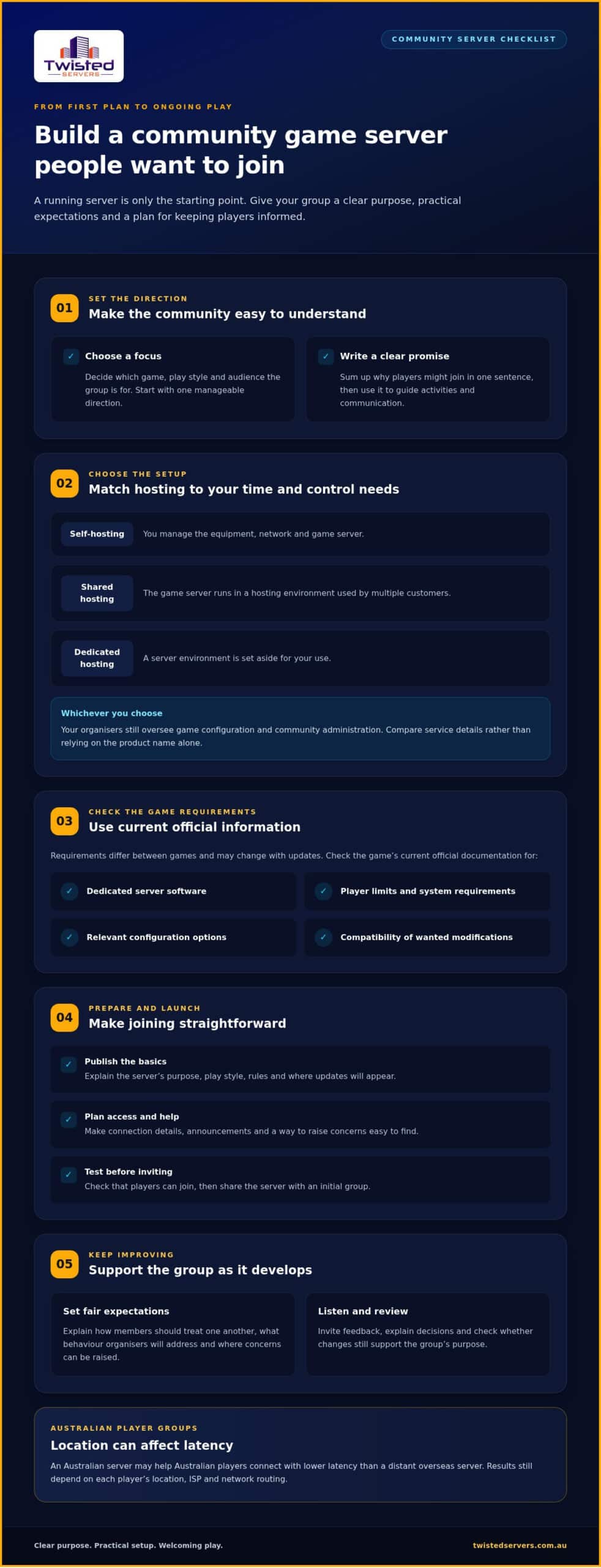
- Choose a focus: Define what the group plays and the kind of sessions it wants.
- Plan access: Decide where members will find connection details, announcements and help.
- Test and launch: Check that players can join, then share the server with an initial group.
- Listen and improve: Invite feedback, explain decisions and review whether changes support the group’s purpose.
Choose a clear purpose and audience for the server
Before setup, decide on the game, play style and intended audience. Your focus might be cooperative sessions for a small group of friends or organised matches for players who prefer a more structured experience. Start with one manageable direction rather than advertising every mode or play style. A specific promise is easier to understand and maintain than a broad offer that leaves players unsure what to expect.
Write one sentence that explains the appeal, such as: “A friendly place for Australian players to team up for cooperative evening sessions.” Use it to guide decisions about activities, communication and who the server is for. Adjust the description as the group learns what members enjoy.
Set expectations before inviting players
Publish the server’s purpose, basic rules and expected play style before sending invitations. Explain how members should treat one another, what behaviour organisers will address and where players can raise a concern. Clear expectations help prospective members decide whether the group suits them and give organisers a consistent basis for responding to issues.
Include practical details, such as whether sessions are organised or drop-in and where updates will appear. Check game-specific settings and rules against current official information before publishing them, as server options and guidance can change between updates. Make the welcome information easy to find and keep it accurate as the community develops.
Plan the game server around the way your community plays
Choose a setup that suits the game and the time your organisers can give to running it. With shared game hosting, the game server runs in a hosting environment used by multiple customers. Dedicated hosting provides a server environment set aside for your use. The exact arrangements and available controls depend on the service, so compare the details rather than relying on the product name alone.
Self-hosting is another option: you run the server on your own equipment and network. That puts setup and ongoing management in your hands, including responsibility for the equipment and connection. With hosted options, the infrastructure sits with a hosting provider, while your organisers still decide how the game is configured and how the community operates.
Server location affects the network route between players and the game, which can influence latency. An Australian server may help local players, but ping also depends on location, ISP and routing.
Decide between self-hosting and hosted game servers
Consider how much control you want and how much time you can commit. With self-hosting, you manage the machine and network as well as the game server. With provider-hosted infrastructure, you don’t manage the physical hosting environment, but you still oversee game configuration and community administration. Our Australian game server hosting is an option if you’d rather not run the server on your own equipment.
Before deciding, assign responsibility for routine checks, configuration changes and troubleshooting. If one organiser has limited availability, reducing their infrastructure workload may leave more time for organising play and supporting members. Use an Australian-focused game server guide to understand the main hosting choices, then compare them against your group’s needs. No one approach suits every game or community.
Match the setup to the game and community
Start with current official documentation for your chosen game. Check its dedicated server software, player limits and system requirements, relevant configuration options, and whether the modifications your group wants are compatible. Requirements differ between games and can change with updates, so don’t choose a setup based only on generic hardware advice. Intel’s dedicated game server hardware guidance offers general considerations, while the game’s official documentation should guide your final requirements.
Then consider expected activity and your organisers’ capacity. A standard setup may involve different work from a heavily customised one. Mods and custom settings can add configuration and update tasks. A game update may also mean reviewing server software or settings before the next session. If you prefer provider-hosted infrastructure, compare the available game server hosting options with your verified requirements and the work your team can manage.
Keep the initial choice practical. Begin with the game’s documented requirements and your planned configuration, then reassess if community activity or administration needs change.
Compare community server options without guessing at requirements
No single hosting setup suits every game or community. The right fit depends on the game’s current requirements, how members plan to play and how much server administration organisers can manage. Use this comparison to narrow down your options, then check the chosen game’s official documentation before committing to a setup.
| Option | Control | Organiser workload | Scaling considerations | May suit |
|---|---|---|---|---|
| Self-hosting | Direct control of your own server device and configuration. | You manage the equipment, network and server software. | Depends on the capacity of your equipment and connection. | Organisers comfortable managing their own setup. |
| Shared game hosting | Control depends on the service and available settings. | The hosting environment is provided, while organisers manage game settings and community needs. | Consider how the service can accommodate changes in activity or configuration. | Groups that prefer provider-hosted infrastructure. |
| Dedicated hosting | Can provide more control over the hosting environment; exact access depends on the service. | The provider hosts the infrastructure, while organisers remain responsible for server administration. | Assess whether the available resources and configuration options suit current and future needs. | Communities that need greater control over their hosting environment. |
These are general descriptions, not promises about specific features. Check what each arrangement includes, which settings you can manage and what tasks remain with your organisers. Requirements vary by game, version, configuration and community activity. A setup that suits a standard server may not suit a heavily customised one. Verify the details for your chosen game rather than relying on generic hardware figures.
When self-hosting may suit a small group
Self-hosting may suit organisers who are comfortable managing the server software and their own network. It gives you direct control, but the server’s availability depends on the host device and connection being available. Decide who will maintain the setup and troubleshoot issues before relying on it for regular sessions. Check the chosen game’s official instructions before changing network settings.
When hosted or dedicated options may fit better
Hosted options move responsibility for the underlying server infrastructure away from organisers, leaving them to focus on game configuration and community operations. Dedicated hosting may be worth assessing if your community needs more control, but access and responsibilities depend on the service. Compare those details with the work your organisers can take on, and review the game server hosting options available for a provider-hosted approach.
Make the decision against a short list: verified game requirements, the settings your group wants, expected activity and available admin time. Revisit the choice if those needs change instead of assuming you must begin with the most involved setup.
Launch, moderate and keep your gaming community active
A server launch is a process, not a single announcement. Test the connection instructions with someone who hasn’t helped set them up, publish the rules where members can find them, then invite an initial group. After they’ve played, ask what worked, what was unclear and what they’d change. This lets you address straightforward problems before inviting more players.
Moderation works best when expectations and responses are consistent. Explain what may happen when a rule is broken, such as a reminder, a temporary restriction or a review by an organiser. Match the response to the behaviour and apply the process fairly. Keep difficult conversations respectful, avoid turning disputes into public arguments and give members a clear way to raise concerns.
A useful first-week feedback loop is to collect comments, prioritise issues that affect access or play, communicate what you’ll change, then review whether the change helped. Not every suggestion needs action. Briefly explain what will change, what will stay the same and why, so members know their feedback was considered.
Make joining and getting started straightforward
Prepare connection instructions using the selected game’s current official documentation, then test them from a player’s perspective. Put the server’s purpose, rules, session schedule and organiser contact point together in one easy-to-find place. A concise welcome message can direct players to connection details, explain how to join a session and show where to ask for help. Ask early members to flag confusing wording or barriers to joining.
Keep the information current. If a game update changes the joining process or a session time moves, update the shared instructions and tell members where to find the latest version. Clear, accurate information saves newcomers from piecing together details from old announcements.
Build routines that encourage players to return
Give members simple ways to take part between sessions. Depending on the group, that might mean a predictable play night, a community event or a discussion about the next map or activity. Choose routines your organisers can maintain. A modest, reliable schedule is easier to communicate than a calendar of events that often changes.
After each activity, invite specific feedback: Was the session time workable? Were the instructions clear? Did the format suit the group? Share the decision that follows, even if the plan stays as it is. Regular, respectful updates help set expectations, but events and moderation cannot guarantee that players will stay or that a community will grow.
Keep the hosting and community plan aligned as the group develops. If you’re planning a provider-hosted setup, explore Twisted Servers Game Server Hosting as part of your launch preparation.
Choose a hosting path and take the next step with confidence
You don’t need to settle every future detail before launching. You do need a sound starting point: a game with a verified server setup, organisers who know their responsibilities and clear information for players. Use the checklist below to identify gaps before you commit to a hosting approach.
Use a short readiness checklist before launch
- Game: Confirm the current dedicated server software, requirements, settings and any mod support using the game’s official documentation.
- Purpose: Make sure your intended play style and audience are clear enough to guide server configuration and activities.
- Admin capacity: Decide who will handle software updates, configuration changes, moderation and player questions. Share the workload where possible rather than relying on one person for everything.
- Rules: Write expectations in plain language and agree how organisers will respond to behaviour that disrupts play.
- Joining information: Prepare accurate connection instructions and make the rules easy to find before inviting players.
If you can’t identify who will maintain the server or answer members’ questions, pause to make a workable plan. A clear division of responsibilities is more useful than choosing a hosting option while leaving administration unresolved.
Choose the hosting approach that fits your group
Self-hosting may suit you if you’re comfortable managing the server software, equipment and network, and can take responsibility for availability. Shared game hosting can suit a group that wants provider-hosted infrastructure while keeping its setup focused on the game and community. Dedicated hosting is worth assessing if your verified requirements call for more control over the hosting environment and your organisers can manage that configuration.
Don’t choose an option based on an assumed player count or hardware figure. Start with the game’s current requirements, your planned settings and the work your organisers can realistically take on. Revisit the decision if the game changes, your configuration grows more involved or the group’s needs shift.
Move from planning to a hosted server
Twisted Servers offers quality shared and dedicated servers for multiplayer gaming, with Australian infrastructure. Australian hosting can be a practical choice for an Australian player group, although latency varies with each player’s location, ISP and network routing. Game Server Hosting starts from $1.50 AUD/month. Dedicated expert support is available 24/7.
Hosting provides the place to play; your organisers still shape the experience through clear rules, steady communication and active moderation. Once your game requirements and responsibilities are clear, explore Australian Game Server Hosting as a next step for your community.
Take the first step towards your community launch
Your first version doesn’t need to answer every future question. Choose a clear starting point, give organisers defined responsibilities and set a date to review how the server is working for the group. That review gives you a practical moment to adjust the plan based on real experience, rather than trying to predict every need before anyone joins.
Keep the next move manageable. Confirm your game’s current requirements, settle on a hosting approach and prepare the information players need to get started. Learning how to host a community game server becomes easier when you make decisions in sequence and leave room to adapt as the group takes shape.
When you’re ready to plan the hosting side, explore Australian Game Server Hosting with Twisted Servers. Choose a setup that fits your community and start planning your launch.
Frequently Asked Questions
Do I need a Discord server to build a gaming community?
No. Discord can be useful for announcements and chat, but it isn’t required to build a gaming community. Choose a communication channel your intended players already use, then make the essentials easy to find: server details, schedule, rules and a way to ask for help. For a small group, a group chat or game-linked forum may be enough. Keep notices organised as plans change.
How do I get the first players onto a new community game server?
Invite people who already enjoy the game and explain the purpose of the first session, when it starts and how to join. A low-pressure test session lets you check access and gives early players a chance to meet one another. Treat those first attendees as founding members: ask for practical feedback, note recurring suggestions and let them know how you’ll respond.
Can one gaming community run servers for more than one game?
Yes, a community can bring together players of different games, but each server needs clear ownership and a reason to exist. Separate announcements and discussions by game so members can follow the interests they care about. Before adding another server, decide who will handle its settings, updates and moderation. If organisers already have a full workload, build activity around the existing game first.
What rules should a community game server have?
Set rules for behaviour that could affect your group, such as harassment, disruptive chat, cheating or exploiting, spam, and how members should follow organiser decisions. Explain how players can report a concern and how moderators will respond, without promising identical outcomes for every situation. Check the game’s current official policies too, so your community rules don’t conflict with the game’s own requirements.
How often should a community game server run events?
There’s no universal event schedule. Choose a rhythm your organisers can maintain and members can plan around, whether that’s a recurring play session or occasional community activity. Ask players which times suit them, then review attendance and feedback instead of adding more events by default. A manageable programme helps set expectations, but events can’t guarantee that players will return.
Can Australian players join a game server hosted overseas?
Australian players can often join an overseas game server if the game and its settings allow it. Before sharing connection details, check the game’s official guidance for region restrictions, platform compatibility and joining requirements. Test the process with someone using the same platform as your intended members. If the game has cross-play or region settings, explain any relevant limits in your joining instructions so players know what applies to them.
Who should manage updates and moderation on a community server?
Assign these tasks to named organisers rather than leaving them to whoever happens to be online. One person might track game and server updates, while another handles reports and member questions. A shared record can note what changed and when. Agree who can make configuration decisions and who steps in if the main moderator is unavailable. Clear responsibilities help prevent missed tasks and inconsistent responses.
Disclaimer
Game titles, trademarks, logos and related assets are the property of their respective owners. Twisted Servers is an independent hosting provider and is not affiliated with or endorsed by the developers or publishers of the games mentioned unless otherwise stated. Information is provided as a general guide and may change as games, software and hosting services are updated.

