
Recommended Services


Supported Scripts

A 30-millisecond network delay can be the difference between winning and losing a match. Hosting a tournament server is about more than choosing a game or adding player slots: the server’s location, network capacity and configuration all affect how fair and consistent play feels.
When hosting a tournament server, look beyond one game’s requirements. Different titles place different demands on server resources, tick rate and configuration, while Australian players’ ping depends on their location, ISP, routing and the server’s location. A local server can reduce latency for Australian players compared with a distant overseas server, but it can’t guarantee the same ping for everyone.
This guide explains how to choose a tournament host and what to consider when setting up servers, bandwidth, ping and tick rate for competitive play. You’ll also see how the right setup can vary between games, so you can plan around your event rather than rely on a one-size-fits-all configuration.
Key Takeaways
- Choose server location with your players’ locations, ISP routing and latency in mind, not just the game’s requirements.
- Assess a host’s ability to support your tournament format, game server software and configuration needs.
- Plan bandwidth around player connections and expected traffic; raw connection speed alone doesn’t determine ping.
- Match tick rate to the game and competitive format, since server update frequency affects how play is processed.
- Clarify what equipment and software your event needs, including network switching for an in-person LAN.
Dedicated game servers and network latency
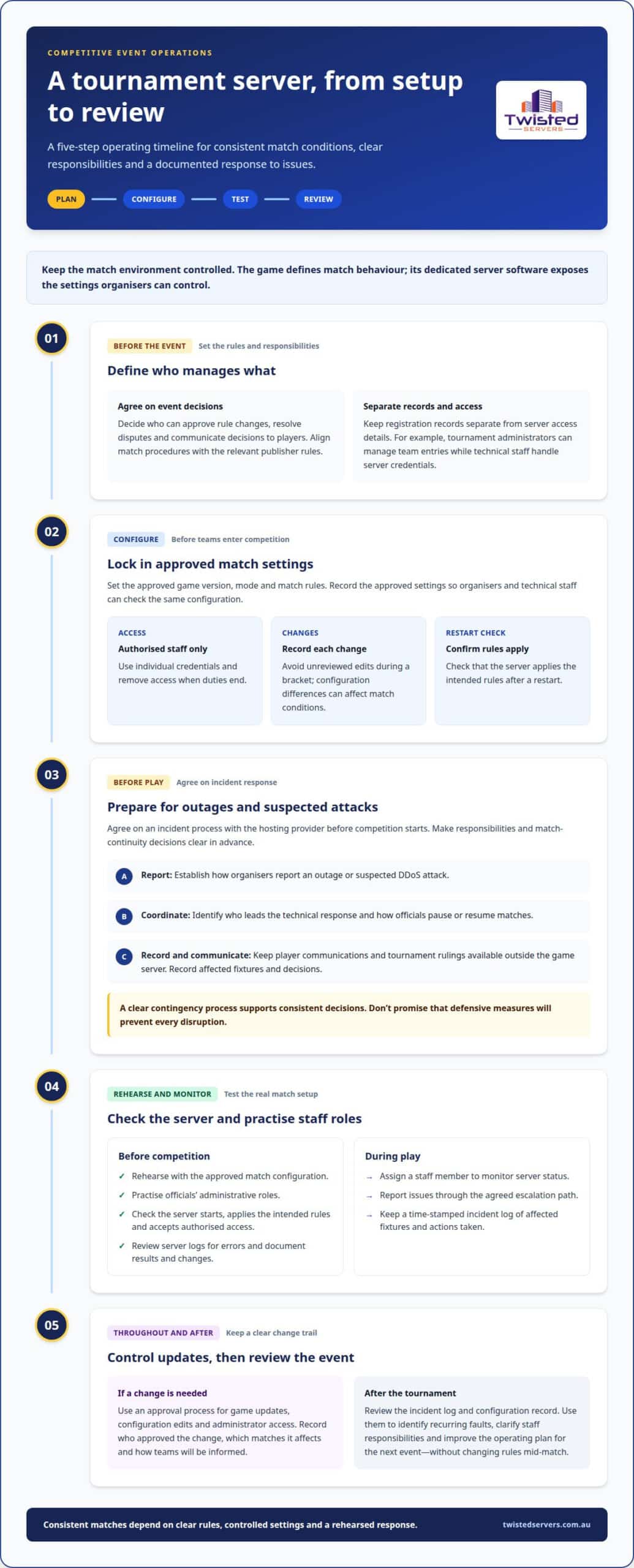
Plan the match environment around the game’s dedicated server software and event rules. Assign technical responsibilities before teams enter the competition.
- Define the event’s data-handling and competition requirements. Organisers should account for Australian privacy and consumer obligations when collecting participant details or publishing event terms. Esports rules vary by game and tournament format, so align match procedures with the relevant publisher rules. Decide who can approve rule changes, resolve disputes and communicate decisions to players.
Keep registration records separate from server access details. For example, a tournament administrator may manage team entries while technical staff handle server credentials.
-
Professional tournament server configuration and security
Set the server to the approved game version, mode and match rules. Restrict administrative access to authorised staff, use individual credentials and remove access when duties end. Record approved settings and changes. Avoid unreviewed changes during a bracket, as even a small configuration difference can affect match conditions.
Confirm that the game server applies the intended rules after a restart. The game defines match behaviour, while its dedicated server software exposes the settings organisers can control.
-
Managing outage and DDoS risks for a tournament server
Agree on an incident process with the hosting provider before competition starts. Establish how organisers report an outage or suspected DDoS attack, who coordinates technical response, and how officials pause or resume matches. Keep player communications and tournament rulings available outside the game server.
Record the affected fixtures and decisions during an incident. Don’t promise that defensive measures will prevent every disruption. A clear contingency process helps officials respond consistently.
-
Professional tournament server testing and monitoring
Rehearse with the approved match configuration and have officials practise their administrative roles. Check that the server starts correctly, applies the intended rules and accepts authorised access. Review server logs for errors, then document the results and any changes made before the competition.
During play, assign a staff member to monitor server status and report issues through the agreed escalation path. Keep a time-stamped incident log that records affected fixtures and actions taken. This gives officials a clear record for decisions and post-event review.
- Keep the match environment controlled throughout the event. Establish an approval process for game updates, configuration edits and administrator access. If a change is needed, record who approved it, which matches it affects and how officials will inform teams.
After the tournament, review the incident log and configuration record. Use them to identify recurring faults, clarify staff responsibilities and improve the operating plan for the next event without changing rules mid-match.
Finding a tournament host
Choose a host that can coordinate the match environment with your event schedule and player access. Start by defining the game, competition format and organiser responsibilities.
- Write a short hosting brief before comparing options. Name the game, tournament format, match schedule and expected player groups. Include whether the event is online or a local LAN, and who controls match settings. For example, a 64-team bracket needs clear match-room allocation and progression between rounds. A nearby college gamer may also bring useful local experience as an event host.
Ask how the provider handles server access, configuration changes and technical incidents. When hosting a tournament server, make sure the answers clarify who manages each task, rather than leaving responsibilities unclear between the organiser, host and tournament officials.
-
Choosing equipment and software for tournament server hosting
Match the server environment to the selected game and competition format. Confirm that the host supports the game’s dedicated server software and required configuration, then establish how administrators will access the environment. For a local LAN, include the network switch and participant connections in the equipment plan. Don’t assume the game server also supplies venue networking, player computers or tournament management software.
Separate match hosting from bracket administration. A server runs the game; organisers still need a clear way to publish fixtures, report results and assign teams to matches.
- Map the match process before registration opens. Decide how players receive match details, when a server becomes available and who can authorise access. For online play, provide instructions for joining the correct match. For an in-person event, include room or station assignments. Give officials a process for resolving late arrivals, incorrect team details and match-room changes.
Ask how configuration updates are handled during the event. A late change to a map or game mode can affect scheduled matches, so establish an approval process with tournament officials before play starts. This planning is essential when hosting a tournament server.
-
Planning player management and moderation for a hosted tournament
Set registration, moderation and cheating procedures before accepting entries. Collect only the details needed to organise participation, publish conduct and eligibility rules, and assign named officials to review disputes. Decide how players should report suspected cheating and what evidence officials will consider. The game’s anti-cheat functions may help, but they don’t replace clear event rules or fair review.
Where possible, keep moderation separate from server administration. Officials can handle conduct and rulings, while authorised technical staff manage server access and settings.
- Check that the provider’s support model fits your match schedule. Identify the escalation route for access failures, configuration problems or a server outage. Share the event timetable and technical requirements early, then confirm which tasks the provider handles and which remain with organisers. Clear responsibilities make handovers easier during a live match.
If you need a managed game environment for scheduled competition, compare the requirements with game server hosting options. A provider experienced in hosting a tournament server should be assessed against the title, server software and operational support your event needs, not unrelated features.
Internet bandwidth and ping
Plan capacity around the game, player connections and event format. Assess network throughput separately from ping, which measures delay between a player and the server.
- Collect the game, expected player count and connection details before sizing resources. For a wireless setup, the guidance gives 1MB to 2MB per computer for decent ping. Treat this as planning advice, not a universal guarantee. Wired and wireless conditions differ, and the number of connected players alone doesn’t describe network quality.
Ask players whether they’ll connect from home, a venue or a mix of locations. This helps identify network conditions the event plan should account for.
- Have the provider assess CPU, RAM, bandwidth and storage against the game’s server requirements, expected player load and configuration. CPU demand depends on the game’s simulation and active tasks; RAM needs depend on the server software and loaded content. Bandwidth relates to player traffic, while storage accommodates game files, maps and updates.
For example, a modified game server may need different resources from a standard match setup. Use the selected game’s official server requirements as your starting point.
- Estimate network capacity using the actual event layout. The advice gives a 10MB connection for a 10-PC LAN aiming for a good low-ping server. This is a specific planning example, not a universal threshold for every game or network. Player traffic, other venue use and connection type can change the demands.
For a larger event, don’t simply multiply that example. Ask the provider to assess the game, expected player activity and network design together.
- Evaluate bandwidth and ping separately. Bandwidth measures how much data a connection can carry; ping measures how long data takes to travel to the server and back. A connection can have ample capacity yet still experience delays because of routing, congestion or a player’s local network.
Record ping readings during a rehearsal and compare them with player reports. Connection stability matters alongside the displayed average.
- Identify what else shares the event connection. Game traffic may compete with downloads, streams, voice chat or software updates on the same network. Schedule large updates outside match periods and, where practical, keep non-essential traffic off the match network.
For a venue, ask the network administrator to review the connection plan and traffic priorities. This can reveal sources of congestion before matches begin.
- Use a rehearsal to assess real conditions, not just a provider’s headline bandwidth figure. Connect representative players, run the intended game mode and check for ping spikes, packet loss or disconnections. Note when problems occur, such as during map changes or when several players join at once.
Share your observations with the hosting provider. They can help distinguish server-side load from ISP routing or local network issues, guiding the next adjustment.
Tick rate and server update frequency
Use the game’s server settings and competition rules to choose an appropriate tick rate. A higher setting alone doesn’t ensure a fair or consistent match.
- Confirm how the selected game handles server updates before choosing a configuration. Tick rate describes how often a server processes game updates. Some competitive Counter-Strike matches use 128-tick servers, which process game updates 128 times per second. Treat that figure as a Counter-Strike example, not a setting that applies to every title.
Check the game’s dedicated server documentation and tournament rules to establish which configurations the event can use. Don’t copy settings from another game, as its server software may handle updates differently.
- Match the server setting to the event’s rules and game mode. Ask tournament officials to specify the approved configuration before match servers are prepared. This gives technical staff a clear target for testing and helps avoid last-minute changes between rounds.
Record the selected setting with the server configuration. For example, officials can include the tick-rate requirement in a match setup sheet. This helps administrators apply the same approved settings across scheduled games.
- Understand how tick rate differs from ping and frame rate. Tick rate concerns updates processed by the server; ping measures network delay between a player and server. Frame rate describes how often a player’s device displays frames. A 128-tick server doesn’t remove network delay or make every player’s computer render at the same rate.
Keep these measures distinct in event reports. If players report delayed actions, compare server update behaviour with ping and client performance. This helps avoid blaming tick rate for every timing issue.
- Test the approved setting with the actual game mode and match configuration. A technical professional can run a rehearsal, review server load and check whether updates remain consistent during play. Include expected player activity and any supported server-side content in the test.
Don’t assume a setting is working just because it appears in a configuration file. Confirm that the game server applies it, then observe a match under realistic conditions. Record the configuration used so officials can compare results if players report inconsistent behaviour.
- Keep the setting consistent throughout the competition unless officials approve a change. Different tick rates between matches can complicate comparisons and prompt disputes about match conditions. If a change is necessary, record the reason, approval and affected fixtures before play resumes.
Give administrators a controlled process for applying updates. Verify the final setting after a server restart or configuration change. This practical check helps prevent an intended 128-tick setup from reverting to another value before a competitive match.
What equipment and software should a tournament server host provide or support?
Separate the game server from the venue’s physical network and event tools. A clear equipment plan helps organisers assign responsibility for each part.
- Ask the venue team to map the network path from player devices to the internet connection. The plan should identify the server connection, player ports and any equipment shared with other event services. A 1 Gigabit switch is recommended in the equipment guidance. Match switch capacity and port availability to the actual layout, rather than relying on a general equipment list.
For a LAN, also account for power distribution. Events with 20 or 30 PCs need a plan for supplying power safely across the venue.
- Choose cabling that suits the network hardware. CAT 5E can support Gigabit Ethernet over suitable cabling runs when connected devices and network ports support Gigabit speeds. CAT7 cable may support data rates of up to ten gigabits per second under suitable conditions, but the speed available depends on the cable run, connectors and connected equipment. These figures describe potential cable capability, not the speed guaranteed across the full setup. The switch, connected devices and internet service also affect the connection available to players.
Label cables and ports by station or team. This gives venue staff a straightforward way to trace a connection problem without disturbing other stations.
- Confirm which game server software the selected title requires. The host should support the relevant dedicated server software and its configuration options. Tournament officials should provide the approved game version, mode and match settings. Don’t assume the server environment also includes bracket management, registration or result-reporting tools.
Assign those event tools to the organiser’s team. This makes it clear who updates fixtures and who manages the game environment.
- Define access roles for technical staff and officials. Server administrators may need to manage approved match settings, while referees need a reliable way to start and oversee fixtures. Give each role only the access it needs, and document how credentials are issued and removed.
For equipment outside the server host’s scope, name the responsible venue or event staff member. This may include player computers, local cabling, voice communication and power arrangements.
- Test the complete equipment and software chain in a rehearsal. Connect the planned devices, run the game server and confirm officials can access their event tools. Record the switch configuration, port assignments and server software version so staff can restore the intended setup after changes.
Keep updates and configuration edits out of live matches. If a change is needed, assign an approver, schedule the work and document the result. Clear records help technical staff distinguish a server issue from a venue network or equipment fault.
Twisted Servers
Twisted Servers helps Australian organisers match hosting to their tournament’s game and technical requirements. Our Game Server Hosting is suited to events that need a dedicated game environment, while VPS Hosting or Dedicated Hosting may suit broader server needs. The right option depends on the game, match format, player locations and how much control your event requires.
Share your game, schedule and setup requirements so we can discuss a suitable hosting approach. Australian infrastructure can support local players, though ping still depends on their location, ISP and routing. If you’re planning a tournament and want to discuss the server setup, contact Twisted Servers.
Build a repeatable plan for your next event
Include tournament hosting in your event plan, rather than leaving it until match day. A reusable brief can record the game, event format, approved configuration and who handles technical decisions. Update it for each competition so organisers, officials and technical staff work from the same plan.
After the event, record what affected match operations and what organisers would change next time. This gives your next planning round a practical starting point, whether you’re running a one-off competition or building a regular esports programme. A clear brief also helps you explain your requirements when discussing hosting a tournament server with a provider.
Twisted Servers offers Game Server Hosting, VPS Hosting and Dedicated Server Hosting for different server requirements. The suitable option depends on how your event will use the server and the level of control it needs. Contact Twisted Servers to discuss your tournament hosting needs, and take the next planning step with confidence.
Frequently Asked Questions
What about other games?
Other games can use different server software, settings and tournament rules, so assess each title on its own requirements. Twisted Servers’ catalogue includes titles such as Counter Strike 2, Minecraft Java, Valheim and Rust. Before planning a competition, match the game’s current dedicated server software and permitted settings to the format. A setup that suits one title may not suit another.
What support can you expect if a hosted tournament game server is not working properly?
Expect support to help investigate the hosting environment, server availability and configuration issues within its service. Twisted Servers provides dedicated expert support 24/7. Give the support team useful details, such as the game, affected match, symptoms and recent configuration changes. Organisers should also have a separate procedure for communicating delays and applying tournament rules if play must pause.
What are the best game server hosting providers for tournaments in Australia?
No single provider suits every tournament. Choose one that supports the required game, offers Australian infrastructure and can meet your configuration and support needs. Check how its service fits your match format and who handles server-side issues during the event. Twisted Servers provides Game Server Hosting, with VPS Hosting and Dedicated Hosting also available for broader server requirements.
What internet speed and latency are needed for a fair online tournament?
No single internet speed guarantees fair play across every game and roster. For a fair event, assess connection stability and latency from the locations players will use, then set consistent match conditions. Upload capacity, congestion, ISP routing and local network traffic can all affect play. A pre-event session with representative players can reveal connection problems that a speed test alone may miss.
Should you self-host a tournament server or use a game hosting provider?
Use a game hosting provider when you want a dedicated service environment without managing every server operation yourself. Self-hosting gives organisers more direct control, but they also manage server software, networking, updates, security and troubleshooting. A self-hosted server may require additional setup for the selected game. Choose the approach that fits your team’s technical capacity and event responsibilities.
Disclaimer
Game titles, trademarks, logos and related assets are the property of their respective owners. Twisted Servers is an independent hosting provider and is not affiliated with or endorsed by the developers or publishers of the games mentioned unless otherwise stated. Information is provided as a general guide and may change as games, software and hosting services are updated.

