
Recommended Services


Supported Scripts


What if changing your server won’t fix the lag? If you’re looking for how to reduce game server latency australia, the first step is to find out whether the problem sits with your connection, the route to the server, or the server itself. A higher ping, sudden spikes and packet loss can point to different causes, so guessing at hardware or hosting changes can waste time.
It’s reasonable to think a server closer to your players will help. Australian hosting can reduce distance-related latency for Australian players, but the result still depends on where they’re connecting from, their ISP, network routing and the server’s location. Moving a server isn’t a guaranteed fix.
This guide will help you run repeatable checks, interpret what they show and make practical changes without relying on game-specific settings you haven’t verified. You’ll learn how to separate player-side issues from routing and server-side problems, then compare self-hosting with Australian game server hosting, including Twisted Servers, to decide whether a local host suits your players. Start with the network path, then change what the evidence points to.
Key Takeaways
- Compare ping, jitter and packet loss to understand which symptoms need further investigation.
- Record results across different times and servers, keeping your game and device conditions consistent.
- Test low-risk changes one at a time before adjusting game settings or changing your hosting arrangement.
- Use a repeatable baseline-and-retest process to make informed decisions about how to reduce game server latency australia.
- Assess Australian game server hosting against your players’ locations, ISPs and network routes before deciding whether it suits your community.
What game server latency means for Australian players
Game server latency is the time data takes to travel between your device and the game server. The Latency (engineering) concept applies to this delay, while in gaming, “ping” usually refers to a round-trip measurement, reported in milliseconds. A ping reading can help you compare connections, but one result doesn’t explain every gameplay problem. A steady connection with a higher ping may feel more consistent than one with frequent spikes.
Several issues can look like lag, so it helps to separate them before deciding how to reduce game server latency australia. Jitter is variation in latency over time. Packet loss means some network data fails to arrive. Server performance problems can delay the game’s response even when the connection appears stable, while visual stuttering can also come from the player’s device rendering frames unevenly. These can overlap, but they aren’t the same fault.
How ping, packet loss, and rubber-banding differ
Ping measures how long a test message takes to travel to a server and back. Treat it as one clue, not a diagnosis: a single reading won’t show whether latency changes during play or whether another issue is affecting the game. Packet loss describes missing data during transmission. Its in-game signs depend on the game, so check for a pattern rather than assuming every pause or missed action proves packet loss.
Rubber‑banding is the visible snap-back of a player or object to an earlier position. High latency or packet loss can contribute, but server-side problems or other game-specific causes may also produce similar behaviour. Note when it happens and whether other players see it too; that context can help narrow down where to investigate.
Why Australian server location can matter
Data travelling farther generally has more distance to cover, which can add delay. An Australian server may therefore be worth testing for players connecting from Australia, particularly if they’re currently using a distant overseas server. But the route the data takes also matters, and a local server isn’t automatically the best-performing option for every player.
Results depend on each player’s location, ISP and routing, as well as the server’s location. If your group is spread across Australia, compare the experience from different players rather than relying on one person’s ping. Twisted Servers provides Australian game server hosting, which may be relevant once testing suggests the server location or hosting setup is a factor. It can reduce distance-related delay for some Australian players, but no specific ping or improvement is guaranteed.
How to diagnose game server latency before changing settings
Start with a repeatable test, not a configuration change. The aim is to find out whether the problem follows one player, one server, a particular route or a specific time. Keep the game, device and test conditions as consistent as you can, then change only one factor at a time.
- Reproduce the issue. Note what you were doing in-game and when the lag appears. Check whether it happens throughout a session or only during specific moments.
- Record measurements and symptoms. Use the game’s supported network display or diagnostic tools where available. Note ping, any reported packet loss, and what you experience, such as delayed actions or rubber-banding.
- Compare conditions. Repeat the test at another time and on another server, keeping the game and device setup unchanged. If you alter a connection or setting, retest before changing anything else.
Compare reports from several players. If one person has trouble while the rest of the group plays normally, start with that player’s device and connection. If several players experience the same symptoms at once, check whether they share a server or session before changing individual settings. A single report, or one test result, isn’t enough to establish an ISP or server fault.
Check the player connection and local network
Where practical, test with the device connected to the router by Ethernet, then compare the result with Wi-Fi. Keep other conditions steady. Ask whether downloads, uploads or other household network activity coincide with the lag, and retest when that activity stops. A difference between tests is useful evidence, but it doesn’t prove the cause on its own.
For broader Australian broadband context, the ACCC’s Measuring Broadband Australia program reports on connection performance. Its measurements can provide context, but they won’t diagnose the route between your device and a particular game server.
Check the route and compare server results
If the game or its official documentation supports it, use ping to test the server address. A command-line ping may not follow the game’s exact traffic path, and some network devices may not respond to these tests. Traceroute can show the sequence of network hops, but a timeout at an intermediate hop doesn’t by itself prove that hop is causing a problem. Follow the game’s own documentation for available status displays and diagnostic tools.
Compare more than one server, but remember each may use a different route. Keep a simple log of the time, server, connection type, symptoms and results. That record gives your ISP or hosting provider clearer information to investigate. If your tests point to the server arrangement, you can review Australian game server hosting as one option, without assuming a move will resolve every cause of lag.
Which latency fixes are worth trying first?
Start with changes that are easy to reverse and test. A lag symptom doesn’t automatically mean the server needs more or better hardware. The cause may be the player’s device, a local connection, the network route or the server. Use the pattern of results to decide what to check next, rather than changing several things at once.
Player or device: Test Ethernet against Wi-Fi, close unnecessary downloads and check whether the device is stuttering. These are low-risk checks you can undo easily.
Local network: Compare gameplay when other household devices are active and when they’re not. Treat this as a clue, not proof that local congestion is the cause.
Network route: Compare results on another game server. A VPN may change the route, but it can also add extra steps or delay. Test it only as a reversible comparison, and keep it only if repeated results improve.
Game server: If several players are affected at the same time, review available server logs and resource indicators. Consider hosting changes only after these checks point towards the server.
When the issue is likely on the player or network side
If one player reports lag while others in the same session are unaffected, investigate that player’s device and connection first. Compare wired and Wi-Fi play, note whether household network activity coincides with the symptoms, and check for repeated signs of packet loss. If several players on different connections report trouble, a shared route or server issue becomes more plausible, but still needs testing.
For a practical answer to “how to reduce game server latency australia”, avoid treating one ping result or one player’s report as a diagnosis. Repeat the checks under comparable conditions. Wi-Fi interference, local congestion, ISP routing and packet loss are possibilities to investigate, not conclusions to jump to.
When to investigate the game server itself
Look more closely at the server if multiple players experience similar problems at the same time, especially if the pattern repeats. Review the server logs and any available indicators of resource use around the affected period. These can help identify a server-side issue, but don’t assume a particular threshold or hardware change will resolve it.
Check the game’s current official documentation before changing CPU or RAM allocations, ports or configuration. Requirements and diagnostic steps vary by game and server software. Make one documented change at a time, then compare results with your baseline. If evidence points to the hosting arrangement, Australian game server hosting is an option to assess, not a guaranteed fix.
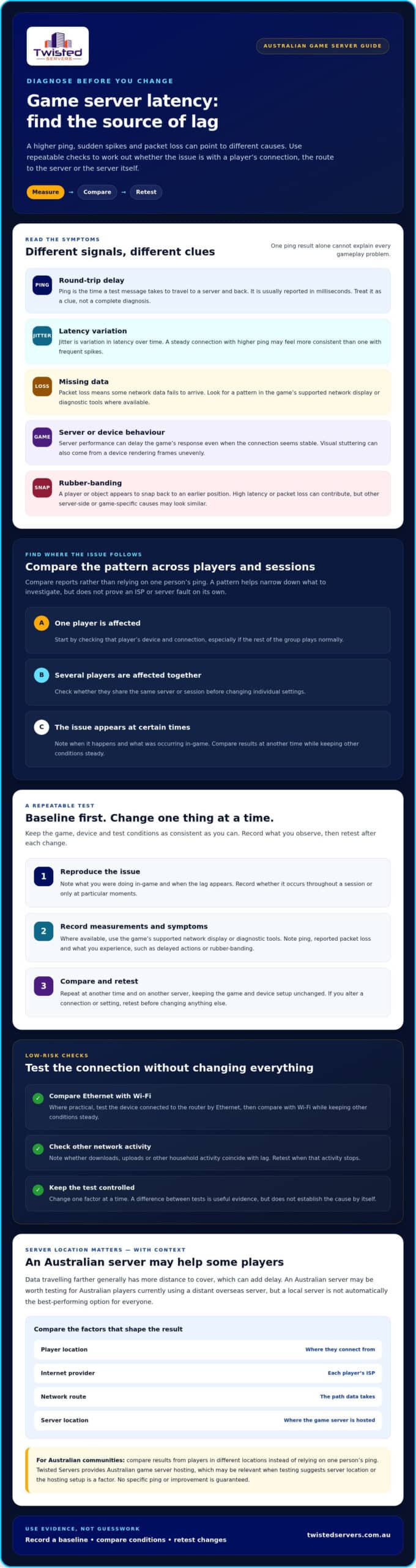
How to reduce game server latency with a practical test-and-change plan
A measured process helps you avoid changing game settings or hosting before you know what’s causing the delay. Work from the player’s connection towards the server, keep a record of each test, and change only one factor at a time. This makes it easier to see what helped, what made no difference and what to undo.
Run a controlled test and keep useful notes
Begin with a baseline during a session where the problem is happening. Record the game, server, approximate time, affected players, connection type, symptoms and any available ping or packet-loss readings. Repeat comparable tests after each change, rather than relying on memory. Use the game developer’s current documentation for supported test procedures and settings.
- Establish a baseline: Capture the same details before adjusting anything.
- Check the connection and route: Test a wired connection where practical, compare another server, and note whether the results change.
- Change one factor: Make a reversible adjustment, then repeat the same test under similar conditions.
- Keep or revert: Retain a change only if repeated tests improve the measured experience. Undo changes that don’t help.
This sequence keeps network checks ahead of game-setting or hosting changes. If you need broader help with symptoms beyond latency, use the separate guide to fixing game-server lag for general troubleshooting rather than changing several settings at once.
Know when a hosting change is worth assessing
Consider server location if your Australian players are connecting to a distant host, but first check whether the symptoms are limited to particular players or appear across the group. Compare server results and routing evidence before deciding that hosting is the cause. Australian infrastructure may reduce distance-related delay for some players, but results vary with player location, ISP, routing and server location.
If your repeatable tests point to the host or server arrangement, compare options using the same game and player conditions. Twisted Servers provides Australian game server hosting for multiplayer gaming. Review the available setup and location details against your community’s needs; a hosting change is worth considering, not a guaranteed latency fix. That evidence-led approach is a practical way to answer how to reduce game server latency australia without guessing.
When Australian game server hosting may help reduce latency
Australian infrastructure can be worth considering if your players are in Australia but connect to a server hosted overseas. A shorter geographic distance may reduce distance-related network delay, but it won’t guarantee a particular ping or fix every cause of lag. Player location, ISP, routing and the server’s location all affect the result, so compare measured performance rather than relying on location alone.
Separate the parts of the setup before deciding what to change. The game determines its own features and requirements; dedicated server software runs the game server; and the hosting provider supplies the infrastructure and any management included in its service. A change to hosting location won’t correct a player’s Wi-Fi issue, and new hardware won’t necessarily fix a poor network route.
Compare self-hosting with a hosted game server
With self-hosting, you’re responsible for arranging the server environment, configuration, monitoring and troubleshooting. A hosted option places the server on a provider’s infrastructure, but what setup and management are included varies. Confirm those responsibilities before choosing. If you’re considering a separate physical server, review the provider’s dedicated server hosting details and check that the service suits your game-server requirements.
Neither approach removes player-side latency. Each player’s connection and route to the server still matter. Twisted Servers provides game server hosting on Australian infrastructure, which may suit communities whose tests point to server location as a factor. Explore Australian game server hosting as an option to compare against your current setup, not as a guaranteed fix.
What to ask before choosing a hosting option
Before moving a server, ask where it will be hosted and whether that location suits the whole player group. Confirm that the provider supports your game, what server management involves, and which current terms apply. Check the game’s documentation for its server software and configuration requirements, then compare those needs with the provider’s stated service details.
Use your test notes to guide the decision: which players are affected, when symptoms occur, and whether other server locations perform differently. If connection and route checks don’t explain the issue and evidence points towards the host, compare Australian hosting with self-hosting on clear, current details. View Australian game server hosting options to assess whether the available information matches your community’s needs. That measured approach is more useful than changing providers simply because lag is present.
Make your next latency change evidence-led
The most reliable way to approach how to reduce game server latency australia is to measure first, then make one change and retest. Compare results across players, times and servers, and distinguish connection or routing issues from symptoms affecting the server. Keep what improves the measured experience; reverse changes that don’t.
Australian game server hosting may help if your tests suggest that a distant server is adding delay for players in Australia. It isn’t a guaranteed fix: player location, ISP, routing and server location all influence results. Twisted Servers offers quality shared and dedicated servers for multiplayer gaming, with Australian infrastructure as part of our game-server hosting. Dedicated expert support is available 24/7.
If your evidence points to hosting as a factor, explore Australian game server hosting and compare the available details with your community’s needs. You’ve got a clear starting point: test carefully, change thoughtfully and choose the setup that best fits your players.
Frequently Asked Questions
Can an Australian game server reduce ping for Australian players?
It can, particularly if players currently connect to a server much farther away. A shorter distance may reduce delay, but the result depends on each player’s location, ISP, network route and the server’s location. Compare ping and in-game symptoms on the current server and an Australian server under similar conditions. Treat the results as specific to your group, not a promise that every Australian player will see the same improvement.
Why is my ping high even when the game server is in Australia?
An Australian server doesn’t guarantee low ping. The route taken by your connection, your ISP, your location and local network conditions can all affect the result. Check whether other players on the same server have similar symptoms, and compare results at different times or on another server. If only your connection is affected, investigate your device and local network first. Use the game’s supported diagnostics and avoid drawing conclusions from one ping reading.
How can I tell whether lag comes from my connection or the game server?
Compare reports from players in the same session. If one player has trouble while others are unaffected, start by checking that player’s connection and device. If several players experience similar problems at the same time, investigate the server and shared network route as well. Record the time, server, symptoms and available measurements, then repeat the checks. This pattern helps narrow down the cause, but it doesn’t prove a fault without further evidence.
Does using Ethernet reduce game server latency compared with Wi-Fi?
Ethernet can provide a more consistent connection by avoiding some wireless interference and signal variation. It may help if your Wi-Fi connection is unstable, though it won’t fix a slow or indirect route to the server or a server-side issue. Test with Ethernet, then compare with Wi-Fi while keeping the game, server and other conditions similar. If the symptoms don’t change, look beyond the wireless connection before making further adjustments.
Can a VPN reduce latency when connecting to a game server?
Sometimes, but a VPN isn’t a guaranteed fix. It changes the route your traffic takes, which may improve or worsen the connection depending on the route and VPN endpoint. Compare the game’s ping and stability with and without the VPN under similar conditions. Keep the change only if repeated tests show a better result. If there’s no clear improvement, turn it off and continue checking the connection and server path.
What is the difference between ping, latency, and packet loss?
Latency is the delay as data travels between your device and the game server. Ping is a measurement of that delay, commonly reported in milliseconds, but one reading doesn’t explain every gameplay issue. Packet loss means some data sent across the network doesn’t arrive. It can contribute to disruptions, but similar symptoms may have other causes. Look at repeated readings and in-game behaviour together rather than treating ping as a complete diagnosis.
Should I change game server hosts to reduce latency?
Change hosts only after your tests suggest the server location or hosting arrangement is contributing to the problem. First compare players’ results, check the connection and route, and review available server information. Australian infrastructure may help Australian players connecting to a distant host, but outcomes vary with player location, ISP and routing. Twisted Servers offers quality shared and dedicated servers for multiplayer gaming on Australian infrastructure, with dedicated expert support available 24/7.
Disclaimer
Game titles, trademarks, logos and related assets are the property of their respective owners. Twisted Servers is an independent hosting provider and is not affiliated with or endorsed by the developers or publishers of the games mentioned unless otherwise stated. Information is provided as a general guide and may change as games, software and hosting services are updated.

