
Recommended Services


Supported Scripts


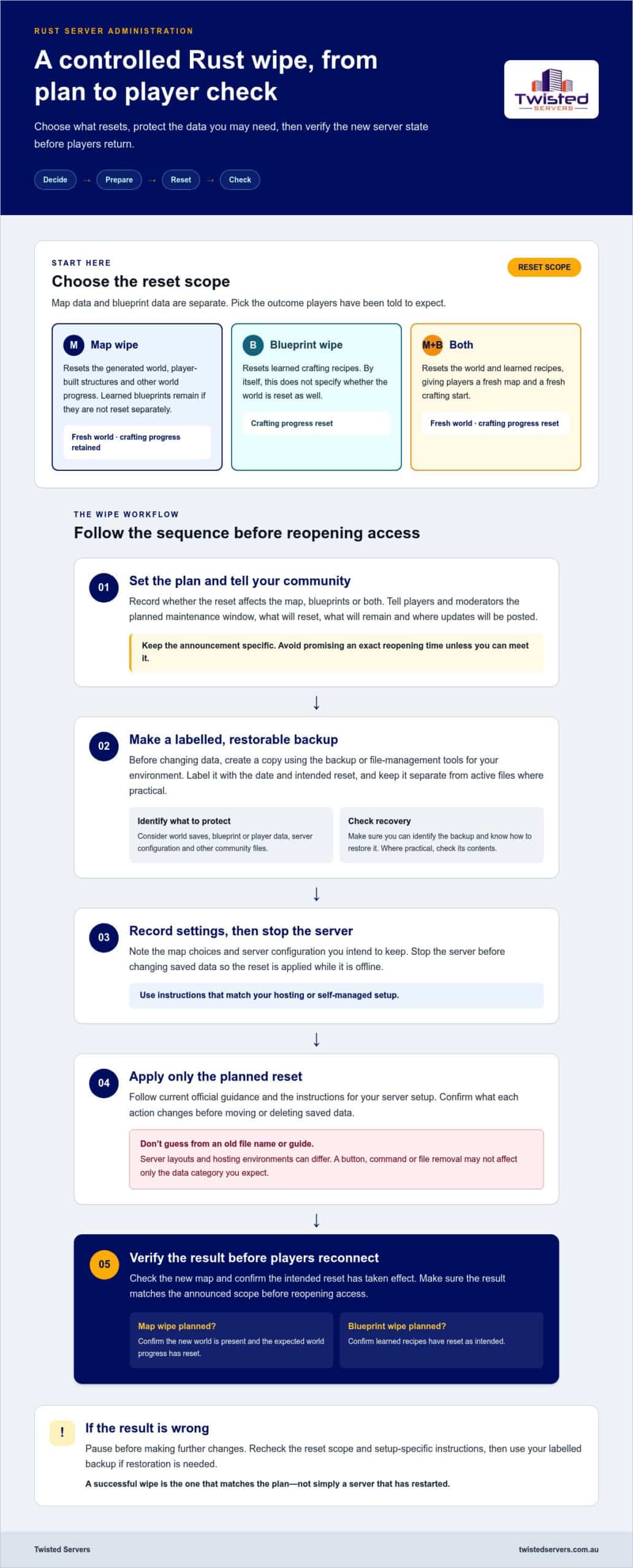
What should a Rust wipe remove, and what progress should your players keep? If you’re working out how to wipe a Rust server, choose the reset scope first. A map wipe resets the world while retaining learned blueprints if they aren’t reset separately. A blueprint wipe resets learned crafting recipes. You can also reset both.
A careful wipe starts with a restorable backup and a clear record of what you plan to remove. Stop the server before changing saved data, use instructions that match your setup, and check the result before players reconnect. This helps prevent a routine reset from removing settings or progress you meant to keep.
This guide covers how to choose between a map-only wipe and a blueprint wipe, prepare safely, apply the reset and verify the new server state. It also explains what to check if the old world appears to remain or players can’t reconnect.
Key Takeaways
- Choose a map wipe, blueprint wipe or both according to the progress you want players to keep.
- Before deciding how to wipe a Rust server, tell your community what will reset and when.
- Make a clearly labelled, restorable backup before changing server data, and stop the server before applying the wipe.
- Check the new map and confirm the intended reset has taken effect before reopening the server.
- Choose between self-managed and hosted administration based on the level of control you want. Australian hosting can reduce distance for local players, but routing and player location also affect latency.
What does wiping a Rust server reset: map, blueprints or both?
A Rust server wipe clears selected game data so players can start again, whether that means exploring a new world, resetting crafting progress or both. Admins may schedule wipes around community expectations, make a fresh start or respond to an update that requires a reset. The key is to decide what the wipe should affect: resetting the world does not automatically mean resetting blueprints.
A map wipe resets the generated world and player-built structures, while a blueprint wipe resets learned crafting recipes. Doing both resets the world and crafting progression. These reset types are described in Facepunch’s Rust wipe guidance. The outcome still depends on the data you reset and your server’s configuration, so follow current official instructions for your setup.
Map wipe versus blueprint wipe: what changes?
Consider map data and blueprint data as separate parts of the reset. A map wipe gives players a new world to explore and build in. A blueprint wipe removes learned recipes. Select the scope that matches what you have told players they can expect to keep.
- Map wipe: Resets the world, including player buildings and other world progress. Learned blueprints are retained if they aren’t separately reset. Choose this for a fresh map while preserving crafting progression.
- Blueprint wipe: Resets learned crafting recipes. On its own, this does not specify whether the world is reset too. Choose it when players should start crafting progression again.
- Both: Resets the world and learned recipes, giving players a fresh map and a fresh crafting start.
Don’t assume a particular button, command or file removal affects only one category. The result depends on the action and server setup. Before resetting anything, identify which data it affects. After the reset, verify that the result matches the plan.
When should a Rust admin wipe the server?
There is no single wipe schedule that suits every community. Some admins plan resets around player expectations; others wipe when an update requires it or when they want to make a deliberate change to the server experience. Rust updates can involve a forced wipe, so check Facepunch’s current update information instead of relying on an old calendar or assuming a fixed date.
Tell players the reason, timing and scope. For example, explain whether the next reset will replace the map only or remove learned blueprints too. Clear wording helps players plan and prevents a map reset from being mistaken for a full progression reset.
When deciding how to wipe a Rust server, start with the outcome your community wants: a new world with crafting knowledge retained, a blueprint reset, or both. Then choose a method that matches that scope and communicate it before the server goes offline.
Prepare your Rust server for a wipe without losing the wrong data
Preparation is what makes a wipe controlled rather than a guess at which files to remove. Tell players when the wipe is planned and exactly what will reset. Then make a backup you can identify and restore, and note the settings you intend to keep. Deleting data before confirming the scope can remove settings or player progress you did not mean to change.
Before a wipe, announce the timing and scope, create and label a restorable backup, record the settings you need to preserve, and verify the result before reopening access.
Back up the files you may need to restore
Use the backup or file-management tools available in your hosting or self-managed environment. Create a copy before changing data. Label it with the date and intended reset, and keep it separate from the active files where practical. A backup is useful only if you can identify what it contains and restore it.
First, list the data you need to protect, such as world saves, blueprint or player data, server configuration and other files your community relies on. Don’t act on a filename remembered from an old guide. Rust server layouts and hosting environments can differ, so consult current Facepunch documentation and the instructions for your specific environment before moving or deleting files. Where practical, confirm that the backup is accessible and contains the data you expect. If you can, test the restoration process in a safe environment.
Record settings and agree on the wipe plan
Write down the intended reset scope, map settings and relevant server configuration. This gives you a reference if a setting changes during the reset and helps moderators give players consistent information. Agree on the plan with moderators or other community stakeholders before making the announcement.
Be specific in the notice, but avoid promising an exact reopening time unless you can meet it. State the planned maintenance window, which progress will reset, what will remain and where you’ll post updates if the restart takes longer than expected. If the plan changes, update the same player-facing channels so players aren’t left with conflicting notices.
- Scope: Record which categories of game data the reset should affect.
- Settings: Note the map choices and server configuration you plan to retain or change.
- Recovery: Label the backup clearly and make sure you know how to restore it.
- Communication: Share the planned timing and reset details with players and moderators.
This preparation makes it easier to manage how to wipe a Rust server without confusing a reset with a wider cleanup. If you’d rather not manage the underlying server infrastructure yourself, Australian game server hosting is another way to run your community server. Twisted Servers offers Rust server hosting from $5.00 AUD per month.
How to wipe a Rust server safely, step by step
Use the same order for each wipe, while matching the reset action to the scope you chose. The controls differ between hosting environments, so don’t assume a panel button or a file operation you remember will behave the same way everywhere. Read the instructions for your setup before changing saved data.
- Announce the plan. Tell players the planned maintenance window and what will reset. Keep the notice clear, and update it if the timing or scope changes.
- Stop player access. Take the server offline using the controls available in your environment. Confirm it has stopped before changing saved data.
- Back up the current state. Create a restorable backup and label it clearly. Keep it separate from the files you’ll change so you don’t mistake it for active server data.
- Apply only the selected reset. Use the documented panel action or follow current server software instructions. Confirm which data the action affects before proceeding.
- Restore retained settings, then restart. Reapply or verify configuration you intend to keep. Don’t restore old world data if that would undo the wipe. Start the server and check its state before allowing players back in.
Wipe through a hosting control panel
Panel layouts and reset tools vary. If your hosting environment provides a wipe action, read its description and instructions to learn what data it changes. Don’t rely on a label such as “map reset” alone. If the documentation doesn’t make the scope clear, follow the documented file-management process for that environment rather than guessing.
After the reset, check that the intended data has changed and that the settings you chose to retain are still correct. A control panel belongs to the hosting environment, not to Rust itself, and you shouldn’t assume every host provides the same tools.
Wipe a self-hosted Rust server
For a self-managed server, follow the same stop, back up, reset and restart order. Before removing or replacing saved data, consult current Facepunch server documentation for the correct procedure and files. File names and locations can depend on the installation, so don’t copy an unverified path or command from an unrelated guide.
Keep the reset separate from configuration recovery. Restore only the settings and other data you intend to retain. Restoring an old world save can bring back the state you meant to clear. Leave the backup untouched until you’ve confirmed that the new server starts and the reset scope is correct.
Following a consistent process makes how to wipe a Rust server a controlled task rather than trial and error. Rust server software determines how saved data behaves. A hosting provider supplies the environment in which you manage it, and tools or instructions can differ between environments.
Check the new Rust map and fix common wipe problems
A restart alone doesn’t confirm that the wipe worked. Before reopening the server, confirm that it’s reachable and that the result matches the plan. Connect using the server’s usual access method, such as its listing or a direct connection, and compare what you see with the intended map and reset scope. If something doesn’t match, keep player access closed while you investigate.
- Confirm the server has completed startup and is available to connect.
- Check that the displayed map matches the intended map settings.
- Verify that the world and blueprint state match the selected wipe scope.
- Review current server logs for startup or update errors.
- Recheck relevant configuration before inviting players back.
Use current Facepunch documentation and the instructions for your hosting environment to check server status or interpret saved data. Don’t rely on old commands, paths or filenames from an unrelated guide. Those details can change, and deleting data without confirming what it contains may remove more than you intended.
The old map or progress appears to remain
Check which reset action you performed and whether the server restarted as documented. Then compare the result with the planned scope: a map-only reset and a blueprint reset affect different progress. If the map or player state appears unchanged, consult the saved-data instructions for your setup before making further changes.
A familiar landscape alone doesn’t prove that the old save is still active. Check the server’s displayed map information against the settings you recorded. If you find that the wrong data was removed, stop making changes and use your labelled backup to restore the affected state according to your environment’s instructions. Avoid deleting more files to force a different result.
The server does not return as expected
If players can’t connect, review the latest server logs and confirm whether the server software completed its update or startup process. Read the messages before changing settings, as a connection problem doesn’t identify its own cause. Compare the installed game-server version with current Facepunch update information, then check the configuration against current Rust documentation.
Investigate ports or network settings only with documentation for the server software and your actual hosting environment. Don’t copy values from an unrelated setup or change several settings at once. Record each change and retest so you can identify whether it resolved the issue.
When the map, reset scope and connection checks all match, reopen access and post a short status update for players. If you’d rather run your community on hosted infrastructure, explore Australian game server hosting from Twisted Servers.
Choose a repeatable Rust wipe process for your community
A repeatable wipe routine makes each reset easier to manage and gives moderators a record of what changed. Self-managed administration puts you in direct control of the server environment and its files. Hosted administration may suit you if you’d rather not manage the underlying infrastructure yourself. Choose based on how much access and hands-on control you want.
Whichever approach you choose, treat each wipe as a planned operation. Record the reset scope, date, map settings and post-wipe checks. Comparing the outcome with the plan helps you spot missed steps before the next cycle.
Keep wipe communication and records consistent
Use the community’s usual announcement channel so players can find the details in one place. State what will reset, what will remain and the planned maintenance window. If the timing changes, update the notice rather than leaving players to rely on outdated information.
For each cycle, record the decision, settings and verification result. A short entry might read “map reset, blueprints retained”, alongside the date and confirmation that the server returned with the intended map. Keep automation details specific to your environment, and use a dedicated map-cycle guide for deeper scheduling instructions.
When hosted Rust server management may suit you
Self-management suits admins who want direct control over server files and operations. Hosting is an alternative if you prefer not to manage the underlying infrastructure. Twisted Servers offers Rust hosting through its Australian game server hosting service, with Australian infrastructure and dedicated expert support available 24/7.
An Australian server can reduce the distance to Australian players compared with a distant overseas server, but latency also depends on each player’s location, internet provider and routing. Local infrastructure is a consideration, not a promise of a particular ping.
If hosted infrastructure fits the time and control your team wants to commit, explore Twisted Servers’ Rust hosting from $5.00 AUD per month. It lets you focus on your wipe process and community while your server runs on hosted infrastructure.
Set a clear direction for your next wipe cycle
A wipe routine should reflect how your community wants to play, not just what is easiest to reset. Before the next cycle, decide who owns the process, how players can share feedback and what would prompt a change to the usual plan. This gives moderators a shared reference as the community evolves.
Use this guide to decide how to wipe a Rust server, then set a process that fits your players and administration style. If managing server infrastructure is taking time away from running your community, consider hosted infrastructure so you can focus more on community decisions.
Ready to explore that option? Explore Australian Rust server hosting from Twisted Servers, with plans from $5.00 AUD per month.
Frequently Asked Questions
Can I wipe a Rust server while players are online?
No. Stop active play before changing world data, as players may still be creating or changing saved progress. Notify your community, then follow the current instructions for your hosting environment or self-managed server to stop access safely. Don’t assume a particular command or control-panel option applies to your setup. After the reset, check the map and intended wipe scope before players reconnect.
Does reinstalling a Rust server automatically wipe its map?
Not necessarily. Reinstalling server software and resetting saved world data can be separate actions. The outcome depends on the installation method or hosting panel. Before reinstalling, read its documentation to see which data will change or remain. Make a labelled backup first. After the server restarts, confirm that the map changed as intended instead of relying on the reinstall action alone.
Can I change a Rust map seed without wiping the server?
Changing the seed alone doesn’t guarantee a new map because map-generation settings can interact with existing saved-world data. Check current Rust server documentation for the process that applies to your setup, and back up the existing state before making changes. Follow the documented steps, then inspect the generated map before reopening access. If the old world remains, don’t delete additional files without confirming what they contain.
Why does my Rust server show the old world after a wipe?
Check whether the reset affected the intended save data, whether the server completed a restart and whether you selected the right reset scope. Compare the result with your wipe plan, then consult current Rust or hosting-environment documentation before changing files. Avoid deleting the whole server directory, as it may contain settings or other data you want to keep. If you removed the wrong data, recovery depends on having a usable backup.
Do Rust server updates always require a wipe?
No. A game update and a server wipe are separate actions, and an update doesn’t automatically mean the world must reset. The effect can depend on the specific update and your server configuration, so review current Facepunch announcements and server guidance before deciding. Back up the server before making changes, and tell players why a wipe is planned. This helps distinguish a required reset from a community choice.
When should I announce a Rust server wipe to players?
Announce it before the reset, with enough notice for your community to understand the plan and prepare. There’s no universal notice period that suits every server. Use the channel players normally follow, and state the planned timing and whether map progress, blueprints or both are affected. Confirm the reset behaviour for your chosen method before posting, and update the notice if the plan changes.
Disclaimer
Game titles, trademarks, logos and related assets are the property of their respective owners. Twisted Servers is an independent hosting provider and is not affiliated with or endorsed by the developers or publishers of the games mentioned unless otherwise stated. Information is provided as a general guide and may change as games, software and hosting services are updated.

