
Recommended Services


Supported Scripts
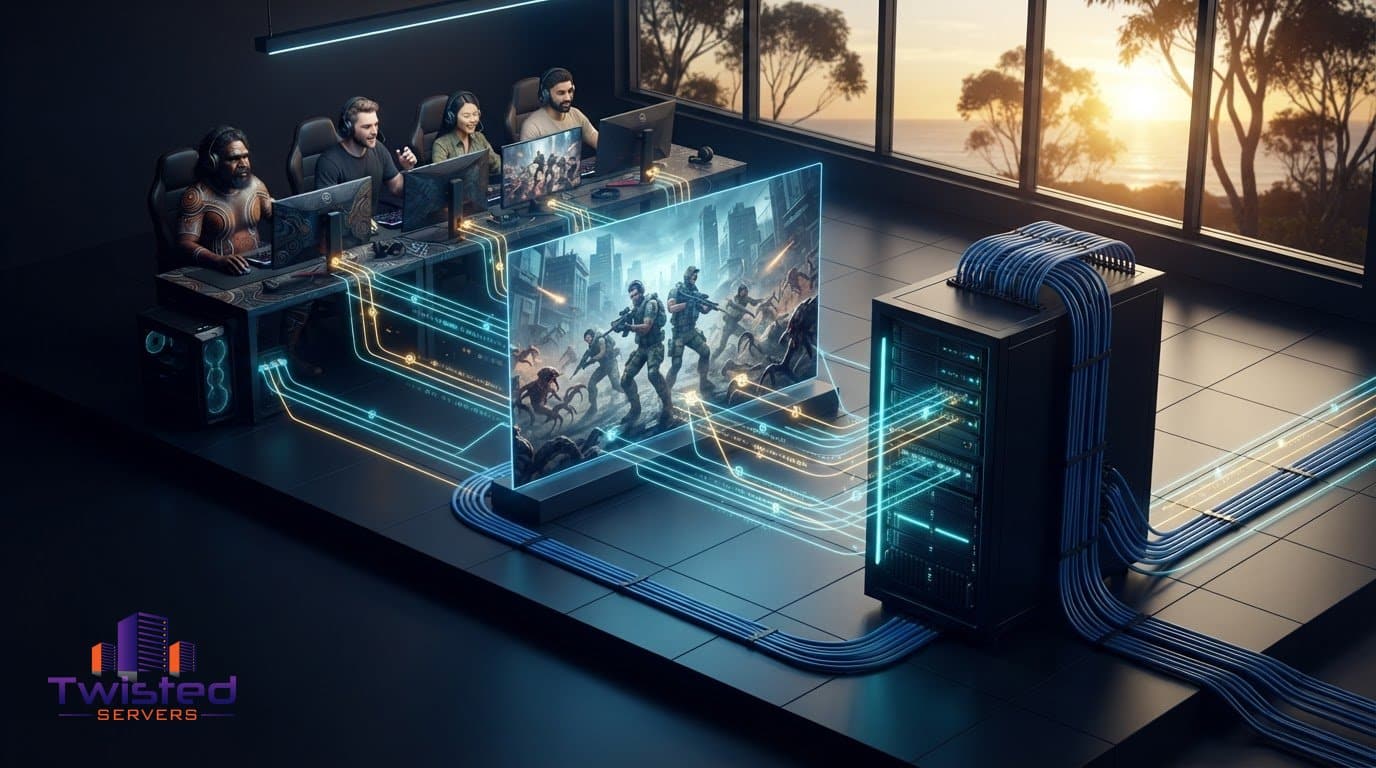

A missed parry against a charging Fleshpound isn’t a skill issue when you’re fighting 150ms of network latency. For Australian squads, relying on overseas game nodes quickly turns high-intensity Zed waves into a frustrating mess of rubber-banding, position desync, and sluggish map downloads. Getting reliable Killing Floor 2 server hosting on local infrastructure is the only real way to guarantee responsive hit registration and crisp Zed-time gunplay.
We understand how tedious it gets dealing with unoptimised ports, dropped connections, and twenty-minute wait times for custom Workshop maps. You shouldn’t need an enterprise IT background just to spin up a dependable co-op server for your friends. In this technical guide, you’ll learn how to deploy and configure a high-performance environment tailored for local players. We’ll walk you through the essential setup steps, from SteamCMD configuration to fast-download redirects and crash prevention, keeping your matches stable wave after wave.
Key Takeaways
- Discover how local Australian infrastructure eliminates desync and hit-registration lag during chaotic Hell on Earth wave spikes.
- Identify the core hardware demands of Unreal Engine 3, focusing on per-core CPU performance to prevent late-game tick rate drops.
- Learn to configure Steam Workshop integration and set up an external fast-download redirect to slash client map loading times.
- Evaluate the hidden power and networking pitfalls of home hosting against managed Killing Floor 2 server hosting built for stability.
- See how Twisted Servers delivers local performance, automated protection, and dedicated expert support from just $3.00 AUD per month.
The Importance of Low Latency for Killing Floor 2 Hosting in Australia
Network latency represents the round-trip time required for data to travel from your gaming rig to the server and back. In a high-octane co-op shooter like Killing Floor 2, every millisecond counts. High ping creates a delayed loop where your client predicts action locally, but the remote server disagrees when resolving incoming data. Connecting to US or European nodes from Australia forces packets across extensive undersea cables, easily pushing latency past 200ms. At that distance, hit-scan weapons miss targets and defensive timings crumble.
Precision combat mechanics suffer immediately under poor connection conditions. Key perk mechanics rely entirely on tight synchronisation:
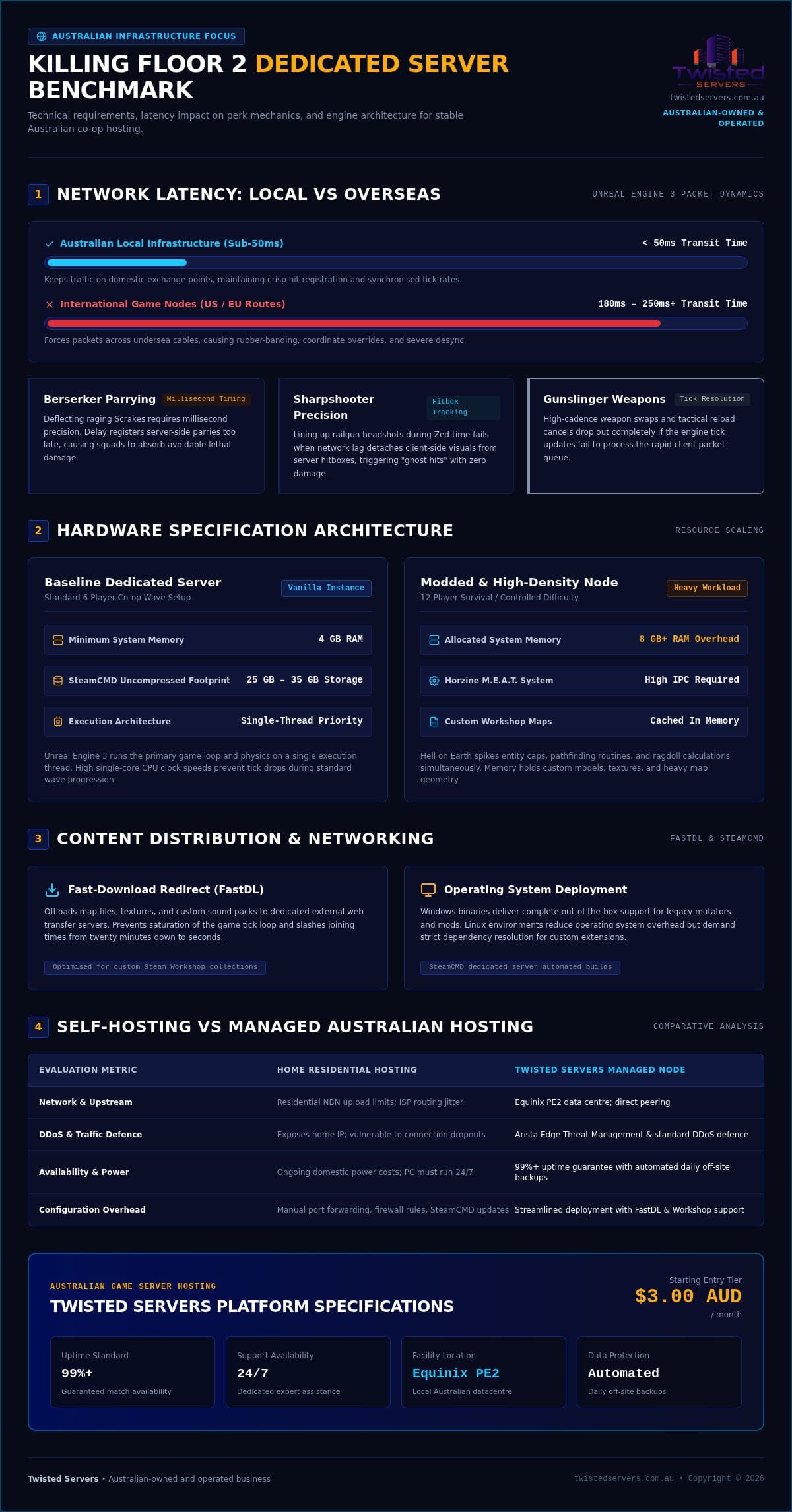
- Berserker parrying: Deflecting a raging Scrake requires strict millisecond timing. Delay forces your guard up too late on the server side, resulting in massive, avoidable damage.
- Sharpshooter precision: Lining up railgun headshots during Zed-time fails when the hitboxes lag behind visual models, causing frustrating “ghost hits” that deal zero damage.
- Gunslinger reloads: Rapid weapon swaps and reload cancels can drop entirely if the tick update misses your packet queue.
Choosing dedicated game server hosting based within Australia eliminates these bottlenecks, giving your squad responsive mechanics even during the chaotic final waves.
Understanding Desync and Rubber-banding
Desync describes a state mismatch where objects and players appear in incorrect positions between your screen and the server. When packet loss or lag spikes occur, the server overrides your local movement to match authoritative coordinate logs. This sudden correction produces rubber-banding, snapping your character backward mid-sprint. Premium Australian network routing minimises packet loss, ensuring that your dodges, jumps, and kite paths track accurately without sudden position corrections.
Why Local Infrastructure Wins for Competitive Co-op
Local infrastructure keeps ping times consistently low, typically delivering sub-50ms response times for national players compared to the punishing 180ms to 250ms pings seen on international game hosts. This massive drop in transit time keeps Unreal Engine 3 tick rates smooth. Partnering with an Australian-owned provider means your traffic stays on local exchange points rather than suffering erratic intercontinental hops. When custom game configs run into trouble, having access to local support teams that understand Australian ISP routing makes setting up reliable Killing Floor 2 server hosting simple and dependable.
Technical Requirements for a Killing Floor 2 Dedicated Server
Running an instance of Killing Floor 2 demands hardware tailored to the quirks of Unreal Engine 3. While a vanilla six-player lobby has modest entry requirements, intensive game modes push server resources hard. A baseline instance requires at least 4 GB of system memory and an uncompressed disk footprint between 25 GB and 35 GB via SteamCMD before installing workshop items. Operating systems also play a role; Windows binaries offer out-of-the-box compatibility with older mutators, whereas Linux instances use slightly less operating system overhead but demand strict dependency management for certain legacy extensions.
Single-core CPU clock speed dictates match stability. Killing Floor 2 dedicates its core game loop and physics calculations primarily to a main execution thread. During “Hell on Earth” difficulty, the server must calculate pathfinding, ragdoll physics via the Horzine M.E.A.T. system, and projectile trajectories for dozens of aggressive Zeds simultaneously. When clock speeds fall behind, server tick rates drop, triggering hit-registration delay even if your network connection is pristine.
RAM and CPU Considerations for Modded Play
Expanding your server beyond standard parameters quickly escalates system demands. Running custom 12-player Versus Survival lobbies or community mutators like Controlled Difficulty multiplies entity tracking calculations across every active wave.
- Entity density: Raising Zed caps forces the CPU to manage dozens of active AI routines at once, demanding strong single-thread IPC performance.
- Memory usage: High-resolution textures, custom character models, and complex custom maps stay cached in system memory, pushing RAM demands toward 8 GB or more on active community nodes.
- Resource flexibility: Using scalable hardware ensures you can allocate more processing cores and memory overhead without taking your community offline as player counts expand.
If you prefer skipping manual environment configuration, provisioning through our game server hosting gives you an optimised framework configured specifically for heavy Unreal Engine workloads.
Storage and NVMe SSD Performance
Fast disk read and write speeds are essential for keeping matchmaking flow seamless. KF2 servers constantly write match logs, track player stats, and swap substantial asset bundles as map votes conclude. Running your server on NVMe SSD storage reduces map transition screens from minutes to seconds, preventing player disconnects between rounds. Twisted Servers deploys fast, enterprise storage arrays across our local nodes so your rotation cycles quickly and map files stream without file system bottlenecks.
Managing Content: Steam Workshop and Fast-download Redirects
Community maps and mutators breathe extended life into Killing Floor 2, transforming the standard grind into entirely fresh survival scenarios. From custom wave counters to total conversion game modes, content customisation keeps squads returning each week. Handling dozens of custom packages requires deliberate setup, particularly for Australian players who face sluggish download pipes when connecting to unoptimised game servers. Balancing Steam Workshop automation with external distribution avoids the common headaches of failed asset syncs and stalled map rotations.
Setting Up Steam Workshop Integration
Automating mod downloads keeps administrative overhead minimal. By adding the specific Steam Workshop ID for your chosen items to your server configuration, the instance checks for updates every time it boots. Setting this up properly involves three key steps:
- Define subscription items: Add your target Workshop ID values under the dedicated Steamworks configuration block in
PCServer-KFEngine.ini. - Use one-click installers: Deploying complex mutators through supported control panels bypasses error-prone manual archive extractions.
- Curate synced collections: Organise map rotations cleanly in the map cycle configuration, ensuring clients fetch identical asset versions without causing local game cache conflicts.
This automated loop ensures your players pull verified files straight from Valve’s distribution network on server relaunch.
Optimising the Fast-download Redirect
Relying on standard in-game downloading creates massive connection bottlenecks. When a player joins a server running a 150MB custom map, sending raw asset packets directly through the Unreal Engine 3 game port caps transfer speeds to a trickle. This saturates the main game thread, generating lag spikes for everyone currently in combat.
Implementing a fast-download redirect solves this problem cleanly. By pointing the RedirectServerURL directive to an external HTTP server, clients download compressed .kfm and cache files through a dedicated web pipeline at full broadband speed. Pairing your instance with Twisted Servers web hosting keeps these redirect assets stored within local Australian facilities. This approach isolates file transfers from game traffic entirely, keeping ping steady for active players while newcomers pull custom maps in seconds. For smooth Killing Floor 2 server hosting, an external download mirror remains an essential operational upgrade.
Self-hosting vs Professional Australian Game Server Hosting
Spinning up a dedicated instance on a spare home desktop seems like an easy way to save money, but residential setups bring subtle complications. Most domestic NBN connections utilise dynamic IP addresses that shift periodically, disconnecting your lobby mid-game. Even worse, many Australian providers route residential connections through Carrier-Grade NAT (CGNAT). Under CGNAT, you share a public IP with dozens of other households, making port forwarding virtually impossible without paying extra for a static IP address. When a routine game patch breaks mod compatibility, troubleshooting alone late at night quickly drains the fun out of running a community.
Security risks add another layer of concern. Exposing your personal IP address directly to public server browsers leaves your local home network open to probing and script attacks. Without enterprise hardware firewalls to scrub unwanted traffic, your domestic modem is left to handle incoming malicious requests on its own.
The Hidden Costs of Self-Hosting
Running a gaming PC continuously draws noticeable wattage, and domestic Australian power tariffs quickly outweigh the perceived savings of a home build. Between continuous power consumption and hardware degradation from 24/7 operation, running a desktop rig in the corner of your bedroom costs far more over a year than dedicated hosting. Standard NBN plans also lack upstream DDoS mitigation, meaning a single flood of bogus packets will take down your entire household internet connection. In contrast, professional Killing Floor 2 server hosting with Twisted Servers delivers fixed pricing starting from just $3.00 AUD per month, providing predictable running costs without unexpected power spikes.
Security and DDoS Protection
Distributed Denial of Service (DDoS) attacks remain common in online gaming, where bad actors flood open ports with malicious UDP traffic to disrupt competitive matches. Standard consumer routers freeze under this pressure, dropping your entire squad offline.
Twisted Servers shields your gameplay using Arista Edge Threat Management alongside upstream network filters. This system analyses incoming traffic in real time, absorbing volumetric attack spikes and dropping junk packets before they ever reach your game process. Pairing managed DDoS defence with 24/7 dedicated expert support guarantees that your matches remain online and your personal network stays protected. Take the stress out of managing home hardware and deploy your Australian game server with us today.
Why Twisted Servers is the Choice for Killing Floor 2 in Australia
Choosing an Australian-owned and operated provider ensures your community benefits from local routing, transparent billing, and regional focus. Twisted Servers provides tailored Killing Floor 2 server hosting starting at just $3.00 AUD per month, making professional-grade performance accessible for casual squads and established gaming groups alike. By hosting hardware locally within the Equinix PE2 data centre, we ensure your game packets travel across direct domestic peering exchanges rather than congested international circuits. Our TCAdmin control panel takes the friction out of server administration, giving you full command over your startup parameters, config files, and map rotations through an intuitive interface.
Expert Support and Local Infrastructure
Technical hitches shouldn’t derail your weekend game nights. Because our team operates within local Australian time zones, you get dedicated expert support available 24/7 without waiting half a day for overseas ticket queues to open. Our local infrastructure guarantees direct routing paths across major Australian ISPs, keeping network jitter low and hit registration crisp across every match. If you have unique setup requests or need assistance configuring custom mutator chains, feel free to contact Twisted Servers to talk through your specific setup.
Scalable Solutions for Growing Communities
As your community expands from a private squad into an active gaming hub, your hosting environment needs the headroom to expand with it. We make scaling straightforward, offering seamless upgrade paths to keep up with player demand:
- Seamless tier migrations: Upgrade effortlessly from a standard plan to a high-capacity dedicated server when launching multiple modded lobbies.
- Generous transfer allowances: Dedicated options come equipped with 1TB of monthly data, easily accommodating heavy FastDL transfers and non-stop player traffic.
- Proven reliability: A 99% uptime guarantee ensures your server remains reachable, keeping your community active around the clock.
Combining local infrastructure with straightforward management gives your community the stability it needs to survive the toughest Zed outbreaks.
Take Command of Your Killing Floor 2 Server Today
Surviving Hell on Earth requires lightning-fast reflexes, clean hit registration, and dependable teammates. Sourcing local Killing Floor 2 server hosting removes the frustrating obstacles of high latency, missed parry windows, and sluggish map downloads, letting your team focus entirely on the fight. Routing your traffic through domestic nodes keeps every wave responsive from the opening pistol round right through to the boss encounter.
Twisted Servers is proud to be an Australian-owned and operated provider backed by a 99% uptime guarantee and Arista Edge Threat Management included on every setup. With dedicated expert support on standby around the clock, you’ll never have to struggle through broken configs alone. Ready to rally your squad and face the horde without compromise? Deploy your Killing Floor 2 server from $3.00 AUD/month and take your co-op sessions to the next level.
Frequently Asked Questions
How much does Killing Floor 2 server hosting cost in Australia?
Professional Killing Floor 2 server hosting with Twisted Servers starts at just $3.00 AUD per month. This entry pricing includes local hosting infrastructure, comprehensive DDoS defence via Arista Edge Threat Management, and access to dedicated expert support around the clock. Transparent monthly pricing ensures you get enterprise-grade gaming hardware without having to worry about surprise setup charges or fluctuating currency conversion fees.
Can I use custom Steam Workshop maps on my KF2 server?
Yes, you can easily run any custom map or mutator available on the Steam Workshop. By adding the specific Workshop item IDs to your server configuration files, your server automatically downloads and stages the newest files upon restart. Players connecting through Steam then retrieve those same map packages seamlessly, keeping your whole lobby synchronised without requiring anyone to install files by hand beforehand.
Do I need a dedicated server for Killing Floor 2 or is a VPS enough?
A VPS or shared game hosting environment handles standard six-player matches perfectly, offering plenty of resources for vanilla wave gameplay. However, if you plan to build a larger gaming community running 12-player Versus Survival lobbies or intensive mutators like Controlled Difficulty, upgrading to a dedicated server provides bare-metal execution power. Dedicated resources isolate your server instance, preventing background interference during chaotic late-game wave spikes.
What is a Fast-download redirect and do I need it?
A fast-download redirect offloads heavy custom assets, such as large custom map files, onto an external web server instead of pushing them through the game port. Without this redirect, players download files at a restricted transfer rate, leading to protracted load screens and noticeable lag spikes for everyone else mid-match. If your server runs custom community maps, setting up an external HTTP download link is essential for maintaining smooth connections.
Is there DDoS protection included with Australian KF2 hosting?
Yes, all game server instances with Twisted Servers include multi-layered DDoS defence and Arista Edge Threat Management as standard. This security setup analyses incoming packets in real time to filter out malicious volumetric UDP traffic before it reaches your game port. Having automated threat detection running quietly behind the scenes keeps your match online and safeguards your players from sudden distributed disruption attempts.
How do I parry effectively with high ping in Killing Floor 2?
Parrying on high latency requires predictive input rather than purely reactive timing, forcing you to initiate your block well before the enemy swing animation connects on your screen. When ping exceeds 100ms, the parry window registered by the authoritative server usually passes before your input arrives. The cleanest, most reliable fix is playing on local servers within Australia, keeping your round-trip times short enough for reactive melee blocking.
Can I increase the player slot count beyond 6?
Yes, you can raise player limits beyond the standard six-player co-op cap using community mutators like Controlled Difficulty or custom server binaries. Keep in mind that increasing active player slots significantly inflates AI pathfinding and physics overhead during intense waves. If you choose to host large-scale matches, ensure your hosting plan provides sufficient CPU clock speed and system memory to handle the extra calculations smoothly.
How do I update my Killing Floor 2 server when a new patch drops?
Updating your instance is simple using built-in SteamCMD integration inside your management dashboard. When Tripwire Interactive issues an official title update, restarting your server or executing an update task fetches the new binaries directly using SteamCMD App ID 232130. If an update temporarily conflicts with community mutators, our dedicated expert support is available 24/7 to assist with troubleshooting your configuration files.
Disclaimer
Game titles, trademarks, logos and related assets are the property of their respective owners. Twisted Servers is an independent hosting provider and is not affiliated with or endorsed by the developers or publishers of the games mentioned unless otherwise stated. Information is provided as a general guide and may change as games, software and hosting services are updated.

