
Recommended Services


Supported Scripts


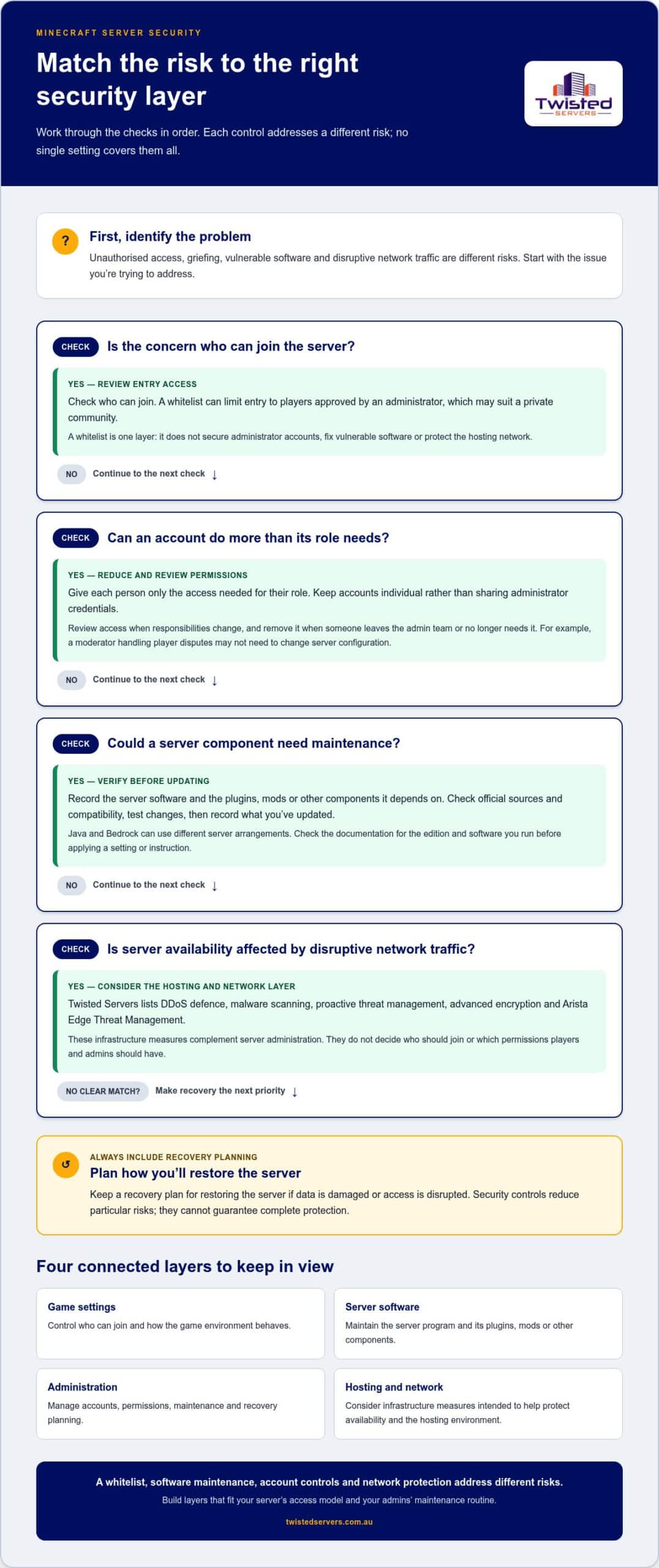
What should you secure first when your Minecraft server faces unauthorised access, griefing or disruptive traffic? There’s no single setting that handles every risk. Minecraft server security best practices rely on layers: careful access and permissions, updated server software and plugins, and protection around the hosting infrastructure.
It can be hard to know which steps matter most, especially when game settings, server software and hosting controls overlap. Start with three practical checks: review who can join and what they can do, record the software and components you run, and make sure you have a recovery plan. Hosting protections can help with infrastructure risks, but they don’t replace careful server administration.
This guide gives Australian Java and Bedrock server admins a prioritised checklist for reducing common risks, protecting accounts and planning for recovery. You’ll learn how to assess plugins and server software, understand where provider-side measures such as DDoS defence and malware scanning fit, and consider Australian game server hosting without assuming a particular ping or outcome.
Key Takeaways
- Use minecraft server security best practices to prioritise account access, software maintenance and recovery planning.
- Give each administrator only the permissions needed for their role, and review access when responsibilities change.
- Compare self-hosting and game hosting by weighing direct control against responsibility for infrastructure and network protections.
- Use a controlled update process: check official sources, review compatibility, test changes and record what you’ve updated.
- Choose a security routine that fits your community’s access model and the time your admins can commit.
Minecraft server security best practices: understand the risks and layers
Minecraft server security is a set of layered controls that reduces risks to access, software, player data and availability. It cannot guarantee complete protection. Each layer addresses a different weakness. A whitelist won’t fix an outdated server component, and network protection won’t stop an administrator account with excessive permissions from being misused.
A Minecraft server manages a shared game environment and the connections that let players join. Java and Bedrock can use different server arrangements, so check the official documentation for the edition and software you run before applying a particular setting or instruction.
Think of security in four connected areas:
- Game settings: Options that control who can join and how the game environment behaves.
- Server software: The server program and any plugins, mods or other components it depends on.
- Administration: Account protection, permission decisions, maintenance and recovery planning.
- Hosting and network: Infrastructure-level measures intended to help protect server availability and the hosting environment.
What does Minecraft server security cover?
Start by identifying what you’re protecting. Server configuration affects how the game operates; player permissions determine who can perform administrative actions; software components need maintenance; and the connected network can be exposed to disruptive traffic. These areas overlap, but they are not interchangeable. A game setting is not a substitute for maintaining server software, and a hosting protection does not decide which players should receive elevated permissions.
Controls reduce particular risks rather than removing every possibility of an incident. A private community may focus first on restricting entry. A server with plugins also needs a process for reviewing and maintaining those components.
Which risks should admins prioritise first?
Identify the type of problem before choosing a response. Unauthorised access concerns who can join or control the server. Griefing is unwanted in-game behaviour, such as a player damaging shared builds. A vulnerable component is a software risk that may be addressed through a verified update. Disruptive network traffic affects availability and calls for a different layer of protection. Avoid treating all of these as the same threat.
For a practical starting point, focus on steps that support day-to-day control and recovery:
- Review who can join and what each account is allowed to do.
- Record the server software and added components so you know what needs maintenance.
- Keep a recovery plan for restoring the server if data is damaged or access is disrupted.
Then assess whether your hosting setup adds relevant infrastructure protections. Twisted Servers lists advanced encryption, DDoS defence, malware scanning, proactive threat management and Arista Edge Threat Management. These measures complement administration rather than replacing it. Our Australian game server hosting is an option for communities considering hosted infrastructure. Access controls and software decisions remain part of running your Minecraft server securely.
Secure Minecraft server access with carefully managed accounts and permissions
Access controls help you decide who can enter the game and who can change how the server is run. Keep those decisions separate. A player may need permission to join without needing administrative access, and a moderator may need a limited set of tools rather than unrestricted control.
How should admins limit player and administrator access?
Use the principle of least privilege: give each person only the access needed for their role, and review that access when responsibilities change. Avoid sharing administrator credentials among staff. Individual accounts make it easier to manage access and identify which account needs attention if a credential is exposed.
Build a simple access review into your admin routine. Check who can join, who can administer the server, and whether each person still needs their current access. Remove access when someone leaves the admin team or no longer needs it. For example, a moderator who handles player disputes may not need permission to alter server configuration.
Don’t assume that a role or permission works the same way across every server setup. Check the documentation for your edition and software before changing commands or permissions. A dedicated permissions and admin-roles guide can provide more detail on role design, bans and command access. Keep those decisions tied to the tools your server actually uses.
Are whitelists and passwords enough on their own?
A whitelist is an entry control: it limits access to players approved by an administrator. It can suit a private community, but it doesn’t prevent every kind of disruption. It won’t secure an administrator’s account, correct a vulnerable software component or protect the hosting network from disruptive traffic.
For edition-specific instructions, use a trusted guide to creating a Minecraft server whitelist alongside the official documentation for the server software you run. Check how your chosen software handles the feature before applying steps, as setup details can differ. Treat a whitelist as one layer, not a complete security plan.
Passwords protect accounts and services that use password-based sign-in, such as an administrator’s email or hosting control panel. Use a strong, unique password for each relevant account, and don’t share it with players or moderators. A server whitelist and an account password do different jobs: one controls who may join, while the other helps protect access to an account. Don’t assume a password prompt is a standard Minecraft join control; confirm the authentication method in the software or service documentation.
Good minecraft server security best practices make access decisions clear and reviewable. Keep a short record of who has administrative access and why, then revisit it as your community changes. If you’d rather host outside a home network, Australian game server hosting is one option to consider. Player and administrator permissions still need your attention.
Compare self-hosting and Australian game hosting for Minecraft security
Choosing where to run your Minecraft server affects who manages the underlying environment, but it doesn’t remove your responsibilities as an admin. Home self-hosting gives you direct control over the equipment and network connection. Game hosting shifts some infrastructure responsibilities to a provider, while you continue to manage the game server and its settings.
Home self-hosting: You manage the host computer and its environment, including its network exposure. This can suit admins who want direct control and are prepared to maintain those layers.
Game hosting: The server runs on provider infrastructure. The provider may offer protections at that level, while you remain responsible for your Minecraft setup and administrative decisions.
This comparison separates general hosting considerations from the features documented by Twisted Servers.
| Area | Home self-hosting | Game hosting with Twisted Servers |
|---|---|---|
| Control | You manage the host and its environment directly. | Your Minecraft server runs on provider infrastructure; you remain responsible for game configuration and admin decisions. |
| Maintenance | You look after the host environment as well as the server software. | Some infrastructure responsibilities sit with the provider; you still maintain your server software and components. |
| Network protection | You manage the network exposure of a home-hosted server. | Twisted Servers lists provider-side protections that complement your own administration. |
What security work remains the admin’s responsibility?
Hosting doesn’t make an unsafe setting or outdated component safe. You still need to make informed choices about server software, plugins and configuration, and keep track of changes to your setup. Before adopting a change, use current documentation for your edition and software. Clear ownership matters too: admins should know who is responsible for maintaining the server and reviewing its configuration.
The key distinction is responsibility. A provider can manage aspects of its infrastructure, but your Minecraft administration remains a separate layer.
What can a hosting provider add to the security picture?
A hosting provider can add protections at the infrastructure level. Twisted Servers lists advanced encryption, DDoS defence, malware scanning, proactive threat management and Arista Edge Threat Management. These measures don’t decide which players you approve or how you configure your game server. Consider them alongside the administration work your community can maintain.
For Australian communities considering hosted infrastructure, Australian Minecraft game server hosting is one option. Server location may affect latency, but results depend on player location, ISP, routing and the server’s location. For performance topics, consult the Minecraft server optimisation guide separately. Performance tuning isn’t a security measure.
Maintain Minecraft server security with verified updates and recovery planning
Updates can close known weaknesses, but an update that conflicts with another component may disrupt your server. Use a controlled routine rather than changing several things at once. Check updates for compatibility with your server software and other components before deploying them. This makes it easier to identify problems and decide what to do if a change doesn’t work as expected.
Work through this sequence whenever you review a software change:
- Inventory your setup. Record the server software, plugins, mods and their current versions.
- Check official sources. Look for update notices and documentation from each project’s official source.
- Review compatibility. Confirm that the proposed versions work together and with your server edition.
- Test the change. Where you can, test in a safe environment before applying it to the live server.
- Document the result. Note what changed, when you changed it and any issues you observed.
These steps make updates easier to review and roll back if needed. Don’t assume a version is suitable just because it is newer. Check current documentation for the software and components you actually run.
How can admins review server software and plugins safely?
Keep a simple component register with each item’s name, version and official project source. Before installing or updating a plugin or mod, check its current documentation and compatibility details. If you can’t establish what a component does or where it came from, pause before adding it. Remove components you no longer use only after checking whether your server configuration or world depends on them.
Review changes as a set, not in isolation. A server update may affect whether a plugin or mod works as expected. Checking compatibility first, then testing and recording the change, helps you avoid turning routine maintenance into guesswork.
What should a Minecraft server recovery plan include?
A backup is useful only if it contains what you need and you know how to restore it. Use the current server documentation to identify the world and configuration data that matter for your setup. Set a backup routine that fits how often your world or settings change, and keep copies protected from unauthorised access.
Test restoration in a safe environment, rather than waiting for an incident to find out whether your files can be recovered. Record the recovery steps in a place authorised administrators can access, but keep credentials out of the instructions. Include where the relevant backup is stored, what it contains and who is permitted to carry out a restore.
These minecraft server security best practices connect maintenance with recovery: verify changes before applying them and plan how to return to a known working state. If you’re planning to host your server on Australian infrastructure, explore Australian Minecraft server hosting as part of your setup decision.
Choose a practical Minecraft server security plan with Twisted Servers
Choose a setup that your admin team can manage consistently. Consider how open your community is, how many people will share administrative duties and how much time you can set aside for upkeep. A private group with a small admin team may need a different operating plan from a community with several moderators and regular software changes.
Self-hosting gives you direct control over the host and its environment, along with responsibility for maintaining them. Game hosting moves some infrastructure responsibilities to the provider, while you still manage the Minecraft server itself. The practical choice is the one that fits your team’s skills and makes ownership of each task clear.
When might Australian game server hosting suit your community?
Hosting may suit admins who prefer not to run the server on a home computer or take responsibility for its hosting environment. Twisted Servers lists Minecraft Java and Minecraft Bedrock hosting, giving communities options for their chosen edition. Both start at $2.00 AUD/month. Before deciding, consider whether your team can maintain the game configuration and follow a routine for reviewing changes. Hosting can change where infrastructure responsibilities sit, but it doesn’t remove the need for an admin plan.
What security protections does Twisted Servers list?
Dedicated expert support is available 24/7 for hosting-related questions. Consider these alongside the tasks your admins will continue to manage, and decide whether that division of responsibility suits your community.
If hosted infrastructure fits your plan, explore Australian game server hosting for your Minecraft community. A clear division of responsibilities can help your team maintain a practical approach as the server and its needs change.
Make security part of your server routine
Turn your plan into a routine your admin team can maintain. Assign clear ownership for reviewing access, checking software changes and keeping recovery instructions current. Revisit those responsibilities when your community changes, an administrator joins or your server setup is altered. A brief review helps keep decisions clear as the community grows.
The minecraft server security best practices that suit your community are the ones you can apply consistently. Start with a manageable approach, then adjust it as your server and admin capacity change. Your choice of hosting setup can shape which infrastructure tasks you manage directly.
Twisted Servers lists Minecraft Java and Minecraft Bedrock hosting for Australian communities considering hosted infrastructure. Explore the options and decide whether they fit the way you want to manage your server: Explore Australian game server hosting.
With clear ownership and a routine your admins can sustain, you can keep building a welcoming community with confidence.
Frequently Asked Questions
Is a Minecraft whitelist enough to secure a server?
No. A whitelist is one of the minecraft server security best practices, but it only limits who can join. An approved account may still be misused, and the list needs upkeep. Review entries when community membership changes, remove access that’s no longer needed, and record who approved additions. This makes access management an ongoing process, but it won’t protect unrelated software or network layers.
Can a Minecraft server be secure without using plugins?
Yes, if the server software and edition you choose provide the functions your community needs without add-ons. Running fewer components can reduce compatibility and maintenance work, but it doesn’t make the remaining software or configuration automatically safe. Before deciding, list the features you rely on, check whether they’re available in your current setup, then consult official project documentation for relevant security guidance.
How do I protect a Minecraft server from DDoS attacks?
Choose hosting with documented network-level protections suited to disruptive traffic, and treat them as risk reduction rather than a promise of uninterrupted access. If you self-host, don’t copy generic router or firewall rules without checking your setup. A change intended for one network can disrupt another. Consult the documentation for your router, server software and internet service before changing network settings.
What happens if a Minecraft server is compromised?
If you suspect compromise, treat it as an incident rather than immediately deleting files or reinstalling. Use authorised controls to limit further access, note what changed and when, and preserve relevant records for review. Identify affected accounts and components, consult official guidance for your software, and restore only from a backup you trust. After containment, review the cause before reopening access.
Should I host a Minecraft server at home or use a hosting provider?
Home hosting suits you if you want direct control and can maintain the host, network and game server. A provider may suit you if you prefer to run the server on hosted infrastructure rather than administer a host computer at home. Before deciding, name who’ll handle updates, access reviews and recovery in either setup. An Australian server location doesn’t guarantee a particular connection quality.
Do Minecraft server updates improve security?
They may, but check release notes rather than assuming every update addresses a vulnerability. Compare the target version with your server software and any add-ons, then plan how to return to the previous working state if needed. Follow the affected project’s official instructions for security advisories, and don’t apply a fix intended for a different edition. Keep a record of the version you install.
Disclaimer
Game titles, trademarks, logos and related assets are the property of their respective owners. Twisted Servers is an independent hosting provider and is not affiliated with or endorsed by the developers or publishers of the games mentioned unless otherwise stated. Information is provided as a general guide and may change as games, software and hosting services are updated.

