
Recommended Services


Supported Scripts


A useful Palworld server settings guide helps you make deliberate changes without guessing what an option does or whether it took effect. Settings affect everyone sharing the world, so check the current guidance for your game version before editing and avoid copying an old preset without understanding it.
Start by recording the game version and current configuration. Then change one setting at a time, follow the instructions for your setup, and check the result before making another adjustment. This makes it easier to identify the cause if the server behaves differently than expected.
This guide covers what to check, how to test changes and common configuration mistakes. Twisted Servers hosts Palworld game servers in Australia, with hosting listed from $7.00 AUD/month. Australian infrastructure may reduce latency for Australian players compared with a distant overseas server, although results depend on each player’s location, internet service provider and network routing.
Key Takeaways
- Check current official Palworld information for your game version before changing a setting.
- Keep game settings, dedicated-server software and hosting features distinct. Each controls a different part of the setup.
- Record the current configuration, change one item at a time and test the result.
- Discuss proposed changes with your players, then review any unwanted effects before keeping them.
- Choose self-hosting or a hosted server based on the administration work you want to manage. Latency depends on player location, ISP and routing.
Palworld server settings: what to check before making changes
Palworld server settings are options that shape how a multiplayer world runs. Before changing one, confirm what it controls and whether it applies to your server version. A setting that seems minor can affect the shared experience, so make decisions with your players in mind rather than treating a copied configuration as a universal preset.
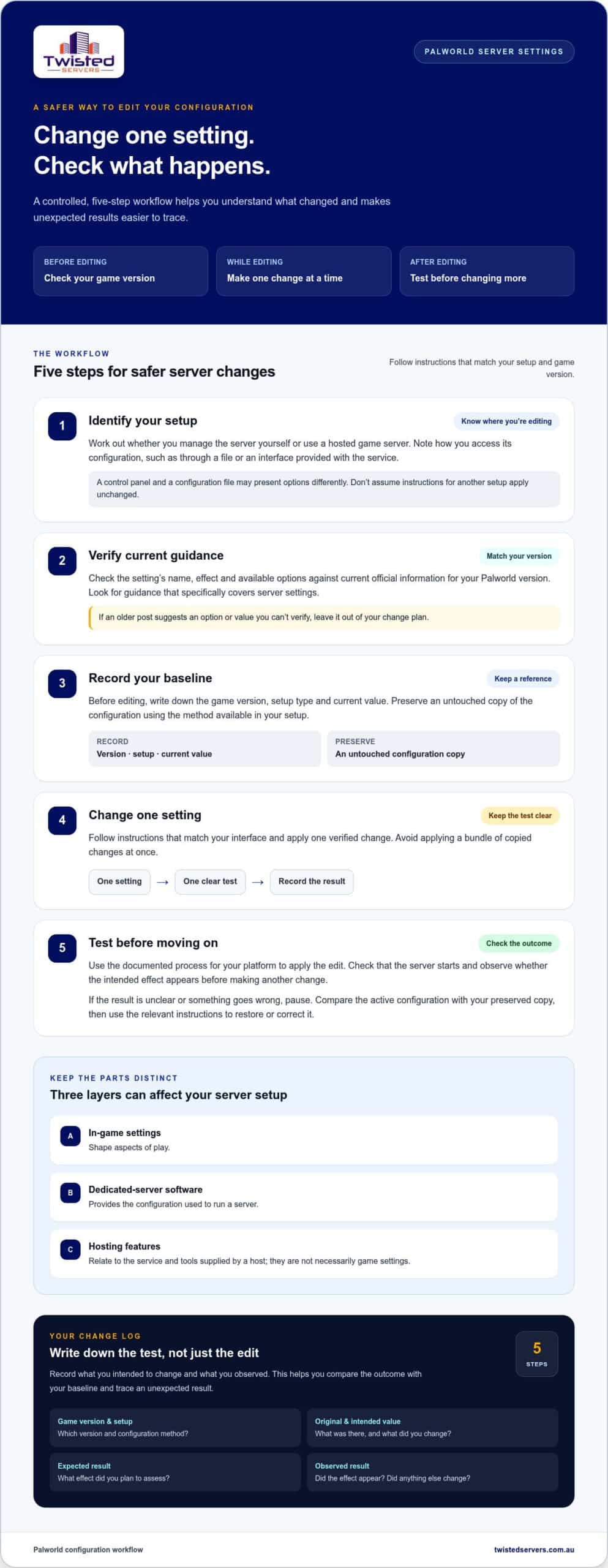
Keep three layers separate. In-game settings shape aspects of play. Dedicated-server software provides the configuration used to run a server. Hosting features relate to the service and tools supplied by a host. A control panel may display options differently from a configuration file, and a hosting feature is not necessarily a game setting.
Record your game version, the current value and where you accessed the setting. Add what you intend to change and what result you expect to test. This gives you a baseline to compare against and makes it easier to reverse an edit if the outcome is not suitable.
Which Palworld server setup are you configuring?
First work out whether you manage the server yourself or use a hosted game server. Identify how you access its configuration, such as through a file or an interface provided with the service. Instructions can differ between setups, so follow steps that match the platform and tools you actually use. If a tutorial shows a different interface, don’t assume its directions will apply unchanged.
Why verify the current Palworld settings reference?
Available options and their behaviour can change between game versions. Check current official Palworld information for your version, then compare it with the settings available in your server setup. The Palworld Wikipedia page provides general background, but it is not a server configuration reference. Use documentation that specifically covers server settings when verifying an edit.
When an older post suggests an option or value you can’t confirm, don’t treat it as a reliable instruction. Leave it out of your change plan until you can verify what it does and whether it applies to your version.
- Before editing: record the current values and game version.
- Before following a tutorial: check that it matches your setup and version.
- Before applying a suggested value: verify its effect and valid options in current documentation.
This preparation gives you a baseline for finding the right configuration method and evaluating each change.
How to find and edit Palworld server settings safely
The right way to edit a Palworld server depends on how it is hosted and what access your setup provides. Use this workflow to keep changes controlled without assuming a particular control panel, file location or operating system. Check that any instructions you follow match your setup and game version.
- Identify your setup. Establish whether you manage the server yourself or use a hosted game server. Note how you access its configuration.
- Check current guidance. Verify the setting’s name, effect and available options against current official information for your version. The Official Palworld Website is a starting point for information about the game. Look for server-specific guidance rather than assuming general game information covers configuration.
- Record your baseline. Note your game version, setup type and the setting’s current value. Preserve an untouched copy of the configuration using the method available on your platform.
- Change one setting. Follow instructions that match your interface. Avoid applying a bundle of copied changes at once.
- Test the change. Use the documented process for your setup to apply the edit. Check that the server starts and observe whether the intended effect appears before changing anything else.
Changing one setting at a time makes it easier to trace an unexpected result. If you adjust several options together, you may not know which edit affected the game or server.
Record a baseline before editing
Keep a short change log with the game version, setup type, original value, intended value and expected result. Describe what you want to assess rather than assuming an option will produce a particular outcome. Save the original configuration separately from your working copy, using the backup or export method available in your setup.
Apply one change and check the result
Apply the edit using the documented process for your platform, then check that the server is running and the relevant behaviour has changed. If the result is unclear or something goes wrong, pause before making more edits. Compare the active configuration with your preserved copy and use the relevant instructions to restore or correct it.
Record what you observed, including whether the intended effect appeared and whether anything else changed. This gives you a useful reference for the next adjustment and can help distinguish a configuration issue from a version mismatch or another server problem. If you’d rather not manage the server environment yourself, explore our Australian game server hosting.
How to choose Palworld settings for your players and play style
There is no single configuration that suits every Palworld community. A group looking for a relaxed shared world may want a different pace from players who prefer a more demanding experience. Ask your players what matters to them, then compare those priorities with options documented for your current game version. Treat the table below as a discussion aid, not a preset to copy.
Before changing a setting, verify its name, effect and available values in current documentation. The Game Developer analysis of Palworld mechanics offers broader context about the player experience, but it is not a server configuration reference.
Match verified options to your community
Agree on what you want to adjust: progression, challenge, accessibility or the pace of a session. Find documented settings that directly relate to that goal and discuss the trade-offs with your players. Avoid assuming that a particular value will suit everyone. Test proposed changes separately so feedback relates to a specific adjustment.
| Setting | Documented effect | Admin consideration | Verification status |
|---|---|---|---|
| Progression-related setting | Check the current documented effect. | Discuss how quickly the group wants progression to feel. | Verify the setting name, effect and valid values for your version. |
| Capture-related setting | Check the current documented effect. | Discuss how accessible or challenging players want capture to feel. | Verify the setting name, effect and valid values for your version. |
| Egg-related setting | Check the current documented effect. | Consider how waiting fits your group’s play schedule. | Verify the setting name, effect and valid values for your version. |
| Death-related setting | Check the current documented effect. | Agree on a challenge level the community is comfortable with. | Check the current documentation for its precise effect and options. |
| Day and night settings | Check the current documented effect of each option. | Discuss how quickly your players want time in the world to pass. | Verify each setting’s behaviour and valid values before editing. |
Separate setting effects from performance claims
A gameplay setting’s documented effect does not, by itself, show whether it will change server performance. Don’t infer CPU or memory use, player capacity or world-size effects from a setting’s name or an older community post. If reliable current documentation does not confirm a performance impact, treat it as unknown and test cautiously.
Use the table to guide discussion, then check current documentation for your version before making a change. A suitable configuration is one your community understands, agrees to test and can review if the result does not meet expectations.
Test, troubleshoot and maintain your Palworld configuration
A setting change is only useful if the server starts and the intended effect is visible to players. For each edit, apply it using your platform’s documented process, start the server, observe the result and record what happened. Then decide whether to keep or reverse the change. A clear history is more useful than a series of edits with uncertain effects.
- Apply: confirm the edit has been saved through the method your setup uses.
- Start: follow current instructions for bringing the server online.
- Observe: check for the intended gameplay change and any new symptoms.
- Record: note when you made the change and what you observed.
- Decide: keep it if it works as intended, or revert it if it appears linked to a problem.
Diagnose unexpected behaviour methodically
Write down the setting you changed, when you applied it and what players noticed. If a new issue appears after an edit, compare the server with your recorded baseline and consider reverting the latest change using the procedure for your platform. Check whether the symptom remains before trying another adjustment. This is a useful comparison, though it does not prove the setting caused the issue.
Compare the active configuration with your notes and current Palworld guidance. Startup problems may relate to configuration or the application, while connection trouble can also involve a player’s network or the hosting environment. Check whether the game and server software versions match the relevant guidance. Don’t rely on a specific log, command or file location unless current instructions for your setup support it.
Keep settings aligned with game updates
After an update to Palworld or its server software, review the official release information and server guidance before assuming your configuration still behaves the same way. Look for stated changes to setting names, accepted values or configuration handling. Retest the options that matter to your community and record the version alongside the results.
Separate confirmed update information from older forum posts or reports you can’t verify. Community comments can suggest what to investigate, but they are not proof that an update changed a setting or that a suggested fix will work. If current official guidance does not resolve the question, leave the behaviour marked as uncertain instead of adding more changes to a live world.
Keep the version, change, test result and decision together in your records. If you’d prefer to spend less time managing the server environment, explore our Australian game server hosting. Dedicated expert support is available 24/7.
Choose a Palworld hosting approach that suits your admin workload
Choosing between self-hosting and a hosted game server depends on how much responsibility you want to take on, how much control you need and who will manage the server environment. Either way, someone needs to make configuration decisions, check that the server is working as intended and respond to player reports. Consider your community’s needs and the time its admins can commit.
Self-hosting and hosted servers: what changes for admins?
With self-hosting, you manage the server environment as well as the game configuration. This may suit admins who want direct responsibility for setup and ongoing maintenance. With a hosted server, the provider supplies game-server hosting, while you still make community decisions about settings and play style. The division of work depends on the service, so don’t assume the provider manages every aspect of administration.
List the recurring tasks your group is prepared to handle. Consider who will apply configuration changes, check the server after updates, investigate access problems and explain changes to players. Then compare that workload with the access and support available through a hosted service. Base your decision on the service details rather than assumptions about its control panel, backups or other features.
When Australian hosting may fit your Palworld community
If most of your players are in Australia, an Australian server may reduce latency compared with a distant overseas server. Latency is the delay in communication between a player’s device and the server. It varies with location, internet service provider and network routing, so an Australian server cannot guarantee a particular ping or the same result for every player.
Twisted Servers hosts Palworld game servers in Australia, with listed hosting from $7.00 AUD/month. Compare the responsibilities of each hosting approach with your group, decide how much server administration you want to manage, and verify settings for your game version. Keep a record of your configuration so you can review it as your community’s needs change.
Use this Palworld server settings guide as a starting point, not a fixed recipe. Agree on the experience players want, decide who will manage the server, verify settings for your version and test changes deliberately. If hosted game-server administration better suits your workload, explore our Australian game server hosting.
Set up a world your community can grow with
Turn your players’ priorities into a configuration you can maintain. Agree on who will manage settings and updates, keep a clear record of decisions and review them as your group changes. Use this Palworld server settings guide as a starting point, then let player feedback and careful testing shape what you keep.
If you’d rather spend less time managing the server environment, hosted game servers offer another approach. Decide which administrative tasks you want to handle yourself and compare that workload with the hosting service before choosing what suits your community.
Explore Australian game server hosting for Palworld hosting listed from $7.00 AUD/month. Twisted Servers hosts Palworld servers in Australia, and dedicated expert support is available 24/7.
Frequently Asked Questions
How do I change settings on a Palworld dedicated server?
The method depends on how your server is hosted and how its configuration is accessed. Follow current instructions for your setup and game version. Before editing, record the current configuration and preserve an untouched copy. Don’t change a reference file or use a file path from a tutorial unless the instructions confirm it applies to your setup.
Which Palworld server settings should I change first?
Start with the issue players raise most often, rather than copying a popular preset. Ask whether the concern is progression, challenge or session pace, then use current official information to identify an option that relates directly to it. Explain the proposed change to players and test it separately so their feedback focuses on that adjustment.
Do Palworld server settings change after game updates?
An update may affect settings or configuration handling, but don’t assume it requires a full rebuild. Check the release information and server guidance for your version for any stated changes. Keep a copy of your configuration with its game version noted, and don’t assume guidance for an earlier release applies to every later update.
Can players on different platforms join the same Palworld server?
Cross-platform access depends on the platforms and server configuration supported by the current game version. Check official Palworld information for the specific platform combination your group uses. Test with a player on each platform before promising that the wider community can join the same server.
Can you use mods on a Palworld dedicated server?
Mod compatibility can depend on the game version, server software and players’ platforms. Don’t assume a mod that works in single-player will also work on a dedicated server or that every player can join with it installed. Check current official information and relevant server documentation before planning a modded world. Treat compatibility as unverified if reliable guidance does not confirm it.
Is an Australian Palworld server better for Australian players?
An Australian server may be worth considering if most of your regular players connect from Australia. The effect on latency varies with each player’s location, internet service provider and network routing, so it cannot guarantee a particular ping. Consider where your community plays from and gather feedback from regular players when choosing a server location.
Disclaimer
Game titles, trademarks, logos and related assets are the property of their respective owners. Twisted Servers is an independent hosting provider and is not affiliated with or endorsed by the developers or publishers of the games mentioned unless otherwise stated. Information is provided as a general guide and may change as games, software and hosting services are updated.

