
Recommended Services


Supported Scripts

What if the server software that seems fastest isn’t the right fit for your community? The paper vs spigot vs fabric server choice starts with compatibility: Paper and Spigot support Bukkit plugins, while Fabric uses a separate mod loader. If your essential add-ons aren’t supported by the software you choose, performance claims won’t solve the problem.
Conflicting advice about speed and compatibility is common. The right option depends on what you want players to do, which plugins or mods you plan to run, and whether you’re starting fresh or changing an established world.
This guide compares Paper, Spigot and Fabric by add-on support, gameplay goals and practical trade-offs, without treating broad performance claims as guarantees. You’ll learn what to check before setup or migration, including software and game-version compatibility, client-side mod requirements and backups. If you’re planning a hosted Minecraft Java server, these checks can help you choose a setup that suits your community and avoid preventable disruption.
Key Takeaways
- Start with your gameplay goal and required add-ons to narrow down the right server software.
- Compare paper vs spigot vs fabric server options by compatibility and administration, not broad performance claims.
- Check that each plugin or mod supports your Minecraft version, and whether players need matching client-side mods.
- Use a step-by-step selection process to weigh plugin-led, modded and mostly vanilla setups.
- Consider Australian game hosting if you want to avoid maintaining an always-on home server. Latency depends on player location, ISP and routing.
What Minecraft server software does, and why Paper, Spigot and Fabric differ
Minecraft server software runs a shared multiplayer world, processes player actions and determines which server-side add-ons can run. Paper, Spigot and Fabric are separate software projects, not hosting plans. Choose between them by identifying the gameplay and add-ons your community needs, then checking version compatibility and how you’ll manage the server.
Think of server software as the tools operating the world, and hosting as the environment where that software runs. You can run a server on a computer you manage or use Minecraft game server hosting to host it away from your home setup. Hosting won’t make an incompatible plugin work, and a software project’s features aren’t automatically features of the hosting provider.
What separates server software from game hosting?
Server software affects game behaviour, add-on support and configuration. Hosting supplies the machine and network environment. Performance depends on the software, configuration, workload and hosting environment together, so a claim about one server core isn’t a guarantee for every community. A Minecraft server optimisation guide can help you assess settings and workload alongside your software choice.
Paper and Spigot are Java Edition server projects that support Bukkit-based plugins. Fabric is a mod loader with a different add-on path. That distinction affects what players experience and what you’ll need to install or maintain. Before comparing performance, list the add-ons your world depends on and confirm they support your chosen software and Minecraft version.
Plugins and mods are different compatibility paths
A plugin generally adds or changes server functions, such as administration tools or gameplay features. A mod can alter or extend the game itself, and may need to be installed by players as well as on the server. The wider history and client-versus-server distinctions are outlined in Minecraft modding.
For example, if your community needs a particular Bukkit plugin, check its supported server software and version before choosing Paper or Spigot. If you’re building a modded world, check Fabric support and each mod’s installation instructions, including whether players need the same mod on their clients. Don’t assume every plugin runs on every plugin-based server, or that a mod can be used as a plugin.
- Gameplay: Decide whether you want a mostly vanilla world, server-side plugin features or modded content.
- Add-ons: List must-have plugins or mods and check their stated compatibility.
- Version: Match the software, add-ons and Minecraft version before setup or migration.
- Administration: Consider the configuration and ongoing add-on maintenance your setup requires.
This order keeps the decision practical: choose software that fits your world first, then assess performance using your actual configuration and expected workload.
Paper vs Spigot: compare plugins, performance claims and compatibility
Paper and Spigot both support Bukkit-based plugins, but compatibility should be your first test, not an assumption. Choose between Paper and Spigot by checking whether your required plugins support your exact server software and Minecraft version before comparing performance.
Use this comparison to guide your checks:
Intended use: Both can suit plugin-led Java Edition servers. Your required add-ons and the project’s supported versions help determine the fit.
Add-on compatibility: Spigot plugins may work on Paper, but don’t assume every plugin behaves identically on both. Check plugin documentation and any Paper-specific requirements.
Administration: Both need configuration and plugin maintenance. The work depends on the features and add-ons you choose, not the server name alone.
Performance evidence: Look for tests that disclose the Minecraft version, software build, hardware, configuration, plugins and workload. Results from a different setup may not predict yours.
Performance is shaped by the world, player activity, plugins and configuration as well as the server software. A fair comparison keeps the environment and workload steady, then measures the result. For example, a test using different plugins or settings can’t isolate the effect of switching from Spigot to Paper. Treat broad claims as a reason to investigate, not as a promise about what your community will experience.
When does Paper make sense for a plugin-led server?
Paper is worth considering if your server relies on Bukkit plugins and the features you need are compatible with its current build. Paper-specific settings or behaviour may matter to some plugins, so read the project’s current documentation and the plugin author’s requirements. If performance is your reason for choosing Paper, test your intended configuration and workload rather than assuming the change guarantees an improvement.
Paper is related to Spigot, but that doesn’t make their plugin support interchangeable in every case. Check the project documentation for the Minecraft version you plan to run, then verify each essential plugin against that same version. Include dependencies and configuration notes in your review. A plugin’s name appearing in a list isn’t enough to confirm it will meet your needs.
When might Spigot fit the server you are planning?
Spigot may be a practical fit if a required plugin specifically targets Spigot, or if your existing setup has been built and tested around it. Base the decision on your actual add-ons and versions. Don’t rule it out based on a general performance claim, or assume Paper is automatically compatible with every Spigot plugin. Review the relevant documentation before changing software.
For the paper vs spigot vs fabric server decision, Fabric is a separate mod-loader path, not another Bukkit-plugin option. Its official website explains its role; next, check whether your chosen add-ons match the server software. If you plan to run either plugin-based setup on hosted infrastructure, Minecraft game server hosting is one option to consider.
Fabric server explained: mods, clients and the right gameplay
Fabric is a mod loader for Minecraft Java Edition. It provides a way to run mods, which can change or extend gameplay, rather than the Bukkit-plugin approach associated with Paper and Spigot. The Fabric project’s official website describes its focus on a lightweight, modular toolchain. If your plan centres on a modpack, follow its stated requirements when choosing server software.
Compatibility depends on several parts: the Minecraft version, the mod loader and the versions of the mods themselves. A mod built for a different loader or game version may not work in your setup. Don’t assume that a mod’s presence in a pack means it will run on Fabric. Read the pack’s installation instructions and each mod’s documentation before preparing the server.
What to check before choosing Fabric for mods
Start with the modpack’s official server instructions, if available. Confirm the Minecraft version and loader it specifies, then check that every required mod supports that combination. Look for dependencies, load-order notes and server installation steps. A mismatch can stop the server starting, prevent a feature from working or leave players unable to join as intended.
- Pack requirements: Record the exact Minecraft version and loader named in the instructions.
- Mod support: Check each essential mod’s supported versions and listed dependencies.
- Server files: Follow instructions for which mods belong in the server installation.
- Testing: Test the complete set together before inviting your community or changing an established world.
This check is useful even if a pack is labelled for Fabric. Individual add-ons can have different version requirements, and a pack update can change what the server needs. Keep a copy of the current world and configuration before making changes. That gives you a known starting point if the updated setup doesn’t work as expected.
What players may need on their Minecraft clients
Some mods are intended to run on the server, some on a player’s client, and some require matching installations on both. Don’t assume every Fabric server needs the same client setup. Check the modpack’s joining instructions and each mod’s documentation to see what players must install, along with the required game and mod versions.
Keep client instructions separate from server configuration. A modpack, for example, may specify server installation and a client pack as distinct steps. Share those requirements with players before launch, then test joining with the intended client setup. This can help distinguish a server-side configuration issue from a client that’s missing a required mod or using an incompatible version.
Fabric uses a different add-on path from Paper and Spigot. Other projects don’t change that distinction: Purpur’s project page describes a Paper-based server project, not a Fabric mod loader. For your paper vs spigot vs fabric server decision, follow the requirements of your chosen gameplay and add-ons, then verify the complete setup before migration.
How to choose between Paper, Spigot and Fabric for your server
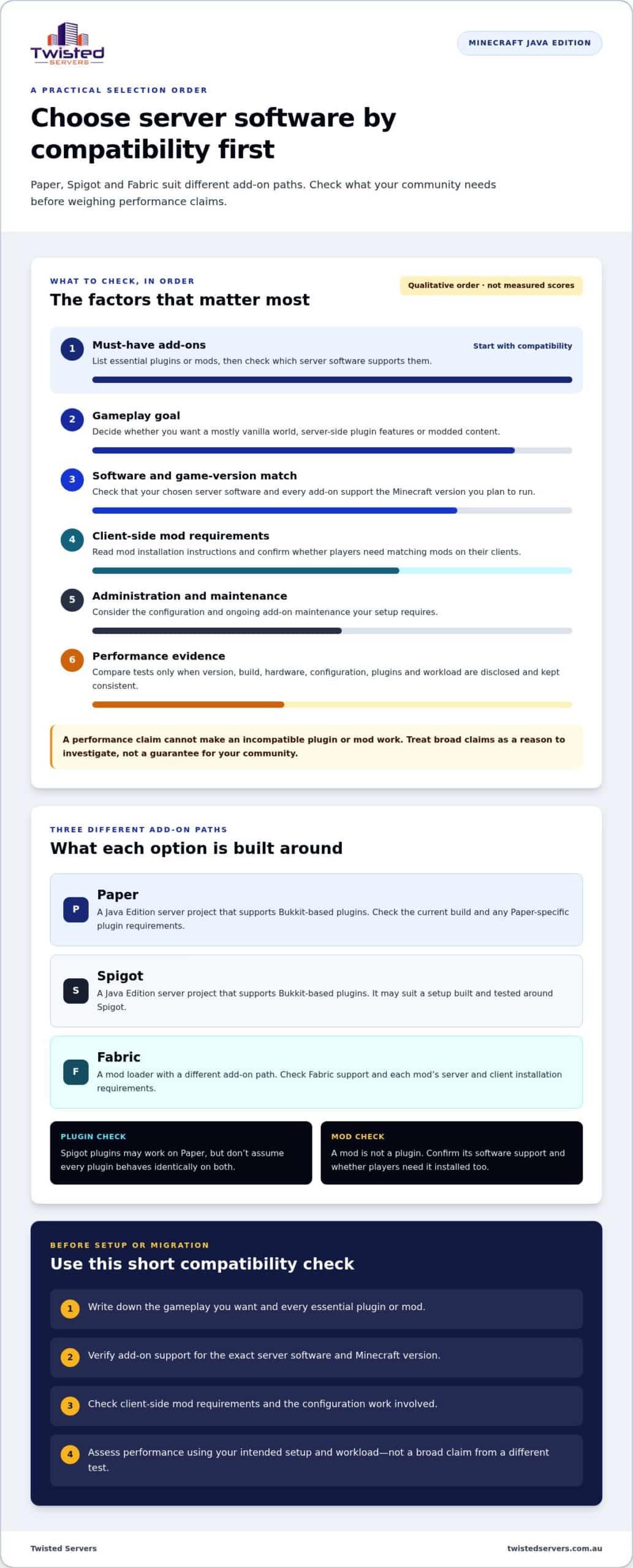
Make the decision in order: define the world you want, check its required add-ons, confirm version support, then consider the administration involved. This avoids choosing a server core for a general performance claim only to find that a must-have plugin or mod won’t run with it.
- Identify the gameplay. Decide whether your community wants a mostly vanilla experience, plugin-led features or modded content.
- List required add-ons. Write down the plugins, mods or modpack your group plans to use, including anything essential for administration or gameplay.
- Check versions. Read current project and add-on documentation for the exact Minecraft version and server software combination.
- Assess administration. Consider the setup, configuration and ongoing updates you’re prepared to manage, including client installation steps for players.
Use the table as a starting point, not a ranking. Compatibility with your chosen add-ons should settle the shortlist; test performance against your own configuration and workload. A Minecraft server optimisation guide can also help you assess settings and performance priorities.
| Server goal | Option to consider | Trade-off to check |
|---|---|---|
| Plugin-led gameplay | Paper or Spigot | Verify each required plugin’s support for the chosen software and game version. |
| A required plugin targets Spigot | Spigot | Check its current maintenance, version support and any dependencies. |
| Modded gameplay or a modpack | Fabric, if specified by the mods | Align loader, Minecraft and mod versions, and confirm what players need client-side. |
| Mostly vanilla gameplay | Choose based on planned add-ons | If you don’t need plugins or mods, avoid adding a loader without a clear reason. |
Match the server core to your add-ons and community
Start with the names of the add-ons, not just their category. If your community depends on a particular plugin or modpack, use its maintained documentation to confirm the supported software and Minecraft version. Prioritise verified compatibility over a theoretical performance advantage. A setup that can’t run a required add-on won’t deliver the gameplay your group planned.
For plugin-led play, compare Paper and Spigot against the specific plugins you’ve selected. For a modpack, follow its stated loader requirements rather than assuming Fabric will support every mod. If your plan is mostly vanilla, consider whether you need a modified server core at all, or whether your planned features justify one.
Plan a change without risking an existing world
Before changing server software or Minecraft versions, create a world backup and verify that it can be restored. Then read the relevant projects’ current migration guidance, including any limits around world formats or configuration. Don’t test an upgrade on the only copy of a community world.
Make a separate copy for the trial. Start it with the intended software and add-ons, check that the world loads, then test the features your players rely on. Apply the change to the live server only once the test behaves as expected and you have a recovery copy. If you’re ready to run your chosen setup on hosted infrastructure, explore Minecraft game server hosting.
Run your chosen Minecraft server with Australian game hosting
Running a Minecraft server at home means keeping the host computer and its network connection available when your community wants to play. Hosted infrastructure can reduce the need to maintain an always-on home server, while leaving you responsible for choosing suitable software, managing add-ons and keeping your world safe. It can suit you if you’d rather not run the server from your home setup.
Before moving to hosting, write down the exact server software, Minecraft version and required plugins or mods. Paper, Spigot and Fabric have different add-on paths, so plan around the combination your community needs. Keep modpack instructions and plugin documentation handy, and allow time to test the setup before players rely on it. A hosting plan doesn’t change compatibility between Minecraft, server software and add-ons.
What to consider when hosting a Paper, Spigot or Fabric server
Plan for ongoing work as well as initial setup. Plugin-led servers may need plugin configuration and updates; a Fabric server may require you to coordinate mod and loader versions, including any client-side requirements. If you’re moving an existing world, keep a separate copy for testing and retain a verified backup before making changes. These steps can help you spot version or add-on issues before they affect the live community.
Twisted Servers provides Australian Game Server Hosting, including Minecraft Java hosting, with dedicated expert support available 24/7. Minecraft Java hosting starts at $2.00 AUD/month. Hosted multiplayer can suit communities that prefer not to maintain a server on a home computer. Our Australian game server hosting gives you a locally hosted option for your chosen setup.
What Australian hosting can, and can’t, tell you about latency
Server location is one factor in connection latency. An Australian server may provide lower latency for players in Australia than a distant overseas server, but the result varies with each player’s location, internet service provider and network routing. Players in different parts of the country may also experience different results. An Australian location is useful context, not a promise of a particular ping or a guarantee that every connection will feel the same.
Plan around your players’ needs as well as the software. Note where your community is based, confirm the version and add-on requirements, and test the server with the setup you intend to use. Keep performance expectations grounded in your actual configuration rather than relying on a general claim about a server core or location.
Ready to plan a hosted Minecraft server? Explore game server hosting options and take your Paper, Spigot or Fabric setup from software choice to a plan for your community.
Put your server plan into action
Before launch, turn your choice into a short checklist: confirm the software and add-on versions, decide who will manage updates, and agree how players will report issues. A clear plan gives your community a shared starting point and makes future changes easier to assess.
The right paper vs spigot vs fabric server setup is one your group can maintain as its gameplay develops. Start with your needs now, then review the setup when those needs change.
If you’re ready to move ahead, choose hosting that fits your plans for the server and community.
Explore Australian game server hosting and take the next step with confidence.
Frequently Asked Questions
Can I switch from Spigot to Paper without resetting my Minecraft world?
Usually, changing server software alone doesn’t mean you need to start a new world. Separate the world files from server configuration and plugin data in your change plan: the world may load while some settings or plugin behaviours need attention. Check Paper’s current guidance for your Minecraft version and consider how your existing setup stores data beyond the world itself. A reset is a separate decision, not an automatic result of switching software.
Do players need to install Fabric to join a Fabric Minecraft server?
Not automatically. If the server’s mods don’t require client-side components, players may be able to join without installing Fabric; a modpack may instead specify a matching client profile. The server’s use of Fabric alone doesn’t establish every player’s requirements. If someone can’t connect, compare their Minecraft version and launcher profile with the server’s instructions before changing server settings or reinstalling the server.
Can a Paper server load Forge or Fabric mods?
Not as a standard Paper feature. Mods can depend on loader-specific code or APIs that a Paper server doesn’t provide, so copying a Forge or Fabric mod into a Paper setup won’t make it compatible. Check the mod’s documentation for the loader it was built for and the server software it supports. Treat any claimed cross-loader support as project-specific, not a general Paper capability.
How can I check whether a Minecraft plugin supports Paper?
Look for an explicit Paper support statement in the plugin’s current release notes or documentation. If the page only names Bukkit or Spigot, don’t treat that wording by itself as proof that every feature works on Paper. Check any listed dependencies and version notes, then test the plugin’s key functions, not just whether the server starts with it installed. This can reveal issues with commands or features your community relies on.
Does Paper always improve Minecraft server performance compared with Spigot?
No. Paper’s optimisations don’t guarantee a noticeable improvement for every server. If your current server meets your community’s needs, changing software may not address a problem players aren’t experiencing. First identify what players report, such as slow chunk loading or delays during a particular activity, and see whether those symptoms persist under normal use. That gives you a clearer reason to test a change than a general claim about speed.
Can I run Paper plugins and Fabric mods together on one Minecraft server?
Don’t expect one standard server instance to run both ecosystems directly. If your group needs a Paper plugin for one style of play and Fabric mods for another, plan separate server setups rather than assuming they can share one installation. Players would connect to the setup that matches the experience they want. Check each project’s documentation before relying on any arrangement that claims to combine them.
Disclaimer
Game titles, trademarks, logos and related assets are the property of their respective owners. Twisted Servers is an independent hosting provider and is not affiliated with or endorsed by the developers or publishers of the games mentioned unless otherwise stated. Information is provided as a general guide and may change as games, software and hosting services are updated.

