
Recommended Services


Supported Scripts


A server password can keep casual visitors out, but it won’t suit every private community. If you’re password protecting a game server, the setting may be in a configuration file or startup options, and the steps vary between games and server software. Some games rely on an allowlist instead of a join password.
A simple way to invite friends is useful, but the access control should fit how your community plays. Find the right option for your game, then test it before sharing the details.
This guide explains how to find and set an access option, when an allowlist may be a better fit, and how to share or change credentials responsibly. You’ll also learn how to test access with an invited player and distinguish game-level entry controls from hosting security.
Key Takeaways
- Match your access method to your community: a password, an allowlist and private listing control access or visibility in different ways.
- Password protecting a game server can discourage casual joining, but a shared password doesn’t confirm who a player is.
- Identify the exact game and server software before changing settings, then follow the current official documentation.
- Test the setup with an invited player before sharing access details more widely.
- Review access when your community changes or a password is exposed, and test again after changing credentials.
Why password protect a game server?
A server password adds a check at the point of entry. Depending on the game and server software, players may need to enter a shared credential before joining, or the server may use a different connection flow. This can make casual joining less likely, but it doesn’t establish who a player is: anyone with the password may be able to share it.
This access control can suit a private group, an invite-only community or a testing session where you want to limit who can join while configuring the server. It’s one part of managing a multiplayer server, not a complete security measure. A password alone doesn’t remove other risks, prevent all disruption or replace careful server administration.
What does a game server password actually do?
In a typical join flow, a player selects or connects to a server and supplies its password when prompted. The server checks the credential before allowing the connection to proceed. The prompt and setting vary, so don’t assume every game works the same way. A server password is also separate from a player’s game account password: it’s a shared entry credential, not their personal account login.
For a game such as The Forest, check the current official documentation for the specific game and server software before changing a setting. This helps you find the right configuration method instead of relying on instructions for another title. For background on the role of a server in multiplayer play, see this overview of dedicated game server architecture.
When is a password useful for a multiplayer server?
Restricted entry can work well when you know who you want to invite and can share the credential through an appropriate channel. It may be practical for friends playing together, a private event or a test session before you open access more widely. For an ongoing community, plan how you’ll share password changes and remove access when someone no longer needs it.
A password can make it harder for new players to join, even if they find the server in a browser or through a friend. That may suit a private session, but it can add friction for a community seeking new members. It also doesn’t prove that a joining player is the person you intended to invite, since the password can be passed on.
- Private group: Share access details only with the people you intend to invite.
- Configuration test: Keep entry limited while you check server behaviour with trusted players.
- Open community: Weigh the extra joining step against the need to control entry.
Password protecting a game server is most useful when the group is small or access is temporary and you can manage the shared credential. If you need to control entry by player identity, a password may not be the only setting to consider. Compare it with the other access options available for your particular game.
Password, allowlist or private listing: which access method fits?
The right access method depends on how you want to manage players, not just whether you want the server to appear in a browser. Passwords, allowlists and listing controls address different parts of access. Some games offer only certain options, and setting names and behaviour vary between games and server software. For The Forest, check the current official documentation before relying on a particular method.
Password access versus an allowlist
A shared password can be convenient for a small invited group: you give players the credential, and they use it when the game requests it. An allowlist, where supported, is managed by adding or removing individual player accounts or identifiers. This can give admins more individual control, but requires keeping approved entries up to date. Neither method works identically across games.
Choose based on how your group changes. A password may be simpler for a temporary session, while an allowlist may suit a community where you want to approve players individually. Check the game’s documentation to confirm which identifiers its allowlist uses and how changes take effect. Don’t assume an account name, platform identity or configuration method is universal.
Does hiding a server replace a password?
No. A private or unlisted setting, if the game supports one, can reduce visibility in a server browser or listing. It doesn’t necessarily add a credential check for direct connections. Treat discoverability and access control as separate settings, and confirm how each behaves in the documentation for your game and server software.
Account authentication is another layer. It verifies a player through their game or platform account, but it isn’t automatically a substitute for server-level access controls. Similarly, password protecting a game server doesn’t confirm the identity of everyone who knows the shared password. Keep administrative credentials separate from player-facing access details, and follow CISA password security recommendations when creating and protecting passwords.
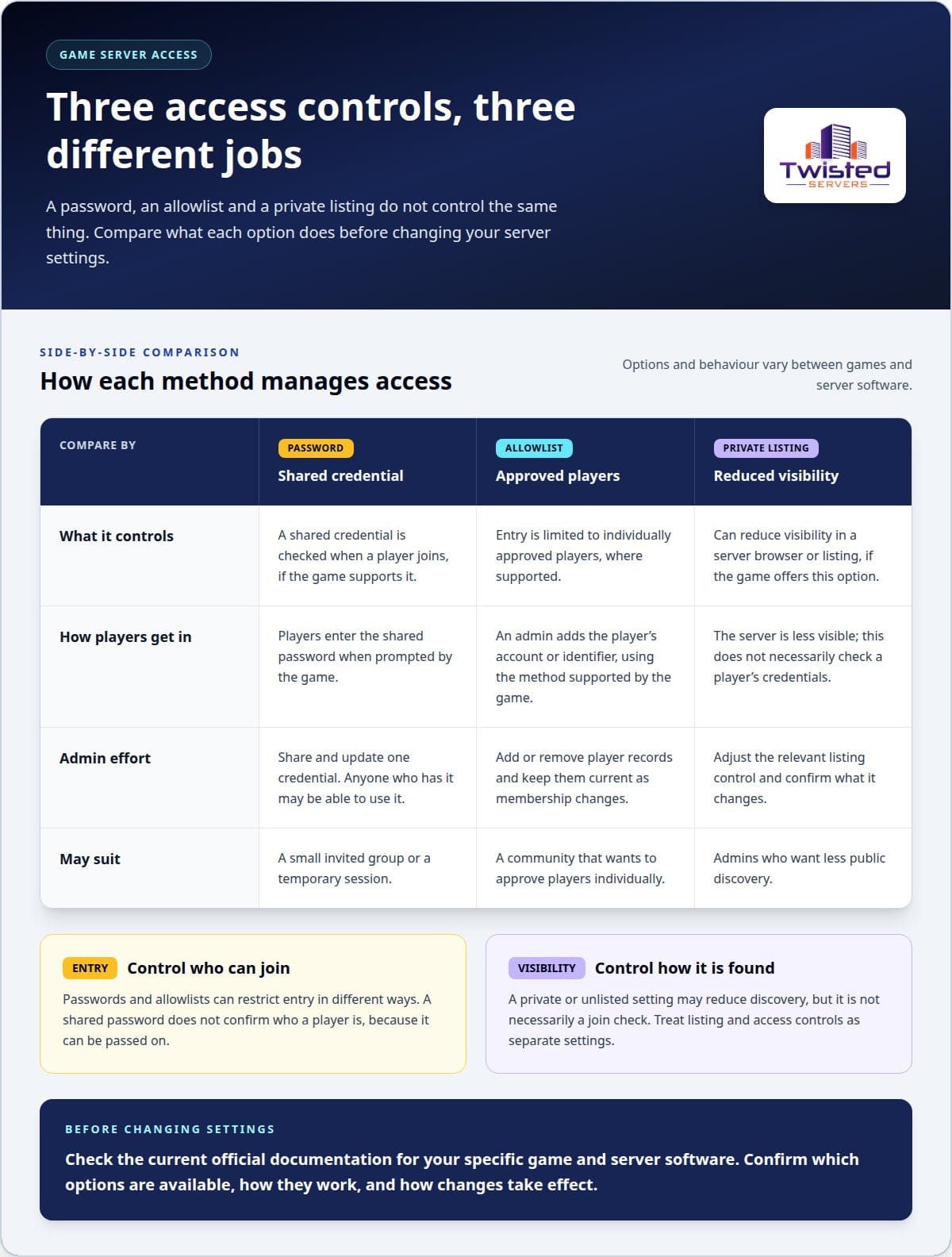
Access method | Access control | Admin effort | May suit
Password | A shared credential is checked when a player joins, if the game supports it. | Share and update one credential; anyone who has it may be able to use it. | A small invited group or temporary session.
Allowlist | Entry is limited to individually approved players, where supported. | Add or remove player records and maintain them as membership changes. | Communities that want individual approval.
Private listing | Reduces visibility if the game provides this option; it isn’t, by itself, a join check. | Adjust the relevant listing control and understand its effect. | Admins who want less public discovery.
Use the combination your game supports, and check current official guidance before changing settings. For a hosted setup, Twisted Servers provides Australian Game Server Hosting for multiplayer communities.
What a game server password can and cannot protect
A server password adds a barrier for people who don’t have the credential. It can make casual joining harder when you want to limit a session to invited players. That benefit depends on keeping the password within the intended group and on the game supporting a server-level password.
It isn’t an identity check. If someone shares the password, another person may be able to use it. A successful password check tells the server that the correct credential was supplied, not that the player is the person you invited. Treat a shared password as a way to control entry, not as proof of who is connecting.
What happens if a server password is shared too widely?
The more widely a credential is shared, the less control it gives you over who can join. If you think it has reached people outside your group, changing it may help, but only if the game supports password changes and you follow its documented process. Send the replacement through a trusted channel, and let invited players know they may need updated details before their next session.
Password protection is one layer, not a complete security plan
Different protections address different concerns. Game account controls relate to a player’s account; moderation gives admins a way to manage behaviour; server settings govern access to the game; and hosting security relates to the hosting environment. A join password doesn’t replace those measures or, by itself, prevent disruption or protect every part of a server.
For a practical review, consider each layer separately:
- Player access: Check which join controls the game supports and who has the current credentials.
- Accounts: Keep player account access separate from the shared server password.
- Administration: Use appropriate admin controls and moderation practices for your community.
- Hosting: Consider the security measures provided by the hosting environment, without assuming they configure the game’s access settings.
Twisted Servers’ listed hosting security features are advanced encryption, DDoS defence, malware scanning, and proactive threat management, powered by Arista Edge Threat Management. These are hosting-level measures, not a setting that creates or manages a password inside a game. Configure game-level access controls through the options supported by the game.
Think of password protecting a game server as one part of an access plan. Keep the credential limited to people who need it, review access when your group changes, and use the relevant game documentation to understand what a password can and can’t do. Separating game access, player accounts, moderation and hosting security makes it easier to manage a private server without relying on one control to do every job.
How to password protect a game server: a safe setup workflow
Password settings aren’t consistent across games. One title may handle access through its server configuration, while another may provide a setting in a server interface or use a different access method. Follow a repeatable process: identify the software, find its current instructions, make the change carefully, then test before sharing the details.
This approach keeps password protecting a game server grounded in settings that apply to your setup, rather than commands or file paths copied from another game.
Find the correct password setting for your game
Start with the exact game and dedicated server software you’re running. Use current official documentation from the developer, publisher or server software project to locate the supported access option. Confirm whether it’s managed in-game, in a configuration file or through a server interface. Don’t assume a setting name, location or procedure applies across titles or versions.
Set, test and share access details
Once you’ve found the documented method, make the change using the instructions for your setup. Choose a server credential that’s distinct from your personal game account password. Before inviting the wider group, test the access method with one invited player and confirm the server behaves as expected.
Use this workflow to reduce avoidable mistakes:
- Identify the setup. Record the game, server software and relevant version information. This gives you a precise basis for finding instructions and helps avoid mixing guidance for different releases or server types.
- Read the current official documentation. Find the section on joining or access control. Check the supported setting and where it must be applied. If the documentation describes more than one method, use the one that matches your server software and how you manage it.
- Prepare the change. Follow the documented format and requirements exactly. Keep the credential separate from personal account details, and avoid placing it in public messages or information visible to people who aren’t meant to join.
- Apply the setting as documented. Use the documented interface or configuration method. Don’t add unverified commands, file paths or settings from a guide for a different game. If the change requires a restart or reload, follow the instructions for your specific software.
- Test before inviting the group. Ask an intended player to connect using the normal joining process. Confirm they can access the server with the correct details, and check that access doesn’t work as expected when the credential is absent or incorrect, if the game allows you to test this safely.
- Share details privately. Send the server information and password only to intended players. Explain who the details are for and how you’ll communicate future changes.
If the test fails, return to the official documentation and review the selected method, formatting and any required restart. Avoid changing several settings at once, as that can make the cause harder to identify. Twisted Servers Game Server Hosting is an Australian-based option for multiplayer communities: read about the service.
Maintain private access and choose hosting that suits your server
Private access needs occasional attention. A password that worked for a small test group may no longer suit a growing community, and old joining instructions can keep circulating after a change. Review access as part of routine server administration, especially after an event ends, membership changes or you suspect a credential has been shared beyond its intended audience.
Keep access manageable as your community changes
Review who still needs to join and whether your access method suits the group. If the game supports changing its shared password, replacing it may be appropriate when a credential is exposed or the invited group changes substantially. Follow the game’s current documentation, send updated joining details privately to intended players and test access again.
A simple maintenance routine helps avoid confusion:
- Review membership: After a group or event changes, decide who should retain access.
- Refresh exposed credentials: If the game supports password changes and the details have spread, use its documented process to set a new one.
- Update instructions: Replace outdated joining details in the channels your community uses, where you can.
- Retest access: Have an invited player try the current details before the next session, so you can catch mistakes early.
If you use an allowlist or another game-level access option, review approved players and update the relevant instructions according to that game’s documentation.
When Australian game server hosting may help
Hosting location is separate from the game’s access settings. An Australian server may provide lower latency for players in Australia than a distant overseas server, but results depend on each player’s location, internet service provider and network routing. No single ping outcome applies to every player.
Hosting infrastructure and game configuration have different roles. A hosting service’s security measures don’t automatically create a game password, approve players or keep an invite list current. Dedicated expert support is available 24/7.
As you plan your setup, consider where your players connect from and how you’ll manage access over time. The Australian Game Server Hosting page provides information about hosting for multiplayer communities. For broader planning, the game server hosting guide can help you consider hosting alongside game-level configuration.
For hosted infrastructure for your community, explore Twisted Servers Game Server Hosting.
Keep your server ready for its next session
Make access review part of your server routine. As your community changes, decide who still needs to join and keep current instructions easy for invited players to find. This helps you prepare for the next session without relying on outdated details.
When you’re ready to plan the hosting side of your setup, explore Australian Game Server Hosting and choose a next step that fits your community.
Frequently Asked Questions
Is a game server password enough to keep unwanted players out?
It may be enough for a small session where your main concern is stopping accidental or casual joins. Consider how access details could spread: a player might forward them, or an old message could remain available after the group changes. Set expectations with invited players about keeping the details private, and decide how you’ll respond if someone outside the group joins.
Can I password protect any game server?
No. Support depends on the game, dedicated server software and version you’re running. Check that the instructions apply to the server build, not just the game client, and note any version-specific requirements before changing configuration. If the server software doesn’t provide a join-password option, use another supported access method rather than trying settings copied from a different title.
How do I change a game server password?
Plan the change around your community’s next session so invited players aren’t caught out mid-game. Once you’ve applied it using the documented process, update pinned messages, event notes or private joining guides that contain the old details. Keep one current version of the instructions and remove obsolete copies you control. This helps prevent failed joins caused by outdated information.
What should I do if my game server password is shared publicly?
First, assess whether anyone unfamiliar has joined and whether you’ve noticed unexpected changes to the game or server. Review the administrative controls available for your setup, then decide whether to rotate the credential or adjust another supported access control. After making changes, tell intended players where to find current joining instructions rather than reposting the replacement publicly.
Is a server password the same as an allowlist?
No. They support different ways of managing a community. A shared password can reduce the administration involved in inviting a short-term group, while an allowlist may require an admin to maintain individual entries. For a community with regular membership changes, the account or platform identifiers used and the process for updating them can affect how manageable an allowlist is.
Does a server password protect against DDoS attacks?
No. If players can’t connect or the server becomes unavailable, changing the join credential isn’t a useful first diagnostic for a network disruption. Record when the issue began, whether it affects all players and any error messages they see. These details can help distinguish a connection problem from a password-entry issue when you investigate the service or hosting environment.
Should I use my personal password for a game server?
No. Keep server credentials separate from passwords for personal accounts, and limit knowledge of the server credential to people who need it. If several admins handle invitations, agree on one private channel for current access instructions so the group doesn’t circulate different versions. Avoid storing the credential in public server descriptions, open forums or documents accessible beyond the intended community.
Disclaimer
Game titles, trademarks, logos and related assets are the property of their respective owners. Twisted Servers is an independent hosting provider and is not affiliated with or endorsed by the developers or publishers of the games mentioned unless otherwise stated. Information is provided as a general guide and may change as games, software and hosting services are updated.

