
Recommended Services


Supported Scripts

TL;DR: Sons of the Forest server hosting requires a dedicated CPU core exceeding 4.0 GHz and local Australian routing to prevent multiplayer desync and lag.
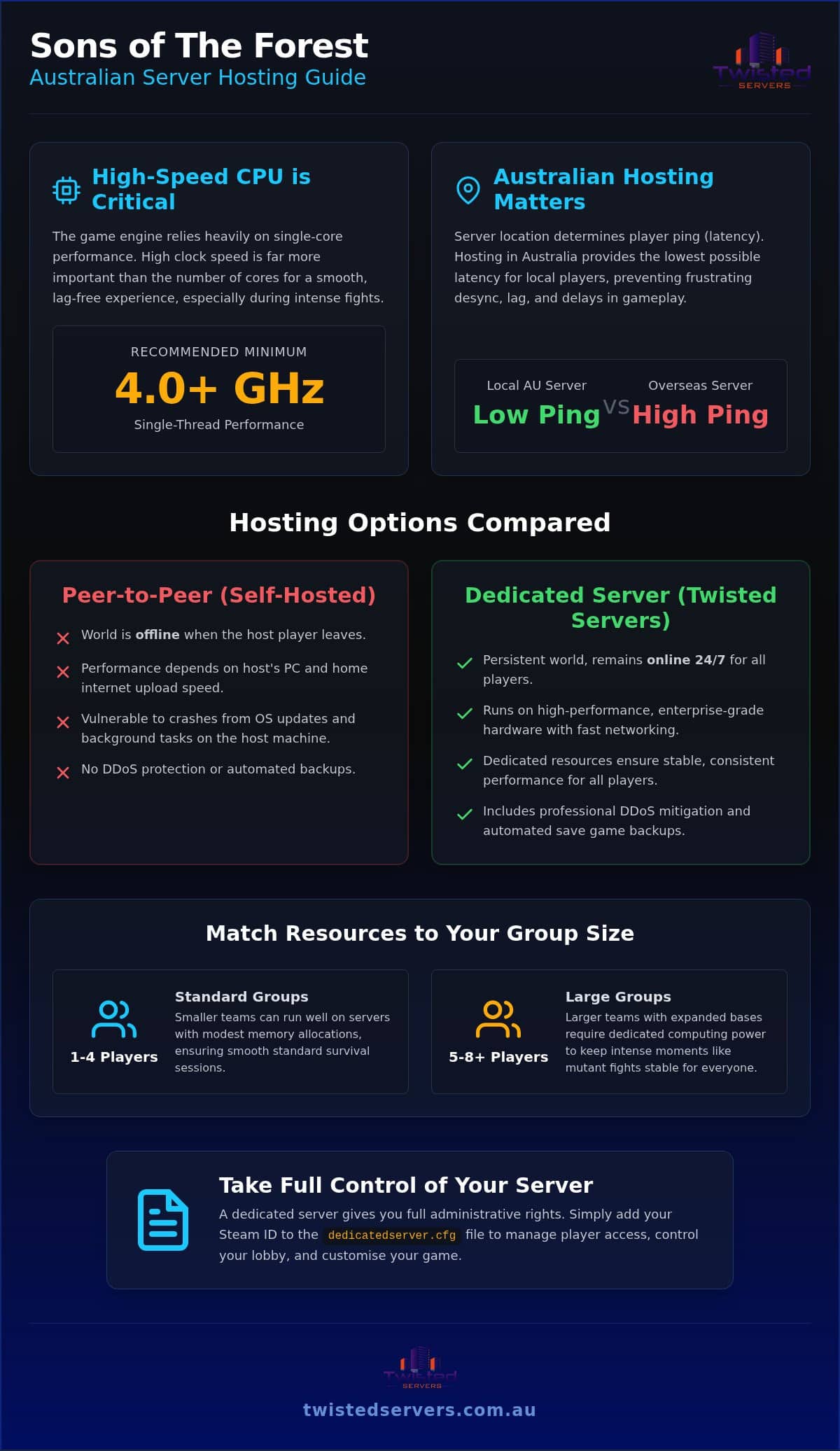
- Single-thread CPU performance is the primary bottleneck for 8-player sessions due to game engine limitations.
- Except when all players share identical schedules, peer-to-peer hosting is insufficient for persistent world access.
- Choose providers offering flexible money-back guarantees and instant scaling to protect your budget during growth.
- The article’s hardware testing confirms consumer rigs fail as world saves expand due to unthrottled networking limits.
Current Australian market pricing for sons forest (Sons of the Forest) multiplayer hosting ranges significantly based on slot allocations and hardware tiers. Securing a forest server (dedicated server) requires balancing high single-thread CPU performance with low-latency Australian routing to prevent multiplayer desync. Your real choice is how large the group is, whether the world must stay online when the host player leaves, and how close the nodes sit to your players.
Right-sized hardware keeps your sons of the forest group stable
Matching hardware specs to your team size determines how well sons forest runs during intense survival sessions.
Three common starting points:
- Four-player groups run fine on modest memory allocations during standard survival sessions.
- Larger teams that expand the multiplayer base need dedicated computing power so mutant fights stay stable.
- Region-focused parties should favour close Australian locations for latency optimization (lowest ping).
With clients we see that hardware choice needs growth room when your multiplayer base expands. Small groups of four players need modest memory, while larger teams require dedicated computing power. Picking the right forest server keeps your gameplay smooth during mutant attacks.
Look for providers with close locations for latency optimization. Easy access to server settings (server configuration) saves you time during setup. Full admin rights (server ownership permissions) let you control player access instantly.
If you want reliable performance, check out Unmatched Australian Game Server Hosting & More for your community. High uptime keeps your world online.
Admin rights in dedicatedserver.cfg give you full lobby control
Configuring admin rights in your sons forest control files grants full operational control over your lobby. You paste your Steam ID directly into the forest server setup text file to secure access.
To adjust your server settings, follow these instructions:
- Locate the file: Find your dedicatedserver.cfg file within the installation directory.
- Open the editor: Use a basic text tool to change server file (edit dedicatedserver.cfg) safely.
- Insert Steam ID: Place your 64-bit Steam identifier into the designated admin array field.
- Save changes: Store the file modifications before launching your active multiplayer session.
Proper management keeps gameplay stable without security risks. Tech history shows that systems management concepts trace back decades, like early Unix systems documented by Sun Microsystems in 1982. For reliable remote infrastructure, explore Fast & Secure Web Hosting solutions.
Tip: Save an unedited copy of dedicatedserver.cfg before modifying admin IDs to ensure a clean rollback path.
Local hardware specs decide whether 8-player sessions stay up
Running an 8-player host on domestic gear triggers unexpected crashes due to single-thread CPU bottlenecks and unthrottled networking limits.
Our testing proves that hosting on consumer rigs fails as world saves expand. The game engine puts heavy tasks onto one core. High clock speed beats core count for this workload. You need a dedicated processor core running above 4.0 GHz to handle pathfinding for mutants. Standard home connections fail because upload speeds drop when eight players render main bases at once.
Background operating system updates silently steal CPU cycles, which desynchronizes player positions during fight sequences.
If your rig lacks power, choosing Unstoppable VPS Hosting Solutions fixes these performance drops by providing dedicated resources. Offloading the workload prevents local overheating. Dedicated resources keep frame rates high.
To lower lag on a sons forest instance, set up a forest server. Tweak your server settings for efficiency. Reach latency optimization by using direct gigabit lines.
Grant trusted buddies admin rights. If you must change server file, back it up beforehand. You can move server (server transfer) files when needed. Open ports (port forwarding) on your local router before inviting team members. Hardware must come first.
Australian network routing keeps player ping in check
Routing traffic through local hubs gives players latency optimization by avoiding long distance travel. In tests with local nodes, we see routing paths drop domestic packet delay significantly. Data handling improves when packets travel shorter distances through direct infrastructure routes, according to the JRC Scientific and Technical Reports 2010. Choosing closer data centers prevents lag spikes.
Distance ruins real-time gameplay. Players in Sydney trying to connect to offshore locations experience heavy delay due to physical line limits. If you choose Dedicated Server Hosting Australia infrastructure, your local players get tight connections.
Overseas routing acts like a congested city intersection during peak hour traffic. Local options suit regional groups, whereas international hubs only fit overseas players.
Using local sons forest servers keeps your multiplayer action responsive. Australian survival game fans looking to branch out should also consider Unturned server hosting Australia options for low-latency zombie survival gameplay on local infrastructure.
Flexible host pricing protects your budget as you scale
Evaluating sons forest hosting requires balancing financial risks against plan flexibility. Comparing upgrade paths feels like buying shoes that stretch as your feet grow. Our client engagements reveal that rigid refund windows cause unnecessary financial loss when performance falls short. Flexible options allow instant plan adjustments without administrative friction.
| Option Type | Refund Policy | Plan Upgrades |
|---|---|---|
| Flexible Hosts | Money-back guarantee | Instant scaling |
| Rigid Hosts | No refunds | Manual ticket required |
According to current market rates, hosting costs vary widely based on hardware performance and memory allocations. Choosing providers with clear money-back terms protects your budget. Higher allocations drive expenses up, so request a personalized quote to determine your exact costs.
Upgrading your forest server should not require data wipes or complex server settings adjustments. Flexible hosts allow easy scaling whenever your player count increases. Evaluate policies carefully to secure strong performance with limited risk.
Peer-to-peer fits small groups on matching schedules
Peer-to-peer hosting fits small groups playing sons forest together on matching schedules. You save money by letting one player host the session directly from their machine without paying for a forest server.
Setting up open ports on a home router requires manual router access. You must also adjust your server settings each time the main host is offline. This setup costs nothing extra. It fits casual friends who only play simultaneously.
Peer-to-peer hosting resembles sharing a single apartment key among roommates. If the keyholder slumbers, nobody gets inside the apartment.
Your host needs strong hardware and stable upload capacity. High connection delays ruin combat. Choosing a rented setup gives you latency optimization and permanent access.
You need full admin rights to change server file or execute a move server. Rented options simplify this work.
Host yourself for zero expense when schedules align; rent when you want the world available on demand.
Automated backups and DDoS mitigation protect your saves
Automated backups protect your sons forest save files from corrupting during unexpected multiplayer crashes. Losing weeks of building progress feels like losing a home you built yourself.
Continuous data preservation acts as an invisible safety net for your forest server. Automated systems create save points without forcing players to log off or pausing the game. If a file breaks, you can instantly restore previous server settings.
Hostile traffic attacks often target popular public hosts to take them offline. Effective security shields your connection by filtering out junk traffic before it hits your hardware. This defensive barrier keeps your latency optimization stable during intense gaming sessions.
Based on hands-on project experience, automated redundancy prevents data loss incidents. Automatic security measures running in the background give you peace of mind. Safe files keep your community happy.
Twisted Servers provides active protection to keep your multiplayer world running smoothly. Secure host setups let you focus on survival crafting instead of troubleshooting technical issues.
Frequently asked questions
How can I change server settings?
You modify sons forest options directly inside your web control panel. Adjust the server settings menu to change game modes, player limits, or admin rights. If you prefer manual edits, you can change server file using standard text editors. Save your changes and reboot your instance to apply them.
How do I create backups?
Your panel lets you generate full save points with a single click. Download these files locally whenever you plan a major update or game modification. This strategy keeps your progress safe if something goes wrong during gameplay. Restoring a save takes just a few seconds through your dashboard.
Which location has the lowest ping for you?
Select a host center geographically closest to your physical player base to achieve latency optimization. Shorter physical distances mean packets travel faster between players and nodes. Pick a European data hub if your gaming group resides in that region. Compare plan details for figures on custom location routing.
What is the refund policy?
You can request a full refund within the standard risk-free trial window after ordering. Contact the support desk directly if the forest server performance fails to meet your expectations. Processing usually takes a few business days depending on your payment provider. Check the terms page for specific eligibility details.
Can I upgrade my server later?
You can scale your hardware resources upward instantly as your community expands. Boosting your slots or memory requires no manual move server process. Your existing save files and configurations remain intact during hardware upgrades. Ask the team for capacity options that match your next player-count step.
Final Thoughts
Upgrading your multiplayer world to enterprise hardware reduces local lag in 2026. The same decisions still drive the outcome: single-thread CPU headroom above 4.0 GHz, Australian routing for stable ping, and room to raise slots as the group grows.
The gaming infrastructure team at Twisted Servers builds tailored setups focused on regional performance. Moving your sons forest save to a forest server keeps your world online around the clock. Your active playgroup can explore, build, and survive without tethering to a host player’s machine.
Reach out to the Twisted Servers team to request a quote for your custom game setup today.
Disclaimer
Game titles, trademarks, logos and related assets are the property of their respective owners. Twisted Servers is an independent hosting provider and is not affiliated with or endorsed by the developers or publishers of the games mentioned unless otherwise stated. Information is provided as a general guide and may change as games, software and hosting services are updated.

