
Recommended Services


Supported Scripts


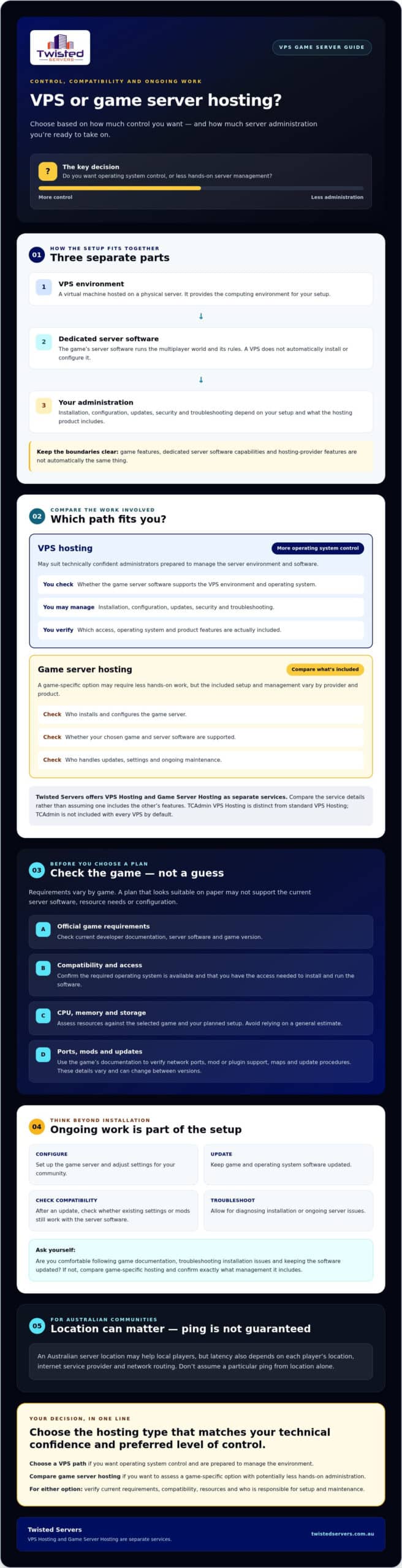
A VPS can give you control over a game server, but it won’t manage setup or ongoing administration for you. Before choosing a vps game server, consider whether you’re comfortable maintaining the operating system and game software, or would prefer a game-specific hosting option that may require less hands-on work.
Requirements vary by game, and a plan that looks suitable on paper may not support the game’s current server software, resource needs or configuration. You’ll also need to plan for updates, security and troubleshooting, not just installation.
This guide explains when a VPS makes sense, how it compares with game server hosting, and what to check against official game requirements. It covers the practical demands of self-management, assessing CPU, memory and storage, and why an Australian server location may help local players without guaranteeing a particular ping. Twisted Servers offers VPS Hosting and Game Server Hosting as separate services, so you can compare them and choose the option that matches your technical confidence and preferred level of control.
Key Takeaways
- Decide whether you want operating system control or a hosting option with less server administration.
- Check the selected game’s current official server requirements and software compatibility before ordering a vps game server.
- Assess CPU, memory and storage against your game and planned setup rather than relying on a general estimate.
- Compare who handles installation, configuration, updates and security for each hosting option.
- Consider an Australian server location for local players, but remember that ping also depends on player location, ISP and network routing.
What is a VPS game server, and who is it suited to?
A VPS game server is game server software installed and run on a Virtual Private Server, a virtual machine hosted on a physical server. The VPS provides the computing environment; the game’s dedicated server software runs the multiplayer world and its rules. They’re separate components, so choosing a VPS doesn’t automatically install or configure a game server.
A Virtual Private Server (VPS) uses virtualisation to create an independent environment on a physical machine. Depending on the product, you may have Root Access, which gives administrative control over the operating system and installed applications. That control can be useful, but it may also leave you responsible for installation, configuration, updates and security.
How does a VPS differ from game server hosting?
A VPS is a general hosting environment, not necessarily a ready-to-play game server. Check that the game’s server software supports the VPS environment and find out what work is needed to install and maintain it.
Game-specific hosting is another option to consider. A provider may offer an environment designed for game servers, but what’s included varies. Compare:
- Setup responsibility: who installs and configures the game server?
- Compatibility: is your chosen game and server software supported?
- Administration: who handles updates, settings and ongoing maintenance?
Twisted Servers offers VPS Hosting and Game Server Hosting as separate services. Compare the details of our VPS Hosting service with the game-specific option rather than assuming one includes the other’s features. TCAdmin VPS Hosting is also distinct from standard VPS Hosting, so don’t assume TCAdmin is included with every VPS.
Who benefits from hosting a game server on a VPS?
A VPS may suit technically confident administrators who want control over the operating system and server environment, and are prepared to manage the software themselves. This flexibility can be useful when you need to configure the environment around a particular server setup.
If you’re new to server administration, consider the ongoing work as well as the initial setup. Are you comfortable following the game’s documentation, troubleshooting installation issues and keeping the server software and operating system updated? If you’d rather spend less time managing the environment, compare game-specific hosting and check exactly what management it includes.
There’s no single right choice for every game or community. Check the selected game’s current server requirements and compatibility, then choose a hosting type that matches the control and administration you’re ready to take on.
How a VPS game server works: software, access and administration
A virtual private server (VPS) provides a virtualised environment on a physical host. To run a game server, choose a hosting plan, check that the game’s requirements fit the environment, install the server software, and configure settings for your community. This is a general outline, not a universal installation guide: commands, dependencies and access methods vary by game and VPS product.
Keep the components distinct. The game defines features such as rules and gameplay settings. The dedicated server software determines which server functions and configuration options are available. The hosting provider supplies the VPS environment and the features specified for that product. A game or server software capability isn’t automatically part of the hosting service.
What do you need to verify before installing a game server?
Start with the game developer’s current documentation. Check which dedicated server software and game version to use, then follow its installation instructions. Confirm that the required operating system is available on your chosen VPS and that you have the access needed to install and run the software. Don’t assume an operating system, control panel or Root Access is included: check the product details.
Use the game’s documentation to check network ports, mod or plugin support, maps and update procedures. These details are game-specific and can change between versions. Confirm them before treating a particular port, mod or installation method as necessary for your setup.
What does ongoing VPS administration involve?
Installation is only the beginning. Allow for server configuration, game and operating system updates, monitoring and troubleshooting. For example, after an update you may need to check whether your existing configuration or mods remain compatible. The workload depends on the game, server software and how you customise the server.
Check backups and security too. Find out what the VPS product includes, what you need to arrange, and how you would restore the server if something goes wrong. Don’t assume backups, security tools or game server administration are included unless the product description confirms them. VPS and game-specific hosting can assign these tasks differently, so compare the service details before deciding.
If you’re assessing managed game server hosting alongside a VPS, review the scope of Twisted Servers Game Server Hosting and confirm which games and management features fit your requirements.
VPS or game server hosting: which option fits your needs?
Choose based on the work you want to manage, the control you need and what the game requires. A VPS may give you more say over the server environment, but it can also leave more setup and administration to you. Game-specific hosting is designed around game servers, but the tools and support vary by provider. Compare the service details rather than assuming either option is automatically faster or simpler.
| What to compare | VPS hosting | Game server hosting |
|---|---|---|
| Control | May offer control over the operating system and software, depending on the product and access provided. | Control may focus on game settings and server management. Check which options are included. |
| Setup responsibility | You may need to install and configure the game server software yourself. | Check what the provider sets up and what you’re expected to do. |
| Compatibility | Confirm the game server software supports the available operating system and VPS environment. | Confirm the provider supports your chosen game and the features you need. |
| Administration | Plan for system and game updates, configuration and troubleshooting unless the service specifies otherwise. | Check which administration tasks the hosting service handles and which remain yours. |
When does a VPS make more sense than game-specific hosting?
A VPS may suit you if you want control over the server environment and are comfortable with server-level administration. First check that your chosen game’s dedicated server software can run on the VPS’s supported operating system and that you’ll have the access it requires. A VPS doesn’t automatically include a game control panel or one-click game installation. If you’d rather consider a service designed for game servers, review the scope of Twisted Servers Game Server Hosting, including its game compatibility and management details.
How should Australian communities think about server location?
For Australian players, a server located in Australia may reduce network distance compared with one hosted overseas. That can be a useful factor when comparing a vps game server with other options, but it doesn’t guarantee a particular ping or connection quality. Player location, ISP, network routing and the server’s actual location all affect latency. Check where the service places your server and where your players connect from.
For a broader overview of game-specific hosting, read our Australian game server hosting guide. Use it alongside the VPS product details to compare control, compatibility and administration.
How to choose VPS resources for a game server without guessing
Start with the game, not a VPS plan’s headline resource figures. Requirements depend on the game and its dedicated server software, so there’s no single CPU, memory or storage allocation for every setup. Use this checklist to compare your needs with the product details:
- Find the current official requirements. Check the developer’s or publisher’s documentation for the server software, supported versions and any published resource guidance.
- Match the requirements to your plans. Check whether the documentation explains the effect of player numbers, mods, maps or world size. Account for these factors only where the official guidance supports them.
- Assess CPU, RAM and storage separately. CPU handles processing, RAM holds data the server needs while running, and storage holds the operating system, server files and game data. Compare each requirement with the VPS allocation.
- Confirm the VPS terms. Check the resources, operating system, access and relevant limits for the specific product. Don’t assume a plan can be expanded or configured in a particular way.
- Plan for maintenance and recovery. Verify update steps, required network ports and available backup options against the game documentation and VPS product details.
How do game requirements affect VPS resource choices?
Use current official guidance for the exact game and server version you intend to run. A server for a small group may have different needs from one with a larger player plan or additional content, but the effect depends on the game. Check the developer’s documentation before estimating resource use for players, mods or world size. If it doesn’t provide clear guidance, don’t treat community estimates as guaranteed minimums.
For a vps game server, compare the VPS resources with what the server software needs. A total allocation alone won’t confirm that the environment is compatible or that all resources are available for your intended use. Check the provider’s product terms and ask for clarification if details are unclear.
What should you check about updates, ports and backups?
Check the game’s current update procedure and network port requirements in its official documentation. Then plan how you’ll apply updates, change configuration and troubleshoot connection issues. These are responsibilities to consider, not features to assume come with a VPS.
Review backups just as carefully. Check whether they’re available, what data they cover and how restoration works. Plan how to keep configuration and game data recoverable, and confirm which tasks are yours and which are included in the hosting product.
Once you’ve checked the game requirements, compare them with the published allocations and terms for our VPS Hosting service before selecting a plan.
Choose a VPS game server path that matches your setup needs
Make the decision in three steps: confirm the game’s current server requirements, decide how much system administration you’re prepared to handle, then compare hosting products against those needs. This keeps the choice grounded in the game and your skills, rather than assumptions about what a hosting label includes.
A VPS may suit you if you want control over the hosting environment and are ready to install, configure and maintain the server software. Game Server Hosting is a separate option if you want to consider a service focused on running game servers. Neither description alone confirms compatibility, included management or particular tools. Check the details for the exact product you’re considering.
What should you confirm before choosing a provider?
Before ordering, check the provider’s current product information and clarify anything that could affect your setup. In particular, confirm:
- Resources and access: what CPU, memory and storage are allocated, which operating systems are supported, and what level of access you receive.
- Game compatibility: whether the chosen game’s dedicated server software can run in that environment and whether the provider supports your intended setup.
- Setup and administration: which installation, configuration, update and troubleshooting tasks are yours to manage.
- Security and recovery: which security features and backup options apply to that product, what they cover and who manages recovery.
Check the game publisher’s documentation as well as the provider’s product details. The game determines its server software and requirements; the provider determines what the hosting product supplies. Keep those responsibilities separate when comparing options.
When should you compare Twisted Servers hosting options?
Twisted Servers offers VPS Hosting and Game Server Hosting as distinct services. Don’t assume standard VPS Hosting includes game-specific tools. TCAdmin VPS Hosting is also a separate product, so check its details independently rather than treating TCAdmin as part of every standard VPS plan.
For Australian communities, consider the server’s actual location alongside your players’ locations, ISPs and network routes. Australian hosting may reduce distance for local players, but it can’t guarantee a particular ping. Check the location and service details for the option you’re assessing.
Compare our Australian VPS Hosting with Australian Game Server Hosting. Review the product information against your game requirements, then choose the setup that fits your preferred level of control and administration.
Choose your hosting path with confidence
A vps game server can suit you if you want control and are prepared to manage the software and system. Before choosing, check the game’s current official requirements, confirm the VPS environment is compatible, and compare its administration demands with a game-specific hosting option.
Twisted Servers offers VPS Hosting and Game Server Hosting as distinct services, so review each product on its own terms. Check the available resources, included features and setup responsibilities before deciding. Dedicated expert support is available 24/7.
Ready to compare your options? Explore Twisted Servers VPS Hosting and review the product details against your game’s requirements.
Frequently Asked Questions
What is a VPS game server?
A vps game server is dedicated game server software running inside a Virtual Private Server, a virtualised hosting environment. The VPS provides the operating system and allocated resources; the game server software runs the multiplayer session. They’re separate components, so ordering a VPS doesn’t automatically install or configure a game. Check that the chosen game’s server software is compatible with the VPS before committing.
Can you host a game server on any VPS?
No. A VPS needs to meet the selected game’s requirements and support its dedicated server software. Check the developer’s current documentation for supported operating systems, installation steps and other requirements, then compare these with the VPS product’s operating system, access and resource details. Don’t assume every VPS supports every game or includes game-specific tools. Confirm compatibility and any limits with the provider before ordering.
Is a VPS better than game server hosting?
Neither option is universally better. A VPS may suit you if you want more control over the server environment and are ready to install, configure and maintain the software. Game Server Hosting may suit you if you prefer a service focused on game servers, but setup and management vary. Compare compatibility, administration responsibilities and product features. Twisted Servers offers VPS Hosting and Game Server Hosting as distinct services.
How much RAM does a VPS game server need?
There isn’t one RAM allocation that suits every game server. Requirements depend on the game and its server software, and may also vary with player plans, mods or world size where the developer’s guidance identifies those factors. Check current official requirements, then compare them with the memory allocation stated for the VPS. Don’t rely on a generic estimate alone, and confirm the product’s resource terms before ordering.
Do I need technical skills to run a game server on a VPS?
You’ll usually need some technical confidence if you’re responsible for managing the VPS. Tasks can include installing server software, changing configuration, applying updates and troubleshooting problems. You may also need to maintain the operating system and check security settings. If that work doesn’t suit you, compare game-specific hosting and confirm what setup and administration the provider includes.
Can Australian VPS hosting reduce lag for Australian players?
An Australian server may reduce network distance for Australian players compared with one hosted overseas, which can help with latency. It can’t guarantee lower lag or a particular ping for everyone. Results depend on each player’s location and ISP, network routing, and the server’s actual location. Check where the service places the VPS and where your community connects from before choosing.
Does standard VPS Hosting include TCAdmin?
Don’t assume TCAdmin is included with standard VPS Hosting. Twisted Servers lists VPS Hosting and TCAdmin VPS Hosting as distinct products, so check the details for the specific option you’re considering. Confirm whether the control panel, game compatibility and any setup features you need are included. Product features can differ, so rely on the current service description rather than treating TCAdmin as a standard VPS feature.
Disclaimer
Game titles, trademarks, logos and related assets are the property of their respective owners. Twisted Servers is an independent hosting provider and is not affiliated with or endorsed by the developers or publishers of the games mentioned unless otherwise stated. Information is provided as a general guide and may change as games, software and hosting services are updated.

