
Recommended Services


Supported Scripts


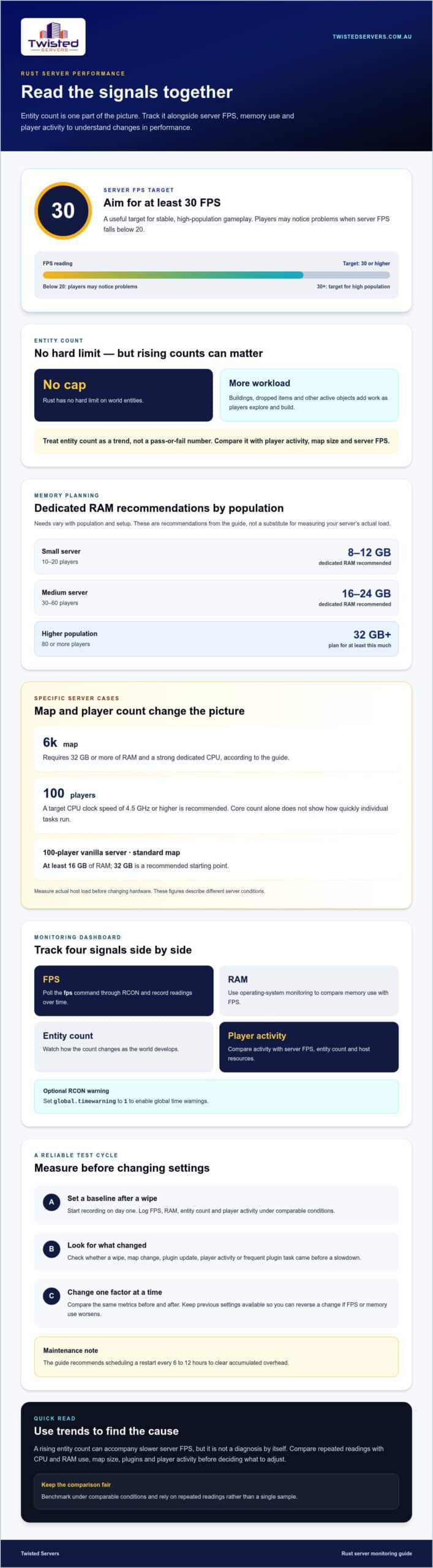
More entities can reduce Rust server FPS, and there’s no hard limit on their number. Optimising Rust server performance means managing server workload; for stable, high-population gameplay, target at least 30 server FPS.
Entity count is one monitoring metric, not a complete diagnosis. Consider it alongside player activity, map size and server load to understand performance changes.
This guide explains Rust server optimisation and how entity counts can relate to performance. Learn what to monitor and how server resources, settings and hosting choices fit into the picture.
Key Takeaways
- Track server FPS through RCON, alongside RAM use and entity count, to spot performance changes.
- Use 30 FPS as a target for a stable, high-population Rust server.
- There’s no hard entity limit, but rising counts can reduce server FPS; compare them with CPU capacity and player activity.
- Record performance after a wipe to establish a baseline and make informed decisions about server settings and hosting resources.
1. What is Rust server optimization?
Rust server optimization means reducing avoidable workload while maintaining responsive gameplay. For a high-population server, target at least 30 server FPS; players may notice problems when FPS falls below 20. Optimizing Rust server performance starts with measurement, not changing settings at random.
Use RCON to poll the fps command and record its readings over time. Track RAM use and entity count alongside FPS, starting on day one after a wipe. This baseline helps show whether performance changes as the world develops, players join or plugins add activity. You can also set global.timewarning to 1 through RCON to enable global time warnings.
For a Rust game server, use RCON and operating-system monitoring to compare FPS with CPU and memory use. Rust application profilers analyse program code, so they do not directly explain a game server’s live entity load.
Rust web frameworks handle HTTP requests, unlike Rust’s dedicated game server software. Comparisons of their throughput and latency do not show how well a Rust game server performs.
To identify CPU, memory and latency bottlenecks, compare RCON FPS with host CPU and RAM readings during busy periods. Check whether plugins are running frequent tasks, then change one factor at a time and compare the results with your baseline.
Benchmark by recording FPS, RAM, entity count and player activity under comparable conditions. Falling below 30 FPS is a useful signal for a high-population server; compare repeated readings rather than relying on one sample.
Rust compiler release settings apply when building Rust application code, not when tuning game server settings. Focus on the game server’s available configuration and measured host resource use.
Tokio runtime settings apply to applications built with Tokio, not Rust game server configuration. For a Tokio service, assess runtime behaviour under its actual workload rather than applying settings without testing.
Database pools and query tuning concern Rust applications that use a database. They are not direct controls for Rust game server entities or FPS.
Test changes in a controlled environment and compare the same monitoring metrics. Deploy one change at a time, keeping the previous settings available so you can reverse a change if FPS or memory use worsens.
2. Entity counts and server performance
Rust has no hard limit on world entities, but high counts can reduce server FPS. Building pieces, dropped items and other active objects add work as players explore and build. Counts can therefore rise alongside slower performance, particularly on a large map or a busy server.
Use entity count as a trend, not a pass-or-fail number. Compare it with player activity and server FPS, then identify whether a wipe, map change or plugin update preceded a slowdown. Remove unnecessary plugins or adjust settings only when the evidence points to them. A 6k map requires 32GB or more of RAM and a strong dedicated CPU.
CPU clock speed matters because Rust server work can depend heavily on fast processing. For 100 players, a target clock speed of 4.5GHz or higher is recommended; core count alone doesn’t show how quickly individual tasks run. Measure the server’s actual load before changing hardware.
RAM needs vary with population and setup. A small server for 10-20 players is recommended to have 8-12GB of dedicated RAM; a medium server for 30-60 players, 16-24GB. For 80 or more players, plan for at least 32GB. A 100-player vanilla server on a standard map needs at least 16GB, with 32GB a recommended starting point.
To reduce allocations and memory use in Rust applications you control, profile first, reuse buffers and avoid unnecessary data copies. These code changes do not directly tune Rust’s dedicated game server.
Common pitfalls include treating entity count as the only cause, adding plugins without measuring their impact, and ignoring changes after the latest update. Compare performance before and after each change; schedule a restart every 6 to 12 hours to clear accumulated overhead.
Twisted Servers: Game Server Hosting
Twisted Servers offers Game Server Hosting for communities that want to run multiplayer servers. If you need a different hosting setup, our VPS Hosting and Dedicated Server Hosting are also available.
Choose a hosting option based on the control you need and the resources your server workload requires. Monitoring FPS, entity counts and memory remains useful as your community grows.
For help exploring a hosting option for your needs, contact Twisted Servers.
Plan your next performance step
Think beyond a single performance target. A server’s settings and content help shape the experience players return for. A carefully curated setup may suit a community that values familiar gameplay, while a customised environment can give it a distinct identity. Optimizing Rust server performance should support that identity, not undermine it in pursuit of a metric. Before planning adjustments, decide what you want your community’s server to be known for.
Clear expectations help administrators make consistent decisions. Set out the principles that guide your server, including the style of play you want to maintain and how you’ll communicate meaningful changes. Explain the context to players when plans affect their experience. As your community develops, revisit those principles and consider whether the server still reflects its priorities.
If hosting is part of your next step, Twisted Servers can discuss options for your needs. Contact Twisted Servers today, and move forward with a plan that keeps your community’s experience at its centre.
Frequently Asked Questions
What is Rust server optimization?
Rust server optimization means adjusting server settings and resource use to support smoother gameplay. For example, you might reduce animal AI or map size to ease simulation demands, while considering how those changes affect the experience players expect. Treat each adjustment as a trade-off: preserve the server’s intended style, then assess whether the change addresses the problem you observed.
Which Rust profiling tools are best for server performance?
Use RCON to poll the fps command, and operating-system monitoring to compare FPS with CPU and RAM use. Track entity count and player activity alongside those readings. Application profilers do not directly explain a game server’s live entity load.
How to benchmark Rust servers and interpret throughput and tail latency?
Record FPS, RAM use, entity count and player activity under comparable conditions, and compare repeated readings with your baseline. For a high-population server, treat below 30 FPS as a useful signal and compare host CPU and memory use during busy periods.
Disclaimer
Game titles, trademarks, logos and related assets are the property of their respective owners. Twisted Servers is an independent hosting provider and is not affiliated with or endorsed by the developers or publishers of the games mentioned unless otherwise stated. Information is provided as a general guide and may change as games, software and hosting services are updated.

