
Recommended Services


Supported Scripts


Can your ping look fine and still leave a game feeling delayed? If you’re asking “what is a good ping for gaming australia”, there isn’t one number that suits every game, player or server. A lower ping can help, but it doesn’t tell the whole story.
When gameplay feels sluggish, ping is a useful place to start. Lag can also involve jitter, which is variation in ping, or packet loss, when data doesn’t reach the game server. Your connection may behave differently across games and server regions, so one test result may not show the full picture.
This guide explains what ping measures and how to check it alongside other connection signs. You’ll learn how to compare results, what to note while testing, and why your ISP’s routing and the game server’s location can affect the outcome. An Australian-hosted game server may be relevant if you’re playing from Australia, but it can’t guarantee a particular ping. Your location, ISP and route to that server all matter.
Key Takeaways
- There’s no single number that answers “what is a good ping for gaming australia”; the right reading depends on your game, location and connection route.
- Check ping alongside jitter and packet loss to get a clearer picture of what may be causing lag.
- Record the game server and test time, then repeat your checks to see whether results stay consistent.
- Check which server region you’re connected to. Its location and your ISP’s routing can affect latency.
- Australian game server hosting may be worth considering, but your location, ISP and route still influence the ping you experience.
What does ping mean in gaming, and what makes it feel good?
There’s no single ping value that suits every game and player. Ping measures network delay, but it doesn’t promise that gameplay will feel smooth. A lower reading generally means less delay between your input and the game server’s response. Consistency, the game itself and server conditions also shape what you experience.
What does a ping number actually measure?
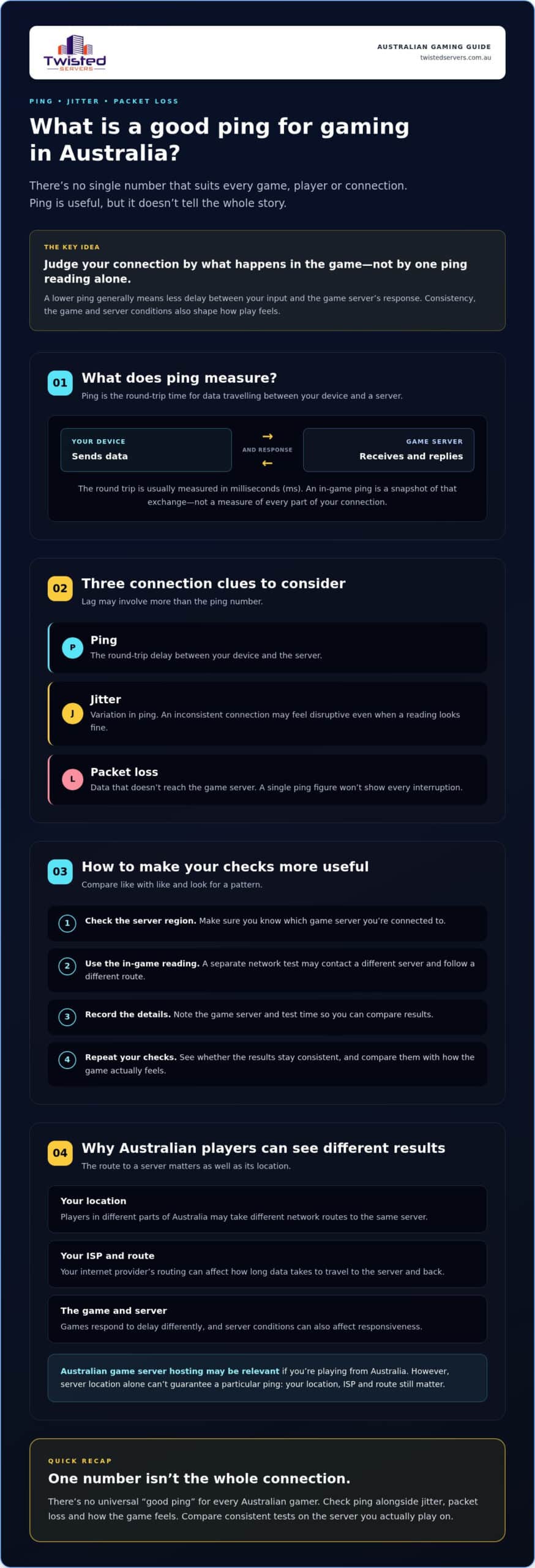
In most gaming and network tests, ping is the time it takes data to travel from your device to a game server and for a response to return. This round trip is usually measured in milliseconds (ms). A game’s ping display is a snapshot of that exchange, not a direct measure of every part of your connection.
The result depends on what’s being tested. An in-game reading reflects the route to the selected game server, while a separate network test may contact a different server. The game, your connection and the route between you and the server can all affect the figure. For background on what ping means in gaming, see the overview of online gaming lag and latency.
In short: ping is the measured round-trip time for data between your device and a server. It can help you assess delay, but it can’t guarantee responsive or uninterrupted play.
Why can the same ping feel different in different games?
Games don’t all respond to delay in the same way. In a fast-reaction game, a pause between your action and the server’s response may be easier to notice because timing matters moment to moment. In slower-paced play, the same reading may feel less disruptive. That’s why the game and your own experience matter when you assess a ping result.
Server conditions can also affect responsiveness. If a game feels delayed despite a low ping reading, the number alone may not explain what’s happening. Use it as one clue, then compare it with how the game behaves and whether the result stays consistent.
If you’re considering hosting a multiplayer game, server location is one factor to check alongside your own connection and route. Learn more about Australian game server hosting, but don’t assume location alone will determine your ping.
Is there one good ping for gaming in Australia?
No single ping value defines good gaming performance for every Australian player. A reading that feels responsive in one game may feel less comfortable in another, and two players connecting to the same game can see different results. Treat the number as useful context, not a verdict on your whole connection.
If you’re searching for what is a good ping for gaming australia, focus on how your connection performs in the game and on the server you actually use. Delays may be more noticeable in fast-reaction play, while slower-paced games may be less sensitive. Your location, the server’s location, your ISP and the route between them all shape the reading.
How should you interpret commonly quoted ping ranges?
Ping ranges shared online can offer a rough point of reference, but they aren’t a universal standard for Australian gamers. Without a clearly sourced, current benchmark for your particular game and server, don’t treat a quoted cutoff as a pass-or-fail test. Compare your own in-game readings and experience instead. A threshold is a guide, not a performance promise.
Look beyond the ping figure if the game feels inconsistent. The British Esports Federation’s guide to ping, jitter and packet loss explains why related connection measures can affect perceived lag. A single ping reading can’t describe every delay or interruption during play.
Why can ping vary between Australian players?
Players in different parts of Australia may take different network routes to the same server. The server’s location, the player’s location and the ISP’s routing can all affect how long data takes to travel and return. That’s why another player’s result may not match yours, even if you’re playing the same game.
When assessing your connection, use the server region you plan to play on and compare like with like. If you’re choosing a multiplayer server, Australian game server hosting may be relevant for players here, but location alone can’t guarantee a particular ping. Check the route and your own in-game results before drawing conclusions.
Ping, jitter and packet loss: what could be behind gaming lag?
Ping is only one part of your connection’s behaviour. A reading can look steady while gameplay still stutters, or it can rise without showing where the delay begins. Jitter and packet loss describe different issues, so checking all three can give you a clearer picture than ping alone.
How are ping, jitter and packet loss different?
Ping measures delay: it is the time taken for data to travel to a server and for a response to return. Jitter measures variation in delay: it describes how much that time changes between data exchanges. Packet loss measures missing data: it describes packets sent that don’t reach their destination.
Each measure describes a different aspect of the connection. Their possible symptoms can overlap, so treat them as clues rather than proof of a specific fault.
| Measure | What it describes | What you might notice |
|---|---|---|
| Ping | Round-trip delay between your device and the server. | A pause between an action and the game’s response. |
| Jitter | How much the delay varies over time. | Uneven or inconsistent responsiveness. |
| Packet loss | Data packets that don’t reach their destination. | Missing updates, interruptions or characters appearing to jump position. |
These symptoms aren’t a diagnosis. A character snapping back, for example, can have more than one possible cause. There isn’t a single ping number that rules jitter or packet loss in or out. Look at the game’s network indicators and how consistently the problem occurs rather than judging your connection by a threshold alone.
Can a high ping reading identify the cause of lag?
No. One high reading shows that the test recorded a longer delay, but it doesn’t identify which part of the connection is responsible. The route to the server, the server itself or something on your local connection may be relevant. A satisfactory ping result also doesn’t rule out jitter or packet loss.
For a more useful check, compare the in-game ping with any jitter or packet-loss indicators the game provides. Repeat the measurement to see whether the pattern persists, and note when the issue happens and which server you’re connected to. If it continues, use the game’s support resources or speak with your ISP, especially if the evidence suggests the issue may be outside your device or home network. Those details are more useful than asking only “what is a good ping for gaming australia”.
How can you test and troubleshoot your gaming ping?
Start with the reading shown by the game. It measures the connection to the server you’re playing on, so it’s more relevant to that session than a general speed test. A speed test can help assess your internet connection, but it may contact a different server and won’t necessarily show the route to your game server.
How do you get a useful ping test?
Keep your checks comparable. Record the details, repeat the check, then change one factor at a time if you need to investigate.
- Note the in-game ping. Record the reading displayed while connected to a live game server.
- Record the server and time. Write down the selected game server or region and when you tested. This makes it easier to compare like with like.
- Repeat the check. Take readings again under similar conditions. One result may not show whether delay is persistent or varies over time.
- Compare connection types if practical. Try a wired Ethernet connection instead of Wi-Fi, keeping the game server and other conditions as similar as possible. The comparison may show whether your connection type affects the readings, but it won’t guarantee a fixed improvement.
Use a general internet speed test as a separate check, not as a substitute for the in-game reading. Its result describes a test to its selected server, which may follow a different route from the game.
What should you check when ping is unexpectedly high?
First, check that you’ve selected the intended game server. If the game offers other servers, compare their in-game readings rather than assuming the geographically closest option will give the best result. Different routes can produce different readings.
Then check whether other devices or applications are using your connection at the same time. If practical, pause non-essential downloads or streams and repeat the test, changing only that factor. You can also compare Wi-Fi and Ethernet results, or restart your router if its instructions recommend doing so. These checks can help you see what changes alongside the ping, but they don’t prove the cause.
If the issue continues, consult the game’s official troubleshooting guidance. If other online activities are affected too, contact your ISP and share your test notes, including the time, server and repeated readings. If the evidence points to the route or game server rather than your own connection, investigate that path before changing hosting. For a multiplayer community assessing server options, explore Australian game server hosting and compare the server location with where your players connect from.
How can Australian game server location affect ping?
The physical distance between you and a game server is one part of the connection path. For players in Australia, an Australian-hosted server may mean data travels a shorter physical distance than it would to a distant overseas server. That can make local hosting worth considering, but it can’t guarantee a particular ping or smooth gameplay.
Your result also depends on where you’re playing from, your ISP and the route your traffic takes to the server. Network routing doesn’t always follow the most direct geographic path, and two players connecting to the same server may see different readings. If you’re asking what is a good ping for gaming australia, check the actual game server and your own connection rather than relying on location alone.
When should you consider an Australian-hosted game server?
If most of your players are in Australia, an Australian server may be a practical option to compare with overseas servers. Check its location and, where possible, test from the places your players connect. Each player’s ISP route still matters, so treat any expected latency benefit as something to measure, not assume. See our Australian game server hosting service for details.
What should you expect from a hosting provider?
Before choosing a host, confirm where the game server will run and whether the provider supports the game you want to host. Consider where your players are based and compare their in-game results on the relevant server. These checks help separate the possible effect of server location from issues with an individual player’s connection or route.
Twisted Servers is an Australian hosting provider offering game server hosting on Australian infrastructure. That may suit communities looking to host for players in Australia, but each player’s location, ISP and route can affect their experience. If you’re considering hosting, review the server details that matter to your community.
Use your ping results to choose your next step
There isn’t one number that answers “what is a good ping for gaming australia” for every player. Readings depend on the game, your connection and the route to its server. For a clearer picture, compare repeated in-game results and check jitter or packet loss as well as ping.
If delays persist, use your test notes to check whether the issue follows your connection, a particular server or its route. For communities with players in Australia, local game server infrastructure may be worth comparing with other options, but it can’t guarantee a specific ping.
Twisted Servers offers Australian game server hosting, with dedicated expert support available 24/7. If you’re considering hosting for your gaming community, explore Australian game server hosting and review the details that matter to your players.
Use your results to compare options and choose the next step that best fits your game and community.
Frequently Asked Questions
What is a good ping for gaming in Australia?
There’s no universal ping threshold that suits every Australian gamer. Ping is the time for data to travel to a game server and for a response to return, usually measured in milliseconds. The game, server location, your location, ISP and network route all influence the result. A number can help you compare connections, but it can’t guarantee smooth gameplay. Check the in-game reading and consider how consistently the connection performs.
Is 50 ms ping good for gaming?
A 50 ms reading may feel acceptable to one player and less responsive to another. The game’s timing demands, the route to its server and how much your connection varies can all affect your experience. Rather than treating one figure as a pass or fail, check the reading in the game you play and repeat the test on the same server. Also note any jitter or packet loss indicators the game provides.
Can an Australian game server reduce ping?
An Australian-hosted server can reduce the distance data travels for players in Australia compared with a distant overseas server, but it can’t guarantee lower ping for every player. Your location, ISP, routing and the server’s location all affect the result, and Australian-hosted options may perform differently from one another. Check the ping shown in your game while connected to the specific server you plan to use, then compare repeated readings.
Why is my ping high even when my internet seems fast?
A speed test and a game’s ping measure different things. A speed test measures performance to its selected test server, while in-game ping reflects the connection to the game server. Routing, server location or changes in your connection can affect that result even if a speed test looks satisfactory. Check the game’s ping more than once, note the server, and investigate the route, game server or ISP rather than relying on download speed alone.
How can I check my ping while gaming?
Check the game’s ping indicator, if it has one, while connected to the server you intend to play on. Record the server selection and reading, then repeat the check in comparable sessions to see whether the result stays consistent. A general internet test may connect to a different destination, so it won’t necessarily measure the route to your game server. Treat each reading as evidence, not proof of what causes lag.
Does ping affect FPS in a game?
Ping measures network delay, while FPS, or frames per second, describes how often your game displays a new frame. Both can affect how play feels, but they aren’t the same measure. High ping alone doesn’t prove your frame rate is low, and low FPS doesn’t necessarily mean your ping is high. Check the game’s network and graphics indicators separately so you can investigate connection delay and display performance as different issues.
Is Ethernet better than Wi-Fi for gaming ping?
Ethernet avoids the wireless link and may make a connection more consistent in some setups, but it can’t guarantee lower ping or fix a long route to a distant server. To compare fairly, use the same game server and check repeated in-game readings over similar sessions on Wi-Fi and Ethernet. Before changing network settings, check the current guidance for your device and router. A connection test can help compare results, but it won’t identify every cause of lag.
Disclaimer
Game titles, trademarks, logos and related assets are the property of their respective owners. Twisted Servers is an independent hosting provider and is not affiliated with or endorsed by the developers or publishers of the games mentioned unless otherwise stated. Information is provided as a general guide and may change as games, software and hosting services are updated.

