
Recommended Services


Supported Scripts

Why spend dozens of hours fortifying your base only to have a 300ms lag spike ruin your headshot during the blood moon? For many Australian players, the true threat isn’t the undead, but the physical distance to international data centres that often makes 7 days to die server hosting feel sluggish and unresponsive. We understand that you want a seamless experience where your focus remains on survival rather than wrestling with complex configuration files or unstable connections during intense horde nights.
In this guide, we’ll show you how to take full control of your dedicated setup using high-performance Australian infrastructure. You’ll learn how to configure your server for low-latency performance, manage mods with ease, and keep your community safe with robust DDoS protection. We’ll walk you through the essential steps to optimise your world settings and use the TCAdmin control panel to target the sub-30ms latency results local players expect. By the end of this article, you’ll have the knowledge to maintain a stable environment that keeps your group connected and your gameplay fluid, no matter how many zombies are at the gates.
Key Takeaways
- Understand why low-latency local infrastructure is vital for accurate hit registration and synchronised physics during intense horde nights.
- Learn how to calculate the hardware requirements for your community, including how world sizes from 6K up to 10K impact RAM consumption.
- Discover why professional 7 days to die server hosting in an Australian datacentre provides better security and reliability than home hosting on NBN connections.
- Master the configuration process using the TCAdmin control panel to easily switch between stable and experimental game branches.
- Gain peace of mind with 24/7 dedicated expert support and proactive DDoS protection to keep your server online and stable.
Why Australian 7 Days to Die Server Hosting is Critical for Performance
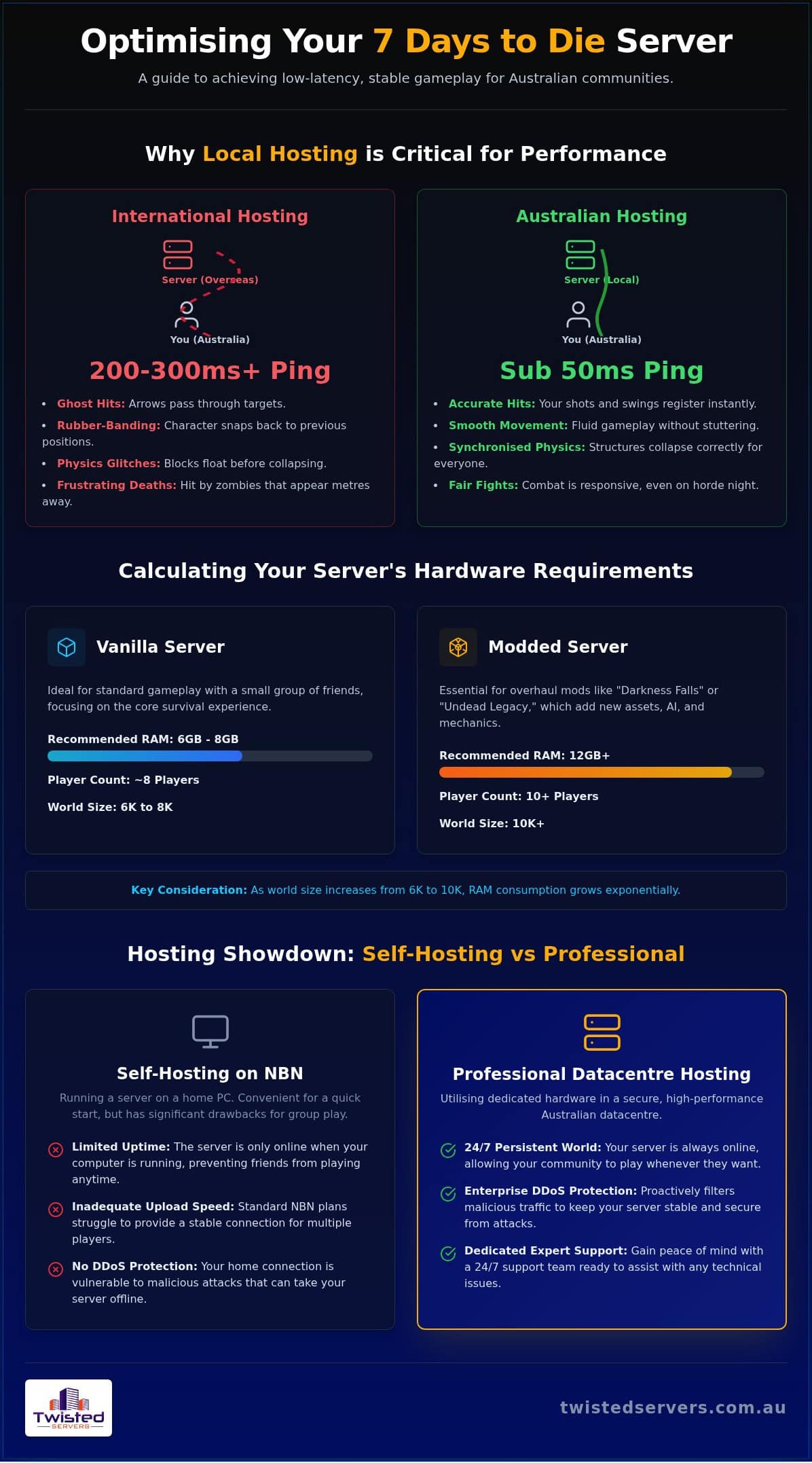
When you’re playing 7 Days to Die, every second counts. While the game allows you to connect to servers globally, the physical distance between your setup and the server hardware creates a lag that can’t be ignored. Opting for 7 days to die server hosting based in Australia ensures that the data packets don’t have to travel across the Pacific and back just to tell the game you’ve swung your club. This local routing is the difference between a clean kill and a frustrating death because the zombie wasn’t actually where your screen showed it to be.
Beyond combat, the game’s unique voxel-based physics engine relies heavily on synchronisation. When a building loses its structural integrity and begins to collapse, the server must calculate the fall of every individual block in real-time. High latency often results in “rubber-banding”, where your character snaps back to a previous position, or blocks appear to float mid-air before suddenly crashing down. Local Australian data centres provide the stable connection needed to keep these complex physics calculations in sync for every player on the server.
The Impact of Latency on Horde Night
Horde night is the ultimate test of your server’s performance. During these events, the server-side AI must calculate pathing for dozens of zombies simultaneously while tracking player movement and projectiles. We aim for a sub-50ms ping because it provides the responsiveness required for high-stakes combat. When latency spikes on international servers, you’ll often experience “ghost hits” where your arrows pass through targets or you take damage from a zombie that appears to be metres away. Investing in high-quality 7 days to die server hosting ensures your hardware can keep up with the intense AI demands of the blood moon without compromising the experience for your group.
Reliability and 24/7 Uptime in Australia
Many players start by hosting a game locally on their own PC, but this peer-to-peer approach has significant drawbacks. It requires your computer to stay powered on around the clock; your friends can only play when you are online. Professional game server hosting Australia removes these hurdles by providing a persistent world that is always accessible. Friends can jump in to gather resources or work on the base while you’re at work or asleep. Additionally, home NBN connections often struggle with the upload speeds required for multiple players. Using a professional service ensures you have a DDoS protected game server Australia as a baseline, keeping your community safe from malicious attacks that would otherwise take a home connection offline.
Calculating Your Server Requirements: RAM, CPU, and World Sizes
Selecting the correct hardware for your 7 days to die server hosting is about more than just meeting the bare minimum requirements listed on a store page. The game’s voxel-based nature means the server isn’t just tracking player locations; it’s managing a fully destructible world where every block has its own integrity and state. As you move from a standard 6K map to a sprawling 10K world, the memory footprint grows exponentially because the server must keep a larger number of active chunks in its cache. High-clock-speed CPU threads are equally vital, as they handle the complex AI pathing and physics calculations that occur whenever a zombie spots a player or a structure begins to fail.
The stability of your world depends on the server’s ability to process these events without delay. Studies on Player Perception of Delays and Jitter highlight how even small variations in processing time can lead to player frustration and a sense of “clunkiness” in the controls. This is particularly noticeable during the blood moon, where dozens of entities are active simultaneously. We recommend prioritising RAM capacity to ensure your world data remains accessible without needing to swap to slower storage disks during peak play times.
Vanilla vs Modded Hosting Requirements
A vanilla world with 8 players usually finds its sweet spot with 6GB to 8GB of dedicated RAM. However, the landscape changes drastically when you introduce overhaul mods such as “Darkness Falls” or “Undead Legacy”. These packs add hundreds of high-resolution assets, complex new AI behaviours, and expanded crafting systems that can double or even triple your memory requirements. RAM acts as the primary bottleneck for 7DTD world data because it must store every active entity, item drop, and modified block state to ensure the world remains consistent for all players.
Managing World Size and RWG Performance
Random World Generation (RWG) remains one of the most taxing processes for any 7 days to die server hosting environment. Generating a new 8K or 10K map requires intense CPU cycles and can take upwards of twenty minutes, often causing significant lag if performed while players are already online. We suggest using a pre-generation tool or creating the map during off-peak hours to maintain a smooth experience. For users who need more advanced resource management, our TCAdmin VPS Hosting offers the flexibility to allocate resources specifically for these heavy tasks. If you’re ready to start your journey without the technical headache, our game server hosting Australia options provide a balanced baseline for both vanilla and modded play.
Self-Hosting vs Professional Australian Datacentre Hosting
Choosing between running a local machine or opting for professional 7 days to die server hosting often comes down to the balance of convenience and reliability. While it’s tempting to repurpose an old gaming rig, the reality of maintaining a 24/7 environment in Australia involves several technical and financial hurdles that aren’t immediately obvious. A dedicated server isn’t just about having the game files on a disk; it’s about providing a stable, secure gateway for your community to connect to at any hour of the day.
The Hidden Costs of Hosting at Home
Australia has some of the highest electricity rates globally. Running a high-spec PC around the clock to host a persistent world can add a noticeable amount to your quarterly power bill, often exceeding the cost of a monthly subscription. Beyond the power draw, you also face the “NBN bottleneck”. Most residential NBN plans are asymmetric, meaning your upload speed is significantly lower than your download. This creates a hard cap on how many players can join before everyone experiences synchronisation issues. Professional game server hosting bypasses these local limitations by utilising enterprise-grade hardware and symmetric fibre connections designed specifically for high-traffic loads.
Security and DDoS Defence for Aussie Communities
Exposing your home IP address to the public server list is a risk many community leaders overlook. Once your IP is public, your home network becomes a target for DDoS attacks, which are surprisingly common in competitive gaming circles. A single attack can knock your entire household offline, affecting your work, streaming services, and security systems. Professional datacentre environments utilise Arista Edge Threat Management to filter malicious traffic before it ever reaches your world data. This level of protection, combined with advanced encryption and regular malware scanning, ensures your progress is safe from both data loss and external interference. For more tips on maintaining a smooth connection, see our guide on game server lag australia fix strategies.
Technical issues don’t follow a schedule. If your configuration file corrupts late at night, self-hosting leaves you searching through old forums for answers. We provide 24/7 dedicated expert support to ensure that if something goes wrong, you have a knowledgeable partner ready to help you get back online. This peace of mind is a core component of reliable 7 days to die server hosting, allowing you to focus on surviving the next horde rather than managing infrastructure.
Step-by-Step: Configuring Your 7 Days to Die Dedicated Server
Managing your world begins with the TCAdmin control panel, which acts as the central hub for your 7 days to die server hosting. Once you log in, you’ll find a streamlined interface that allows you to start, stop, and update your server without needing to touch a single line of code. For most players, the first decision is choosing between the Stable and Experimental game branches, as this determines which features and zombies your community will face.
Version Management: Stable vs Experimental
The Stable branch is the recommended choice for long-term communities, offering the most consistent experience with fewer game-breaking bugs. In contrast, the Experimental branch allows you to test the newest updates before they are officially released. While exciting, these versions carry a higher risk of save corruption or sudden crashes. We suggest performing a clean install when switching branches to ensure no legacy files conflict with the new update. Always use the backup manager within your control panel to secure your world data before making any major version changes; it’s a simple step that prevents hours of lost progress.
Customising the Survival Experience
To truly make the world your own, you’ll need to edit the serverconfig.xml file. This document controls every aspect of the game’s rules, from the length of the day to how punishing the zombies are. You can easily adjust variables such as:
- GameDifficulty: Scales from 0 (easiest) to 5 (insane).
- XPMultiplier: Increases the speed at which players level up.
- LootAbundance: Controls how much gear is found in containers.
- LandClaimCount: Determines how many protective blocks each player can place.
Protecting player bases is vital for community longevity. By configuring Land Claim Blocks, you ensure that structures can’t be easily destroyed by others while the owner is offline. Finally, you should decide on your server’s visibility. Setting the visibility to “2” makes it public on the Steam browser, while “0” keeps it private for friends only. For those who want to manage their community in real-time, setting up admin permissions via the adminconfig.xml allows you to use Telnet or RCON commands to kick troublemakers or spawn items for events.
Ready to build your ultimate survival world? You can start your 7 Days to Die journey today with our easy-to-use control panel and local Australian support.
Why Twisted Servers is the Top Choice for Australian 7DTD Players
Choosing a partner for your 7 days to die server hosting involves more than just looking at a spec sheet. It’s about finding a team that understands the unique routing challenges of the Australian internet and provides the tools to manage them effectively. We’ve designed our service to be the backbone of your community, combining high-performance hardware with a support structure that never sleeps. This ensures that whether you’re a small group of mates or a growing public community, your world remains stable and responsive during every blood moon.
Australian-Based Infrastructure and Support
Our commitment to local infrastructure means your players enjoy the lowest possible latency. By keeping our data centres within Australia, we reduce the physical distance data must travel, which directly translates to the precise hit registration and smooth physics we discussed earlier. We don’t just provide the hardware; we provide peace of mind. Our 24/7 dedicated expert support team is composed of people who actually play and understand the game. If you encounter a configuration error or a mod conflict at 2 AM, you won’t be stuck waiting for a response from an overseas ticket queue. We are here when you need us, providing straightforward advice and technical skill to keep your server running at its peak.
Getting Started with Your Aussie Server
We believe that high-quality hosting should be accessible to everyone. Our 7 days to die server hosting plans start from just $5.00 AUD/month, providing a highly competitive entry point for the local market without compromising on security or performance. Every plan includes proactive Arista Edge Threat Management to shield your world from DDoS attacks, ensuring that your community stays online even if you become a target. The deployment process is near-instant; once your order is confirmed, our automated systems begin setting up your environment so you can start building your base immediately.
Every community has different needs. If you’re planning a massive 10K world with dozens of players and heavy overhauls, you can contact Twisted Servers to discuss custom resource allocations. We pride ourselves on being a flexible ally in your survival journey, offering the scalability you need as your group grows. When you’re ready to leave the lag behind and experience the game as it was intended, you can start your 7 Days to Die server hosting journey today with a team that truly has your back.
Secure Your Community and Survive the Blood Moon
Building a reliable environment for your group requires a balance of high-performance hardware and local routing. We’ve explored how Australian infrastructure eliminates the frustration of ghost hits and rubber-banding, ensuring that your 7 days to die server hosting remains stable even as your world grows to 10K and beyond. By moving away from the limitations of home NBN connections, you gain access to professional security features like Arista Edge Threat Management and the peace of mind that comes with 24/7 dedicated expert support.
Whether you’re running a vanilla world or a complex overhaul mod, having a persistent and secure server allows your community to thrive without technical interruptions. You’re now equipped with the knowledge to configure your world settings and manage your community with confidence. It’s time to stop worrying about lag and start focusing on your next fortification. Launch Your 7 Days to Die Server from $5.00 AUD/Month and experience the difference that local, high-performance Australian infrastructure makes to your gameplay. Good luck out there, survivor.
Frequently Asked Questions
How much RAM do I need for a 7 Days to Die server with 10 players?
We recommend at least 8GB to 12GB of RAM for a 10-player vanilla world to ensure smooth performance. If you plan to explore a large 10K map or use overhaul mods, increasing this to 16GB provides a necessary buffer for high-entity events like blood moons. Memory acts as the primary cache for active chunks, so having a surplus prevents the stuttering often seen when players are spread across the world.
Can I host a 7 Days to Die server on my own PC in Australia?
You can host locally, but you’ll likely face the “NBN bottleneck” where limited upload speeds cause significant lag for your mates. Leaving your gaming rig running 24/7 also leads to high electricity costs and hardware wear. Professional 7 days to die server hosting provides a persistent world on symmetric high-speed fibre, allowing your group to join anytime without your personal computer being online or your home network being compromised.
Does Twisted Servers support 7 Days to Die modpacks like Darkness Falls?
Yes, we fully support overhaul modpacks like Darkness Falls and Undead Legacy through our flexible 7 days to die server hosting environment. Our TCAdmin control panel allows you to upload custom files and manage complex mod requirements with ease. Because these packs significantly increase hardware demands, our scalable resource allocations let you increase your RAM to ensure the added assets and AI behaviours don’t impact your community’s stability.
How do I change my 7 Days to Die server to the Experimental branch?
You can switch to the Experimental branch through the “Updates” or “Branch Selection” section of your TCAdmin control panel. This process involves selecting the latest beta branch and performing a clean update. We always advise creating a full world backup before switching, as experimental versions are prone to save corruption. Once updated, your server will run the newest features, though you should verify your group has also updated their game clients.
Is DDoS protection included with my Australian game server hosting?
Every server includes proactive DDoS defence and Arista Edge Threat Management as standard. This security layer filters malicious traffic before it reaches your game data, which is essential for public servers listed on the Steam browser. We also utilise advanced encryption and malware scanning to protect your community. This baseline protection ensures your home network isn’t targeted and your gameplay remains uninterrupted by external network attacks that could otherwise take you offline.
Can console players join my 7 Days to Die dedicated server?
Currently, dedicated servers for 7 Days to Die are primarily designed for the PC version, including Steam and Windows Store players. While the developers have introduced crossplay features in recent versions like 1.0, console players on PlayStation or Xbox typically connect through different networking protocols. It’s best to check the official developer notes for the current version compatibility if your group is split across different platforms, as dedicated server support for consoles remains limited.
How do I become an admin on my own 7 Days to Die server?
You can become an admin by adding your Steam64 ID to the adminconfig.xml file located in your server’s configuration directory. Alternatively, you can use the TCAdmin web console or a Telnet connection to issue the “admin add” command with your player name and permission level. Level 0 provides full permissions, allowing you to manage players, spawn items, or change the time of day to keep your survival world running smoothly.
What is the best world size for a stable 7 Days to Die server?
An 8K world size is generally the “sweet spot” for balancing exploration and server performance. While 10K maps offer more room, they require substantially more RAM and can increase load times for players with slower Australian internet connections. For smaller groups or those prioritising stability on standard hardware, a 6K map provides plenty of content while ensuring the server’s CPU isn’t overstretched during the intense AI pathing calculations of horde night.
Disclaimer
Game titles, trademarks, logos and related assets are the property of their respective owners. Twisted Servers is an independent hosting provider and is not affiliated with or endorsed by the developers or publishers of the games mentioned unless otherwise stated. Information is provided as a general guide and may change as games, software and hosting services are updated.

