
Recommended Services


Supported Scripts


You’ve finally tracked down a high-level Rex on The Island, but just as you fire your tranquiliser dart, the world stutters and you find yourself staring at a respawn screen. We know there’s nothing more frustrating than losing hours of progress to a sudden lag spike or a server that can’t handle the heavy demands of Unreal Engine 5. For many Aussie survivors, the excitement of exploring Scorched Earth or the new island of Helianthos is often ruined by high ping and constant rubber-banding on international hosts.
Finding the right ark server hosting shouldn’t feel like a survival challenge of its own. We believe you deserve a stable, 24/7 environment where your only worry is the local wildlife, not your connection quality. This guide provides a clear path to configuring a reliable setup for local players, focusing on the high-clock-speed hardware and NVMe storage required for modern performance. We’ll walk you through the essentials of technical specifications, straightforward mod management, and how to prepare your cluster for the Astraeos update. By the end, you’ll have the knowledge to maintain a low-latency world that stays online through every update and expansion.
Key Takeaways
- Identify the significant hardware requirements for ARK: Survival Ascended (ASA) to ensure your host can manage the demanding Unreal Engine 5 environment.
- Select ark server hosting that prioritises high-frequency CPUs and NVMe storage to maintain stable performance during intense dino encounters.
- Understand why physical distance to data centres dictates your ping and why local Australian infrastructure is the only way to avoid frustrating rubber-banding.
- Learn to effectively manage world configurations, including the installation of mods and the setup of clusters for seamless travel between maps like The Island and Scorched Earth.
- Explore how professional management tools like the TCAdmin control panel provide a straightforward way to organise your server without technical stress.
Understanding ARK Server Hosting in 2026: ASE vs ASA
Choosing your own world starts with understanding the different ways to play. Official servers are managed by the developers, but they often lack the flexibility many Aussie tribes need. Private ark server hosting allows you to set the rules; you decide the harvest rates, taming speeds, and which mods are active. While non-dedicated sessions let you play with friends for free, they come with a restrictive “tether” that forces everyone to stay near the host. Dedicated hosting removes this barrier, allowing your community to spread out across the map without restriction.
The landscape changed significantly with the release of the remaster. While the original Ark: Survival Evolved remains a beloved legacy title, ARK: Survival Ascended (ASA) has moved the experience into Unreal Engine 5. This shift means 2026 survivors must choose between the massive library of content in the original game or the cutting-edge visuals and physics of the remake. Hosting your own world provides total control over these versions, ensuring your progress is never at the mercy of official server shutdowns.
ARK: Survival Evolved (ASE) Requirements
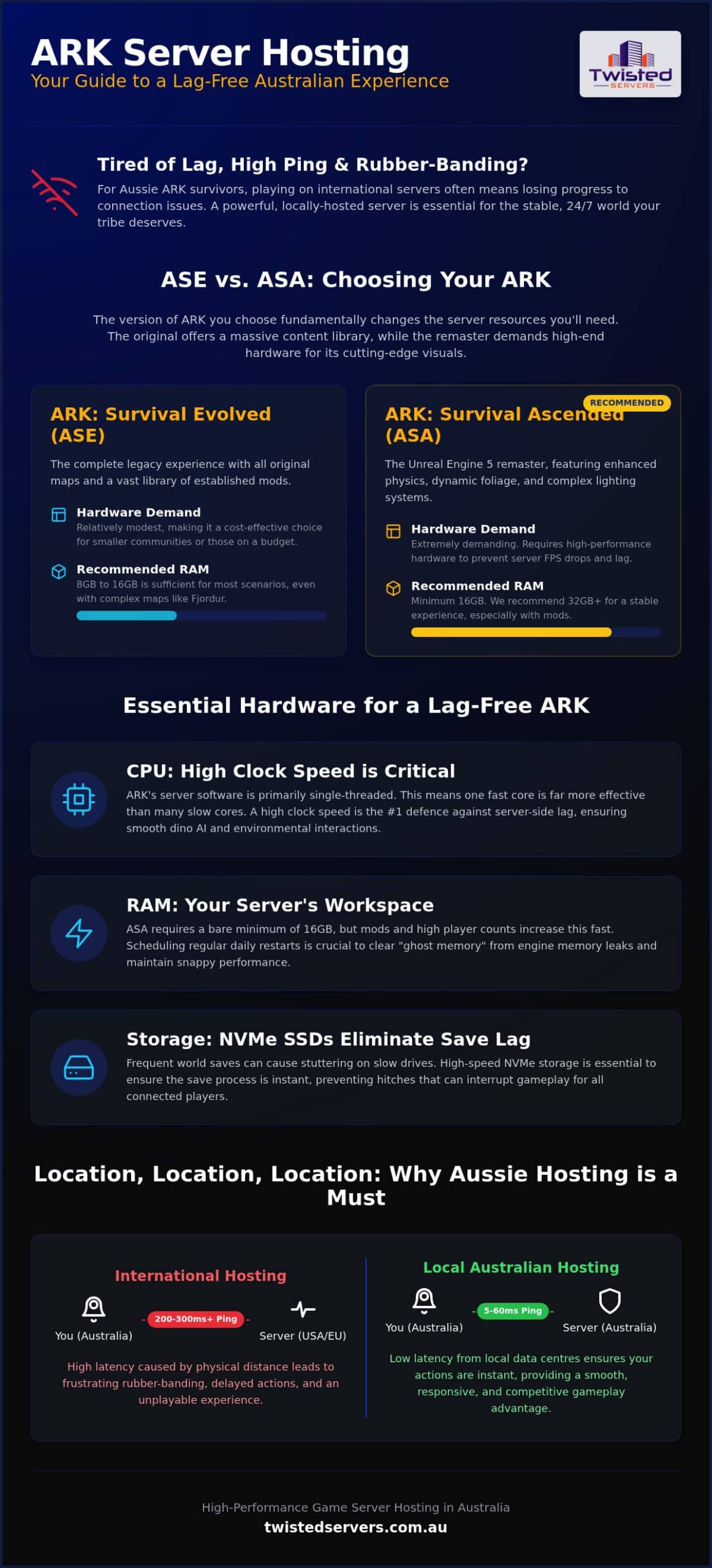
ASE is now considered a legacy title, but it still commands a huge player base due to its complete map library. Hosting a server for maps like The Island requires relatively modest hardware. However, if you plan to host more complex maps like Fjordur or Crystal Isles, you’ll need to account for higher RAM usage. Typically, a small community can run smoothly on 8GB to 16GB of RAM. It remains an excellent, cost-effective choice for survivors with older PCs or tighter hosting budgets who still want to enjoy the full range of original DLC maps.
ARK: Survival Ascended (ASA) Requirements
The move to Unreal Engine 5 has fundamentally changed how we look at hardware. ASA demands much more from a server than its predecessor. The enhanced physics, dynamic foliage, and complex lighting systems require substantial memory; we recommend at least 16GB to 32GB of RAM for a stable experience. CPU clock speed is the most critical factor here. Because the game engine handles so many simultaneous calculations for wild dinos and environmental interactions, a high-frequency processor is essential to prevent the server FPS from dropping. Our game server hosting focuses on this high-performance infrastructure to ensure your ASA world remains fluid even during large-scale raids or boss fights.
Essential Hardware Specs for a Lag-Free ARK Experience
ARK is famously heavy on resources. It isn’t just about graphics; the server tracks thousands of wild dinosaurs, complex building structures, and player inventories in real-time. This is why standard web hosting or generic virtual servers often fail under the weight of a busy tribe. For a smooth experience, your hardware must be capable of processing these constant calculations without stuttering.
CPU: The Brain of Your ARK World
ARK’s dedicated server software is primarily single-threaded for its most critical tasks. This means that a processor with a high single-core clock speed is far more valuable than one with dozens of slower cores. The CPU handles every AI calculation for dinosaur behaviour and pathfinding across the map. If the clock speed is too low, you’ll experience server-side lag where dinos teleport or don’t react to being hit. We use high-clock hardware specifically to avoid these bottlenecks, ensuring a smooth experience even during massive base raids or complex boss encounters.
RAM and Memory Management
RAM acts as the workspace for your server. A vanilla server for ASA generally needs about 16GB to 32GB to breathe properly. However, once you start adding mods from the Steam Workshop or building a cluster, those requirements climb quickly. Memory leaks are a known issue in the ARK engine, where the server slowly consumes more RAM over time until it eventually crashes. Scheduling regular restarts through a control panel is a best practice to clear this ghost memory and keep performance snappy. For those running high-population communities, we recommend our dedicated server hosting Australia options to ensure you have the necessary overhead for growth.
Storage and Read/Write Speeds
World saves happen frequently in ARK to prevent progress loss. On traditional mechanical drives or even older SATA SSDs, the world save process can cause a noticeable hitch or save lag that lasts several seconds. In extreme cases, this can even kick players from the game. The ACCC broadband gaming report highlights that while many Australians have fast connections, the quality of the gaming experience depends heavily on the underlying infrastructure. NVMe SSDs are the standard for 2026, offering the read/write speeds required to handle massive save files and backup rotations without interrupting gameplay. Reliability in storage is a core part of what makes our ark server hosting reliable for long-term Aussie tribes.
The Importance of Australian Infrastructure and Latency
Ping is the heartbeat of your online experience. It measures the time, in milliseconds, for data to travel from your gaming rig to the server and back again. In a high-stakes environment like ARK, where a split-second reaction determines whether you dodge a Rex’s bite or lose your gear, low latency is non-negotiable. When you choose ark server hosting based in Australia, you’re shortening that physical path, which directly translates to more responsive gameplay and a fairer combat environment for everyone in your tribe.
The reality of the Australian internet landscape is that distance equals lag. While light travels fast, the thousands of kilometres of undersea cables between Australia and the United States or Europe introduce a physical delay that no software can bypass. This often results in pings exceeding 200ms on international hosts. We focus on local routing through Aussie data centres to keep those numbers as low as possible. It’s important to remember that your final result also depends on your own ISP and home connection type; however, starting with a local server is the most significant step you can take to improve performance. The same principle applies to other tactical games; for example, players running Arma Reforger servers on overseas hardware face identical latency penalties that make precise, coordinated gameplay nearly impossible.
Why Aussie Servers Beat International Hosting
Domestic routing ensures your data stays within the country, avoiding the congested international gateways that cause “rubber-banding.” This phenomenon, where your character teleports back to a previous position, is a direct result of high latency or packet loss. For local communities, a domestic server provides several advantages:
- Precise Taming: Land your tranquiliser shots accurately without having to predict where a dino was two seconds ago.
- Competitive PVP: Ensure your hits register instantly during fast-paced raids and skirmishes.
- Fluid Movement: Enjoy smooth flight on a Pteranodon without the world stuttering around you.
By keeping the data path short, we help you build a more immersive world where the technology fades into the background, allowing you to focus on survival. Australian Ark players planning to branch out into other upcoming titles in 2026 will find these same latency principles apply when setting up a Hytale server with local infrastructure ahead of launch.
DDoS Protection for Australian Gaming
Game servers are frequent targets for Distributed Denial of Service (DDoS) attacks, often triggered by competitive rivalries or simple malice. An unprotected server can be knocked offline in seconds, leading to lost progress and frustrated players. Our game server hosting includes multi-layered defence systems designed specifically to handle these threats. We utilise advanced filtering that identifies and blocks malicious traffic at the edge of our network. This ensures that your world stays online while maintaining the low-latency environment required for a smooth gaming experience. We believe security should be transparent; it should protect your progress without adding unnecessary lag to your connection.
Configuring Your World: Maps, Mods, and Clusters
Choosing the right environment is the first step in your journey. The Island offers a classic start with its 11 caves and 10 artifacts, while Scorched Earth provides a harsher challenge with significantly fewer metal nodes and a punishing climate. With the Astraeos update in August 2026, many survivors are also preparing to explore the new island of Helianthos. High-quality ark server hosting gives you the freedom to swap between these maps or run them simultaneously as your community grows.
The Steam Workshop allows for endless customisation, from quality-of-life improvements like S+ to entirely new creatures like the Concavenator. However, every mod adds to the server’s load and memory footprint. It’s vital to automate your updates and backups so that a single corrupted file doesn’t wipe weeks of tribe progress. We prioritise a methodical approach to these technical tasks, ensuring your world remains stable even as you layer on complex community-made content.
Managing Mods with TCAdmin
We provide the TCAdmin control panel to make mod management straightforward and accessible. Instead of wrestling with manual FTP transfers or complex command lines, you can install and update mods through a clean interface. This system helps ensure that mod IDs are correctly mapped and that updates are applied without corrupting your world save. Balancing your mod count is essential for long-term server health. We recommend selecting a few high-quality mods rather than dozens of smaller ones to maintain fast load times and avoid technical conflicts that could lead to unexpected downtime.
Setting Up ARK Clusters
A cluster allows you to link multiple servers together, enabling survivors to travel between maps with their same character, items, and tamed dinosaurs. This “Cross-Travel” system is the gold standard for large communities who want the full ARK experience. On the backend, this works by using a shared cluster directory where player data is stored securely during the transfer process. Running a cluster is more hardware-intensive; each active map requires its own dedicated allocation of RAM and CPU power to handle the thousands of wild dinos and structures unique to that world.
If you are looking to expand your community across multiple maps, our game server hosting Australia plans offer the high-performance infrastructure needed to keep every world in your cluster running smoothly. This ensures that when your tribe moves from the desert of Scorched Earth back to the safety of The Island, the transition is seamless and lag-free.
The Twisted Servers Approach to ARK Hosting
We take a straightforward approach to ark server hosting. Instead of relying on marketing hype or unsupported superlatives, we focus on the technical precision required to run a stable world. Our commitment to high-performance Australian infrastructure means we utilise the exact hardware discussed earlier, such as NVMe SSDs and high-clock CPUs. We see ourselves as a dedicated ally in your survival journey, providing a service that emphasises peace of mind and ethical operations.
Reliability comes from more than just hardware. It requires a support team that understands the local landscape. Our experts are based right here in Australia and have genuine experience with the game. We don’t offer cold, detached responses; we provide practical solutions because we know how much effort goes into your builds and tames. This customer-centric model ensures you feel supported rather than overwhelmed by the technical side of server management.
Specialised TCAdmin VPS Hosting
For power users, we offer something beyond standard game slots. Our TCAdmin VPS Hosting provides a distinct environment from regular VPS hosting. It is designed for those who need total control over their server environment. You can manage multiple map instances, run custom scripts, and organise complex clusters with complete independence. This specialised option is the preferred choice for large Australian ARK communities that require high-level administrative access alongside our local performance.
Getting Started with Your Aussie ARK Server
Launching your first world with us is a methodical and logical process. You can move from configuration to gameplay quickly, with your server ready to host your tribe in minutes. Once you’re online, you can access our knowledge base for specific optimisations tailored to the Australian market. If you are currently hosting on an international server and are ready to leave the lag behind, our team is ready to assist with your migration to ensure a smooth transition of your world data. Whether you need a small private space or a massive dedicated server hosting Australia solution, we have the scalable options to grow with your community.
Launch Your Aussie ARK World Today
Building a stable world in 2026 requires more than just a basic server; it demands a deep understanding of the Unreal Engine 5 landscape and the specific infrastructure needs of Australian survivors. We’ve explored how high-clock CPUs and NVMe storage are essential for managing the increased demands of ARK: Survival Ascended, especially when running complex clusters or a heavily modded community. By choosing local ark server hosting, you eliminate the physical distance that causes frustrating lag, ensuring every tranquiliser shot and building placement is precise.
Our team is here to support your journey with low-latency Australian infrastructure, the professional TCAdmin control panel, and genuine advice from local Aussie experts who know the game inside out. We believe in providing a straightforward service that removes technical stress, allowing you to focus on taming, breeding, and exploring new horizons. Explore our high-performance ARK server hosting options and start building your legacy without the technical hurdles. Your tribe is waiting, and we’re ready to help you keep your world online.
Frequently Asked Questions
Do I need a separate server for ARK: Survival Ascended?
Yes, ARK: Survival Ascended is a completely separate game from the original ARK: Survival Evolved. You cannot run an ASA world on an ASE server instance because the underlying Unreal Engine 5 software and file structures are entirely different. Each version requires its own dedicated installation and hosting environment. If you want to play both versions, you’ll need separate server instances to manage the distinct performance requirements and game files effectively.
How much RAM does an ARK server actually need in 2026?
In 2026, a base ARK: Survival Ascended server requires at least 16GB of RAM to run smoothly. If you plan to add mods or host a larger community on maps like Scorched Earth, we recommend 32GB. ARK: Survival Evolved is less demanding, typically needing 8GB to 16GB. Having sufficient overhead is vital to prevent crashes during the intensive world save process or during high-population events where many players are active.
Can I host an ARK server on my own PC instead of renting?
You can host a non-dedicated session on your PC, but it forces other players to stay within a specific distance of your character. Running a dedicated server on your own machine is possible but requires a high-end CPU and significant RAM to handle both the game and the server software simultaneously. Most Aussie survivors prefer dedicated hosting to ensure the world stays online 24/7 without slowing down their own personal gameplay.
What is a good ping for an ARK server in Australia?
A good ping for local players generally falls between 15ms and 60ms, depending on your physical distance from the data centre and your ISP’s routing. While results vary based on home connection types like NBN or 5G, staying under 100ms is essential for fluid combat and taming. Using ark server hosting with Australian infrastructure is the most effective way to achieve these lower latency results compared to using international alternatives based overseas.
How do I add mods to my ARK server hosting?
You can add mods easily through our TCAdmin control panel by entering the specific Mod IDs from the Steam Workshop. The system automates the download and installation process for you. It’s important to restart your server after adding new content to ensure the files are correctly loaded. We recommend checking for mod updates regularly to maintain world stability and prevent technical conflicts between different community creations that might cause downtime.
Can I switch maps on my server without losing my character?
Yes, you can switch maps by changing the startup map in your control panel, but you must ensure your player data is backed up. To move between maps seamlessly while keeping your character and items, setting up a server cluster is the professional choice. This allows you to travel via Obelisks or Tek Transmitters, moving your survivor between worlds like The Island and Helianthos without any progress loss or character corruption.
Is DDoS protection included with Australian ARK hosting?
Every server we host includes multi-layered DDoS protection as a standard feature. We use advanced filtering to identify and block malicious traffic before it reaches your world, which is crucial for preventing downtime during competitive play. Our protection is designed to be transparent, meaning it secures your connection without adding unnecessary latency. This ensures your tribe’s progress remains safe from external attacks while you focus on survival in the outback.
What is the difference between ASE and ASA hosting requirements?
The primary difference lies in the engine; ASA uses Unreal Engine 5, which is significantly more resource-intensive than ASE’s older engine. ASA requires much higher CPU clock speeds and nearly double the RAM to handle enhanced physics and dynamic foliage. While ASE is a legacy title that runs well on older hardware, ASA demands modern, high-performance infrastructure to maintain a stable frame rate and avoid server-side stuttering during intense gameplay sessions.
Disclaimer
Game titles, trademarks, logos and related assets are the property of their respective owners. Twisted Servers is an independent hosting provider and is not affiliated with or endorsed by the developers or publishers of the games mentioned unless otherwise stated. Information is provided as a general guide and may change as games, software and hosting services are updated.

