
Recommended Services


Supported Scripts

TL;DR: Professional Project Zomboid server hosting is the most economical choice for persistent communities, as renting typically costs less than the electricity for home hosting.
- Stable 30–32 player sessions require 8GB–12GB of RAM, increasing to 16GB+ with mods.
- Except when hosting brief sessions for one friend, where local peer-to-peer setups cost nothing.
- Renting is the best verdict for active groups needing 24/7 uptime without port-forwarding.
- The median market rate for dedicated servers is 18 AUD monthly according to the article.
Running a persistent multiplayer world in Project Zomboid requires balancing dedicated RAM with low-latency network routing. Hosting costs adjust depending on memory allocations and local infrastructure demand. Three decision points shape the right choice: how large your survivor group is, whether you need round-the-clock uptime, and how much memory your mods and zombie density will consume.
Project Zomboid hosting: 3 setup choices compared
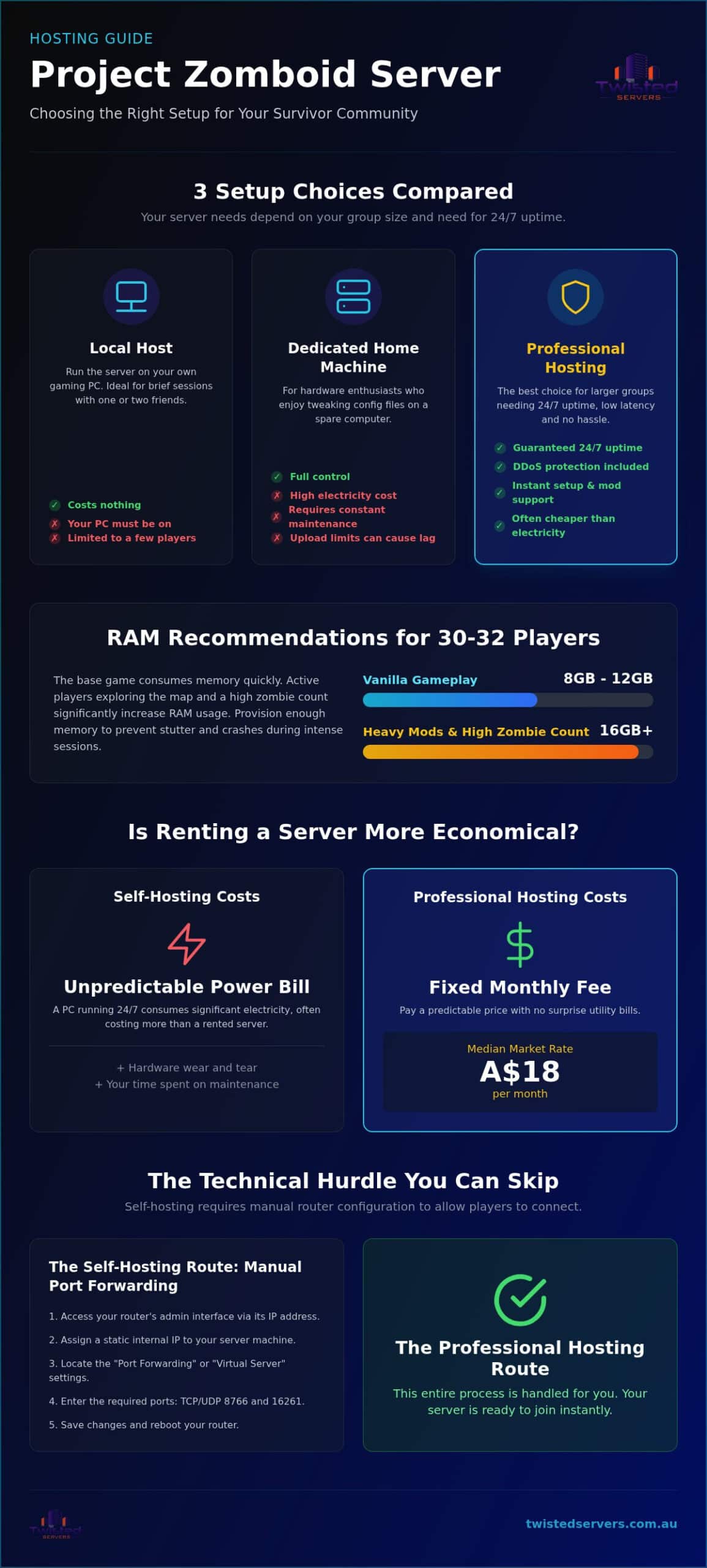
Hosting your Project Zomboid server boils down to local hosting, a dedicated home machine, or professional game server hosting. Typical situations map cleanly to one option:
- Short testing sessions with two friends: run the server locally on your own PC.
- Hardware enthusiasts who enjoy tweaking config files: set up a spare home machine.
- Larger survivor groups that need high uptime and low latency: rent dedicated hosting for instant setup, mod support, and DDoS protection out of the box.
With clients we see self-hosting fail when strict network upload limits choke traffic as soon as real players join. Dedicated home hardware then adds constant maintenance. Managed hosting removes those technical headaches and keeps the world reachable while your own PC is off.
For stable multiplayer runs, try Unmatched Australian Game Server Hosting & More to keep your community online around the clock.
Self-hosting vs paid servers: uptime beats hobby hardware
Self-hosting saves subscription fees, yet paid hardware delivers consistent uptime and offloads tedious network maintenance. Running Project Zomboid on a spare home computer works for weekend hobbyists, but consumer internet and consumer hardware produce lag spikes the moment an active group connects.
Situation: an active community hits heavy multiplayer sessions on home broadband. Solution: move the world to managed infrastructure so upload caps no longer throttle traffic. Result: high availability without burning out on troubleshooting, which is why renting fits public servers while self-hosting stays limited to single-player testing.
Alongside game nodes, managed providers like Twisted Servers offer Fast & Secure Web Hosting to keep your community portal online and remove port-forwarding work from your router.
8–12 GB RAM stabilises 30–32 player sessions
Running a 30–32 player server requires a minimum of 8GB to 12GB of RAM. The base game eats memory quickly, and active players driving vehicles across the map push allocation hard.
Situation: fast-moving players force background map generation far faster than a high count of idle users. Solution: provision headroom before the first public session. Result: you stay inside the 8GB–12GB band for vanilla play, or step to 16GB+ once heavy mods and high zombie density enter the pack.
| Player Count | Recommended RAM | Ideal Usage |
|---|---|---|
| 30–32 Players | 8GB–12GB | Vanilla gameplay |
| 30–32 Players | 16GB+ | Heavy mods & high zombies |
Choosing our Unstoppable VPS Hosting Solutions gives you full control over hardware resources to prevent sudden system crashes. Allocate extra resources early so stutter never interrupts the group.
Port forwarding steps you can skip with a hosted instance
Port forwarding routes external game traffic through your home router to the host computer. Direct router access is mandatory if you want to bypass connection blocks on a self-hosted box. According to the Wikipedia TCP and UDP port list (2026), standard networking relies on assigned port bounds to direct data correctly.
Follow these direct setup steps:
- Access router interface: Type your gateway IP address into a web browser.
- Assign static IP: Set a fixed internal address for your host machine.
- Locate port forwarding: Open the router’s virtual server settings tab.
- Enter server ports: Input TCP and UDP default ranges 8766 and 16261.
- Save and reboot: Apply your changes, then restart the network hardware.
This manual task suits patient home hosts. Renting a hosted instance removes local router configuration entirely. Check Dedicated Server Hosting Australia to run your game hardware immediately.
Project Zomboid monthly budget and 2026 price levels
Renting a dedicated host usually costs less than keeping a home PC running continuously for your community.
Situation: a home rig runs night and day for a persistent world. Solution: move to commercial hosting with fixed monthly billing. Result: you avoid hardware wear and unthrottled utility draw that erode any initial self-hosting savings, while electricity no longer climbs with each extra hour of uptime.
Commercial hosting pairs stable connections with predictable invoices. Renting fits active groups that want guaranteed uptime; self-hosting still suits casual testing. Request a personalised quote for exact server package rates so you can compare the fixed fee against your own power costs.
Tip: Factor electricity rates into home hosting costs, as dedicated market servers median at 18 AUD monthly without utility volatility.
Can I switch between B41 and B42 on the same server?
You cannot switch an active world between Build 41 and Build 42 without pain, because structural code changes break existing save files. Upgrading or downgrading requires a complete map reset (wiping save data) to function properly.
Running multiple distinct world saves on a single server instance is still possible, so you can keep a B41 world and a fresh B42 world side by side rather than forcing one save through a broken upgrade path. Dedicated hosting keeps those multiplayer universes online 24/7 even when your local rig is powered down, which protects friends from losing access during the transition.
Upgrading to B42 fits groups that want fresh mechanics. Staying on B41 fits players with long-term survival bases. Switching back later means another wipe, so pick the build before you invest weeks of loot and base-building.
When renting a game server is the wrong choice
Paying for a hosted server yields minimal value if your gaming consists of brief sessions with a single friend every few weeks.
Situation: casual co-op happens only occasionally and the room stays empty most nights. Solution: stay on a personal computer via direct peer-to-peer setups. Result: you spend nothing on idle hardware resources.
Hosting locally works when your schedule is unpredictable and your group is tiny. A paid instance shines once the community needs round-the-clock uptime without relying on your personal computer staying powered on. Think of hosting like renting a private venue: useless for a quick chat, but vital for permanent gatherings. If your squad plays daily, paid hosting protects local system performance and keeps the world reachable while you are offline.
Mod order, Lua stability, and automated DDoS filtering
You restart your Project Zomboid host after adding workshops, only to find the map corrupted. Poorly ordered Lua scripts break saves quickly.
Situation: a new workshop stack goes live without a local test. Solution: load additions on a private instance first. Result: you catch Lua error loops that would otherwise consume total server memory in minutes and corrupt game files before public deployment.
One bad script can collapse the whole load order, so treat mod sequence with care. DDoS defense filters malicious traffic automatically: continuous volumetric attacks flood open game ports and force unconfigured hosts offline, while automated filtering keeps the connection stable during peak raids.
A heavy modpack fits experienced admins with large teams; vanilla setups suit small groups that want zero maintenance. Pick managed protection if you lack time for manual firewall rules. Australian survival game communities running other titles alongside Project Zomboid may also want to explore DayZ server hosting in Australia for persistent open-world multiplayer with the same low-latency local infrastructure. Groups branching into other survival titles can also find detailed 2026 pricing and hardware specs for Sons of the Forest server hosting to compare dedicated CPU and routing requirements before committing to a plan.
24/7 Support and automated backups protect long saves
You need 24/7 technical support and automated backup systems to protect your multiplayer world from sudden data loss. A corrupted save file destroys months of group effort in a single crash.
Situation: players forget to trigger manual save backups before updating host mods. Solution: turn on automated daily snapshots. Result: restore points exist before the bad update, so recovery takes minutes instead of a full rebuild.
Free hosts rarely provide instant ticket responses or automated restore points. Dedicated hosts offer real-time control panels for fast file recovery. Check support availability before you commit to a provider; fast help saves hours of downtime.
Automated server backups fit busy admins who run heavily modded public communities. Manual backup setups suit small private groups playing short casual sessions. Turn snapshots on before the first major mod update.
Frequently asked questions
What RAM is needed for 30‑32 players?
You will need at least 8GB to 12GB of RAM for 30–32 players on a Project Zomboid server hosting platform. Adding many workshop mods raises this requirement, so dedicated hardware with headroom prevents lag spikes.
How do I forward ports for the server?
You must open UDP ports 16261 and 16262 in your router settings to allow incoming connections. Hosting through a provider bypasses this step entirely because control panels handle routing automatically.
How do I change the settings of my server?
Edit the servertest.ini file inside the Zomboid admin folder to adjust sandbox rules and spawn rates. Most hosts offer a web interface with simple toggles for these settings; save the file and restart so the new values load.
Why do I need backups and how do I create them?
Backups protect your world save from file corruption or destructive game updates. Schedule automatic snapshots inside your server management panel, or copy the saves folder manually on a fixed rhythm.
How do I install a custom map on my server?
Add the map Workshop ID and file name directly into your server configuration files. The server downloads required files automatically when it boots up; resolve mod conflicts beforehand so players receive the map cleanly on join.
Taking Your Project Zomboid Server Online
Reliable Project Zomboid server hosting keeps your multiplayer survival world active without technical interruptions in 2026, provided you answer the same three questions you started with: group size, uptime need, and RAM budget for mods and hordes. Custom hardware configurations prevent severe lag spikes during massive zombie horde events once those answers point to a managed node.
The technical team at Twisted Servers brings specialized experience in Australian game server hosting. Reach out to support for a customized server deployment quote when you are ready to move from a test world to a persistent one.
Disclaimer
Game titles, trademarks, logos and related assets are the property of their respective owners. Twisted Servers is an independent hosting provider and is not affiliated with or endorsed by the developers or publishers of the games mentioned unless otherwise stated. Information is provided as a general guide and may change as games, software and hosting services are updated.

